Viture Smart Home
Luma Smart Glasses Lineup: Finding the Best Display for Mobile Creators
Finding the right balance between optical clarity, display immersion, and spatial anchor stability is critical when choosing luma smart glasses for remote production and on-the-go creative work. Mobile video editors, digital artists, and multi-tasking creators frequently face the physical limitation of a single compact laptop screen while traveling or working outside traditional studio environments. Wearable…

As Amazon Associates, we earn from qualifying purchases. This means we may receive a small commission at no extra cost to you if you click through and make a purchase.
Finding the right balance between optical clarity, display immersion, and spatial anchor stability is critical when choosing luma smart glasses for remote production and on-the-go creative work. Mobile video editors, digital artists, and multi-tasking creators frequently face the physical limitation of a single compact laptop screen while traveling or working outside traditional studio environments. Wearable display glasses solve this workspace bottleneck by projecting a massive, high-definition virtual canvas directly in front of your eyes, effectively replacing bulky desktop monitors with a lightweight pair of frames that plug directly into your editing machine or mobile device.
This comprehensive luma smart glasses comparison examines the three distinct models currently shaping the brand lineup: the base XR model, the upgraded Pro edition, and the flagship Ultra version. While all three options share a foundation of 1200p resolution, high refresh rates, and multi-platform compatibility, they differ significantly in their optical engineering, peak brightness output, spatial tracking capabilities, and display scale. Understanding how field of view, Sony Micro-OLED panel brightness, and three-degree-of-freedom versus six-degree-of-freedom spatial awareness vary across these units ensures you pick the best luma smart glasses for your personal workflow demands.
Which Luma Smart Glasses Should You Buy
All 3 models on this page, side by side
| Model | Buyer rating | Listing |
|---|---|---|
01 VITURE Luma XR AR Glasses VITURE Luma XR AR Glasses |
Price | |
02 VITURE Luma Pro XR AR Glasses VITURE Luma Pro XR AR Glasses |
Price | |
03 VITURE Luma Ultra XR Glasses VITURE Luma Ultra XR Glasses |
Price |
Prices and ratings are read from the Amazon product listing and change there, not here. Every rating is the average left by Amazon buyers, not a score from this site.
Why each one is on the list
- Travelers and everyday laptop multitaskers who want integrated myopia correction dials and rapid lens dimming should pick the VITURE Luma XR AR Glasses.
- Colorists, visual designers, and video editors demanding wider field coverage, Hollywood-grade color precision, and premium acoustic feedback should choose the VITURE Luma Pro XR AR Glasses.
- Power creators, 3D artists, and spatial computing enthusiasts who require extreme 1500-nit daylight visibility and camera-driven positional tracking should invest in the VITURE Luma Ultra XR Glasses.
01 VITURE Luma XR AR Glasses
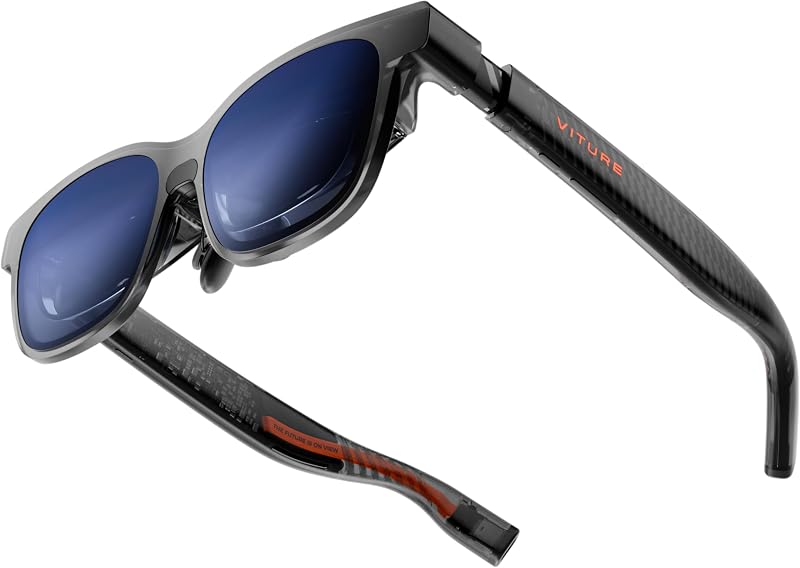
Best for Travelers needing integrated myopia adjustments
Pros
- Built-in -6.0D myopia adjustment
- One-tap electrochromic dimming
- Fluid 120Hz 1200p display
Cons
- Smaller 50-degree field of view
- Fixed standard IPD sizing
The VITURE Luma XR AR Glasses deliver a streamlined entry point for creators seeking a high-density portable monitor without complicated hardware configurations. Built around a 146-inch virtual screen rendering at 1200p resolution, this model ensures that interface menus, timeline markers, and text documentation remain crisp without blurry perimeter edges. It features a balanced 50-degree field of view paired with a peak brightness of 1000 nits, which provides ample illumination for indoor cafes, commuter transit, and hotel workstations. The 120Hz refresh rate guarantees fluid cursor movements and stutter-free video playback, matching the performance expectations of high-end mobile workstations.
Ergonomics and convenience form the core appeal of this model, particularly for optical health and comfort. Equipped with built-in rotary dials supporting myopia adjustment down to -6.0D, users with mild to moderate nearsightedness can view pristine images without inserting custom prescription lenses, contrasting sharply with traditional eyewear that requires specialized inserts like meta glasses with prescription options. The frame incorporates flexible arms, silicone contact points, and magnetic nose pads designed for standard interpupillary distance measurements between 56mm and 72mm. An integrated electrochromic film darkens the outer glass at the touch of a button, blocking ambient light so you can focus entirely on your editing timeline.
Productivity across operating systems is anchored by direct DisplayPort-over-USB-C connectivity and the dedicated SpaceWalker software suite. Connecting directly to macOS, Windows, Android, or iOS devices enables viture luma multi-screen productivity, allowing creators to organize multiple virtual displays in horizontal, vertical, or specialized coding layouts. While this model relies on built-in 3DoF tracking to pin screens firmly in virtual space rather than true environmental tracking, it provides reliable workspace expansion for everyday creative tasks.
- Projects an edge-to-edge 146-inch virtual display running at sharp 1200p resolution and a smooth 120Hz refresh rate.
- Features integrated mechanical myopia adjustment up to -6.0D to accommodate glasses wearers without extra inserts.
- Includes one-touch electrochromic lens dimming to block ambient sunlight and preserve contrast anywhere.
- Connects seamlessly through direct USB-C DisplayPort output across laptops, tablets, and handheld gaming consoles.
02 VITURE Luma Pro XR AR Glasses

Best for Color-focused video editors and designers
Pros
- Cinema-grade DeltaE under 2 color
- Wider 52-degree field of view
- Upgraded HARMAN spatial sound
Cons
- Lacks front-facing depth cameras
- No integrated optical diopter dials
Stepping up to the VITURE Luma Pro XR AR Glasses gives digital visual artists and video colorists the expanded visual real estate and color fidelity required for precision post-production. The display expands to a massive 152-inch virtual screen with an increased 52-degree field of view, providing greater optical immersion and reducing the perceived physical borders around your monitors. VITURE applies proprietary optical tuning to this 1200p panel to deliver clarity that feels remarkably close to 4K, ensuring small interface text, scrubbing timelines, and detailed pixel selections render with pin-sharp separation across the entire glass surface.
Color grading and accurate media evaluation represent major strengths for this Pro variant. The display delivers Hollywood-grade color accuracy rated at DeltaE under 2, ensuring that chromatic tones, skin tones, and exposure curves match industry-standard mastering expectations. Audio has received an equal upgrade through a specialized acoustic collaboration with HARMAN. The integrated temple speakers provide deeper low-end response, cleaner high frequencies, and wider spatial imaging, letting creators monitor edit tracks and dialogue without constantly reaching for secondary earbuds.
Physical fitting and exterior styling also separate the Pro from the baseline unit. Available in two distinct frame sizes to accommodate wider or narrower facial structures, it incorporates tilt-adjustable temples and magnetic ergonomic nose pads for prolonged wear. The translucent frame chassis features dynamic light effects that can illuminate productivity modes. When connected to PC or Mac hardware via SpaceWalker, users can cast up to three distinct virtual monitors, positioning timeline monitors, reference material, and communication windows across an uninterrupted 152-inch digital panoramic field.
- Expands visual immersion with a 152-inch virtual display and an extended 52-degree field of view.
- Delivers Hollywood-grade color accuracy with DeltaE under 2 for color-critical video and photo editing workflows.
- Features custom HARMAN-tuned audio drivers offering richer bass response and clear vocal separation.
- Provides two distinct frame sizes and tilt-adjustable temples to ensure an exact fit across different facial profiles.
03 VITURE Luma Ultra XR Glasses

Best for Power users demanding daylight brightness and 6DoF
Pros
- 1500 nits Sony Micro-OLED display
- Dual depth cameras for 6DoF tracking
- Built-in microphone for voice workflows
Cons
- Requires neckband for gesture control
- Adapter needed for full iOS SpaceWalker
At the apex of the lineup, the VITURE Luma Ultra XR Glasses transition the wearable monitor concept into an advanced spatial computing platform. Unlike display-only glasses, the Ultra integrates a front-facing RGB camera alongside dual depth-sensing cameras directly into its brow. While conventional smart glasses focus primarily on media capture, as detailed in our meta glasses camera overview, the optical sensor array on the Ultra is engineered specifically for spatial positioning, depth calculation, and environment mapping, unlocking true six-degree-of-freedom spatial capabilities.
Visual fidelity reaches peak performance thanks to premium Sony Micro-OLED display panels driving the 152-inch, 1200p virtual surface. Peak luminance increases to an industry-leading 1500 nits, allowing mobile operators to work outdoors under direct midday sun without losing dark shadow detail or UI legibility. Combined with the 120Hz refresh rate and ultra-wide display modes within SpaceWalker, the luma xr glasses display on the Ultra maintains structural stability and clarity even during rapid head movements or complex multi-window arrangement tasks.
Interaction and tracking versatility set this flagship apart from its siblings. In desktop environments running macOS or Windows, SpaceWalker leverages the camera sensors for native 6DoF head tracking, enabling virtual screens to stay anchored relative to physical room coordinates as you lean forward or step back. When paired with the optional VITURE Pro Neckband, users unlock hand-gesture control for touchless window management. An integrated microphone handles voice input and calls, while HARMAN-tuned open-ear speakers preserve situational awareness during field operations.
- Equipped with high-output Sony Micro-OLED panels reaching 1500 nits peak brightness for clear daylight viewing.
- Integrates one RGB camera and dual depth cameras to power advanced six-degree-of-freedom spatial tracking.
- Supports hand-gesture navigation and untethered spatial compute when paired with the VITURE Pro Neckband.
- Includes built-in microphone and HARMAN-tuned open-ear acoustic system for seamless communication on the go.
What Sets These Models Apart
| Model | Virtual Screen & FOV | Brightness & Display Type | Spatial Tracking & Sensors |
|---|---|---|---|
| VITURE Luma XR AR Glasses | 146-inch Virtual Canvas, 50° FOV | 1000 nits, 1200p Optical Engine | Built-in 3DoF via SpaceWalker |
| VITURE Luma Pro XR AR Glasses | 152-inch Virtual Canvas, 52° FOV | 1000 nits, 1200p (DeltaE < 2) | Built-in 3DoF via SpaceWalker |
| VITURE Luma Ultra XR Glasses | 152-inch Virtual Canvas, 1200p | 1500 nits, Sony Micro-OLED | Full 6DoF, RGB + Dual Depth Cameras |
Buying Tips for Luma Smart Glasses
Selecting which luma smart glasses to buy requires balancing your primary operating environment, required tracking degrees, and hardware ecosystem. If your workflow consists primarily of standard multi-tasking, answering emails, and writing code inside cafes or on flights, the standard XR model provides an ideal balance of simplicity, rapid electrochromic dimming, and mechanical myopia correction. However, if your projects demand meticulous color work or wider screen visibility, moving to the Pro variant delivers calibrated color output and expanded acoustic performance that will noticeably improve media production accuracy.
For creators planning to invest in spatial computing workflows, evaluating luma glasses 6dof functionality is essential. The standard and Pro models excel at rotational tracking (3DoF), which fixes virtual screens in a floating plane that moves with your torso’s location. The Ultra model, by contrast, tracks translation through space (6DoF), letting you physically lean toward an asset or inspect a 3D timeline layout in virtual space. Keep in mind that mobile device compatibility varies; while modern USB-C laptops and handhelds connect directly, users planning to run full SpaceWalker features on an iPhone should prepare for specialized adapter hardware.
Physical fit and optical adjustments should also steer your purchasing decision. While shoppers browsing wearable technology often monitor a meta glasses clearance for simple camera frames, dedicated AR glasses require a precise fit to avoid optical distortion at the periphery of the virtual canvas. If you have non-standard interpupillary spacing, the dual-size options and tilt-adjustable temples of the Pro and Ultra frames will provide a more stable optical sweet spot than fixed-size alternatives during marathon editing sessions.
FAQ
What is the difference between 3DoF and 6DoF on Luma smart glasses?
Three degrees of freedom (3DoF) tracking monitors rotational movement, allowing you to turn your head left, right, up, or down while keeping your virtual screens pinned in place. Six degrees of freedom (6DoF) tracking, found on the Ultra model through its dual depth cameras, adds positional translation. This enables the software to recognize when you physically lean closer to a screen, step backward, or move laterally within your physical environment.
Can I use Luma smart glasses directly with an iPhone or Mac?
Yes, Luma glasses feature universal direct USB-C connectivity with DisplayPort alternate mode support, allowing plug-and-play mirror operation with macOS machines, Windows laptops, and compatible USB-C iPhones such as the 15, 16, and 17 series. To access advanced multi-screen desktop layouts, you install the SpaceWalker application on macOS or Windows, while full iOS spatial workspace features require an upcoming dedicated charging adapter.
How does the electrochromic film work on Luma AR glasses?
The electrochromic film integrated into the outer lens changes its optical tint electronically at the tap of a button. When activated, the glass darkens almost instantly, reducing ambient room light and background distractions. This feature enhances contrast and perceived black levels on the virtual display without requiring users to snap physical plastic lens covers over the front frame.
Do I need prescription lens inserts to use Luma glasses?
If you choose the baseline VITURE Luma XR AR Glasses, you may not need inserts if your correction falls between 0.0D and -6.0D, as the frame contains built-in mechanical diopter dials above each lens. The Pro and Ultra models rely on standard optical designs where users requiring vision correction typically use custom magnetic prescription frame inserts to achieve perfect focus across the virtual display.
How does SpaceWalker enable multi-screen productivity for creators?
SpaceWalker is the proprietary software platform that interfaces between your computer and the Luma glasses. Instead of merely duplicating your laptop screen, it generates a panoramic multi-display desktop with support for up to three independent virtual monitors. Creators can arrange these monitors side by side, stack them vertically, or rotate them into portrait orientations for reading scripts and programming code.


