Best Smart Home Hubs with Home Assistant in 2026: 10 Picks Ranked by Specs
We compared 10 smart home hubs ranked by specs. Find the right hub for your Zigbee, Thread, or Z-Wave devices in 2026.
As Amazon Associates, we earn from qualifying purchases. This means we may receive a small commission at no extra cost to you if you click through and make a purchase.
As an Amazon Associate we earn from qualifying purchases. Links on this page are affiliate links.
Finding the best smart home hubs with home assistant requires matching your network needs to specific hardware capabilities. We compared 10 options ranked by their published specifications. The Nabu Casa Home Assistant Green Hub leads as the best overall pick because it offers an official, pre-configured setup that prioritizes local data privacy. This guide helps you decide which hub fits your space, whether you need compact designs or extended range for Zigbee and Thread devices.
Check your wireless protocol needs first
Your hub must support the radio protocols your devices use. Most picks here handle Zigbee and Thread for local control. If you use Z-Wave, choose the HomeSeer Z-NET PRO. For Matter and Alexa integration, the Aqara Hub M3 adds infrared control. Match the wireless specs to your existing gear to ensure reliable communication without cloud dependency.
| # | Product | Best for | Price |
|---|---|---|---|
| 1 | Nabu Casa Home Assistant Green Hub Best overall | Official Home Assistant setup with local privacy | |
| 2 | Aqara Hub M3 Matter Controller Best amazon alexa | Aqara Zigbee and Matter integration with IR control | |
| 3 | SMLIGHT SLZB-MR1 Dual Antenna Hub Best budget | Large spaces needing extended Zigbee and Thread range | |
| 4 | LinknLink HomeClaw Gateway Also great | Compact multi-protocol hubs with local AI | |
| 5 | SMLIGHT SLZB-MR4U Dual-Protocol Gateway Best premium | Dual-protocol Zigbee and Thread coverage | |
| 6 | SMLIGHT SLZB-MR1U Dual-Protocol Gateway Also great | Dual-protocol Zigbee and Thread coordination | |
| 7 | SMLIGHT SLZB-MR3U Dual-Chip Zigbee Coordinator Also great | Dual-protocol Zigbee and Thread networks | |
| 8 | HomeSeer Z-NET PRO Zigbee & Z-Wave Hub Also great | mixed Z-Wave and Zigbee networks | |
| 9 | SwitchBot AI Hub with Local NVR Best built-in camera | Local camera storage with Home Assistant | |
| 10 | Fabater 8-Inch Home Assistant Wall Panel Best voice control | wall-mounted voice-controlled automation |
The best fit for you
- You want the official pre-configured Home Assistant experience – Nabu Casa Home Assistant Green Hub – It is the official Home Assistant Green Hub with local privacy.
- You need IR control for legacy appliances – Aqara Hub M3 Matter Controller – The Aqara Hub M3 includes an IR blaster for legacy devices.
- You need extended range for large spaces – SMLIGHT SLZB-MR1 Dual Antenna Hub – The SMLIGHT SLZB-MR1 uses dual antennas for extended Zigbee and Thread range.

Nabu Casa Home Assistant Green Hub
Best for: Official Home Assistant setup with local privacy
- Compatible Platform
- Home Assistant
- Ecosystem Compatibility
- Home Assistant
- Network Connectivity
- Ethernet
- System Memory
- 4GB
- Internal Storage
- 32GB
- Dimensions
- 4.41 × 1.26 × 4.41 inches
Home Assistant Green is the official hardware for running Home Assistant locally. It features a quad-core processor, 4GB of RAM, and 32GB of internal storage. The unit connects via Ethernet and requires no setup beyond plugging in power and the network cable. Its fanless design keeps operation silent and power efficient. You control your entire home ecosystem from this single, compact device.
- Official Nabu Casa hardware with Home Assistant pre-installed
- 4GB RAM and 32GB internal storage for local data
- Fanless, silent design using only a couple of watts
- USB expandability for Z-Wave, Zigbee, and Thread adapters
- Ethernet-only network connectivity without built-in WiFi
- 32GB internal storage is limited for large media libraries
- You want the official, supported Home Assistant hardware
- You prefer a silent, fanless device for home use
- You have an available Ethernet port for the hub
- You need built-in WiFi without a USB adapter
- You require more than 32GB of internal storage
- You want a hub with Z-Wave or Zigbee built-in
Verdict: Home Assistant Green Hub is the best overall pick for users who want the official, pre-configured Home Assistant experience. It fits those who value local data privacy and silent operation over wireless convenience.

Aqara Hub M3 Matter Controller
Best for: Aqara Zigbee and Matter integration with IR control
- Compatible Platform
- Home Assistant, SmartThings
- Wireless Protocols
- Zigbee, Thread, Matter, Bluetooth
- Ecosystem Compatibility
- Apple HomeKit, Alexa, SmartThings
- Network Connectivity
- Wi-Fi 2.4/5 GHz, PoE
- Power Supply
- PoE, USB-C
- Device Capacity
- Up to 127 Aqara Zigbee devices
The Aqara Smart Home Hub M3 is a compact black hub supporting Zigbee, Thread, and Matter. It handles up to 127 Aqara Zigbee devices and 127 Thread devices. The unit includes an IR blaster for legacy appliances and 8GB of encrypted local storage. You get dual-band Wi-Fi and Power over Ethernet options. It integrates with Home Assistant and Alexa for local automation control.
- Supports Zigbee, Thread, Matter, and Bluetooth protocols
- Includes a 360° IR blaster with feedback
- Provides 8GB of end-to-end encrypted local storage
- Offers Power over Ethernet and USB-C power options
- Integrates with Home Assistant and Alexa
- Supports only 127 Aqara Zigbee devices, excluding third-party units
- Requires 127 Thread device repeaters for full coverage
- Has a small 8GB internal storage capacity
- You use Aqara Zigbee devices and need Matter bridge support
- You want local automation with encrypted storage
- You need an IR blaster for legacy AC units
- You rely on third-party Zigbee devices not made by Aqara
- You need a larger storage capacity than 8GB
- You require Thread support without additional repeaters
Verdict: Aqara Smart Home Hub M3 fits users who own Aqara Zigbee devices and want Matter bridge support with local automation. It suits those needing an IR blaster for legacy appliances and encrypted local storage.

SMLIGHT SLZB-MR1 Dual Antenna Hub
Best for: Large spaces needing extended Zigbee and Thread range
- Compatible Platform
- Home Assistant, Zigbee2MQTT
- Wireless Protocols
- Zigbee 3.0, Thread
- Ecosystem Compatibility
- Home Assistant, ZHA, Zigbee2MQTT
- Network Connectivity
- Ethernet, USB, WiFi
- Power Supply
- PoE, Type-C
- Wireless Connectivity
- Wi-Fi
The SMLIGHT SLZB-MR1 is a dual-radio coordinator for Home Assistant, supporting both Zigbee 3.0 and Thread. It features two separate antennas with 5+ dBi gain and 20+ dBm transmit power for extended range. You can connect via Ethernet, USB, or WiFi, and power it with PoE or Type-C. This setup allows you to add multiple coordinators to one server, covering larger homes or buildings easily.
- Dual SoCs (CC2652P7 & EFR32MG21) for Zigbee and Thread
- Two separate antennas with 5+ dBi gain
- 20+ dBm transmit power for strong signal
- Supports PoE and Type-C power
- Compatible with Home Assistant, ZHA, and Zigbee2MQTT
- Lighter build at 3.17 ounces may feel less substantial
- Single SoC per radio limits simultaneous protocol density compared to quad-SOC models
- Smaller form factor offers less internal space for additional ports
- You need strong Zigbee and Thread coverage in a large space
- You want to run multiple coordinators on one Home Assistant instance
- You prefer PoE power for reliable network connectivity
- You require a built-in display or touch interface
- You need a single device to handle all smart home protocols without expansion
- You prefer a heavier, more robust physical build
Verdict: The SMLIGHT SLZB-MR1 Dual Antenna Hub fits users who need reliable, long-range Zigbee and Thread connectivity via dual antennas and PoE. It is ideal for those expanding their Home Assistant setup with multiple coordinators.

LinknLink HomeClaw Gateway
Best for: Compact multi-protocol hubs with local AI
- Compatible Platform
- Home Assistant
- Wireless Protocols
- Matter
- Ecosystem Compatibility
- Apple Home, Alexa, Google Home
- Color
- Black
- Wired Connectivity
- USB
- Dimensions
- 6.57 × 3.98 × 2.05 inches
The LinknLink HomeClaw integrates Home Assistant with OpenClaw AI for local automation. It supports Matter, Zigbee, and Z-Wave protocols, bridging devices to Apple Home, Alexa, and Google Home. This black gateway measures 6.57 by 3.98 by 2.05 inches. It connects via USB and processes data locally for privacy. You get one-click container deployment and plain-language automation setup. It suits users wanting a compact, multi-protocol hub with built-in AI assistance.
- Supports Matter, Zigbee, and Z-Wave protocols for broad device compatibility
- Includes OpenClaw AI agent for plain-language automation creation
- Processes data locally with peer-to-peer remote access tunnel
- One-click Home Assistant container and HACS installation
- USB wired connectivity limits placement flexibility compared to Ethernet options
- Smaller physical footprint may restrict internal component cooling or expansion slots
- Single USB connection point may limit peripheral device additions
- You want to unify Zigbee and Z-Wave devices under Home Assistant
- You prefer local AI automation without cloud dependency
- You need Matter bridge capabilities for Apple Home or Alexa
- You require Ethernet connectivity for stable network connections
- You need a hub with multiple USB ports for peripherals
- You prefer a larger device with more expansion options
Verdict: LinknLink HomeClaw Smart Home Gateway offers a compact, AI-enhanced solution for users prioritizing local processing and multi-protocol support. It fits those who value Matter bridging and plain-language automation over wired Ethernet stability.

SMLIGHT SLZB-MR4U Dual-Protocol Gateway
Best for: Dual-protocol Zigbee and Thread coverage
- Compatible Platform
- Home Assistant, Zigbee2MQTT
- Wireless Protocols
- Zigbee, Thread, Matter
- Ecosystem Compatibility
- Home Assistant
- Network Connectivity
- Ethernet, USB, Wi-Fi
- Power Supply
- PoE, Type-C
- Color
- Black
This device combines Zigbee and Thread support using CC2674P10 and EFR32MG26 chips. It connects via Ethernet, USB, or Wi-Fi and accepts PoE or Type-C power. The dual antennas with 5+ dBi gain and 20+ dBm power levels help extend network range. It works with Home Assistant, ZHA, and Zigbee2MQTT. This hub suits users who need reliable local control for mixed protocol devices.
- Supports both Zigbee and Thread networks simultaneously
- Dual antennas provide 5+ dBi gain and 20+ dBm transmission power
- Offers PoE and Type-C power supply options
- Connects via Ethernet, USB, or Wi-Fi
- Compatible with Home Assistant, ZHA, and Zigbee2MQTT
- Weighs 2.88 ounces, which is heavier than the SMLIGHT SLZB-MR1U
- Length of 6.1 inches is bulkier than the compact SMLIGHT SLZB-MR1
- Supports only experimental Matter-over-Thread rather than full native Matter
- You need a single coordinator for both Zigbee and Thread devices
- You prefer PoE power to avoid using a power adapter
- You want to extend Zigbee range with high-power antennas
- You need a compact hub that fits in tight spaces
- You require stable, non-experimental Matter-over-Thread support
- You are looking for the lightest possible coordinator
Verdict: SMLIGHT SLZB-MR4U 2026 Dual-Antenna Hub is a robust coordinator for users who need strong signal coverage for mixed Zigbee and Thread networks. It fits those who prioritize antenna power and PoE connectivity over a small form factor.

SMLIGHT SLZB-MR1U Dual-Protocol Gateway
Best for: Dual-protocol Zigbee and Thread coordination
- Compatible Platform
- Home Assistant, Zigbee2MQTT
- Wireless Protocols
- Zigbee 3.0, Thread, Matter
- Ecosystem Compatibility
- Home Assistant, ZHA, Zigbee2MQTT
- Network Connectivity
- LAN Ethernet, USB, WiFi
- Power Supply
- PoE, USB Type-C
- Wireless Connectivity
- Wi-Fi
This Xnbada SLZB-MR1U combines Zigbee 3.0 and Thread support in one device. It uses CC2652P7 and EFR32MG21 chips for dual-network coordination. You get LAN, USB, and WiFi connections. Power comes from PoE or USB Type-C. Dual antennas with 5+ dBi gain help signal reach. It works with Home Assistant and ZHA. This unit suits users needing both protocols without extra hardware.
- Supports Zigbee 3.0 and Thread networks simultaneously
- Dual-antenna design with 5+ dBi gain
- Offers LAN, USB, and WiFi connectivity
- Supports PoE or USB Type-C power
- Compatible with Home Assistant and ZHA
- Uses older CC2652P7 and EFR32MG21 chips instead of newer models
- Physical dimensions are 4.17 x 0.94 x 0.87 inches
- Matter support is listed as experimental
- You need a single device for both Zigbee and Thread
- You want PoE power for reliable operation
- You use Home Assistant with ZHA or Zigbee2MQTT
- You require the latest EFR32MG26 chip
- You need stable Matter-over-Thread without experimental status
- You prefer a more compact form factor
Verdict: Xnbada SLZB-MR1U Dual-Band Coordinator is a solid choice for users who need both Zigbee and Thread support in one unit. It fits those who value dual-antenna signal strength and flexible power options.

SMLIGHT SLZB-MR3U Dual-Chip Zigbee Coordinator
Best for: Dual-protocol Zigbee and Thread networks
- Compatible Platform
- Home Assistant, Zigbee2MQTT
- Wireless Protocols
- Zigbee 3.0, Thread, Matter
- Ecosystem Compatibility
- Home Assistant, ZHA, Zigbee2MQTT
- Network Connectivity
- LAN Ethernet, USB, WiFi
- Power Supply
- PoE, USB Type-C
- Wireless Connectivity
- Wi-Fi
This Xnbada gateway combines Zigbee 3.0 and Thread support using two separate system-on-chips. It connects via LAN Ethernet, USB, or WiFi, and accepts PoE or USB-C power. The dual antennas provide 20+ dBm transmit power and 5+ dBi gain. You can use it with Home Assistant, ZHA, or Zigbee2MQTT. It measures 6.1 by 0.94 by 0.98 inches and weighs 2.88 ounces. This setup suits users who need robust local control for mixed protocol networks.
- Dual SoCs (CC2652P10 and EFR32MG24) for Zigbee and Thread
- Three connection options: LAN, USB, or WiFi
- PoE or USB-C power supply flexibility
- Dual antennas with 20+ dBm power and 5+ dBi gain
- Weighs 2.88 ounces, which is heavier than the SMLIGHT SLZB-MR1 at 1.76 ounces
- Length of 6.1 inches is longer than the SMLIGHT SLZB-MR1 at 3.54 inches
- You need a single device to manage both Zigbee and Thread networks
- You want to power the hub via PoE for a cleaner setup
- You require high signal strength with 20+ dBm transmit power
- You prefer a compact, lightweight hub under 2 ounces
- You only need Zigbee support and want to avoid Thread complexity
- You want a pre-assembled hub rather than a coordinator adapter
Verdict: Xnbada SLZB-MR3U Dual-SoC Zigbee Gateway offers strong signal coverage and protocol flexibility for complex Home Assistant setups. It fits users who prioritize network range and dual-protocol support over minimal physical footprint.

HomeSeer Z-NET PRO Zigbee & Z-Wave Hub
Best for: mixed Z-Wave and Zigbee networks
- Compatible Platform
- Home Assistant
- Wireless Protocols
- Z-Wave 800 series, Zigbee 3.0
- Ecosystem Compatibility
- HomeSeer, Home Assistant, openHAB
- Network Connectivity
- Ethernet, Wi-Fi
- Dimensions
- 2.9 × 2.8 × 1 inches
The HomeSeer Z-NET PRO is a dual-protocol interface supporting Z-Wave 800 series and Zigbee 3.0. It connects via Ethernet or Wi-Fi, allowing central placement for stronger mesh networks. The device is compatible with Home Assistant, HomeSeer HS4, and openHAB. Its compact white and blue build measures 2.8 by 2.9 by 1 inches. This hub suits users needing reliable local control for mixed ecosystems without USB constraints.
- Supports Z-Wave Plus v2 800 series for longer range and faster communication
- Connects via Ethernet or Wi-Fi for flexible network placement
- Compatible with Home Assistant, HomeSeer HS4, and openHAB platforms
- Includes Z-Wave S2 Security and SmartStart for secure device pairing
- Smaller physical footprint with a 1-inch height compared to larger hub bases
- Dual-protocol design limits native support to Z-Wave and Zigbee only
- You need Z-Wave 800 series range and Zigbee 3.0 in one device
- You want to place the radio centrally via Ethernet or Wi-Fi
- You run Home Assistant or openHAB for local automation
- You require native Matter or Thread support
- You need a single-protocol device for Z-Wave only
- You prefer a USB dongle that plugs directly into a server
Verdict: The HomeSeer Z-NET PRO Z-Wave Zigbee Hub fits users who need robust Z-Wave 800 series range and flexible Ethernet or Wi-Fi placement for Home Assistant setups.
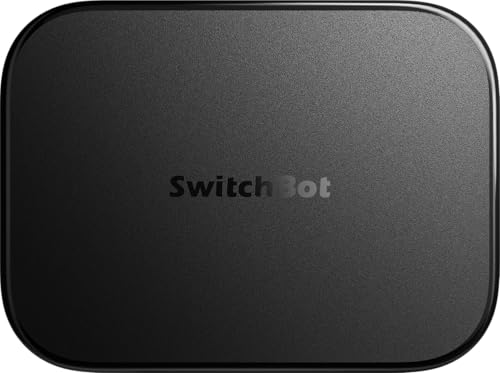
SwitchBot AI Hub with Local NVR
Best for: Local camera storage with Home Assistant
- Compatible Platform
- Home Assistant
- Wireless Protocols
- Matter, BLE
- Ecosystem Compatibility
- Home Assistant
- Network Connectivity
- Dual-Band Wi-Fi
- Device Capacity
- 8 cameras
- Entry Method
- Built-In Camera
This SwitchBot AI Hub combines Home Assistant with local video storage. It supports up to 8 cameras and includes a 16GB microSD card. Dual-band Wi-Fi and Matter connectivity help integrate devices. It works as an edge hub for BLE automations. The built-in camera entry point suits users wanting local NVR capabilities alongside smart home control.
- Pre-installed Home Assistant software
- Supports up to 8 compatible cameras
- Includes 16GB MicroSD card for local storage
- Dual-band Wi-Fi connectivity
- Matter bridge support
- Smaller 16GB included storage compared to external drive options
- Requires AI+ subscription for full camera context features
- Limited to BLE and Matter protocols without native Zigbee
- You want local video storage with Home Assistant
- You own SwitchBot BLE devices needing fast automation
- You need Matter bridge functionality
- You require native Zigbee or Z-Wave support
- You prefer a device without subscription requirements
- You need IR control for TVs or AC
Verdict: SwitchBot AI Hub with Local NVR is a practical choice for users who prioritize local camera storage and BLE automation within a Home Assistant setup. It fits those who already use SwitchBot devices and want Matter integration.
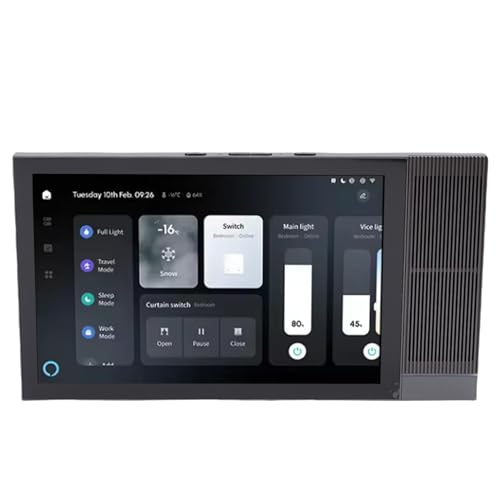
Fabater 8-Inch Home Assistant Wall Panel
Best for: wall-mounted voice-controlled automation
- Compatible Platform
- Home Assistant
- Ecosystem Compatibility
- Home Assistant, Tuya
- System Memory
- 2 GB
- Internal Storage
- 16 GB
- Control Method
- Voice Control
- Dimensions
- 11 × 7.08 × 2.75 inches
This Fabater wall panel combines Home Assistant integration with a dedicated 8-inch 1280×800 touchscreen. It includes 2GB of RAM and 16GB of internal storage for smooth operation. Dual microphones enable voice control, while dual 2W speakers provide audio feedback. The unit mounts directly into standard electrical boxes. It suits users who want a fixed, high-resolution interface for managing Tuya and Home Assistant devices.
- 8-inch 1280×800 touchscreen for clear navigation
- Built-in dual microphones for hands-free voice commands
- Dual 2W speakers for media and notifications
- 2GB RAM and 16GB ROM for responsive performance
- 16GB internal storage is limited for local media
- 2GB RAM may restrict heavy multitasking
- Fixed 8-inch screen size offers no flexibility
- You want a dedicated wall-mounted control center
- You prefer voice commands for daily tasks
- You use Tuya devices with Home Assistant
- You need expandable storage for large media libraries
- You require a portable or tablet-style interface
- You want a screen larger than 8 inches
Verdict: Fabater 8-Inch Smart Home Panel delivers a fixed, high-resolution interface for users who value voice control and wall-mounted convenience. It fits those who prioritize a dedicated touchscreen over portability.
Specifications side by side
| Spec | Nabu Casa Home Assistant Green Hub | Aqara Hub M3 Matter Controller | SMLIGHT SLZB-MR1 Dual Antenna Hub | LinknLink HomeClaw Gateway | SMLIGHT SLZB-MR4U Dual-Protocol Gateway | SMLIGHT SLZB-MR1U Dual-Protocol Gateway | SMLIGHT SLZB-MR3U Dual-Chip Zigbee Coordinator | HomeSeer Z-NET PRO Zigbee & Z-Wave Hub | SwitchBot AI Hub with Local NVR | Fabater 8-Inch Home Assistant Wall Panel |
|---|---|---|---|---|---|---|---|---|---|---|
| Wireless Protocols | – | Zigbee, Thread, Matter, Bluetooth | Zigbee 3.0, Thread | Matter | Zigbee, Thread, Matter | Zigbee 3.0, Thread, Matter | Zigbee 3.0, Thread, Matter | Z-Wave 800 series, Zigbee 3.0 | Matter, BLE | – |
| Ecosystem Compatibility | Home Assistant | Apple HomeKit, Alexa, SmartThings | Home Assistant, ZHA, Zigbee2MQTT | Apple Home, Alexa, Google Home | Home Assistant | Home Assistant, ZHA, Zigbee2MQTT | Home Assistant, ZHA, Zigbee2MQTT | HomeSeer, Home Assistant, openHAB | Home Assistant | Home Assistant, Tuya |
| Network Connectivity | Ethernet | Wi-Fi 2.4/5 GHz, PoE | Ethernet, USB, WiFi | – | Ethernet, USB, Wi-Fi | LAN Ethernet, USB, WiFi | LAN Ethernet, USB, WiFi | Ethernet, Wi-Fi | Dual-Band Wi-Fi | – |
| Power Supply | – | PoE, USB-C | PoE, Type-C | – | PoE, Type-C | PoE, USB Type-C | PoE, USB Type-C | – | – | – |
| Device Capacity | – | Up to 127 Aqara Zigbee devices | – | – | – | – | – | – | 8 cameras | – |
| System Memory | 4GB | – | – | – | – | – | – | – | – | 2 GB |
| Internal Storage | 32GB | 8GB | – | – | – | – | – | – | – | 16 GB |
| Smart Home Compatibility | – | Amazon Alexa, Apple HomeKit, Matter | – | Matter | – | – | – | – | Matter | – |
| Wireless Connectivity | – | Wi-Fi | Wi-Fi | – | Wi-Fi | Wi-Fi | Wi-Fi | Wi-Fi | Wi-Fi | – |
| Entry Method | – | – | – | – | – | – | – | – | Built-In Camera | – |
| Color | – | Black | Black | Black | Black | SLZB-MR1U:2SOCs CC2652P7 & EFR32MG | SLZB-MR3U:2SOCs CC2652P10 & EFR32MG24 | White / Blue | Coal | – |
| Connectivity | – | Bluetooth, Thread | – | – | Wireless | Wireless | Wireless | – | – | – |
| Wireless Protocol | – | Zigbee, Infrared | Zigbee | Zigbee, Z-Wave | Zigbee | Zigbee | Zigbee | Zigbee, Z-Wave | – | – |
| Compatible Platform | Home Assistant | Home Assistant, SmartThings | Home Assistant, Zigbee2MQTT | Home Assistant | Home Assistant, Zigbee2MQTT | Home Assistant, Zigbee2MQTT | Home Assistant, Zigbee2MQTT | Home Assistant | Home Assistant | Home Assistant |
| Control Method | – | Alexa | – | – | – | – | – | – | – | Voice Control |
| Wired Connectivity | – | PoE | PoE, Ethernet, USB | USB | PoE, Ethernet, USB | PoE, Ethernet, USB | PoE, Ethernet, USB | Ethernet | – | – |
| Band | – | – | – | – | – | – | – | – | Dual-Band | – |
| Compatibility | – | Apple Home | – | – | – | – | – | – | – | – |
| Dimensions | 4.41 × 1.26 × 4.41 inches | 4.13 × 1.42 × 4.13 inches | – | 6.57 × 3.98 × 2.05 inches | 6.1 × 0.94 × 0.98 inches | 4.17 × 0.94 × 0.87 inches | 6.1 × 0.94 × 0.98 inches | 2.9 × 2.8 × 1 inches | 7.8 × 5.79 × 2.2 inches | 11 × 7.08 × 2.75 inches |
| Weight | – | 6 ounces | 3.17 ounces | – | 2.88 ounces | – | 2.88 ounces | – | – | – |
| Size | – | Small | SLZB-MR1:2SOCs CC2652P7 & EFR32MG | – | – | – | 6.1 x 0.94 x 0.98 inches | – | – | – |
| Model | – | HM-G01E | – | HomeClaw | SLZB-MR4 | SLZB-MR4U: CC2674P10 + EFR32MG26 | SLZB-MR4 | Z-NET PRO | W8002100 | Fabaterigxyazqb8u |
Key Specs for Choosing a Hub
Check Wireless Protocols
You must match your hub’s wireless protocols to your existing devices. Most picks here support Zigbee and Thread for local control. If you rely on Z-Wave sensors, the HomeSeer Z-NET PRO is the clear choice as it handles both Zigbee and Z-Wave. The Aqara Hub M3 adds Matter and Alexa compatibility. Verify the specific radio standards listed in the attributes. This ensures your lights and sensors connect without needing extra bridges.
Verify Power Options
Placement flexibility depends on how the hub receives power. Many SMLIGHT models, such as the SLZB-MR1 and SLZB-MR4U, offer Power over Ethernet (PoE). This allows you to mount them anywhere with an Ethernet cable, removing the need for nearby outlets. The Nabu Casa Green Hub does not list PoE, so you must place it near a power source. Check the wired connectivity specs. PoE hubs often provide more stable connections for critical automation tasks.
Consider Physical Size
Hub dimensions determine where you can hide or display the device. The Nabu Casa Green Hub is compact at 1.26 inches wide. In contrast, the Fabater 8-Inch Wall Panel is much larger at 7.08 inches wide. The LinknLink HomeClaw Gateway is also substantial. If you want a discreet setup, look for smaller footprints. The SMLIGHT dual-antenna hubs are slim but long. Measure your available space before deciding on a form factor that fits your shelf or wall mount.
Look for IR Control
You can control legacy appliances with infrared if your hub supports it. The Aqara Hub M3 includes an IR blaster. This lets you automate older TVs, fans, or air conditioners without smart replacements. Other hubs in this list do not mention infrared capabilities. If you want to integrate non-smart devices, this feature is essential. Check the wireless protocol attributes for IR support. It adds significant versatility to your local automation setup.
Assess Camera Needs
Some hubs integrate local video storage for security. The SwitchBot AI Hub with Local NVR includes a built-in camera. This suits users who want Matter integration and local camera storage in one unit. Most other hubs focus solely on device coordination. If you need video surveillance alongside automation, this is a unique option. Check the entry method attributes. It combines a camera with smart home bridging, saving you from buying separate hardware.
Frequently asked questions
Can I run Home Assistant on a standard PC?
Yes, you can install Home Assistant on various hardware, but dedicated hubs offer optimized performance. The Nabu Casa Home Assistant Green Hub provides a pre-configured, official experience designed for local privacy. It operates silently and fits users who prefer a plug-and-play setup over managing general-purpose computing resources.
Which hub supports both Zigbee and Z-Wave?
The HomeSeer Z-NET PRO supports both Zigbee and Z-Wave protocols. It features Z-Wave 800 series range and connects via Ethernet or Wi-Fi. This makes it suitable for mixed networks within a Home Assistant environment, ensuring compatibility with diverse sensor types without needing multiple coordinators.
Do these hubs require an internet connection to work?
Most hubs operate locally, processing automations on the device itself. The Aqara Hub M3 uses encrypted local storage and supports Matter bridge functions. While some models like the SwitchBot AI Hub connect via Wi-Fi, local control remains a core feature for privacy and reliability in Home Assistant setups.
Is there a hub with an IR blaster for old TVs?
The Aqara Hub M3 includes an IR blaster to control legacy appliances. It also supports Aqara Zigbee devices and Matter integration. This makes it ideal for users who want to unify modern smart devices with older electronics that only respond to infrared signals.
Which hub is best for large homes with many devices?
The SMLIGHT SLZB-MR1 Dual Antenna Hub offers extended range for large spaces. It uses dual antennas to improve Zigbee and Thread connectivity. This model is designed for users expanding their Home Assistant setup, providing reliable signal coverage for multiple coordinators across a wider area.
Can I mount a hub on the wall for easy access?
The Fabater 8-Inch Home Assistant Wall Panel is designed for wall mounting. It features a fixed, high-resolution touchscreen interface with voice control capabilities. This option suits users who prioritize a dedicated, accessible control panel over portable or hidden hub installations.
Does any hub include local camera storage?
The SwitchBot AI Hub with Local NVR includes built-in local storage for cameras. It supports BLE automation and Matter integration. This hub fits users who already use SwitchBot devices and want to keep video data on-premise while maintaining compatibility with Home Assistant.


