15 Best Smart Locks Under $300, Compared
We compared 15 smart locks under $300 using published specifications. Check compatibility with Alexa, Google Home, and Apple Home to find the right model for your setup.

As Amazon Associates, we earn from qualifying purchases. This means we may receive a small commission at no extra cost to you if you click through and make a purchase.
As an Amazon Associate we earn from qualifying purchases. Links on this page are affiliate links.
Finding the best smart locks under $300 requires comparing published specifications to ensure compatibility with your home. We analyzed 15 models to help you choose. The top pick is the Schlage Encode Smart WiFi Deadbolt. It leads because it offers direct Wi-Fi connectivity and works with Amazon Alexa and Google Assistant without extra hardware. Every selection here is based strictly on the specs listed on the product pages. This guide helps you decide which lock fits your door and security needs.
Check smart home compatibility first
Direct Wi-Fi connectivity is standard across most options, but ecosystem support varies. The Schlage Encode works with Alexa and Google Home. The Schlage Encode Plus adds Apple HomeKit. If you use Apple devices, choose the Plus model. For Alexa or Google users, either lock works. Verify your assistant before buying.
| # | Product | Best for | Price |
|---|---|---|---|
| 1 | Schlage Encode Smart WiFi Deadbolt Best overall | reliable keyless entry with high security | |
| 2 | Schlage Encode Plus Smart WiFi Deadbolt Best apple homekit | Apple Home Key users needing Wi-Fi | |
| 3 | Yale Extended Range Wi-Fi Smart Deadbolt Best backup key | Users needing a physical backup key | |
| 4 | eufy Security FamiLock Video Smart Lock Also great | Biometric security and rear-screen visitor checks | |
| 5 | Yale Wi-Fi Deadbolt with Fingerprint Best budget | homes needing unlimited codes and fingerprint access | |
| 6 | Yale Google Nest x Yale Keyless Deadbolt Also great | Google Home users wanting auto-lock | |
| 7 | Yale Wi-Fi Touchscreen Deadbolt Best black suede | Users needing unlimited codes and direct Wi-Fi | |
| 8 | Chamberlain myQ Secure View 3-in-1 Video Deadbolt Best premium | Integrated locking and video monitoring | |
| 9 | Yale Assure Lock 2 Wi-Fi Keypad Deadbolt Also great | Guests requiring temporary code access and auto-locking | |
| 10 | Yale Assure Lock 2 Wi-Fi Touchscreen Deadbolt Best auto-lock | Auto-locking with remote guest access | |
| 11 | Lockly Secure Pro Smart Lock with Handle Also great | multi-method access with Wi-Fi control | |
| 12 | Yale Assure Lock 2 Touchscreen Black Suede Also great | Homeowners wanting integrated handleset design | |
| 13 | EIYSIE WiFi Smart Lock with Camera Best facial recognition | Biometric access and integrated video monitoring | |
| 14 | August Smart Lock Pro + Connect Hub Also great | automating existing deadbolts with Wi-Fi | |
| 15 | August Smart Lock Pro with Connect Hub Best silver | retrofitting existing locks with voice control |
The best fit for you
- You want reliable entry with high security standards – Schlage Encode Smart WiFi Deadbolt – This deadbolt offers certified security and direct Wi-Fi for remote code management without extra hardware.
- You use Apple Home and need direct Wi-Fi – Schlage Encode Plus Smart WiFi Deadbolt – It supports Apple Home Key and provides hub-free Wi-Fi connectivity for secure access.
- You need a physical backup key for entry – Yale Extended Range Wi-Fi Smart Deadbolt – This Grade 2 lock includes a backup key entry method alongside unlimited code capabilities.
- You want to automate your existing deadbolt – August Smart Lock Pro + Connect Hub – This retrofit lock adds Wi-Fi and voice control to your current deadbolt without replacing it.

Schlage Encode Smart WiFi Deadbolt
Best for: reliable keyless entry with high security
- Unlock Methods
- Touchscreen keypad, app, physical key
- Smart Home Compatibility
- Alexa, Google Home, Ring, Airbnb
- Security Certification
- BHMA highest residential rating
- User Code Capacity
- Up to 100 codes
- Auto-Lock Function
- Adjustable time delay
- Wireless Connectivity
- Wi-Fi
This Schlage Encode deadbolt offers built-in Wi-Fi for remote access via the app. It supports up to 100 user codes and works with Alexa and Google Home. The BHMA highest residential rating ensures durability. It features an adjustable auto-lock and a fingerprint-resistant touchscreen. This lock suits users seeking reliable keyless entry with strong security certifications.
- Built-in Wi-Fi connectivity for remote control
- Supports up to 100 user access codes
- BHMA highest residential security certification
- Compatible with Alexa and Google Home
- Uses four AA batteries for power
- Includes only one physical backup key
- You want built-in Wi-Fi without a separate hub
- You need to manage multiple access codes
- You prefer high security certifications
- You require palm vein recognition
- You need a video doorbell integrated into the lock
- You want a smart lock with a handle
Verdict: Schlage Encode WiFi Deadbolt is a solid choice for renters or homeowners who value certified security and easy code management. It fits you best if you want reliable remote access without extra hardware.

Schlage Encode Plus Smart WiFi Deadbolt
Best for: Apple Home Key users needing Wi-Fi
- Unlock Methods
- Touchscreen, app, Apple home keys
- Smart Home Compatibility
- Apple HomeKit, Alexa, Google Assistant
- Installation Type
- Deadbolt replacement
- Security Certification
- BHMA certified
- User Code Capacity
- Up to 100
- Wireless Connectivity
- Wi-Fi
The Schlage Encode Plus is a deadbolt with built-in Wi-Fi and Apple Home Key support. It features a touchscreen keypad and allows up to 100 user codes. This lock connects directly to your home network without a separate hub. It works with Alexa and Google Assistant for voice control. The BHMA certified hardware offers high security ratings. It suits users who want seamless Apple integration and reliable remote access.
- Built-in Wi-Fi for direct connection
- Supports Apple Home Key tap to unlock
- Manages up to 100 access codes
- BHMA certified for security and durability
- Compatible with Alexa and Google Assistant
- Only supports Wi-Fi connectivity
- Fixed touchscreen keypad without physical keys
- You use Apple devices and want Home Key access
- You need built-in Wi-Fi without extra hubs
- You require high security certification for your door
- You prefer Bluetooth-only locks for lower power use
- You need a keypad with physical buttons
- You want a lock with a battery backup option
Verdict: Schlage Encode Plus Satin Nickel delivers direct Wi-Fi connectivity and Apple Home Key support for secure, hub-free access. It is ideal for Apple users seeking reliable remote management and high security ratings.

Yale Extended Range Wi-Fi Smart Deadbolt
Best for: Users needing a physical backup key
- Unlock Methods
- Keypad, app, backup key
- Wireless Connectivity
- 2.4 or 5 GHz Wi-Fi
- Installation Type
- Deadbolt
- Security Certification
- BHMA Grade 2
- User Code Capacity
- Unlimited codes
- Auto-Lock Function
- DoorSense
This Yale deadbolt uses an included Wi-Fi Bridge to manage 2.4 or 5 GHz connections, which helps extend battery life. It features DoorSense for auto-locking and supports unlimited user codes. The BHMA Grade 2 certification ensures commercial-grade durability. You get app control, keypad entry, and a backup key. This model suits those who need reliable, long-range connectivity without complex setup.
- Includes Wi-Fi Bridge for 2.4 or 5 GHz connectivity
- BHMA Grade 2 security certification
- Supports unlimited user codes
- DoorSense auto-lock function
- Backup key entry method
- Requires separate Wi-Fi Bridge for connectivity
- Heavier and bulkier build than touchscreens
- You want a Grade 2 certified lock
- You need unlimited code sharing
- You prefer a physical backup key
- You want built-in Wi-Fi without a bridge
- You prefer a touchscreen interface
- You need video surveillance
Verdict: Yale Extended Range WiFi Smart Lock offers Grade 2 durability and unlimited codes for users who value a physical backup key and reliable app control.

eufy Security FamiLock Video Smart Lock
Best for: Biometric security and rear-screen visitor checks
- Unlock Methods
- Palm vein
- Wireless Connectivity
- Wi-Fi, Matter
- Smart Home Compatibility
- Apple Home, Google Home, Alexa
- Installation Type
- Deadbolt
- Security Certification
- BHMA Grade 1
- Application
- Front Door
This deadbolt combines palm vein unlocking with a 2K HD camera and rear video screen. It holds BHMA Grade 1 certification for high security. The lock supports Wi-Fi and Matter for integration with Apple Home, Google Home, and Alexa. You get a 150-degree wide-angle view and local data storage. The battery lasts up to four months, with emergency AAA backup. It suits users wanting advanced biometric security and visual verification without relying solely on an app.
- Palm vein recognition unlocks in 0.6 seconds
- BHMA Grade 1 security certification
- Built-in 2K HD camera with 150-degree view
- Rear video screen for checking visitors without an app
- Supports Matter, Apple Home, Google Home, and Alexa
- Heavier build at 5.4 pounds compared to standard deadbolts
- Camera streams do not support Matter connectivity
- Incompatible with HomeBase 2, requiring HomeBase 3 for advanced features
- You want forgery-resistant palm vein unlocking for added security
- You need a rear screen to check visitors without a smartphone
- You require BHMA Grade 1 certification for high security standards
- You prefer a lighter lock under 5 pounds
- You only have a HomeBase 2 hub for automation
- You want full camera streaming support via Matter
Verdict: eufy FamiLock S3 Max Palm Vein Lock is a heavy-duty option for buyers who prioritize biometric security and local video monitoring. It fits households that want a dedicated rear screen for quick visitor checks and high-grade hardware certification.

Yale Wi-Fi Deadbolt with Fingerprint
Best for: homes needing unlimited codes and fingerprint access
- Unlock Methods
- Fingerprint, app, keypad
- Wireless Connectivity
- 2.4 or 5 GHz Wi-Fi
- Security Certification
- BHMA Grade 2
- User Code Capacity
- Unlimited codes
- Auto-Lock Function
- DoorSense, Auto-Lock
- Application
- Airbnb
This Yale deadbolt combines Wi-Fi connectivity with fingerprint and keypad entry. It supports unlimited user codes and includes DoorSense for auto-locking. The unit holds BHMA Grade 2 certification for durability. It connects to 2.4 or 5 GHz networks directly. You get real-time alerts via the Yale Access app. This model suits users who want reliable keyless access without a hub.
- BHMA Grade 2 certification for durability
- Supports unlimited user codes
- Direct 2.4 and 5 GHz Wi-Fi connection
- Fingerprint and keypad entry methods
- BHMA Grade 2 rating is lower than Grade 1 options
- Oil Rubbed Bronze finish limits color choices
- You want direct Wi-Fi without a hub
- You need unlimited codes for guests
- You prefer fingerprint entry over codes
- You require Grade 1 commercial security
- You only have 2.4 GHz networks
- You need a Satin Nickel finish
Verdict: Yale Wi-Fi Deadbolt with Fingerprint offers solid Grade 2 security and unlimited codes for everyday use. It fits homes that value direct Wi-Fi connectivity and fingerprint convenience.

Yale Google Nest x Yale Keyless Deadbolt
Best for: Google Home users wanting auto-lock
- Unlock Methods
- LED keypad, phone
- Installation Type
- Deadbolt replacement
- Auto-Lock Function
- Automatic when away
- Application
- Front Door
- Color
- Satin Nickel
- Compatibility
- Google Home
This deadbolt replaces your existing hardware with a satin nickel finish. It offers keyless entry via an LED keypad and remote access through your phone. The lock integrates with Google Home and includes automatic locking when you are away. You receive alerts for tampering or door status changes. It suits users who want simple integration with the Google ecosystem and reliable keypad access without a separate hub.
- Integrates with Google Home
- LED keypad for keyless entry
- Automatic locking when away
- Remote unlocking via phone
- Heavier at 4 pounds
- Larger footprint at 7.03 x 2.78 inches
- Only two unlock methods available
- You use Google Home for smart control
- You want automatic locking when away
- You prefer keypad entry without keys
- You need fingerprint or palm vein recognition
- You want a video camera built in
- You prefer a lighter or more compact lock
Verdict: Google Nest x Yale Lock Satin Nickel fits users who prioritize Google Home integration and automatic locking. It is a solid choice for those who want reliable keypad access and remote phone control.

Yale Wi-Fi Touchscreen Deadbolt
Best for: Users needing unlimited codes and direct Wi-Fi
- Unlock Methods
- Auto-unlock, keypad, app, watch
- Wireless Connectivity
- 2.4 or 5 GHz Wi-Fi
- Security Certification
- BHMA Grade 2
- User Code Capacity
- Unlimited
- Auto-Lock Function
- DoorSense auto-lock
- Application
- Airbnb
This Yale deadbolt offers keyless entry via a touchscreen keypad, smartphone app, and Apple Watch. It connects directly to 2.4 or 5 GHz Wi-Fi without a hub. The BHMA Grade 2 certification ensures commercial-grade durability. DoorSense technology confirms the door is closed for auto-locking. You get unlimited user codes for flexible access management. This model features a distinctive black suede finish.
- BHMA Grade 2 security certification
- Direct 2.4 and 5 GHz Wi-Fi connectivity
- Unlimited user code capacity
- DoorSense auto-lock functionality
- Apple Watch and app control
- Heavier build at 1 pound compared to lighter competitors
- Limited to Wi-Fi connectivity without Bluetooth option in this specific model
- Standard Grade 2 rating rather than Grade 1
- You want direct Wi-Fi connectivity without a separate hub
- You need unlimited access codes for guests or staff
- You prefer a touchscreen keypad with auto-unlock features
- You require Grade 1 commercial security certification
- You prefer Bluetooth-only connectivity for lower power usage
- You want a lighter weight installation option
Verdict: Yale Assure Lock 2 Wi-Fi Black Suede fits users who need unlimited codes and direct Wi-Fi access. It suits those who value the black suede aesthetic and Grade 2 durability.

Chamberlain myQ Secure View 3-in-1 Video Deadbolt
Best for: Integrated locking and video monitoring
- Unlock Methods
- Face, fingerprint, PIN, app, key
- Installation Type
- Deadbolt
- Entry Method
- Keypad, Built-In Camera
- Color
- Black
- Special Features
- Two-Way Audio
- Control Method
- App Control
This Chamberlain device combines a smart deadbolt, video doorbell, and 2K HDR camera into one unit. You get five entry methods, including face recognition and fingerprint scanning. The 7.25-pound build supports two-way audio and app control. It suits homeowners who want integrated security hardware. The black finish fits modern exteriors. You manage access via the myQ app.
- Three-in-one design with deadbolt, camera, and doorbell
- 2K HDR video with color night vision
- Face and fingerprint recognition for hands-free entry
- Two-way audio communication
- Five entry methods including PIN and app
- 7.25-pound weight is heavier than standard smart locks
- Face and fingerprint features restricted in Illinois, Texas, and outside the U.S./Canada
- Single black color option available
- You want a single device for locking and video monitoring
- You prefer face or fingerprint access over keys
- You need two-way audio for visitors
- You live in Illinois or Texas
- You prefer a lighter, standard deadbolt only
- You need multiple color finishes
Verdict: Chamberlain myQ 3-in-1 Smart Lock fits users who want a heavy-duty, all-in-one security solution with advanced biometric entry. It is ideal for those who value integrated video monitoring and do not mind the additional weight.

Yale Assure Lock 2 Wi-Fi Keypad Deadbolt
Best for: Guests requiring temporary code access and auto-locking
- Unlock Methods
- Keypad, app
- Installation Type
- Deadbolt replacement
- Auto-Lock Function
- DoorSense door closed detection
- Wireless Connectivity
- Wi-Fi
- Color
- Satin Nickel
- Dimensions
- 0.6 × 2.6 × 3.75 inches
The Yale Assure Lock 2 is a Wi-Fi deadbolt with a keypad entry method. It measures 2.6 inches wide and 3.75 inches high. The unit includes a Yale Connect Wi-Fi Bridge for remote app access. It features DoorSense technology for automatic locking when the door closes. This lock replaces standard deadbolts using a screwdriver. It suits users who want reliable keyless entry without complex installation.
- Includes Yale Connect Wi-Fi Bridge for remote access
- DoorSense detects door closure for auto-locking
- Replaces deadbolt with just a screwdriver
- Generates unique temporary codes for guests
- Keypad and app are the only unlock methods listed
- Requires a power outlet for the included Wi-Fi bridge
- You want automatic locking after the door closes
- You need to share temporary codes with guests
- You prefer a deadbolt replacement with built-in Wi-Fi
- You require fingerprint or biometric access
- You want to avoid using a power outlet for connectivity
- You need a lock with multiple unlock methods like Bluetooth or key
Verdict: Yale Assure Lock 2 Wi-Fi Deadbolt fits renters or homeowners who value automatic locking and remote code sharing. It is a solid choice for standard US entry doors where a power outlet is available for the bridge.

Yale Assure Lock 2 Wi-Fi Touchscreen Deadbolt
Best for: Auto-locking with remote guest access
- Unlock Methods
- Touchscreen, app
- Installation Type
- Deadbolt replacement
- Auto-Lock Function
- DoorSense detection
- Wireless Connectivity
- Wi-Fi
- Color
- Oil Rubbed Bronze
- Special Features
- Auto-Lock
This Yale deadbolt uses DoorSense to auto-lock when the door closes. It includes a Wi-Fi bridge for app access from anywhere. You unlock via touchscreen or the app. The unit weighs 4 pounds and measures 2.5 by 4.88 inches. It fits standard US entry doors. You get temporary codes for guests. This model suits those who want automatic security without manual locking.
- DoorSense detects closure for auto-locking
- Includes Wi-Fi bridge for remote access
- Touchscreen and app unlock methods
- Generates unique temporary guest codes
- Heavier build at 4 pounds
- Requires separate Wi-Fi bridge plug-in
- Limited to US and Canada regions
- You want the door to lock automatically
- You need remote app control via Wi-Fi
- You rent and share temporary guest codes
- You prefer a built-in Wi-Fi module
- You live outside the US or Canada
- You want a lighter weight installation
Verdict: Yale Assure Lock 2 Touchscreen Wi-Fi is a solid choice for hosts who need automatic locking and remote guest management. It fits users who prioritize convenience over integrated hardware.

Lockly Secure Pro Smart Lock with Handle
Best for: multi-method access with Wi-Fi control
- Unlock Methods
- Keypad, fingerprint, app, physical key
- Installation Type
- Handle
- Wireless Connectivity
- Wi-Fi
- Dimensions
- 7.8 × 2.9 × 7.2 inches
- Weight
- 2.5 pounds
The Lockly Secure Pro Wi-Fi Smart Lock with Handle offers versatile access methods including a PIN Genie keypad, 3D biometric fingerprint sensor, mobile app control, and physical keys. It features Wi-Fi connectivity for remote management and real-time alerts. Designed for durability with an IPX4 rating, it suits residential and commercial use. The unit measures 2.9 inches wide and weighs 2.5 pounds, providing a compact yet robust solution for keyless entry.
- PIN Genie keypad reshuffles numbers after each use
- 3D biometric fingerprint sensor stores up to 99 fingerprints
- Wi-Fi connectivity for remote app control
- IPX4 rating for residential and commercial durability
- Heavier at 2.5 pounds compared to lighter alternatives
- Requires optional Lockly Secure Link Wi-Fi hub for extended functionality
- You want a durable lock with IPX4 rating
- You need multiple unlock methods including fingerprint and PIN
- You prefer Wi-Fi connectivity without a separate hub for basic use
- You prioritize lightweight locks under 2 pounds
- You need built-in video recording capabilities
- You want a lock with a touchscreen display
Verdict: Lockly Secure Pro Wi-Fi Smart Lock with Handle fits users who value durable, multi-method access with Wi-Fi control. It is ideal for those needing fingerprint and PIN options in a weather-resistant build.

Yale Assure Lock 2 Touchscreen Black Suede
Best for: Homeowners wanting integrated handleset design
- Unlock Methods
- App, physical key, keypad, auto-unlock
- Installation Type
- Handleset
- Auto-Lock Function
- Auto-Lock
- Wireless Connectivity
- Wi-Fi
- Color
- Black
- Keypad Type
- Touchscreen
This Yale smart lock uses Wi-Fi connectivity and a touchscreen keypad for keyless entry. It includes a Ridgefield handleset and supports auto-locking. You can manage access via the Yale Access app, send entry codes, and monitor entry logs. The unit weighs 6 pounds and measures 4.88 inches in height. It fits homeowners who want integrated handle design and app-based control without a separate hub.
- Wi-Fi connectivity for direct app control
- Touchscreen keypad for keyless entry
- Includes matching Ridgefield handleset
- Auto-Lock function secures door automatically
- App allows sending entry codes and checking logs
- Heavier build at 6 pounds compared to lighter deadbolts
- Single touchscreen keypad option without numeric backup
- Limited to Wi-Fi without Bluetooth support listed
- You want a handleset design integrated with the lock
- You prefer touchscreen entry over physical keypads
- You need direct Wi-Fi control without a hub
- You require Bluetooth connectivity for local access
- You prefer a standard deadbolt without a handle
- You need a lighter weight installation option
Verdict: Yale Assure Lock 2 Touchscreen Black Suede suits buyers who want a stylish handleset with direct Wi-Fi control. It works well for those who prefer touchscreen entry and app management over traditional keypads.

EIYSIE WiFi Smart Lock with Camera
Best for: Biometric access and integrated video monitoring
- Unlock Methods
- Palm vein, face, fingerprint, PIN, app
- Smart Home Compatibility
- Amazon Alexa, Google Assistant
- Installation Type
- Deadbolt
- User Code Capacity
- Up to 300 user records
- Wireless Connectivity
- Wi-Fi
- Application
- Front Door
The EIYSIE smart deadbolt offers eight access methods, including palm vein and 3D face recognition. It integrates an HD camera and video doorbell for two-way talk and auto-recording. The device supports up to 300 user records and connects via Wi-Fi to Alexa and Google Assistant. It features a fully automatic, handle-free design. This lock suits users seeking advanced biometric security and integrated video monitoring for their front door.
- Supports palm vein and 3D face recognition
- Includes HD camera and video doorbell
- Stores up to 300 user records
- Fully automatic operation without a mechanical handle
- Compatible with Alexa and Google Assistant
- Heavier build at 5.05 pounds compared to lighter competitors
- Requires additional drilling for mismatched hole positions
- Language switching limited to factory default status only
- You want palm vein or facial recognition access
- You need a built-in video doorbell
- You have a door with 35–50 mm thickness
- You prefer a traditional mechanical handle
- You cannot perform additional drilling
- You need language changes after setup
Verdict: The EIYSIE Gold Smart Deadbolt with Camera fits users who prioritize biometric security and integrated video monitoring. It provides a comprehensive entry solution for those willing to manage a heavier, fully automatic unit.
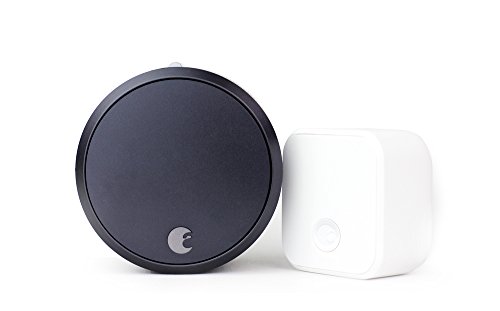
August Smart Lock Pro + Connect Hub
Best for: automating existing deadbolts with Wi-Fi
- Unlock Methods
- Auto-Unlock
- Smart Home Compatibility
- Alexa, Google Assistant
- Auto-Lock Function
- Auto-Lock
- Wireless Connectivity
- Wi-Fi
- Dimensions
- 3.4 × 2.22 × 3.4 inches
- Weight
- 13.9 ounces
The August Smart Lock Pro lets you control your existing deadbolt remotely via Wi-Fi. It supports Auto-Lock and Auto-Unlock for keyless entry. The unit connects to Amazon Alexa and Google Assistant. It measures 2.22 by 3.4 by 3.4 inches and weighs 13.9 ounces. This design allows you to keep your current keys while adding smart access. It suits users who want remote monitoring and automated locking routines.
- Wi-Fi connectivity for remote control
- Auto-Lock and Auto-Unlock functions
- Compatible with Alexa and Google Assistant
- Retains existing keys and lock
- Heavier build at 13.9 ounces
- No integrated keypad for code entry
- You want to automate your existing deadbolt
- You use Alexa or Google Assistant
- You prefer remote access over local codes
- You need a built-in touchscreen or keypad
- You want a lighter, more compact unit
- You require a lock with a camera
Verdict: August Smart Lock Pro fits homeowners who want to automate their current deadbolt with Wi-Fi and voice control. It is a solid choice for those who value remote monitoring and automatic locking over having a built-in keypad.

August Smart Lock Pro with Connect Hub
Best for: retrofitting existing locks with voice control
- Unlock Methods
- Auto-Unlock
- Smart Home Compatibility
- Alexa, Google Assistant
- Auto-Lock Function
- Auto-Lock
- Wireless Connectivity
- Wi-Fi
- Color
- Silver
- Dimensions
- 3.4 × 2.22 × 3.4 inches
The August Home Smart Lock Pro is a silver Wi-Fi deadbolt designed to retrofit your existing hardware. It measures 2.22 by 3.4 by 3.4 inches and weighs 13.9 ounces. You control it via voice commands using Amazon Alexa or Google Assistant. The system includes an Auto-Lock function and supports Auto-Unlock. This model keeps your current keys and lock cylinder intact while adding smart connectivity.
- Wi-Fi connectivity for remote access
- Compatible with Amazon Alexa and Google Assistant
- Features Auto-Lock function
- Supports Auto-Unlock capability
- Retains existing keys and lock
- Heavier build at 13.9 ounces
- Larger footprint with 3.4 inch height
- Fewer unlock methods than keypad models
- You want to keep your existing keys
- You use Amazon Alexa or Google Assistant
- You need remote Wi-Fi access
- You require a built-in keypad
- You prefer a fingerprint scanner
- You want a lighter device
Verdict: August Home Smart Lock Pro Silver is a practical retrofit option for users who want to keep their existing keys and control access via voice assistants like Alexa or Google Assistant.
Specifications side by side
| Spec | Schlage Encode Smart WiFi Deadbolt | Schlage Encode Plus Smart WiFi Deadbolt | Yale Extended Range Wi-Fi Smart Deadbolt | eufy Security FamiLock Video Smart Lock | Yale Wi-Fi Deadbolt with Fingerprint | Yale Google Nest x Yale Keyless Deadbolt | Yale Wi-Fi Touchscreen Deadbolt | Chamberlain myQ Secure View 3-in-1 Video Deadbolt | Yale Assure Lock 2 Wi-Fi Keypad Deadbolt | Yale Assure Lock 2 Wi-Fi Touchscreen Deadbolt | Lockly Secure Pro Smart Lock with Handle | Yale Assure Lock 2 Touchscreen Black Suede | EIYSIE WiFi Smart Lock with Camera | August Smart Lock Pro + Connect Hub | August Smart Lock Pro with Connect Hub |
|---|---|---|---|---|---|---|---|---|---|---|---|---|---|---|---|
| Unlock Methods | Touchscreen keypad, app, physical key | Touchscreen, app, Apple home keys | Keypad, app, backup key | Palm vein | Fingerprint, app, keypad | LED keypad, phone | Auto-unlock, keypad, app, watch | Face, fingerprint, PIN, app, key | Keypad, app | Touchscreen, app | Keypad, fingerprint, app, physical key | App, physical key, keypad, auto-unlock | Palm vein, face, fingerprint, PIN, app | Auto-Unlock | Auto-Unlock |
| Wireless Connectivity | – | – | 2.4 or 5 GHz Wi-Fi | Wi-Fi, Matter | 2.4 or 5 GHz Wi-Fi | – | 2.4 or 5 GHz Wi-Fi | – | – | – | – | – | – | – | – |
| Smart Home Compatibility | Alexa, Google Home, Ring, Airbnb | Apple HomeKit, Alexa, Google Assistant | – | Apple Home, Google Home, Alexa | – | – | – | – | – | – | – | – | Amazon Alexa, Google Assistant | Alexa, Google Assistant | Alexa, Google Assistant |
| Installation Type | – | Deadbolt replacement | Deadbolt | Deadbolt | – | Deadbolt replacement | – | Deadbolt | Deadbolt replacement | Deadbolt replacement | Handle | Handleset | Deadbolt | – | – |
| Security Certification | BHMA highest residential rating | BHMA certified | BHMA Grade 2 | BHMA Grade 1 | BHMA Grade 2 | – | BHMA Grade 2 | – | – | – | – | – | – | – | – |
| User Code Capacity | Up to 100 codes | Up to 100 | Unlimited codes | – | Unlimited codes | – | Unlimited | – | – | – | – | – | Up to 300 user records | – | – |
| Auto-Lock Function | Adjustable time delay | – | DoorSense | – | DoorSense, Auto-Lock | Automatic when away | DoorSense auto-lock | – | DoorSense door closed detection | DoorSense detection | – | Auto-Lock | – | Auto-Lock | Auto-Lock |
| Application | Airbnb | Airbnb | – | Front Door | Airbnb | Front Door | Airbnb | – | – | – | – | – | Front Door | – | – |
| Entry Method | Keypad | – | Backup Key | Built-In Camera | Keypad, Fingerprint | Keypad | Keypad | Keypad, Built-In Camera | Keypad | – | – | – | Built-In Camera, Fingerprint, Facial Recognition | – | – |
| Color | Satin Nickel | Satin Nickel | Satin Nickel | Black | Oil Rubbed Bronze | Satin Nickel | Black Suede | Black | Satin Nickel | Oil Rubbed Bronze | Venetian Bronze | Black | Gold | Dark Gray | Silver |
| Lock Type | Deadbolt | Deadbolt | Deadbolt | Deadbolt | Deadbolt | Deadbolt | Deadbolt | Deadbolt | Deadbolt | Deadbolt | – | – | Deadbolt | – | – |
| Keypad Type | Touchscreen | Touchscreen | – | – | – | – | Touchscreen | – | – | Touchscreen | – | Touchscreen | – | – | – |
| Special Features | – | – | – | – | – | – | – | Two-Way Audio | – | Auto-Lock | – | – | – | – | – |
| Control Method | App Control, Alexa | Alexa | App Control, Remote Control | – | App Control, Remote Control | – | App Control, Remote Control | App Control | – | – | – | – | Remote Control, Voice Control | Alexa | Alexa |
| Compatibility | Google Home | Apple Home | – | – | – | Google Home | – | – | – | – | – | – | – | Google Home | Google Home |
| Dimensions | 0.9 × 3 × 5 inches | 0.9 × 3 × 5 inches | 0.88 × 2.5 × 4.88 inches | 3.07 × 1.22 × 7.87 inches | 0.9 × 2.5 × 3.75 inches | 4.5 × 2.59 × 0.8 inches | 0.88 × 2.5 × 3.75 inches | 2.95 × 3.84 × 6.85 inches | 0.6 × 2.6 × 3.75 inches | 0.88 × 2.5 × 4.88 inches | 7.8 × 2.9 × 7.2 inches | 0.88 × 2.5 × 4.88 inches | 15.6 × 2.71 × 1.53 inches | 3.4 × 2.22 × 3.4 inches | 3.4 × 2.22 × 3.4 inches |
| Weight | 3.31 pounds | – | – | 5.4 pounds | – | 4 pounds | 1 pounds | 7.25 pounds | – | 4 pounds | 2.5 pounds | 6 pounds | 5.05 pounds | 13.9 ounces | 13.9 ounces |
| Size | Encode | Encode Plus | Wi-Fi (Extended Range) | – | Wi-Fi | 7.03 x 2.78 Inch | Wi-Fi | – | – | Wi-Fi (Extended Range) | Latch | touchscreen | – | – | 100 |
| Model | BE489WBCAM619 | BE499WBCAM619 | YRD410-CB1-619 | E85V0 | YRD430-F-WF1-0BP | RB-YRD540-WV-619 | YRD450-WF1-BSP | MYQ-NF0HXAB1 | YRD430-CB1-619 | YRD420-CB1-0BP | PGD628W | B-YRD420-WF1-RX-BSP | QZDMD01 | AUG-SL03-C02-G03 | ASL-03, AC-R1 |
If you want to coordinate home temperature with your lock schedule, evaluate specs for the best smart thermostats under 300.
Key Specs for Choosing Smart Locks
Check Ecosystem Compatibility
Verify that the lock supports your existing smart home platform. The Schlage Encode works with Alexa and Google Home, while the Schlage Encode Plus adds Apple HomeKit support. If you rely on Apple devices, the Plus model is necessary for direct integration. Other options like the Yale Google Nest x Yale Deadbolt focus on Google Home compatibility. Ensure the listed compatibility matches your hub to avoid needing extra bridges or separate apps for basic control.
Verify Wireless Connectivity
Most locks in this list offer direct Wi-Fi connectivity, which removes the need for a separate hub. The Yale Extended Range Wi-Fi Smart Deadbolt provides extended range capabilities for larger homes. The eufy Security FamiLock Video Smart Lock also uses Wi-Fi for its built-in camera feed. Direct Wi-Fi allows for remote access and status updates without intermediate hardware. Check the specifications to confirm the lock connects directly to your network rather than relying on Bluetooth or Z-Wave, which may require additional accessories.
Select Entry Method
Choose an entry method that fits your daily habits. The Schlage Encode features a touchscreen keypad for code entry. The Yale Wi-Fi Deadbolt with Fingerprint adds biometric access alongside the keypad. For those who prefer physical backups, the Yale Extended Range model includes a backup key option. The EIYSIE WiFi Smart Lock offers facial recognition and fingerprint scanning. Consider whether you need multiple entry options or if a single method like a keypad is sufficient for your household.
Review Lock Grade
Security ratings indicate the durability and resistance of the lock mechanism. The Yale Extended Range Wi-Fi Smart Deadbolt and the Yale Wi-Fi Deadbolt with Fingerprint both carry Grade 2 durability ratings. This rating suggests a higher level of security and resistance to forced entry compared to lower grades. The eufy Security FamiLock Video Smart Lock is also described as heavy-duty with high-grade hardware certification. Checking the grade helps you understand the physical robustness of the deadbolt before purchase.
Consider Physical Dimensions
Measure your door thickness and backset to ensure proper fit. The Schlage Encode measures 3 inches in width and 5 inches in height. The Chamberlain myQ Secure View 3-in-1 Video Deadbolt is significantly larger, weighing 7.25 pounds and measuring 6.85 inches in height. The August Smart Lock Pro is compact, weighing only 13.9 ounces. Verify that the lock’s dimensions align with your door’s existing hardware. Larger units with integrated cameras or handlesets require more space and may not fit standard door preparations without modification.
Frequently asked questions
Which smart lock supports Apple Home Key?
The Schlage Encode Plus Smart WiFi Deadbolt supports Apple Home Key. This feature allows for secure, hub-free access using your iPhone or Apple Watch. It connects directly via Wi-Fi, eliminating the need for a separate bridge. This makes it the top choice for users who prioritize Apple ecosystem integration and reliable remote management.
Do these smart locks require a hub for Wi-Fi?
No, most locks on this list connect directly to your Wi-Fi network. Models like the Schlage Encode, Yale Wi-Fi Deadbolt, and eufy FamiLock have built-in Wi-Fi. This direct connectivity allows you to control the lock via an app without purchasing an additional hub or bridge. You can manage access remotely with just your internet connection.
Which smart lock includes a built-in camera?
The eufy Security FamiLock Video Smart Lock and the Chamberlain myQ Secure View 3-in-1 Video Deadbolt both feature built-in cameras. These models allow you to see who is at your door via the app. The Chamberlain unit also adds two-way audio, while the eufy model includes a rear screen for quick visitor checks without using your phone.
Can I use a fingerprint to unlock these doors?
Yes, several models support biometric entry. The Yale Wi-Fi Deadbolt with Fingerprint and the Yale Assure Lock 2 Wi-Fi Touchscreen Deadbolt offer fingerprint scanning. The Lockly Secure Pro and EIYSIE WiFi Smart Lock also include fingerprint or facial recognition. These methods provide a convenient way to enter without carrying keys or remembering codes.
Which smart lock allows unlimited access codes?
The Yale Extended Range Wi-Fi Smart Deadbolt and the Yale Wi-Fi Deadbolt with Fingerprint both support unlimited codes. This feature is useful for managing access for family members, guests, or service providers. You can generate unique codes for each person, ensuring you can track who enters your home and revoke access instantly through the app.
Is there a smart lock with a physical backup key?
Yes, the Yale Extended Range Wi-Fi Smart Deadbolt includes a physical backup key. This ensures you can still enter your home if the battery dies or the electronic system fails. While many modern locks rely solely on codes or biometrics, this model provides a traditional key option for added peace of mind during power outages.
Which smart lock works with Google Home?
The Schlage Encode Smart WiFi Deadbolt and the Yale Google Nest x Yale Keyless Deadbolt are compatible with Google Home. You can use voice commands to lock or unlock the door. The August Smart Lock Pro also works with Google Assistant. These integrations allow you to automate your entry system alongside other smart home devices.
Does the August Smart Lock have a keypad?
The August Smart Lock Pro does not have a built-in keypad. It is designed to retrofit your existing deadbolt, keeping your current keys. You control it via an app, voice assistants, or an optional external keypad. This makes it ideal for users who want to automate their current lock without replacing the entire hardware assembly.


