Best Smart Locks with App Control in 2026: 15 Picks Ranked by Specs
Compare 15 smart locks with app control. We rank models by specs like connectivity, entry methods, and durability to help you choose the right lock.

As Amazon Associates, we earn from qualifying purchases. This means we may receive a small commission at no extra cost to you if you click through and make a purchase.
As an Amazon Associate we earn from qualifying purchases. Links on this page are affiliate links.
Finding the best smart locks with app control requires looking past marketing claims. This guide compares 15 models ranked by their published specifications. The top pick is the Schlage Encode Smart WiFi Deadbolt, which leads due to its built-in Wi-Fi connectivity that eliminates the need for a separate hub. All selections are based strictly on the technical data provided by manufacturers. You will find options for various door types and security needs. This guide helps you decide which lock matches your specific door dimensions and smart home setup.
Check Smart Home Compatibility Before Buying
Most models here support Amazon Alexa, but Google Home compatibility is not universal. The Schlage Encode and Yale Wi-Fi Deadbolt both work with Alexa. Some Philips models also support Google Home. Verify your existing smart home ecosystem first. This ensures the app control features function correctly with your current setup without needing extra hubs or adapters.
| # | Product | Best for | Price |
|---|---|---|---|
| 1 | Schlage Encode Smart WiFi Deadbolt Best overall | Standard doors needing high security and app control | |
| 2 | Philips 4200 Series Wi-Fi Deadbolt with Handle Best budget | fast fingerprint entry and complete handle sets | |
| 3 | eufy Security Modern Deadbolt and Lever Set Also great | Unified entryway design with fingerprint access | |
| 4 | Yale Wi-Fi Smart Deadbolt with Keypad Best premium | users needing unlimited codes and direct Wi-Fi | |
| 5 | Chamberlain myQ 3-in-1 Video Doorbell Smart Lock Best built-in camera | integrated video doorbell and locking | |
| 6 | Kwikset Halo Wi-Fi Keypad Deadbolt Also great | homes needing high code capacity and Grade AAA security | |
| 7 | Veise Smart Deadbolt Handle Set Best key fob | users needing physical fob access | |
| 8 | Schlage Arrive Wi-Fi Smart Deadbolt Also great | Users needing high code capacity and BHMA certification | |
| 9 | Philips Wi-Fi Keypad Deadbolt with Handle Also great | homes needing high user code capacity | |
| 10 | Tapo Smart Wi-Fi Fingerprint Deadbolt Also great | fast biometric entry and remote app management | |
| 11 | Philips Wi-Fi Smart Deadbolt Set with Handles Also great | Complete entry sets with fingerprint access | |
| 12 | Philips DDL242X-15HW Wi-Fi Smart Lock Also great | Remote access management with multiple codes | |
| 13 | Veise Wi-Fi Smart Deadbolt with Handle Set Also great | Fast entry and remote management | |
| 14 | Philips Wi-Fi Fingerprint Smart Lock Set Also great | Remote app management and fingerprint entry | |
| 15 | Yale Wi-Fi Touchscreen Deadbolt Best black suede | Users needing direct Wi-Fi and unlimited codes |
The best fit for you
- You need the most durable lock for standard doors – Schlage Encode Smart WiFi Deadbolt – It offers certified durability and robust security for standard door installations.
- You want fast fingerprint entry with a complete handle set – Philips 4200 Series Wi-Fi Deadbolt with Handle – This model includes a lever handle and rapid fingerprint scanning capabilities.
- You require unlimited codes for rental properties – Yale Wi-Fi Smart Deadbolt with Keypad – It provides direct Wi-Fi connectivity and supports unlimited user codes.
- You want integrated video monitoring with locking – Chamberlain myQ 3-in-1 Video Doorbell Smart Lock – It combines a 2K HDR camera with face recognition in one unit.

Schlage Encode Smart WiFi Deadbolt
Best for: Standard doors needing high security and app control
- Control Method
- App Control, Alexa
- Unlock Methods
- Touchscreen keypad, app, physical key
- Smart Home Compatibility
- Alexa, Google Home, Ring, Airbnb
- Security Certification
- BHMA highest residential rating
- User Code Capacity
- Up to 100 codes
- Auto-Lock Function
- Adjustable time delay
The Schlage Encode adds built-in Wi-Fi to a touchscreen deadbolt, letting you control it via the Schlage Home app. It supports up to 100 access codes and works with Alexa and Google Home. The lock holds a BHMA highest residential rating and offers adjustable auto-lock timing. It fits standard doors and runs on four AA batteries. This model suits users who want app control without a separate hub.
- Built-in Wi-Fi for direct app control
- BHMA highest residential security certification
- Supports up to 100 user codes
- Compatible with Alexa and Google Home
- Adjustable auto-lock time delay
- Weighs 3.31 pounds, which is bulkier than lighter lever sets
- Requires four AA batteries instead of long-life lithium packs
- Uses a touchscreen keypad that may show fingerprints
- You want a deadbolt with built-in Wi-Fi
- You need to manage up to 100 access codes
- You prefer a lock with the highest BHMA rating
- You need a lever handle instead of a deadbolt
- You want fingerprint recognition for faster entry
- You prefer a lock with a physical key only
Verdict: Schlage Encode Smart WiFi Deadbolt offers robust security and app control for standard doors. It fits users who prioritize certified durability and extensive code management over sleek lever designs.

Philips 4200 Series Wi-Fi Deadbolt with Handle
Best for: fast fingerprint entry and complete handle sets
- Control Method
- App Control, Remote Control, Voice Control
- Unlock Methods
- Fingerprint, app, voice, passcode
- Wireless Connectivity
- 2.4GHz Wi-Fi
- Smart Home Compatibility
- Alexa, Google Assistant
- Installation Type
- Deadbolt with handle set
- Auto-Lock Function
- Timer delay (0-180 seconds)
This Philips smart lock combines a deadbolt with a matching handle set. It connects directly to 2.4GHz Wi-Fi without a hub. You unlock the door via app, voice commands, passcodes, or a 0.3-second fingerprint scan. The app manages access codes and sets an auto-lock timer from zero to 180 seconds. It runs on standard alkaline batteries for up to six months. This unit suits you if you want a complete hardware package with fast biometric entry.
- Includes a matching handle set for a complete installation
- Unlocks in 0.3 seconds via fingerprint sensor
- Connects directly to 2.4GHz Wi-Fi without a hub
- Supports Alexa and Google Assistant voice control
- Battery life is rated at 6 months, which is shorter than many competitors
- Requires standard 1.5V alkaline batteries, excluding rechargeable options
- Wi-Fi range is limited to 33 feet from the router
- You need a complete lock and handle set in one purchase
- You want fast 0.3-second fingerprint access for daily entry
- You prefer direct Wi-Fi connection without buying extra hubs
- You require a lock that works with 5GHz Wi-Fi networks
- You want to use rechargeable batteries for long-term maintenance
- You need a deadbolt only without an integrated handle
Verdict: Philips WiFi Keypad Deadbolt with Handle offers a complete entry solution with rapid fingerprint scanning. It fits you best if you value fast biometric access and a single-package installation over extended battery longevity.

eufy Security Modern Deadbolt and Lever Set
Best for: Unified entryway design with fingerprint access
- Control Method
- App Control
- Unlock Methods
- Fingerprint, app, keypad, key, voice
- Wireless Connectivity
- Built-in Wi-Fi
- Smart Home Compatibility
- Alexa, Google Assistant
- Installation Type
- Deadbolt lever set
- Security Certification
- BHMA Certified
This eufy Security lever set pairs a deadbolt with a matching handle for a unified look. It features built-in Wi-Fi for app control without a bridge. You unlock via fingerprint, keypad, app, key, or voice. The system learns your print for faster access. It runs on eight AA batteries for up to eight months. It fits standard US and Canadian doors.
- Built-in Wi-Fi connects directly to your network
- Five unlock methods including fingerprint and app
- Self-learning AI improves recognition speed
- BHMA Certified for security standards
- Matches handle and lock for consistent design
- Uses eight AA batteries instead of rechargeable packs
- Small handle size limits aesthetic options
- Black color is the primary finish shown
- You want a matching handle and deadbolt set
- You prefer fingerprint entry over standard keys
- You need direct Wi-Fi connectivity without a hub
- You require a traditional handleset design
- You need a nickel finish option
- You prefer rechargeable battery systems
Verdict: eufy Security T8506 Smart Lever Set suits homeowners who value a cohesive entryway design and rapid fingerprint access. It works well for those who want direct app control without extra hardware.

Yale Wi-Fi Smart Deadbolt with Keypad
Best for: users needing unlimited codes and direct Wi-Fi
- Control Method
- App Control, Remote Control
- Unlock Methods
- Auto-unlock, keypad, app, watch, key
- Wireless Connectivity
- 2.4 or 5 GHz Wi-Fi
- Security Certification
- BHMA Grade 2
- User Code Capacity
- Unlimited
- Auto-Lock Function
- DoorSense auto-lock
The Yale Assure Lock 2 is a Wi-Fi deadbolt that connects directly to 2.4 or 5 GHz networks. It offers BHMA Grade 2 security certification and supports unlimited user codes. You can unlock the door via app, Apple Watch, keypad, or auto-unlock sensors. The unit weighs 4.5 pounds and measures 2.5 inches wide. It suits users who need reliable remote access without a separate hub.
- BHMA Grade 2 security certification
- Unlimited user code capacity
- Dual-band 2.4 or 5 GHz Wi-Fi
- Auto-unlock and DoorSense auto-lock functions
- Heavier 4.5-pound build compared to lighter alternatives
- Limited to deadbolt lock type only
- You want direct Wi-Fi connectivity without a hub
- You need to manage unlimited temporary codes for guests
- You require Grade 2 commercial-grade durability
- You prefer a lever handle set over a deadbolt
- You need fingerprint recognition for entry
- You want a built-in video doorbell camera
Verdict: Yale Assure Lock 2 Wi-Fi Deadbolt is a solid choice for renters who need robust security and flexible code management. It fits users who prioritize direct network connection and commercial-grade durability over integrated cameras or biometric scanners.

Chamberlain myQ 3-in-1 Video Doorbell Smart Lock
Best for: integrated video doorbell and locking
- Control Method
- App Control
- Unlock Methods
- Face, fingerprint, PIN, app, key
- Installation Type
- Deadbolt
- Auto-Lock Function
- Motion detection (subscription)
- Entry Method
- Built-In Camera, Fingerprint, Facial Recognition
- Color
- Black
This Chamberlain lock combines a deadbolt, video doorbell, and 2K HDR camera into one black device. You unlock it via face recognition, fingerprint, PIN, app, or key. The 2K HDR video and color night vision provide clear visibility. Two-way audio allows communication. The rechargeable battery lasts four to six months. It weighs 4.87 pounds and measures 6.85 inches high. This unit suits those wanting integrated security monitoring.
- 2K HDR video with color night vision
- Face recognition and fingerprint access
- Two-way audio communication
- Rechargeable battery lasts 4–6 months
- Heavier build at 4.87 pounds compared to standard deadbolts
- Larger height at 6.85 inches due to integrated camera housing
- Requires subscription for AI-powered smart detection features
- You want a single device for locking and video monitoring
- You prefer hands-free entry using facial recognition
- You need color night vision for clear evening footage
- You prefer a lightweight standard deadbolt installation
- You want all smart features included without a subscription
- You do not need video doorbell functionality
Verdict: Chamberlain myQ 3-in-1 Smart Lock integrates 2K HDR video and face recognition into a heavy, 6.85-inch black unit. It fits users who want combined locking and monitoring capabilities without separate devices.

Kwikset Halo Wi-Fi Keypad Deadbolt
Best for: homes needing high code capacity and Grade AAA security
- Control Method
- App Control
- Unlock Methods
- Keypad, app, geofence
- Smart Home Compatibility
- Amazon Alexa, Google Home
- Installation Type
- Deadbolt replacement
- Security Certification
- Grade AAA
- User Code Capacity
- Up to 250
The Kwikset Halo is a Wi-Fi deadbolt that requires no hub. It supports up to 250 user codes and uses geofencing for auto-unlock. The Grade AAA security rating meets high standards. You get remote app control and voice assistant compatibility. This lock suits homes needing robust access management and reliable automatic locking features.
- Grade AAA security certification
- Supports up to 250 access codes
- Built-in Wi-Fi with no hub required
- Geofencing for automatic unlock
- 1-year electronics warranty is shorter than typical lifetime mechanical coverage
- Timed auto-lock duration requires manual setting rather than instant engagement
- You want high security with Grade AAA certification
- You need to manage many guest codes
- You prefer automatic unlocking via geofencing
- You require a fingerprint scanner
- You need a video doorbell integrated
- You want a longer electronics warranty
Verdict: Kwikset Halo Wi-Fi Deadbolt fits households that prioritize high security ratings and extensive code management. It is ideal for users who value automated entry without extra hubs.

Veise Smart Deadbolt Handle Set
Best for: users needing physical fob access
- Control Method
- App Control, Remote Control
- Unlock Methods
- App, code, fob, mechanical key
- Smart Home Compatibility
- Alexa, Google Home (with gateway)
- Installation Type
- Handle set
- User Code Capacity
- 250+ user codes
- Application
- Front Door
This handle set deadbolt supports app control, codes, fobs, and keys. It stores over 250 user codes and includes auto-locking. You can manage access remotely via the app. Smart home features require a separate gateway. The unit weighs 5.06 pounds and fits standard US doors. It suits users who want physical fob access alongside digital management.
- Supports five access methods including app, code, fob, key, and thumb turn
- Stores over 250 user codes for flexible guest management
- Includes auto-lock and privacy modes for enhanced security
- Comes with a 2-year total warranty after registration
- Heavier build at 5.06 pounds compared to lighter alternatives
- Requires a separate gateway for Alexa and Google Home compatibility
- Limited to two color options: Matte Black and Satin Nickel
- You need a physical key fob for entry
- You want to manage over 250 user codes
- You prefer a handle set design over a deadbolt only
- You want built-in smart home compatibility without extra hardware
- You prefer a lighter lock for easier installation
- You need more than two color choices
Verdict: Veise VE06-H Matte Black Smart Lock fits users who value physical fob access and high code capacity. It is a solid choice for those willing to buy a gateway for smart home features.

Schlage Arrive Wi-Fi Smart Deadbolt
Best for: Users needing high code capacity and BHMA certification
- Control Method
- App Control, Alexa
- Unlock Methods
- Keypad, app, voice
- Wireless Connectivity
- Built-in Wi-Fi
- Smart Home Compatibility
- Alexa, Google Home, Ring
- Installation Type
- Deadbolt
- Security Certification
- BHMA certified
This Schlage Arrive deadbolt features built-in Wi-Fi for direct app control via the Schlage Home app. You can manage up to 250 access codes and unlock the door using the push-button keypad or voice commands through Alexa and Google Home. It carries BHMA certification for security and durability. The satin nickel finish includes a Camelot trim design. This lock suits users who want a trusted brand with high code capacity and standard installation requirements.
- Built-in Wi-Fi connectivity for app management
- Supports up to 250 access codes
- BHMA certified for security and durability
- Compatible with Alexa and Google Home
- Heavier build at 2.4 pounds compared to lighter competitors
- Requires standard door thickness of 1-3/8 to 1-3/4 inches
- You need a high capacity for managing many access codes
- You prefer a BHMA certified lock for added security assurance
- You want direct Wi-Fi control without a separate hub
- You require fingerprint recognition for keyless entry
- You need a video doorbell integrated into the lock
- You have a non-standard door thickness or backset
Verdict: Schlage Arrive Smart WiFi Deadbolt is a solid choice for users who prioritize security certification and extensive code management. It fits homes with standard door dimensions where app control is the primary need.
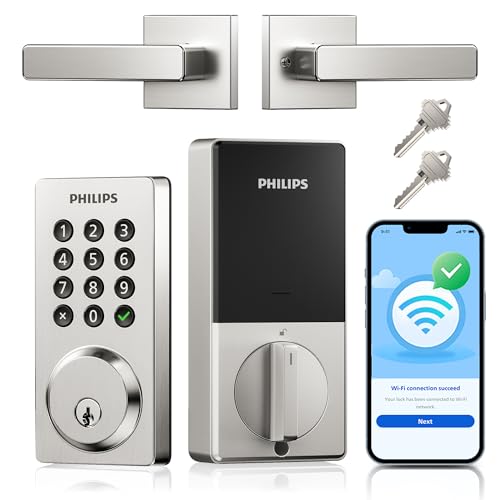
Philips Wi-Fi Keypad Deadbolt with Handle
Best for: homes needing high user code capacity
- Control Method
- App Control, Voice Control, Alexa
- Unlock Methods
- App, voice, key, passcode
- Wireless Connectivity
- Built-in Wi-Fi
- Smart Home Compatibility
- Amazon Alexa, Google Assistant
- Installation Type
- Deadbolt with handle
- User Code Capacity
- 100 PIN codes
This Philips smart deadbolt connects directly to your home Wi-Fi network, allowing you to manage access via the Philips Home Access app. It supports up to 100 custom PIN codes and integrates with Amazon Alexa and Google Assistant for voice control. The unit features physical buttons for entry and auto-locks within 10 to 180 seconds. It operates in temperatures from -31°F to 150°F and is powered by eight AA batteries.
- Built-in Wi-Fi for direct app control without a hub
- Supports up to 100 custom PIN codes for guests
- Physical keypad buttons offer reliable manual entry
- Auto-lock timer adjustable from 10 to 180 seconds
- Compatible with Amazon Alexa and Google Assistant
- Requires eight AA batteries, which are not included
- IP54 waterproof rating limits outdoor exposure compared to higher ratings
- Physical buttons are less modern than touchscreen interfaces
- You need a deadbolt with built-in Wi-Fi
- You want to manage up to 100 user codes
- You prefer physical buttons over touchscreens
- You require a touchscreen keypad interface
- You need a lock with a higher waterproof rating
- You want batteries included with the purchase
Verdict: Philips WiFi Keypad Deadbolt, Satin Nickel provides direct Wi-Fi connectivity and a high capacity for user codes, making it a solid choice for households needing extensive access management without a separate hub.

Tapo Smart Wi-Fi Fingerprint Deadbolt
Best for: fast biometric entry and remote app management
- Control Method
- App Control
- Unlock Methods
- Fingerprint, keypad, app, key
- Wireless Connectivity
- Wi-Fi, Bluetooth
- Installation Type
- Deadbolt
- Security Certification
- BHMA Grade 2
- Color
- Black
The Tapo DL110 is a Wi-Fi deadbolt with app control and touchscreen keypad entry. It offers BHMA Grade 2 security and unlocks in 0.42 seconds via fingerprint. You get one-year battery life with a rechargeable unit and USB-C charging. It supports 100 fingerprints and custom passcodes. This lock suits you if you want fast biometric access and remote management without complex installation.
- BHMA Grade 2 security certification
- 0.42-second rapid fingerprint recognition
- One-year battery life with USB-C charging
- Supports up to 100 registered fingerprints
- Wi-Fi and Bluetooth connectivity for app control
- Heavier build at 4.61 pounds compared to lighter deadbolts
- BHMA Grade 2 rating is lower than Grade 1 options
- Black color finish may not match all door hardware
- You want fast fingerprint unlocking under half a second
- You need remote access via Wi-Fi app control
- You prefer a rechargeable battery with USB-C convenience
- You require the highest BHMA Grade 1 security rating
- You need a lighter lock under four pounds
- You prefer a satin nickel or brass finish over black
Verdict: Tapo DL110 Smart Deadbolt fits users who prioritize speed and app control over maximum security grades. It is ideal for homes where quick biometric entry and remote management are top priorities.

Philips Wi-Fi Smart Deadbolt Set with Handles
Best for: Complete entry sets with fingerprint access
- Control Method
- App Control, Remote Control, Voice Control, Alexa
- Unlock Methods
- App, fingerprint, PIN, key, voice
- Smart Home Compatibility
- Amazon Alexa, Google Assistant
- Installation Type
- Handle set
- User Code Capacity
- Up to 100 user codes
- Auto-Lock Function
- 30 to 180 seconds
This Philips smart lock set includes both the deadbolt and interior handles for a coordinated look. It connects via Wi-Fi for app control without a hub. You can unlock the door using fingerprints, PIN codes, keys, or voice commands with Alexa and Google Assistant. The system supports up to 100 user codes and auto-locks after 30 to 180 seconds. It fits standard doors from 35 to 50mm thick.
- Includes matching interior and exterior handles
- Supports five unlock methods including fingerprints
- Stores up to 100 user codes
- Auto-locks on a 30 to 180-second timer
- Fits only doors 35 to 50mm thick
- Limited to 100 user codes capacity
- You want a complete handle set for a coordinated look
- You need fingerprint and app control combined
- You require auto-locking with a customizable timer
- Your door thickness is outside the 35 to 50mm range
- You need more than 100 user codes
- You prefer a lock without included handles
Verdict: Philips Wi-Fi Smart Lock Set offers a complete handle solution with versatile entry options. It fits homeowners who value a coordinated aesthetic and flexible access management for their standard entry doors.

Philips DDL242X-15HW Wi-Fi Smart Lock
Best for: Remote access management with multiple codes
- Control Method
- App Control, Remote Control, Alexa
- Unlock Methods
- Voice commands, password, key, app
- Wireless Connectivity
- 2.4GHz Wi-Fi
- Smart Home Compatibility
- Alexa, Google Assistant
- Installation Type
- Handle set
- User Code Capacity
- Up to 100 passwords
This Philips deadbolt set offers app control over 2.4GHz Wi-Fi for remote locking and unlocking. You can create up to 100 custom passwords for family or guests. The auto-lock feature activates between 10 and 180 seconds after entry. Real-time alerts track every access event. It works with Alexa and Google Assistant. The matte black handle set fits standard US doors.
- Supports up to 100 custom passwords
- Auto-lock timing adjustable from 10 to 180 seconds
- Real-time activity records in the app
- Includes complete handle set and deadbolt
- Limited to 2.4GHz Wi-Fi networks only
- No fingerprint recognition capability
- Requires 8 AA batteries
- You need to manage access for many users with unique codes
- You want remote control via app without a separate hub
- You prefer a complete handle set for a modern look
- You require fingerprint scanning for entry
- Your router only broadcasts 5GHz Wi-Fi
- You prefer a lock that uses fewer batteries
Verdict: Philips Wi-Fi Smart Lock Matte Black suits households that need flexible code management and remote app control. It fits buyers who want a complete handle set with standard Wi-Fi connectivity.

Veise Wi-Fi Smart Deadbolt with Handle Set
Best for: Fast entry and remote management
- Control Method
- App Control, Remote Control, Voice Control
- Unlock Methods
- Voice, fingerprint, app, code, card, key
- Smart Home Compatibility
- Amazon Alexa, Google
- Installation Type
- Deadbolt with handle set
- Security Certification
- ANSI Grade 3, BHMA
- User Code Capacity
- 100+ codes
The Veise VE017G-H is a matte black deadbolt with a handle set. It uses Wi-Fi for app and voice control. You get 0.2-second fingerprint recognition and 100+ customizable codes. The unit weighs 5.29 pounds and measures 12.8 inches long. It fits busy households needing quick entry. The lock meets ANSI Grade 3 standards. You can manage access remotely via the KK Home App.
- 0.2-second fingerprint recognition speed
- Supports 100+ customizable user codes
- Compatible with Amazon Alexa and Google
- Includes auto-lock timer from 0 to 180 seconds
- Heavier build at 5.29 pounds compared to lighter models
- Lower ANSI Grade 3 certification versus Grade 1 options
- Longer length of 12.8 inches may not fit all doors
- You want fast fingerprint entry for busy routines
- You need remote app control for property management
- You prefer a unified matte black handle set design
- You require the highest Grade 1 security certification
- You need a lighter lock under 4 pounds
- You prefer a standard deadbolt without a handle set
Verdict: Veise VE017G-H Matte Black Smart Lock suits users who value speed and remote management. It is ideal for those who want a complete handle set with reliable Wi-Fi connectivity.

Philips Wi-Fi Fingerprint Smart Lock Set
Best for: Remote app management and fingerprint entry
- Control Method
- App Control, Voice Control, Alexa
- Unlock Methods
- Fingerprint, PIN, key, app, voice
- Wireless Connectivity
- 2.4 GHz Wi-Fi
- Smart Home Compatibility
- Amazon Alexa, Google Assistant
- Installation Type
- Handle set
- User Code Capacity
- 100 user PINs, unlimited one-time PINs
This Philips handle set adds app control and fingerprint entry to your front door. It connects via 2.4 GHz Wi-Fi without a hub. You can store up to 100 user PINs and 50 fingerprints. The touchscreen keypad supports voice commands through Alexa or Google Assistant. The auto-lock engages when the door closes, though it lacks a dedicated sensor. This model offers solid keyless entry for daily use.
- Supports 100 user PINs and unlimited one-time codes
- Stores up to 50 fingerprints for quick access
- Connects directly via 2.4 GHz Wi-Fi
- Compatible with Amazon Alexa and Google Assistant
- Auto-lock function relies on door closure rather than a dedicated sensor
- Weighs 5 pounds, which is heavier than many standard deadbolts
- You want to manage access remotely via the Philips app
- You prefer fingerprint entry alongside traditional PIN codes
- You already use Alexa or Google Assistant for home control
- You need a lock that works without Wi-Fi
- You prefer a traditional deadbolt shape over a handle set
- You require a dedicated auto-lock sensor for extra safety
Verdict: Philips WiFi Fingerprint Door Lock, Matte Black fits households that value fingerprint convenience and remote app management. It is a practical choice for users who already have smart home assistants and want a handle set upgrade.

Yale Wi-Fi Touchscreen Deadbolt
Best for: Users needing direct Wi-Fi and unlimited codes
- Control Method
- App Control, Remote Control
- Unlock Methods
- Auto-unlock, keypad, app, watch
- Wireless Connectivity
- 2.4 or 5 GHz Wi-Fi
- Security Certification
- BHMA Grade 2
- User Code Capacity
- Unlimited
- Auto-Lock Function
- DoorSense auto-lock
This Yale Wi-Fi deadbolt offers app control and direct 2.4 or 5 GHz Wi-Fi connectivity without a hub. It supports auto-unlock, touchscreen keypad, and Apple Watch entry. The BHMA Grade 2 certification ensures commercial-grade durability. DoorSense technology verifies the door is closed before auto-locking. It suits users who want reliable, code-based access with flexible connectivity options for their front door.
- Direct 2.4 or 5 GHz Wi-Fi connectivity without a hub
- BHMA Grade 2 security certification for durability
- Unlimited user code capacity for shared access
- DoorSense auto-lock function for added security
- Supports auto-unlock, keypad, app, and watch entry
- Weighs 1 pound, which is heavier than some lighter alternatives
- Limited to 2.4 or 5 GHz Wi-Fi without Bluetooth option in this specific Wi-Fi model variation
- You want direct Wi-Fi connectivity without needing a separate hub
- You need unlimited user codes for frequent guests or service providers
- You prefer a touchscreen keypad with auto-unlock convenience
- You require Bluetooth-only connectivity for local control
- You are looking for a lighter lock under 1 pound
- You need a lock with a different finish than Black Suede
Verdict: Yale Wi-Fi Deadbolt Black Suede provides robust Grade 2 security and flexible entry methods for users who value direct Wi-Fi integration and unlimited code management. It is a solid choice for those prioritizing durability and convenient access control.
Specifications side by side
| Spec | Schlage Encode Smart WiFi Deadbolt | Philips 4200 Series Wi-Fi Deadbolt with Handle | eufy Security Modern Deadbolt and Lever Set | Yale Wi-Fi Smart Deadbolt with Keypad | Chamberlain myQ 3-in-1 Video Doorbell Smart Lock | Kwikset Halo Wi-Fi Keypad Deadbolt | Veise Smart Deadbolt Handle Set | Schlage Arrive Wi-Fi Smart Deadbolt | Philips Wi-Fi Keypad Deadbolt with Handle | Tapo Smart Wi-Fi Fingerprint Deadbolt | Philips Wi-Fi Smart Deadbolt Set with Handles | Philips DDL242X-15HW Wi-Fi Smart Lock | Veise Wi-Fi Smart Deadbolt with Handle Set | Philips Wi-Fi Fingerprint Smart Lock Set | Yale Wi-Fi Touchscreen Deadbolt |
|---|---|---|---|---|---|---|---|---|---|---|---|---|---|---|---|
| Unlock Methods | Touchscreen keypad, app, physical key | Fingerprint, app, voice, passcode | Fingerprint, app, keypad, key, voice | Auto-unlock, keypad, app, watch, key | Face, fingerprint, PIN, app, key | Keypad, app, geofence | App, code, fob, mechanical key | Keypad, app, voice | App, voice, key, passcode | Fingerprint, keypad, app, key | App, fingerprint, PIN, key, voice | Voice commands, password, key, app | Voice, fingerprint, app, code, card, key | Fingerprint, PIN, key, app, voice | Auto-unlock, keypad, app, watch |
| Wireless Connectivity | – | 2.4GHz Wi-Fi | Built-in Wi-Fi | 2.4 or 5 GHz Wi-Fi | – | – | – | Built-in Wi-Fi | Built-in Wi-Fi | Wi-Fi, Bluetooth | – | 2.4GHz Wi-Fi | – | 2.4 GHz Wi-Fi | 2.4 or 5 GHz Wi-Fi |
| Smart Home Compatibility | Alexa, Google Home, Ring, Airbnb | Alexa, Google Assistant | Alexa, Google Assistant | – | – | Amazon Alexa, Google Home | Alexa, Google Home (with gateway) | Alexa, Google Home, Ring | Amazon Alexa, Google Assistant | – | Amazon Alexa, Google Assistant | Alexa, Google Assistant | Amazon Alexa, Google | Amazon Alexa, Google Assistant | – |
| Installation Type | – | Deadbolt with handle set | Deadbolt lever set | – | Deadbolt | Deadbolt replacement | Handle set | Deadbolt | Deadbolt with handle | Deadbolt | Handle set | Handle set | Deadbolt with handle set | Handle set | – |
| Security Certification | BHMA highest residential rating | – | BHMA Certified | BHMA Grade 2 | – | Grade AAA | – | BHMA certified | – | BHMA Grade 2 | – | – | ANSI Grade 3, BHMA | – | BHMA Grade 2 |
| User Code Capacity | Up to 100 codes | – | – | Unlimited | – | Up to 250 | 250+ user codes | Up to 250 access codes | 100 PIN codes | – | Up to 100 user codes | Up to 100 passwords | 100+ codes | 100 user PINs, unlimited one-time PINs | Unlimited |
| Auto-Lock Function | Adjustable time delay | Timer delay (0-180 seconds) | – | DoorSense auto-lock | Motion detection (subscription) | Timed duration | – | – | Timer delay (10-180 seconds) | – | 30 to 180 seconds | 10 to 180 seconds | Timer delay (0-180s) | Auto-Lock (no sensor) | DoorSense auto-lock |
| Application | Airbnb | Front Door | Front Door | Airbnb | – | – | Front Door | – | – | – | – | Front Door | Front Door | Front Door | Airbnb |
| Entry Method | Keypad | Keypad, Fingerprint | Keypad, Fingerprint | Keypad, Backup Key | Built-In Camera, Fingerprint, Facial Recognition | Keypad | Key Fob | Keypad | Keypad | Keypad, Fingerprint | Keypad, Fingerprint | Keypad | Keypad, Fingerprint | Keypad, Fingerprint | Keypad |
| Color | Satin Nickel | Matte Black | Black | Oil Rubbed Bronze | Black | Venetian Bronze | Matte Black | Satin Nickel | Satin Nickel | Black | Jet black | Matte Black | Matte Black | Matte Black | Black Suede |
| Lock Type | Deadbolt | Deadbolt, Lever | Deadbolt, Handle Set, Lever | Deadbolt | – | Deadbolt | Deadbolt, Handle Set | Deadbolt | Deadbolt | Deadbolt | Deadbolt, Handle Set | Deadbolt, Handle Set | Deadbolt, Handle Set | Handle Set | Deadbolt |
| Keypad Type | Touchscreen | – | – | – | – | – | – | – | – | Touchscreen | Touchscreen | – | Touchscreen | Touchscreen | Touchscreen |
| Special Features | – | Auto-Lock | – | – | Two-Way Audio | – | Auto-Lock | – | Auto-Lock | – | Auto-Lock | Auto-Lock | Auto-Lock | Auto-Lock | – |
| Control Method | App Control, Alexa | App Control, Remote Control, Voice Control | App Control | App Control, Remote Control | App Control | App Control | App Control, Remote Control | App Control, Alexa | App Control, Voice Control, Alexa | App Control | App Control, Remote Control, Voice Control, Alexa | App Control, Remote Control, Alexa | App Control, Remote Control, Voice Control | App Control, Voice Control, Alexa | App Control, Remote Control |
| Features | – | – | – | – | Security Camera | – | – | – | – | – | – | – | – | – | – |
| Compatibility | Google Home | – | – | – | – | – | – | Google Home | Google Home | – | Google Home | Google Home | – | Google Home | – |
| Dimensions | 0.9 × 3 × 5 inches | 6 × 2.2 × 1.5 inches | 6.08 × 2.53 × 0.99 inches | 0.88 × 2.5 × 4.88 inches | 2.95 × 3.84 × 6.85 inches | 3.99 × 4.24 × 9.74 inches | 18 × 7 × 4 inches | 0.83 × 2.5 × 4.49 inches | 9 × 7.5 × 4.45 inches | 5.91 × 2.69 × 1.29 inches | 11 × 9 × 4 inches | 2.7 × 0.73 × 5.73 inches | 12.8 × 9.29 × 3.74 inches | 6 × 2 × 1.5 inches | 0.88 × 2.5 × 3.75 inches |
| Weight | 3.31 pounds | – | – | 4.5 pounds | 4.87 pounds | 1 pounds | 5.06 pounds | 2.4 pounds | – | 4.61 pounds | – | – | 5.29 pounds | 5 pounds | 1 pounds |
| Size | Encode | 2.2 inches x 6 inches x 1.5 inches | Small Handle | Wi-Fi | 1 Count (Pack of 1) | – | – | 3 x 5.55 x 2.3 inch | – | 2.91 x 7.83 x 1.83 inches | – | No Fingerprint | – | – | Wi-Fi |
| Model | BE489WBCAM619 | DDL242X-1HW-L | T8506 | YRD410-WF1-0BP | MYQL90AXXB | 99380-002 | VE06-H | BE459WBCAM619 | DDL242X-15HW-L | Tapo DL110 | DDL240X-1HW-H2 | DDL242X-15HW-H-MB | VE017G-H | DDL240X-1HW-L | YRD450-WF1-BSP |
If you prefer physical fobs over phones, compare specifications of the best PHILIPS smart locks with remote control.
Check Compatibility and Entry Methods
Verify Smart Home Ecosystem
Confirm that your chosen lock supports the voice assistants you already use. The Schlage Encode Smart WiFi Deadbolt works with both Amazon Alexa and Google Home, offering broad compatibility. Other models, such as the Yale Wi-Fi Smart Deadbolt with Keypad, list Alexa support but may not include Google Home. If you rely on Google Assistant, check the attributes carefully. Choosing a lock that matches your existing hub prevents connectivity issues later. This spec ensures your voice commands will actually control the lock without needing extra adapters or workarounds.
Select Your Entry Method
Decide how you prefer to unlock your door each day. The Philips 4200 Series Wi-Fi Deadbolt with Handle offers rapid fingerprint scanning alongside keypad entry. If you dislike remembering codes, the Chamberlain myQ 3-in-1 Video Doorbell Smart Lock adds facial recognition and a built-in camera. Some users prefer the simplicity of the Veise Smart Deadbolt Handle Set, which includes a physical key fob. Your choice depends on whether you value speed, convenience, or physical backup options. Check the entry method spec to ensure it matches your daily habits and security preferences.
Check Wireless Connectivity Type
Ensure the lock connects directly to your home network without a separate hub. Most locks in this list, including the eufy Security Modern Deadbolt and the Kwikset Halo Wi-Fi Keypad Deadbolt, feature built-in Wi-Fi. This direct connection allows you to control the lock remotely via app without buying extra hardware. Some older or specific models might require a gateway, but the majority here offer standalone Wi-Fi. Verifying this spec simplifies installation and reduces the number of devices you need to manage in your smart home setup.
Match Lock Type to Door
Identify whether your door requires a deadbolt, a lever set, or a complete handle assembly. The Schlage Encode is a standard deadbolt, fitting most interior and exterior standard doors. If you need a full entry solution, the Philips Wi-Fi Smart Deadbolt Set with Handles includes both the lock and the lever. The eufy Security Modern Deadbolt and Lever Set also provides a unified design. Measuring your door thickness and backset is crucial. Selecting the correct lock type ensures the hardware fits your existing door frame without requiring professional modification or additional carpentry work.
Consider Application and Features
Determine if you need features for short-term rentals or general home use. The Schlage Encode and Yale Wi-Fi Smart Deadbolt with Keypad list Airbnb compatibility, suggesting robust code management for guests. If you want monitoring, the Chamberlain myQ includes two-way audio and a security camera. For basic home security, the Tapo Smart Wi-Fi Fingerprint Deadbolt focuses on fast biometric entry. Review the special features and application specs to ensure the lock handles your specific use case, whether it is managing frequent visitor access or providing basic automated entry.
Frequently asked questions
Do smart locks with app control need a separate hub?
No, most models on this list connect directly to your Wi-Fi network. The Schlage Encode, Yale Wi-Fi Deadbolt, and Philips 4200 Series all feature built-in Wi-Fi. This direct connection allows you to manage access remotely without purchasing an additional gateway or hub for smart home integration.
Which smart locks support fingerprint entry?
Several models offer biometric access for fast entry. The Philips 4200 Series, eufy Security Modern Deadbolt, and Tapo Smart Wi-Fi Fingerprint Deadbolt all include fingerprint scanners. The Chamberlain myQ 3-in-1 adds facial recognition to its entry methods. These options allow you to unlock the door without a keypad code or physical key.
Can I use these locks with Alexa or Google Home?
Compatibility varies by model. The Schlage Encode and Schlage Arrive support both Amazon Alexa and Google Home. The Yale Wi-Fi Smart Deadbolt works with Alexa. Some Philips models, like the DDL242X-15HW, also support Google Home. You should verify the specific Smart Home Compatibility listed for each unit before purchasing.
Are there smart locks with built-in cameras?
Yes, the Chamberlain myQ 3-in-1 Video Doorbell Smart Lock integrates a 2K HDR camera directly into the unit. It also features two-way audio and facial recognition. This design combines locking and monitoring capabilities into one device, eliminating the need for a separate video doorbell for users who want all-in-one security.
What is the difference between a deadbolt and a handle set lock?
A deadbolt only secures the door with a bolt, while a handle set includes both the lock and a lever or knob. The Philips 4200 Series and eufy Security Modern Deadbolt are handle sets that provide a complete entryway solution. Standard deadbolts like the Schlage Encode focus purely on the locking mechanism.
Do these locks offer auto-locking features?
Yes, many models include automatic locking for added convenience. The Philips 4200 Series, Veise Smart Deadbolt Handle Set, and Philips Wi-Fi Smart Lock Set all feature auto-lock capabilities. This function engages the lock automatically after you close the door, ensuring your home is secured without manual intervention.
Can I manage access codes remotely via the app?
Yes, app control is the primary feature for all listed models. You can create, delete, and manage user codes remotely. The Yale Wi-Fi Smart Deadbolt and Schlage Encode are noted for extensive code management. This allows you to grant temporary access for guests or service providers from anywhere using your smartphone.


