9 Best Smart Locks with Google Assistant, Compared
We compare 9 smart locks with Google Assistant. This guide reviews published specs including connectivity, entry methods, and security ratings to help you choose.

As Amazon Associates, we earn from qualifying purchases. This means we may receive a small commission at no extra cost to you if you click through and make a purchase.
As an Amazon Associate we earn from qualifying purchases. Links on this page are affiliate links.
Finding the best smart locks with google assistant requires comparing technical specs. We analyzed 9 models based on published listing data. The Schlage Encode Smart WiFi Deadbolt leads because it offers a touchscreen keypad and Wi-Fi connectivity for direct Google Home control. This guide helps you decide which lock fits your entry method needs. You will see how each model handles voice commands and remote access. Our focus remains strictly on the hardware and software capabilities listed by manufacturers. This ensures you choose a device that meets your specific security and automation requirements.
Choose your entry method carefully
You should match the lock’s entry method to your daily habits. The Schlage Encode uses a touchscreen keypad, while the eufy Familock relies on fingerprint scanning. The Lockly Visage Zeno adds facial recognition. Select the interface you prefer for unlocking, as this feature varies significantly across the top picks.
| # | Product | Best for | Price |
|---|---|---|---|
| 1 | Schlage Encode Smart WiFi Deadbolt Best overall | WiFi deadbolts with Google Assistant support | |
| 2 | Schlage Arrive Wi-Fi Smart Deadbolt Also great | Direct Wi-Fi managed code entry | |
| 3 | Yale Smart Deadbolt with Matter Also great | Google Home users wanting Matter connectivity | |
| 4 | eufy Security Familock Traditional Smart Lock Best budget | long battery life and app control | |
| 5 | Lockly Visage Zeno Smart Lock Best premium | hands-free entry and smart home control | |
| 6 | Level Lock Pro Smart Deadbolt Best thread | hidden design and Thread connectivity | |
| 7 | LINGDU T225 Matte Black WiFi Lock Best backup key | Users needing voice control and hub-free Wi-Fi | |
| 8 | August Smart Lock Pro + Connect Hub Also great | retrofitting existing deadbolts with smart features | |
| 9 | August Smart Lock Pro with Connect Hub Best silver | retrofitting existing deadbolts with smart features |
The best fit for you
- You want the most secure WiFi deadbolt available – Schlage Encode Smart WiFi Deadbolt – It features a touchscreen keypad and holds the highest BHMA security rating.
- You prefer fingerprint access over keypad codes – eufy Security Familock Traditional Smart Lock – This budget model uses fingerprint entry and integrates with Google Home.
- You want advanced biometric entry with facial recognition – Lockly Visage Zeno Smart Lock – It supports facial recognition, fingerprint, and keypad entry for hands-free access.
- You need a hidden design with Thread connectivity – Level Lock Pro Smart Deadbolt – The Level Lock Pro uses Thread technology and hides inside the door.
- You want to retrofit an existing deadbolt easily – August Smart Lock Pro + Connect Hub – The August Smart Lock Pro attaches to your current deadbolt without replacement.

Schlage Encode Smart WiFi Deadbolt
Best for: WiFi deadbolts with Google Assistant support
- Smart Home Compatibility
- Amazon Alexa, Google Assistant
- Unlock Methods
- Touchscreen keypad, app, physical key
- Security Certification
- BHMA highest residential rating
- User Code Capacity
- Up to 100 codes
- Auto-Lock Function
- Adjustable time delay
- Wireless Connectivity
- Wi-Fi
The Schlage Encode is a WiFi deadbolt with a touchscreen keypad and physical key backup. It supports up to 100 user codes and works with Google Assistant and Alexa. The lock features a BHMA highest residential security rating and an adjustable auto-lock delay. You can manage access via the Schlage Home app. It fits standard doors with a 3.31-pound build.
- Built-in WiFi for remote control
- BHMA highest residential security rating
- Supports up to 100 user codes
- Works with Google Assistant and Alexa
- Adjustable auto-lock time delay
- Heavier 3.31-pound build compared to some compact smart locks
- Limited to touchscreen, app, and physical key unlock methods
- Requires four AA batteries for operation
- You need a deadbolt with built-in WiFi
- You want Google Assistant voice control
- You require a BHMA highest security rating
- You prefer a lock with facial recognition
- You want a keyless entry without a keypad
- You need a lock under 3 pounds
Verdict: Schlage Encode Deadbolt fits users who want a secure, WiFi-enabled deadbolt with Google Assistant support. It is ideal for those who value the BHMA highest rating and a touchscreen interface.

Schlage Arrive Wi-Fi Smart Deadbolt
Best for: Direct Wi-Fi managed code entry
- Smart Home Compatibility
- Amazon Alexa, Google Assistant
- Unlock Methods
- Keypad, app, voice
- Wireless Connectivity
- Built-in Wi-Fi
- Installation Type
- Deadbolt
- Security Certification
- BHMA certified
- User Code Capacity
- Up to 250 access codes
The Schlage Arrive is a deadbolt with built-in Wi-Fi and a push-button keypad. It supports up to 250 access codes and works with Google Home and Alexa. The satin nickel finish features durable, backlit silicone buttons. BHMA certification ensures high security and durability standards. This lock connects directly to your network without a separate hub. It suits users who want reliable, app-managed entry with strong physical security ratings.
- Built-in Wi-Fi for direct app control
- Supports up to 250 access codes
- Compatible with Google Home and Alexa
- BHMA certified for security and durability
- Backlit push-button keypad for low light
- Heavier build at 2.4 pounds
- Smaller keypad area at 2.5 inches wide
- You need direct Wi-Fi connectivity
- You want BHMA certified security
- You manage many access codes
- You prefer fingerprint or facial recognition
- You want a lighter, more compact lock
Verdict: Schlage Arrive WiFi Deadbolt fits households needing robust, code-managed entry with direct Wi-Fi. It is ideal for those prioritizing certified security and voice control compatibility.
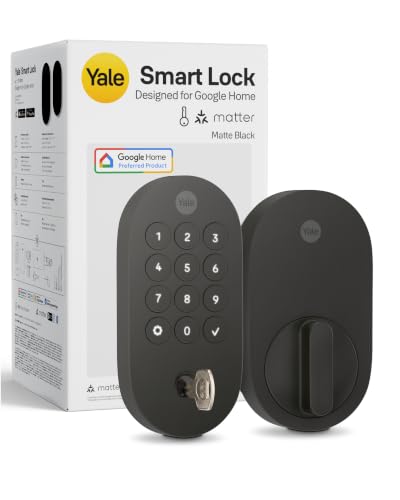
Yale Smart Deadbolt with Matter
Best for: Google Home users wanting Matter connectivity
- Smart Home Compatibility
- Google Assistant, Matter
- Unlock Methods
- Keypad, phone, voice, backup key
- Wireless Connectivity
- Matter over Thread
- Installation Type
- Deadbolt
- Security Certification
- BHMA Grade 2
- Color
- Matte Black
This Yale deadbolt integrates with Google Home and supports Matter over Thread for reliable mesh connectivity. It offers keyless entry via keypad, phone, voice commands, or a backup key. The unit carries BHMA Grade 2 certification and operates in temperatures from -22 to 140°F. Weighing 3 pounds, it fits standard door preparations. You get remote control through the Yale Access or Google Home apps when using a Matter hub.
- Matter over Thread connectivity for mesh network efficiency
- BHMA Grade 2 security certification
- Multiple unlock methods including keypad, phone, voice, and key
- Operates in extreme temperatures from -22 to 140°F
- Heavier build at 3 pounds compared to lighter smart locks
- Requires a Matter hub for full remote access capabilities
- Limited to Grade 2 security rating rather than Grade 1
- You want a lock that works with Google Assistant and Matter devices
- You need a keyless entry system with backup physical key access
- You prefer a deadbolt with established security certification
- You require Grade 1 commercial-grade security ratings
- You want a lock that works without an additional hub for remote features
- You need a lighter or more compact deadbolt design
Verdict: Yale Smart Lock Deadbolt with Google Matter provides solid Grade 2 security with Matter over Thread connectivity for Google Home users. It suits homeowners who value multiple entry methods and reliable mesh network performance over ultra-lightweight designs.

eufy Security Familock Traditional Smart Lock
Best for: long battery life and app control
- Smart Home Compatibility
- Amazon Alexa, Google Assistant, Apple HomeKit, Matter
- Unlock Methods
- Fingerprint, app
- Wireless Connectivity
- Built-in Wi-Fi, Matter
- Application
- Front Door
- Color
- Black
- Lock Type
- Deadbolt
The eufy Familock E32 is a black deadbolt that uses fingerprint and app access via built-in Wi-Fi. It supports Google Home, Apple Home, and Alexa. The unit runs on eight AA batteries for up to eight months. Its self-learning AI improves fingerprint recognition over time. This lock suits you if you want keyless entry with strong smart home integration and long battery life.
- Built-in Wi-Fi requires no bridge
- Supports Google Home and Apple Home
- Self-learning AI for fingerprint accuracy
- Up to 8-month battery life
- Requires 8 AA batteries
- Only supports fingerprint and app unlock
- You want keyless entry via fingerprint
- You use Google Home or Apple Home
- You prefer long battery life
- You need a keypad for codes
- You require physical key backup
- You need a different color
Verdict: The eufy Familock E32 Fingerprint Lock fits you if you value long battery life and seamless Google Home integration. It is a solid choice for users who prefer fingerprint access over keypad codes.

Lockly Visage Zeno Smart Lock
Best for: hands-free entry and smart home control
- Smart Home Compatibility
- Amazon Alexa, Google Assistant, Apple HomeKit
- Unlock Methods
- Face, fingerprint, keypad, app, key
- Wireless Connectivity
- Built-in Wi-Fi
- Installation Type
- Deadbolt
- Application
- Front Door
- Entry Method
- Keypad, Fingerprint, Apple Home Key, Facial Recognition
The Lockly Visage Zeno combines facial recognition with fingerprint scanning for keyless entry. It features built-in Wi-Fi and supports Google Assistant, Alexa, and Apple Home Key. The lock stores up to 99 fingerprints and uses dual infrared sensors for accuracy. It includes two 10,000mAh batteries for long life. This deadbolt fits standard doors and installs in 15 minutes. It suits users who want advanced biometric access without a bridge.
- Facial recognition with dual infrared sensors
- Built-in Wi-Fi connectivity
- Supports Google Assistant and Apple Home Key
- Stores up to 99 fingerprints
- Two 10,000mAh rechargeable batteries
- Larger physical dimensions compared to compact locks
- Requires power for facial recognition sensors
- You want hands-free entry via face scanning
- You use Google Assistant or Apple Home
- You prefer built-in Wi-Fi over a hub
- You need a lock smaller than 8 inches wide
- You only use Bluetooth without Wi-Fi
- You prefer traditional key-only entry
Verdict: Lockly Visage Zeno Smart Lock offers advanced biometric access and smart home integration for users valuing convenience. It fits well in homes where facial recognition and app control are priorities.

Level Lock Pro Smart Deadbolt
Best for: hidden design and Thread connectivity
- Smart Home Compatibility
- Amazon Alexa, Google Assistant, Apple HomeKit, Matter
- Unlock Methods
- Apple Home Key, NFC fob, touch, key
- Wireless Connectivity
- Matter over Thread, Bluetooth
- Installation Type
- Deadbolt
- Security Certification
- BHMA AAA, ANSI Grade 1/A
- Color
- Matte Black
The Level Lock Pro hides inside your door, measuring 2.75 by 4.5 inches. It uses Matter over Thread and Bluetooth for local control. The lock carries BHMA AAA and ANSI Grade 1/A security certifications. You can unlock it with Apple Home Key, NFC fobs, or a physical key. It works with Google Home, Apple Home, and Alexa via a Matter hub. This compact design suits users who want a clean look without bulky hardware.
- BHMA AAA and ANSI Grade 1/A security certification
- Matter over Thread and Bluetooth connectivity
- Apple Home Key and NFC fob unlock methods
- Integrated door status detection sensors
- Requires a separate Matter-compatible hub or Level Connect Wi-Fi Bridge for remote access
- Level Keypad is sold separately for traditional code entry
- Apple Home Key support limits primary smartphone compatibility to Apple devices
- You want a smart lock that remains invisible inside the door frame
- You use a Matter hub and Thread border router for home automation
- You prefer Apple Home Key or NFC fobs for entry
- You need a built-in Wi-Fi connection for remote access without extra hardware
- You require a traditional numeric keypad included in the box
- You rely primarily on Android phones without NFC key support
Verdict: Level Lock Pro Matte Black fits users who prioritize a hidden design and Thread-based Matter compatibility. It offers strong security ratings and flexible entry options for Apple-centric households.

LINGDU T225 Matte Black WiFi Lock
Best for: Users needing voice control and hub-free Wi-Fi
- Smart Home Compatibility
- Amazon Alexa, Google Assistant
- Unlock Methods
- Fingerprint, passcode, app, fob, key
- Installation Type
- Handle set
- Security Certification
- ANSI Grade 3
- User Code Capacity
- Up to 50 passcodes
- Wireless Connectivity
- Wi-Fi
The LINGDU T225 is a matte black smart lock with a built-in handle. It supports Google Assistant and Alexa for voice control. You can unlock it via fingerprint, passcode, app, FOB card, or mechanical key. It holds 50 fingerprints and 50 passcodes. The unit is ANSI Grade 3 certified and weighs 3.79 pounds. It connects via Wi-Fi without a hub.
- Supports Google Assistant and Alexa voice commands
- Six unlocking methods including fingerprint and FOB card
- Built-in Wi-Fi requires no extra gateway
- Stores up to 50 fingerprints and 50 passcodes
- ANSI Grade 3 mechanical reliability rating
- ANSI Grade 3 rating is lower than higher-grade competitors
- Weighs 3.79 pounds, which is heavier than slim models
- Max capacity of 50 passcodes is modest for large households
- You want direct Wi-Fi connectivity without a hub
- You need voice control with Google Assistant
- You prefer a single handle set installation
- You require a higher security grade than ANSI 3
- You need a lock under 3 pounds
- You want more than 50 unique user codes
Verdict: The LINGDU T225 Matte Black Smart Lock offers versatile entry options and voice control for users who value convenience over maximum security ratings. It suits renters or homeowners who want a straightforward, hub-free installation with solid basic specs.
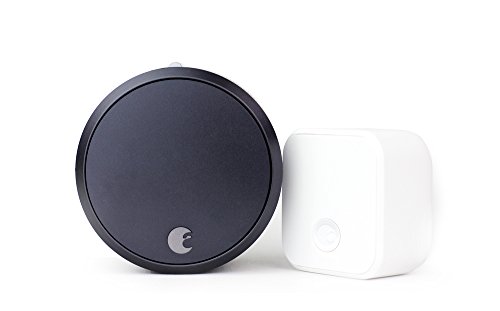
August Smart Lock Pro + Connect Hub
Best for: retrofitting existing deadbolts with smart features
- Smart Home Compatibility
- Amazon Alexa, Google Assistant
- Unlock Methods
- Auto-Unlock
- Auto-Lock Function
- Auto-Lock
- Wireless Connectivity
- Wi-Fi
- Dimensions
- 3.4 × 2.22 × 3.4 inches
- Weight
- 13.9 ounces
This August Home smart lock adds Wi-Fi connectivity to your existing deadbolt, allowing you to control and monitor your door from anywhere. It features Auto-Lock and Auto-Unlock capabilities for hands-free entry. The device is compatible with both Google Assistant and Amazon Alexa. With a compact build measuring 2.22 inches in width and weighing 13.9 ounces, it integrates seamlessly into homes that already use a physical key.
- Wi-Fi connectivity for remote control
- Auto-Lock and Auto-Unlock functions
- Compatible with Google Assistant and Alexa
- Retains existing keys and lock
- Requires a separate Connect Hub for full functionality
- Heavier at 13.9 ounces compared to some competitors
- Limited to standard deadbolt installation without handle integration
- You want to keep your existing keys and deadbolt
- You need remote access via Wi-Fi without a gateway
- You use Google Assistant or Alexa for home control
- You prefer a lock with a built-in keypad
- You want a single unit without additional hubs
- You need a handle-integrated smart lock
Verdict: August Home Smart Lock Pro + Connect Hub is a solid choice for users who want to retrofit their current deadbolt with smart features. It fits best for those who value remote access and voice control without replacing their existing hardware.

August Smart Lock Pro with Connect Hub
Best for: retrofitting existing deadbolts with smart features
- Smart Home Compatibility
- Amazon Alexa, Google Assistant
- Unlock Methods
- Auto-Unlock
- Auto-Lock Function
- Auto-Lock
- Wireless Connectivity
- Wi-Fi
- Color
- Silver
- Dimensions
- 3.4 × 2.22 × 3.4 inches
The August Home Smart Lock Pro is a Wi-Fi enabled device compatible with Google Assistant and Alexa. It measures 2.22 by 3.4 inches and weighs 13.9 ounces. This lock supports Auto-Lock and Auto-Unlock functions. It allows you to keep your existing keys and lock hardware. It suits users who want remote monitoring and voice control without replacing their current door hardware.
- Wi-Fi connectivity for remote access
- Compatible with Google Assistant and Alexa
- Features Auto-Lock and Auto-Unlock
- Allows use of existing keys and lock
- Heavier build at 13.9 ounces
- Larger dimensions of 2.22 by 3.4 inches
- Requires a separate Connect Hub for full functionality
- You want to keep your existing deadbolt hardware
- You need remote monitoring via Wi-Fi
- You use Google Assistant or Alexa for voice control
- You prefer a compact lock under 10 ounces
- You want a single unit without extra hubs
- You need fingerprint or facial recognition entry
Verdict: August Smart Lock Pro Silver is a practical choice for renters or homeowners who want to retrofit their current deadbolts with smart features. It fits buyers who prioritize remote access and voice control over a sleek, integrated design.
Specifications side by side
| Spec | Schlage Encode Smart WiFi Deadbolt | Schlage Arrive Wi-Fi Smart Deadbolt | Yale Smart Deadbolt with Matter | eufy Security Familock Traditional Smart Lock | Lockly Visage Zeno Smart Lock | Level Lock Pro Smart Deadbolt | LINGDU T225 Matte Black WiFi Lock | August Smart Lock Pro + Connect Hub | August Smart Lock Pro with Connect Hub |
|---|---|---|---|---|---|---|---|---|---|
| Unlock Methods | Touchscreen keypad, app, physical key | Keypad, app, voice | Keypad, phone, voice, backup key | Fingerprint, app | Face, fingerprint, keypad, app, key | Apple Home Key, NFC fob, touch, key | Fingerprint, passcode, app, fob, key | Auto-Unlock | Auto-Unlock |
| Wireless Connectivity | – | Built-in Wi-Fi | Matter over Thread | Built-in Wi-Fi, Matter | Built-in Wi-Fi | Matter over Thread, Bluetooth | – | – | – |
| Smart Home Compatibility | Alexa, Google Home, Ring, Airbnb | Alexa, Google Home, Ring | Google Home, Google Assistant, Matter | Apple Home, Google Home, Alexa | Apple Home Key, Alexa, Google Home | Apple Home, Alexa, Google, SmartThings | Amazon Alexa, Google Assistant | Alexa, Google Assistant | Alexa, Google Assistant |
| Installation Type | – | Deadbolt | Deadbolt | – | Deadbolt | Deadbolt | Handle set | – | – |
| Security Certification | BHMA highest residential rating | BHMA certified | BHMA Grade 2 | – | – | BHMA AAA, ANSI Grade 1/A | ANSI Grade 3 | – | – |
| User Code Capacity | Up to 100 codes | Up to 250 access codes | – | – | – | – | Up to 50 passcodes | – | – |
| Auto-Lock Function | Adjustable time delay | – | – | – | – | – | – | Auto-Lock | Auto-Lock |
| Application | Airbnb | – | – | Front Door | Front Door | – | – | – | – |
| Entry Method | Keypad | Keypad | – | Fingerprint | Keypad, Fingerprint, Apple Home Key, Facial Recognition | Apple Home Key | Keypad, Fingerprint, Backup Key | – | – |
| Color | Satin Nickel | Satin Nickel | Matte Black | Black | Satin Nickle | Matte Black | Matte Black | Dark Gray | Silver |
| Connectivity | – | – | – | – | – | Thread | – | – | – |
| Lock Type | Deadbolt | Deadbolt | Deadbolt | Deadbolt | Deadbolt | – | – | – | – |
| Keypad Type | Touchscreen | – | – | – | – | – | – | – | – |
| Compatible Platform | – | – | – | – | – | SmartThings | – | – | – |
| Control Method | App Control, Alexa | App Control, Alexa | Voice Control | Alexa | App Control, Alexa | Remote Control, Alexa | App Control, Remote Control, Voice Control, Alexa | Alexa | Alexa |
| Compatibility | Google Home | Google Home | Google Home | Google Home, Apple Home | Google Home, Apple Home | Google Home, Apple Home | Google Home | Google Home | Google Home |
| Dimensions | 0.9 × 3 × 5 inches | 0.83 × 2.5 × 4.49 inches | 0.88 × 2.56 × 5.38 inches | 8.07 × 7.64 × 4.41 inches | 8 × 8.8 × 5.3 inches | 4.5 × 2.75 × 2.75 inches | 6 × 3 × 1 inches | 3.4 × 2.22 × 3.4 inches | 3.4 × 2.22 × 3.4 inches |
| Weight | 3.31 pounds | 2.4 pounds | 3 pounds | – | – | 3.17 pounds | 3.79 pounds | 13.9 ounces | 13.9 ounces |
| Size | Encode | 3 x 5.55 x 2.3 inch | 5.38 x 2.56 inch (Pack of 1) | – | – | – | – | – | 100 |
| Model | BE489WBCAM619 | BE459WBCAM619 | YRD510-MT1-BLK | T85F2 | PGK728WRHK | D4 | T225 | AUG-SL03-C02-G03 | ASL-03, AC-R1 |
If you want another brand, compare yale smart lock deadbolt google alternatives that share similar integration specs.
How to choose the right one
Check wireless connectivity
You should verify if the lock connects directly to your router or requires a separate hub. Direct Wi-Fi models like the Schlage Encode and Schlage Arrive allow you to control the lock without extra hardware. This setup simplifies installation and reduces potential points of failure. If you prefer a mesh network for better reliability, consider the Yale Smart Deadbolt with Matter, which uses Thread connectivity. Thread often provides more stable communication within a smart home ecosystem than standard Wi-Fi alone. Choose based on your existing network infrastructure and preference for hub-free operation.
Select entry method
Your daily habits should dictate the primary way you unlock the door. If you prefer typing codes, the Schlage Encode features a touchscreen keypad. For hands-free convenience, the eufy Familock uses fingerprint scanning, which is faster if you have clean, dry fingers. The Lockly Visage Zeno offers facial recognition, allowing you to enter without touching anything. Some models, like the LINGDU T225, combine keypad, fingerprint, and backup key options. Match the entry method to your comfort level with technology and physical interaction at the door.
Verify smart home compatibility
Ensure the lock explicitly lists Google Assistant or Google Home in its compatibility specs. All models in this guide support Google Assistant for voice control. However, you should also check if it supports Matter for future-proofing. The Yale Smart Deadbolt and eufy Familock include Matter support, which can simplify integration with other devices. If you use Apple Home, the eufy and Level Lock Pro also support that platform. Confirming dual compatibility ensures you can control the lock via voice commands from any compatible assistant in your home.
Consider retrofitting needs
If you want to keep your existing deadbolt, look for retrofit options. The August Smart Lock Pro is designed to attach to the inside of your current lock. It does not replace the exterior hardware, which preserves your home’s aesthetic. This approach is ideal for renters or those who like their current keyway. Note that retrofit locks often require a separate connect hub for Wi-Fi features. Compare the dimensions of the retrofit module against your existing interior deadbolt to ensure a proper fit before purchasing.
Review physical dimensions
Check the width, height, and length of the lock to ensure it fits your door. The Schlage Encode is 3 inches wide and 5 inches tall. The Level Lock Pro is more compact at 2.75 inches square. Larger models like the Lockly Visage Zeno measure 8.8 inches wide. Measure your door’s backset and edge bore to verify compatibility. Incorrect dimensions can lead to installation failures or exposed hardware. Always compare the product specs against your door’s physical specifications to guarantee a secure and flush fit.
Frequently asked questions
Which smart lock works best with Google Assistant?
The Schlage Encode Smart WiFi Deadbolt is the top choice. It offers direct Wi-Fi connectivity for seamless Google Home control. You get a touchscreen keypad for entry. The lock holds the highest BHMA security rating. It is ideal for users who want a secure, WiFi-enabled deadbolt with reliable voice integration.
Can I use Google Assistant to unlock my door?
Yes, most locks on this list support Google Assistant. The Schlage Arrive Wi-Fi Smart Deadbolt allows direct Wi-Fi managed code entry with voice control. The Yale Smart Deadbolt with Matter also provides Google Home compatibility. You can use voice commands to lock or check the status of your door through your Google Home device.
Do I need a hub for these smart locks?
No, several models connect directly to your Wi-Fi router. The Schlage Encode and Schlage Arrive both feature built-in Wi-Fi. This means you can control them via the app or Google Assistant without extra hardware. The eufy Familock also integrates directly with Google Home for straightforward setup and management.
Which lock supports Matter and Thread?
The Level Lock Pro Smart Deadbolt uses Thread connectivity for Matter compatibility. It features a hidden design and works with Google Home. The Yale Smart Deadbolt with Matter also supports this standard. These protocols ensure faster response times and more reliable connections when you control your lock through Google Assistant or other smart home platforms.
Are there fingerprint or facial recognition options?
Yes, several models offer advanced biometric entry methods. The eufy Familock Traditional Smart Lock uses fingerprint scanning for quick access. The Lockly Visage Zeno Smart Lock adds facial recognition to its keypad and fingerprint options. These features provide hands-free convenience and are fully compatible with Google Assistant for voice-controlled management.
Can I retrofit my existing deadbolt?
Yes, the August Smart Lock Pro series is designed for retrofitting. Both the Dark Gray and Silver models attach to your current deadbolt. They include a Connect Hub for Wi-Fi and Google Assistant support. This option is ideal if you want to add smart features without replacing your existing hardware or changing the lock's exterior appearance.
What is the best budget smart lock with Google Assistant?
The eufy Security Familock Traditional Smart Lock is the best budget option. It offers long battery life and seamless Google Home integration. You get fingerprint entry instead of a keypad. This model provides solid security and convenience at a lower price point, making it suitable for users who prefer biometric access over traditional codes.
Which lock includes a backup key entry?
The LINGDU T225 Matte Black WiFi Lock includes a backup key option. It also features keypad and fingerprint entry methods. You get hub-free Wi-Fi connectivity for direct Google Assistant control. This model suits users who want versatile entry options and voice control without relying solely on digital credentials for access.


