Best Smart Locks with Remote Control: 15 Spec-Based Picks
Compare 15 smart locks with remote control. We analyze published specs like connectivity and power to help you choose the right hardware for your home.
As Amazon Associates, we earn from qualifying purchases. This means we may receive a small commission at no extra cost to you if you click through and make a purchase.
As an Amazon Associate we earn from qualifying purchases. Links on this page are affiliate links.
Finding the best smart locks with remote control requires comparing technical specifications rather than marketing claims. We analyzed 15 options to help you decide which hardware fits your door. The Philips 4200 Series Wi-Fi Deadbolt with Handle leads because it includes direct Wi-Fi connectivity and app control in a single package. This guide compares entry methods, wireless standards, and physical dimensions. You will use these spec-based picks to choose a lock that matches your security needs and installation requirements.
Check Wi-Fi and Hub Requirements
Most locks use built-in Wi-Fi for direct remote control. This avoids extra hubs. The Level Lock Pro uses Thread instead. You will need a Matter hub for that model. Check your smart home setup first. This ensures your remote app works without compatibility issues. Direct Wi-Fi is simpler for most doors.
| # | Product | Best for | Price |
|---|---|---|---|
| 1 | Philips 4200 Series Wi-Fi Deadbolt with Handle Best overall | complete front door hardware upgrades with app control | |
| 2 | Yale Wi-Fi Smart Deadbolt with Keypad Best backup key | Users needing durable, code-managed entry | |
| 3 | Veise Smart Deadbolt Handle Set Best budget | remote access management | |
| 4 | Philips Wi-Fi Smart Deadbolt Set with Handles Also great | complete handle sets with remote app control | |
| 5 | Philips DDL242X-15HW Wi-Fi Smart Lock Also great | Users needing remote app control and 100 codes | |
| 6 | Veise Wi-Fi Smart Deadbolt with Handle Set Also great | Remote app control and fast fingerprint entry | |
| 7 | Philips Wi-Fi Smart Deadbolt with Lever Handles Also great | Complete handle set with built-in Wi-Fi | |
| 8 | Yale Wi-Fi Touchscreen Deadbolt Best premium | Direct Wi-Fi deadbolts with unlimited codes | |
| 9 | Yale WiFi Smart Lock Deadbolt Also great | Users needing fingerprint entry and unlimited codes | |
| 10 | ARPHA D289W WiFi Video Lock Also great | renters needing video monitoring and remote access | |
| 11 | ULTRALOQ U-Bolt Pro WiFi Deadbolt Also great | High-security exterior doors with remote access needs | |
| 12 | ULTRALOQ Latch 5 Touchscreen Smart Lever Lock Best home office | home offices needing remote app control | |
| 13 | ARPHA WiFi Video Smart Lock, Black Also great | remote video monitoring and keyless entry | |
| 14 | Yale Wi-Fi Smart Deadbolt with Keypad Also great | rental properties needing unlimited code management | |
| 15 | Level Lock Pro Smart Deadbolt Best google assistant | invisible design and high security |
The best fit for you
- You want the most complete front door hardware upgrade – Philips 4200 Series Wi-Fi Deadbolt with Handle – It combines a deadbolt and lever handle with direct Wi-Fi app control for a single installation.
- You need durable entry for rental properties like Airbnb – Yale Wi-Fi Smart Deadbolt with Keypad – This hub-free deadbolt offers remote access and durable code management without extra hardware requirements.
- You require a budget-friendly option with remote access – Veise Smart Deadbolt Handle Set – The Veise handle set provides remote app control and extensive user code capacity at a lower cost.
- You prioritize high security with unlimited access codes – Yale Wi-Fi Touchscreen Deadbolt – The Yale touchscreen deadbolt provides BHMA Grade 2 durability and unlimited code management for frequent guests.
- You need video monitoring with remote keyless entry – ARPHA D289W WiFi Video Lock – The ARPHA lock includes a built-in camera and two-way audio for visual verification and remote control.

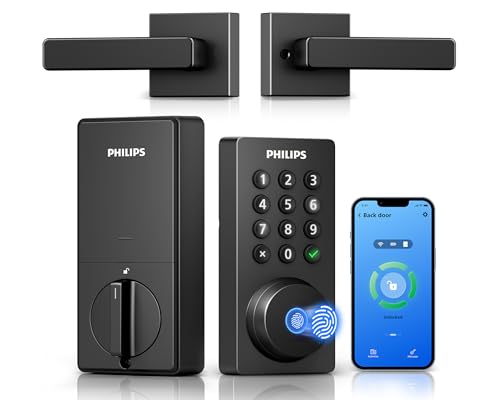
Philips 4200 Series Wi-Fi Deadbolt with Handle
Best for: complete front door hardware upgrades with app control
- Control Method
- App Control, Remote Control, Voice Control
- Unlock Methods
- Fingerprint, app, voice, passcode
- Wireless Connectivity
- 2.4GHz Wi-Fi
- Smart Home Compatibility
- Alexa, Google Assistant
- Installation Type
- Deadbolt with handle set
- Auto-Lock Function
- Timer delay (0-180 seconds)
This Philips smart lock connects directly to 2.4GHz Wi-Fi without a hub. You control it via the app, voice commands, a keypad, or a fingerprint scanner. The unit includes a matching handle set for a complete front door upgrade. It features a 0.3-second unlock speed and an auto-lock timer adjustable from 0 to 180 seconds. The battery lasts up to 6 months with standard alkaline cells. It suits users who want a full hardware set with remote access.
- Direct 2.4GHz Wi-Fi connection without a hub
- Includes matching handle set for complete installation
- 0.3-second fingerprint unlock speed
- Auto-lock timer adjustable from 0 to 180 seconds
- Compatible with Alexa and Google Assistant
- Requires standard 1.5V alkaline batteries, excluding rechargeable options
- Wi-Fi range limited to 33 feet from the router
- Auto-lock feature is off by default and must be enabled manually
- You want a complete lock and handle set included in the box
- You need direct Wi-Fi connectivity without buying extra hardware
- You prefer fingerprint access for quick entry
- You require 5GHz Wi-Fi support for your network
- You want rechargeable battery options for lower long-term maintenance
- You need a lock that auto-locks immediately upon closing
Verdict: Philips WiFi Deadbolt with Handle offers a complete installation package with direct Wi-Fi control. It fits homeowners who want a single purchase for both the lock and handle, paired with reliable app management.

Yale Wi-Fi Smart Deadbolt with Keypad
Best for: Users needing durable, code-managed entry
- Control Method
- App Control, Remote Control
- Unlock Methods
- Auto-unlock, keypad, app, watch, key
- Wireless Connectivity
- 2.4 or 5 GHz Wi-Fi
- Security Certification
- BHMA Grade 2
- User Code Capacity
- Unlimited
- Auto-Lock Function
- DoorSense auto-lock
The Yale Assure Lock 2 is a Wi-Fi deadbolt that connects directly to 2.4 or 5 GHz networks without a hub. It features BHMA Grade 2 certification for durability and supports unlimited user codes. The lock includes DoorSense for auto-locking and offers remote control via the Yale Access app. It provides a reliable backup key option alongside digital access methods. This model suits users seeking a certified, hub-free entry solution with broad code management.
- BHMA Grade 2 security certification
- Direct 2.4 and 5 GHz Wi-Fi connectivity
- Unlimited user code capacity
- DoorSense auto-lock functionality
- Heavier build at 4.5 pounds
- Limited to 2.4 or 5 GHz Wi-Fi bands
- App control restricted to US and Canada
- You want a BHMA Grade 2 certified lock
- You need unlimited access codes for guests
- You prefer direct Wi-Fi without a hub
- You live outside the US or Canada
- You require a fingerprint sensor
- You need a lever handle design
Verdict: Yale Assure Lock 2 Wi-Fi is a robust, hub-free deadbolt ideal for renters or homeowners needing durable, code-managed entry. It fits those who value certified security and remote access without extra hardware.

Veise Smart Deadbolt Handle Set
Best for: remote access management
- Control Method
- App Control, Remote Control
- Unlock Methods
- App, code, fob, mechanical key
- Smart Home Compatibility
- Alexa, Google Home (with gateway)
- Installation Type
- Handle set
- User Code Capacity
- 250+ user codes
- Application
- Front Door
The Veise VE06-H is a matte black handle set deadbolt designed for front doors. It supports app control and remote access sharing. You get 250+ user codes for managing guests. The unit weighs 5.06 pounds and measures 18 inches long. It fits standard US doors between 1-3/8 and 2 inches thick. This lock suits those who want a complete handle set with remote management capabilities.
- Supports 250+ user codes
- Includes mechanical key backup
- Fits standard US door thicknesses
- Remote app control and eKeys
- Heavier at 5.06 pounds
- Requires separate gateway for smart home integration
- Limited to 2 color options
- You need a handle set with remote access
- You want to manage many user codes
- You prefer a matte black finish
- You want built-in smart home compatibility
- You need a lever-style lock
- You prefer a lighter weight lock
Verdict: Veise VE06-H Smart Handle Set offers robust code management for users who prioritize remote access and standard hardware installation. It is a solid option for homeowners needing a complete handle set with extensive user code capacity.

Philips Wi-Fi Smart Deadbolt Set with Handles
Best for: complete handle sets with remote app control
- Control Method
- App Control, Remote Control, Voice Control, Alexa
- Unlock Methods
- App, fingerprint, PIN, key, voice
- Smart Home Compatibility
- Amazon Alexa, Google Assistant
- Installation Type
- Handle set
- User Code Capacity
- Up to 100 user codes
- Auto-Lock Function
- 30 to 180 seconds
This Philips deadbolt set includes matching interior and exterior handles for a coordinated look. It connects via built-in Wi-Fi for app remote control without a hub. You can unlock the door using fingerprints, PIN codes, physical keys, or voice commands through Alexa and Google Assistant. The lock supports up to 100 user codes and features an auto-lock timer. It fits standard doors between 35 and 50 mm thick.
- Built-in Wi-Fi for direct app remote control
- Five unlock methods including fingerprint and voice
- Supports up to 100 unique user codes
- Includes matching interior and exterior handles
- Adjustable auto-lock timer from 30 to 180 seconds
- Limited to two smart home ecosystems
- Maximum door thickness is 50 mm
- You want a complete handle set with the lock
- You need remote access via Wi-Fi without a hub
- You require fingerprint entry alongside traditional keys
- You need compatibility with Apple HomeKit
- Your door is thicker than 50 mm
- You prefer a standard deadbolt without handles
Verdict: Philips Wi-Fi Smart Lock with Handles offers a complete entry solution with five unlock methods and built-in Wi-Fi. It suits homeowners who want a coordinated look and remote app control for their front door.

Philips DDL242X-15HW Wi-Fi Smart Lock
Best for: Users needing remote app control and 100 codes
- Control Method
- App Control, Remote Control, Alexa
- Unlock Methods
- Voice commands, password, key, app
- Wireless Connectivity
- 2.4GHz Wi-Fi
- Smart Home Compatibility
- Alexa, Google Assistant
- Installation Type
- Handle set
- User Code Capacity
- Up to 100 passwords
This Philips deadbolt set includes a matching handle for a complete front door upgrade. It connects via 2.4GHz Wi-Fi for app remote control without a hub. You can unlock it using a physical key, password, voice commands, or the app. The system supports up to 100 custom passwords and offers auto-lock settings from 10 to 180 seconds. It works with Alexa and Google Assistant.
- Built-in 2.4GHz Wi-Fi for remote app control
- Supports up to 100 custom user passwords
- Includes complete handle set and deadbolt
- Auto-lock timing adjustable from 10 to 180 seconds
- Compatible with Alexa and Google Assistant
- 2.4GHz Wi-Fi only, limiting range compared to dual-band options
- No fingerprint sensor for biometric entry
- Requires 8 AA batteries for power
- You want a complete handle set included with the lock
- You need to manage up to 100 different access codes
- You prefer remote control via a smartphone app
- You require fingerprint scanning for quick entry
- You only have 5GHz Wi-Fi networks available
- You prefer a standard deadbolt without a matching handle
Verdict: Philips Wi-Fi Smart Lock with Handle offers a complete entry solution with extensive code management. It fits users who value remote app control and a modern aesthetic over biometric speed.

Veise Wi-Fi Smart Deadbolt with Handle Set
Best for: Remote app control and fast fingerprint entry
- Control Method
- App Control, Remote Control, Voice Control
- Unlock Methods
- Voice, fingerprint, app, code, card, key
- Smart Home Compatibility
- Amazon Alexa, Google
- Installation Type
- Deadbolt with handle set
- Security Certification
- ANSI Grade 3, BHMA
- User Code Capacity
- 100+ codes
The Veise VE017G-H is a Wi-Fi deadbolt with handle set designed for remote control via the KK Home App. It features 0.2-second fingerprint recognition and supports 100+ user codes. The unit includes voice compatibility with Amazon Alexa and Google. It carries ANSI Grade 3 and BHMA security certifications. This lock suits users who want app-based management and fast biometric access for their front door.
- 0.2-second fingerprint recognition speed
- Supports 100+ customizable user codes
- ANSI Grade 3 and BHMA certified
- Compatible with Amazon Alexa and Google
- Heavier at 5.29 pounds compared to many competitors
- Lower ANSI Grade 3 rating versus Grade 1 options
- Larger footprint at 12.8 inches in length
- You need reliable remote app control
- You want fast fingerprint entry
- You prefer a deadbolt with handle set
- You require Grade 1 security
- You want a lighter lock
- You need a lever handle style
Verdict: Veise VE017G-H Matte Black Deadbolt offers solid remote control and fast fingerprint access for households needing app management. It fits users who prioritize security certifications and voice integration over lightweight design.

Philips Wi-Fi Smart Deadbolt with Lever Handles
Best for: Complete handle set with built-in Wi-Fi
- Control Method
- App Control, Remote Control, Voice Control, Alexa
- Unlock Methods
- Fingerprint, PIN, key, app, voice
- Wireless Connectivity
- 2.4 GHz Wi-Fi
- Smart Home Compatibility
- Amazon Alexa, Google Assistant
- Installation Type
- Deadbolt handle set
- User Code Capacity
- 100 user PIN codes
This Philips deadbolt set includes two lever handles and built-in 2.4 GHz Wi-Fi, so you control it remotely via the app without a hub. You unlock it with fingerprints, PIN codes, keys, or voice commands through Alexa and Google Assistant. The touchscreen keypad stores 100 user PINs and supports up to 50 fingerprints. It auto-locks when the door closes, though it lacks a door sensor to confirm the latch position.
- Built-in 2.4 GHz Wi-Fi for direct app control
- Includes two lever handles for a complete upgrade
- Supports 50 fingerprints and 100 user PIN codes
- Compatible with Amazon Alexa and Google Assistant
- Auto-lock function relies on door closure rather than a sensor
- One-time PINs require a separate Philips WiFi Gateway for sharing
- You want a complete handle set with a smart lock included
- You need remote access via Wi-Fi without buying a separate hub
- You prefer unlocking with fingerprints or voice commands
- You require a dedicated door sensor for automatic locking confirmation
- You need to share recurring or timed PINs without extra hardware
- You only have 5 GHz Wi-Fi and cannot use 2.4 GHz
Verdict: Philips Wi-Fi Smart Deadbolt with Handles offers a complete entry solution with built-in Wi-Fi and multi-method access. It fits households that want remote control and voice integration without extra hubs.

Yale Wi-Fi Touchscreen Deadbolt
Best for: Direct Wi-Fi deadbolts with unlimited codes
- Control Method
- App Control, Remote Control
- Unlock Methods
- Auto-unlock, keypad, app, watch
- Wireless Connectivity
- 2.4 or 5 GHz Wi-Fi
- Security Certification
- BHMA Grade 2
- User Code Capacity
- Unlimited
- Auto-Lock Function
- DoorSense auto-lock
The Yale Assure Lock 2 is a Wi-Fi deadbolt with a touchscreen keypad. It connects directly to 2.4 or 5 GHz networks without a hub. You get real-time alerts and remote control via the Yale Access app. It supports unlimited user codes and offers Apple Watch access. The BHMA Grade 2 certification ensures commercial-grade durability. DoorSense detects if the door is closed for auto-locking.
- Direct 2.4 and 5 GHz Wi-Fi connectivity
- BHMA Grade 2 security certification
- Unlimited user code capacity
- DoorSense auto-lock functionality
- Apple Watch control support
- Heavier at 1 pound compared to lighter lever locks
- Limited to touchscreen keypad entry only
- No fingerprint sensor included in this model
- You need a commercial-grade deadbolt with Wi-Fi
- You want to manage unlimited guest codes
- You prefer touchscreen keypad entry over fingerprint scanning
- You require a lever handle design
- You want built-in fingerprint recognition
- You need a 24/7 live video feed
Verdict: Yale Assure Lock 2 Wi-Fi suits users who prioritize BHMA Grade 2 durability and unlimited code management. It is ideal for those who want direct Wi-Fi access without a hub and prefer a traditional deadbolt over a lever lock.

Yale WiFi Smart Lock Deadbolt
Best for: Users needing fingerprint entry and unlimited codes
- Control Method
- App Control, Remote Control
- Unlock Methods
- Fingerprint, keypad, app, key
- Wireless Connectivity
- 2.4 GHz or 5 GHz Wi-Fi
- Installation Type
- Deadbolt
- Security Certification
- BHMA Grade 2
- User Code Capacity
- Unlimited
This Yale deadbolt offers direct Wi-Fi connectivity on 2.4 or 5 GHz bands, removing the need for a separate hub. You unlock the door using a fingerprint, keypad, app, or backup key. The system supports unlimited user codes and includes DoorSense to detect if the door is closed. It holds BHMA Grade 2 certification for durability and operates in extreme temperatures.
- Direct 2.4 or 5 GHz Wi-Fi connection without a hub
- Fingerprint, keypad, app, and key unlock methods
- Unlimited user code capacity for shared access
- BHMA Grade 2 security certification
- DoorSense technology for automatic locking
- Limited to 2.4 GHz or 5 GHz Wi-Fi bands only
- Physical dimensions are 2.6 inches wide by 5.1 inches tall
- App control restricted to US and Canada regions
- You want direct Wi-Fi control without extra hardware
- You need to manage unlimited access codes for guests
- You require a fingerprint entry method for quick access
- You live outside the US or Canada
- You need a Bluetooth-only lock for low power usage
- You prefer a lever handle design over a deadbolt
Verdict: Yale Assure Lock 2 Touch Fingerprint provides reliable Grade 2 security with direct Wi-Fi access. It suits users who need fingerprint entry and unlimited codes for frequent guest management.

ARPHA D289W WiFi Video Lock
Best for: renters needing video monitoring and remote access
- Control Method
- App Control, Remote Control, Alexa
- Unlock Methods
- Fingerprint, app, keypad, key, voice
- Wireless Connectivity
- 2.4GHz WiFi
- Smart Home Compatibility
- Alexa, Google Assistant
- Installation Type
- Deadbolt
- Auto-Lock Function
- Timer delay (10-99 seconds)
This ARPHA lock combines a deadbolt with a 150-degree camera and two-way audio. You get app remote unlock, fingerprint access, and keypad entry. The 7800mAh rechargeable battery lasts for months. It supports Alexa and Google Assistant. The 2.4GHz WiFi connection enables live video viewing. This 3-pound unit fits standard doors. It suits renters who want video monitoring and remote control without monthly fees.
- Built-in 150-degree wide-angle camera for 24/7 live viewing
- 7800mAh rechargeable lithium battery eliminates AA replacements
- Auto-lock timer adjustable from 10 to 99 seconds
- IP54 waterproof rating withstands rain and snow
- Two-way audio allows communication with visitors via app
- Heavier 3-pound build compared to standard deadbolts
- Limited to 2.4GHz WiFi, excluding 5GHz networks
- Requires default PIN or fingerprint before setting custom codes
- You want live video monitoring and two-way audio at your door
- You prefer a rechargeable battery over frequent AA replacements
- You need remote unlock capabilities via the TUYA app
- You require 5GHz WiFi connectivity for your smart home
- You prefer a lighter lock under 3 pounds
- You want a lock that does not require an app for basic operation
Verdict: ARPHA D289W WiFi Video Smart Lock is a solid choice for renters who want video monitoring and remote control without monthly fees. It fits standard doors and offers reliable weather resistance for exterior use.
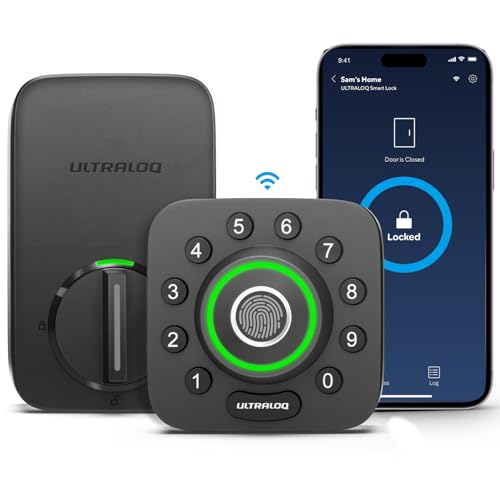
ULTRALOQ U-Bolt Pro WiFi Deadbolt
Best for: High-security exterior doors with remote access needs
- Control Method
- App Control, Remote Control
- Unlock Methods
- Fingerprint, passcode, app, key, voice
- Wireless Connectivity
- 2.4GHz Wi-Fi, Bluetooth
- Smart Home Compatibility
- Alexa, Google Home, SmartThings, IFTTT
- Installation Type
- Deadbolt replacement
- Security Certification
- ANSI Grade 1
The ULTRALOQ U-Bolt Pro is a deadbolt with built-in 2.4GHz Wi-Fi and Bluetooth. It offers eight entry methods, including fingerprint, passcode, and app control. The unit meets ANSI Grade 1 security standards and features an IP65 weatherproof rating. It includes a door sensor for auto-locking. This lock suits users who want robust security with remote management via Alexa or Google Home.
- ANSI Grade 1 certified durability
- IP65 dust and weatherproof rating
- Supports up to 100 fingerprints
- Built-in 2.4GHz Wi-Fi connectivity
- Auto-locks via door sensor detection
- 2.4GHz Wi-Fi only, no 5GHz support
- 18 months electronic guarantee
- 2.8 pounds weight is bulkier than lever locks
- You need ANSI Grade 1 security certification
- You want remote access via built-in Wi-Fi
- You require fingerprint and passcode entry methods
- You need 5GHz Wi-Fi connectivity
- You prefer a lever handle style lock
- You want a warranty longer than 18 months
Verdict: The ULTRALOQ U-Bolt Pro WiFi Deadbolt fits homeowners who prioritize high security standards and remote app control. It is ideal for exterior doors needing weather resistance and multi-user access management.
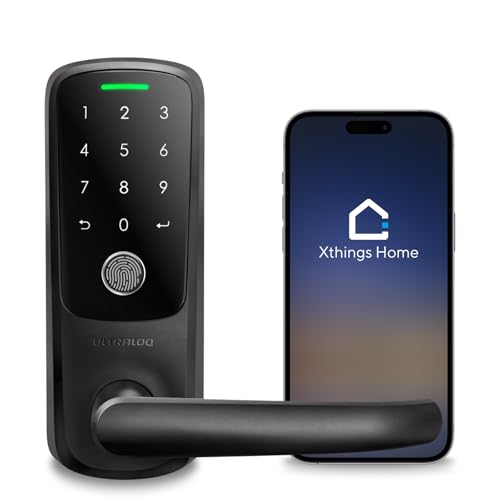
ULTRALOQ Latch 5 Touchscreen Smart Lever Lock
Best for: home offices needing remote app control
- Control Method
- App Control, Remote Control
- Unlock Methods
- App, Fingerprint, Code, Mechanical Key
- Wireless Connectivity
- 2.4GHz Wi-Fi
- Installation Type
- Smart lever lock
- Auto-Lock Function
- Auto lock
- Application
- Front Door
This ULTRALOQ Latch 5 is a lever-style smart lock with built-in 2.4GHz Wi-Fi. It supports app remote control, fingerprint, code, and mechanical key entry. The touchscreen keypad and auto-lock function add convenience. Its zinc alloy build handles busy household use. This model suits home offices or rentals where remote access management is key. It fits standard interior and exterior doors without drilling.
- Built-in 2.4GHz Wi-Fi for remote app control
- Four unlock methods: app, fingerprint, code, and key
- Auto-lock function for added security
- Sturdy zinc alloy construction
- Touchscreen digital keypad
- Limited to 2.4GHz Wi-Fi connectivity only
- Lever lock design may not suit all door types
- Black color option only in this variation
- You need remote access via smartphone app
- You prefer a lever-style handle for your door
- You want fingerprint and code entry options
- You require 5GHz Wi-Fi support
- You need a deadbolt-style lock
- You prefer multiple color options like satin nickel
Verdict: ULTRALOQ Latch 5 Black Fingerprint Lever Lock fits home offices needing remote app control and lever-style hardware. It suits users valuing fingerprint and code entry with sturdy zinc alloy build.

ARPHA WiFi Video Smart Lock, Black
Best for: remote video monitoring and keyless entry
- Control Method
- App Control, Remote Control, Alexa
- Unlock Methods
- Fingerprint, app, PIN, key, voice
- Wireless Connectivity
- 2.4GHz Wi-Fi
- Smart Home Compatibility
- Amazon Alexa, Google Assistant
- Installation Type
- Deadbolt with handle set
- Auto-Lock Function
- Adjustable timer (0–99 seconds)
This ARPHA lock combines a deadbolt with a built-in 150-degree camera and two-way intercom. You get five unlock methods, including fingerprint, app, and PIN. The 7800mAh battery lasts months per charge. It supports 2.4GHz Wi-Fi and voice control via Alexa or Google Assistant. This unit suits you if you want live video monitoring and remote access in one device.
- Built-in 150-degree wide-angle camera for live video
- 7800mAh rechargeable battery for long-lasting power
- Five unlock methods including fingerprint and app
- Adjustable auto-lock timer from 0 to 99 seconds
- IP54 weatherproof design for outdoor reliability
- Heavier build at 3 pounds compared to standard deadbolts
- Requires 2.4GHz Wi-Fi only, limiting network compatibility
- Limited color options with only black and silver
- You want to see and speak to visitors before unlocking
- You prefer a single unit that replaces a doorbell
- You need remote access via a smartphone app
- You only have 5GHz Wi-Fi available
- You prefer a lightweight lock under 2 pounds
- You do not want a built-in camera
Verdict: ARPHA D289W-H Video Smart Lock fits you if you need video verification and remote control in one package. It is a solid choice for renters or homeowners who prioritize security monitoring over minimal hardware.

Yale Wi-Fi Smart Deadbolt with Keypad
Best for: rental properties needing unlimited code management
- Control Method
- App Control, Remote Control
- Unlock Methods
- Auto-unlock, keypad, app, watch
- Wireless Connectivity
- 2.4 or 5 GHz Wi-Fi
- Security Certification
- BHMA Grade 2
- User Code Capacity
- Unlimited
- Auto-Lock Function
- DoorSense auto-lock
This Yale deadbolt connects to 2.4 or 5 GHz Wi-Fi without a hub. It offers auto-unlock, keypad entry, app control, and Apple Watch access. The BHMA Grade 2 certification ensures commercial-grade durability. You can manage unlimited user codes for guests or rentals. DoorSense technology confirms the door is closed before auto-locking. This model suits those needing reliable remote management.
- Connects directly to 2.4 or 5 GHz Wi-Fi
- BHMA Grade 2 security certification
- Supports unlimited user codes
- Includes DoorSense auto-lock and auto-unlock features
- Heavier build at 1 pound compared to lighter lever options
- Limited to 2.4 or 5 GHz Wi-Fi without Bluetooth variant in this specific SKU
- You need commercial-grade durability for high-traffic entries
- You want to manage unlimited codes for rentals
- You prefer direct Wi-Fi connection without a hub
- You require a lever handle design
- You need fingerprint access capability
- You want a built-in video camera
Verdict: Yale Assure Lock 2 Wi-Fi Deadbolt provides robust Grade 2 security and direct Wi-Fi connectivity for users managing multiple access codes. It fits homes needing reliable, hub-free remote control and auto-locking convenience.

Level Lock Pro Smart Deadbolt
Best for: invisible design and high security
- Control Method
- Remote Control, Alexa
- Unlock Methods
- Apple Home Key, NFC fob, touch, key
- Wireless Connectivity
- Matter over Thread, Bluetooth
- Smart Home Compatibility
- Apple Home, Alexa, Google, SmartThings
- Installation Type
- Deadbolt
- Security Certification
- BHMA AAA, ANSI Grade 1/A
The Level Lock Pro hides inside your door, measuring 2.75 by 2.75 inches. It uses Matter over Thread and Bluetooth for local control. You get remote access via a separate hub. It holds ANSI Grade 1/A security certification. The matte black finish fits modern homes. You can unlock it with Apple Home Key or NFC fobs. This compact design suits those who want invisible smart hardware without sacrificing high security standards.
- ANSI Grade 1/A security certification
- Matter over Thread connectivity
- Apple Home Key support
- Hidden internal design
- Requires separate hub for remote access
- Keypad sold separately
- Apple Home Key limits non-Apple users
- You want invisible smart lock hardware
- You use Apple Home or Matter hubs
- You need Grade 1/A security
- You need built-in remote Wi-Fi
- You do not use Apple devices
- You want an included keypad
Verdict: Level Lock Pro Matte Black fits users who prioritize invisible design and high security ratings. It suits Apple ecosystem users who already have a Matter hub for remote control.
Specifications side by side
| Spec | Philips 4200 Series Wi-Fi Deadbolt with Handle | Yale Wi-Fi Smart Deadbolt with Keypad | Veise Smart Deadbolt Handle Set | Philips Wi-Fi Smart Deadbolt Set with Handles | Philips DDL242X-15HW Wi-Fi Smart Lock | Veise Wi-Fi Smart Deadbolt with Handle Set | Philips Wi-Fi Smart Deadbolt with Lever Handles | Yale Wi-Fi Touchscreen Deadbolt | Yale WiFi Smart Lock Deadbolt | ARPHA D289W WiFi Video Lock | ULTRALOQ U-Bolt Pro WiFi Deadbolt | ULTRALOQ Latch 5 Touchscreen Smart Lever Lock | ARPHA WiFi Video Smart Lock, Black | Yale Wi-Fi Smart Deadbolt with Keypad | Level Lock Pro Smart Deadbolt |
|---|---|---|---|---|---|---|---|---|---|---|---|---|---|---|---|
| Unlock Methods | Fingerprint, app, voice, passcode | Auto-unlock, keypad, app, watch, key | App, code, fob, mechanical key | App, fingerprint, PIN, key, voice | Voice commands, password, key, app | Voice, fingerprint, app, code, card, key | Fingerprint, PIN, key, app, voice | Auto-unlock, keypad, app, watch | Fingerprint, keypad, app, key | Fingerprint, app, keypad, key, voice | Fingerprint, passcode, app, key, voice | App, Fingerprint, Code, Mechanical Key | Fingerprint, app, PIN, key, voice | Auto-unlock, keypad, app, watch | Apple Home Key, NFC fob, touch, key |
| Wireless Connectivity | 2.4GHz Wi-Fi | 2.4 or 5 GHz Wi-Fi | – | – | 2.4GHz Wi-Fi | – | 2.4 GHz Wi-Fi | 2.4 or 5 GHz Wi-Fi | 2.4 GHz or 5 GHz Wi-Fi | 2.4GHz WiFi | 2.4GHz Wi-Fi, Bluetooth | 2.4GHz Wi-Fi | 2.4GHz Wi-Fi | 2.4 or 5 GHz Wi-Fi | Matter over Thread, Bluetooth |
| Smart Home Compatibility | Alexa, Google Assistant | – | Alexa, Google Home (with gateway) | Amazon Alexa, Google Assistant | Alexa, Google Assistant | Amazon Alexa, Google | Amazon Alexa, Google Assistant | – | – | Alexa, Google Assistant | Alexa, Google Home, SmartThings, IFTTT | – | Amazon Alexa, Google Assistant | – | Apple Home, Alexa, Google, SmartThings |
| Installation Type | Deadbolt with handle set | – | Handle set | Handle set | Handle set | Deadbolt with handle set | Deadbolt handle set | – | Deadbolt | Deadbolt | Deadbolt replacement | Smart lever lock | Deadbolt with handle set | – | Deadbolt |
| Security Certification | – | BHMA Grade 2 | – | – | – | ANSI Grade 3, BHMA | – | BHMA Grade 2 | BHMA Grade 2 | – | ANSI Grade 1 | – | – | BHMA Grade 2 | BHMA AAA, ANSI Grade 1/A |
| User Code Capacity | – | Unlimited | 250+ user codes | Up to 100 user codes | Up to 100 passwords | 100+ codes | 100 user PIN codes | Unlimited | Unlimited | – | Up to 50 codes | – | – | Unlimited | – |
| Auto-Lock Function | Timer delay (0-180 seconds) | DoorSense auto-lock | – | 30 to 180 seconds | 10 to 180 seconds | Timer delay (0-180s) | Auto-lock (no sensor) | DoorSense auto-lock | Auto-Lock with DoorSense | Timer delay (10-99 seconds) | Door sensor detection | Auto lock | Adjustable timer (0–99 seconds) | DoorSense auto-lock | – |
| Application | Front Door | Airbnb | Front Door | – | Front Door | Front Door | Front Door | Airbnb | Airbnb | Front Door | Front Door | Front Door | Front Door | Airbnb | – |
| Entry Method | Keypad, Fingerprint | Keypad, Backup Key | Key Fob | Keypad, Fingerprint | Keypad | Keypad, Fingerprint | Keypad, Fingerprint | Keypad | Keypad, Fingerprint | Keypad, Built-In Camera, Fingerprint | Fingerprint | Keypad, Fingerprint | Keypad, Built-In Camera, Fingerprint | Keypad | Apple Home Key |
| Color | Matte Black | Oil Rubbed Bronze | Matte Black | Jet black | Matte Black | Matte Black | Nickel | Black Suede | Lifetime Brass | Black | Black | Black | Black | Oil Rubbed Bronze | Matte Black |
| Connectivity | – | – | – | – | – | – | – | – | – | – | – | – | – | – | Thread |
| Lock Type | Deadbolt, Lever | Deadbolt | Deadbolt, Handle Set | Deadbolt, Handle Set | Deadbolt, Handle Set | Deadbolt, Handle Set | Deadbolt, Handle Set | Deadbolt | Deadbolt | – | Deadbolt | – | Deadbolt | Deadbolt | – |
| Keypad Type | – | – | – | Touchscreen | – | Touchscreen | Touchscreen | Touchscreen | – | – | – | Touchscreen | – | – | – |
| Special Features | Auto-Lock | – | Auto-Lock | Auto-Lock | Auto-Lock | Auto-Lock | Auto-Lock | – | – | Auto-Lock, Two-Way Audio | Auto-Lock | Auto-Lock | Auto-Lock, Two-Way Audio | – | – |
| Compatible Platform | – | – | – | – | – | – | – | – | – | – | – | – | – | – | SmartThings |
| Control Method | App Control, Remote Control, Voice Control | App Control, Remote Control | App Control, Remote Control | App Control, Remote Control, Voice Control, Alexa | App Control, Remote Control, Alexa | App Control, Remote Control, Voice Control | App Control, Remote Control, Voice Control, Alexa | App Control, Remote Control | App Control, Remote Control | App Control, Remote Control, Alexa | App Control, Remote Control | App Control, Remote Control | App Control, Remote Control, Alexa | App Control, Remote Control | Remote Control, Alexa |
| Room | – | – | – | – | – | – | – | – | – | – | – | Home Office | – | – | – |
| Compatibility | – | – | – | Google Home | Google Home | – | Google Home | – | – | Google Home | – | – | Google Home | – | Google Home, Apple Home |
| Dimensions | 6 × 2.2 × 1.5 inches | 0.88 × 2.5 × 4.88 inches | 18 × 7 × 4 inches | 11 × 9 × 4 inches | 2.7 × 0.73 × 5.73 inches | 12.8 × 9.29 × 3.74 inches | 6 × 2 × 1.5 inches | 0.88 × 2.5 × 3.75 inches | 0.88 × 2.6 × 5.1 inches | 5.7 × 2.3 × 1.57 inches | 2.95 × 2.95 × 1.19 inches | 3.5 × 6.5 × 7 inches | 5.8 × 2.3 × 1.57 inches | 0.88 × 2.5 × 3.75 inches | 4.5 × 2.75 × 2.75 inches |
| Weight | – | 4.5 pounds | 5.06 pounds | – | – | 5.29 pounds | – | 1 pounds | – | 3 pounds | 2.8 pounds | – | 3 pounds | 1 pounds | 3.17 pounds |
| Size | 2.2 inches x 6 inches x 1.5 inches | Wi-Fi | – | – | No Fingerprint | – | – | Wi-Fi | Wi-Fi | – | Bluetooth + Built-in WiFi + Door Sensor | Fingerprint | – | Wi-Fi | – |
| Model | DDL242X-1HW-L | YRD410-WF1-0BP | VE06-H | DDL240X-1HW-H2 | DDL242X-15HW-H-MB | VE017G-H | DDL240X-1HW-L | YRD450-WF1-BSP | YRD410-F-WF1-P05 | D289W | U-BOLT-PRO-WiFi | Latch 5 | D289W-H | YRD430-WF1-0BP | D4 |
If you want this brand, compare hardware specs across the best PHILIPS smart locks with remote control.
How to Choose Remote Smart Locks
Check Connectivity Standards
Most locks use built-in Wi-Fi for direct remote control without extra hubs. The Philips 4200 Series Wi-Fi Deadbolt with Handle offers this standard setup. You can manage access directly from your phone. The Level Lock Pro uses Thread instead. You will need a separate Matter hub for that model. Verify your home network supports your choice. This ensures reliable remote access every time. Wi-Fi provides consistent connectivity for most users.
Compare Entry Methods
Entry methods vary significantly across these models. Some locks include fingerprint scanners for quick access. The Philips 4200 Series Wi-Fi Deadbolt with Handle supports both keypad and fingerprint entry. Others rely solely on keypads or backup keys. The Yale Wi-Fi Smart Deadbolt with Keypad includes a backup key option. Choose based on your daily habits. Fingerprint entry offers speed. Keypad codes allow temporary access for guests. Backup keys provide a reliable fallback method.
Review Code Capacity
Code management is critical for rental properties or busy households. Some locks offer unlimited codes for extensive guest lists. The Yale Wi-Fi Touchscreen Deadbolt supports unlimited codes. This suits Airbnb hosts or families with many members. Other models have fixed limits. The Philips DDL242X-15HW Wi-Fi Smart Lock supports 100 codes. Check the specifications before buying. Ensure the capacity matches your needs. Unlimited codes provide flexibility for frequent visitors.
Consider Smart Home Compatibility
Verify your smart home ecosystem before purchasing. Many locks work with Amazon Alexa and Google Home. The Philips Wi-Fi Smart Deadbolt Set with Handles supports both platforms. It also allows voice control. The Level Lock Pro works with Apple HomeKit and Matter. Choose based on your existing devices. This ensures seamless integration. You can lock or unlock doors via voice commands. Compatibility checks prevent connectivity issues later.
Evaluate Hardware Type
Hardware types range from deadbolts to complete handle sets. The Philips 4200 Series Wi-Fi Deadbolt with Handle includes a lever. This offers a complete front door upgrade. The Yale Wi-Fi Smart Deadbolt with Keypad is a standalone deadbolt. Choose based on your door configuration. Lever sets provide a coordinated look. Standalone deadbolts fit existing handles. Ensure the new hardware matches your door style. This simplifies installation and improves aesthetics.
Frequently asked questions
Do smart locks with remote control require a hub?
Most models on this list use built-in Wi-Fi for direct remote control. This setup allows you to manage the lock via an app without extra hardware. The Level Lock Pro is an exception. It uses Thread connectivity. You will need a Matter hub to enable remote features for that specific model.
Can I unlock my door remotely without an internet connection?
Remote control requires an active internet connection to function. The listed devices rely on Wi-Fi or Thread networks to send commands from your phone to the lock. Without connectivity, you cannot use app-based remote entry. You must rely on local methods like keypads, fingerprints, or physical keys when the network is down.
Which smart lock supports the most user codes?
The Yale Assure Lock 2 Wi-Fi models support unlimited codes. This feature is ideal for managing frequent guests or rental tenants. Other locks, such as the Philips DDL242X-15HW, offer up to 100 codes. Check the specific code capacity in the product attributes before purchasing if you need extensive user management.
Do these locks work with Google Home or Alexa?
Many models support voice control through major platforms. The Philips Wi-Fi Smart Deadbolt Set with Handles works with both Amazon Alexa and Google Home. The ARPHA D289W also integrates with both ecosystems. The Level Lock Pro supports Apple HomeKit, Matter, and Google Assistant. Verify the compatibility section for each specific model.
Are there smart locks with built-in cameras for remote viewing?
Yes, the ARPHA D289W WiFi Video Lock includes a built-in camera. It allows you to see who is at your door remotely. It also features two-way audio for communication. This model combines video monitoring with standard remote lock control. It is designed for renters who want security verification without monthly fees.
What is the difference between a deadbolt and a lever lock?
A deadbolt locks only the bolt mechanism, while a lever lock includes the handle mechanism. The Yale Wi-Fi Smart Deadbolt uses a traditional deadbolt design. The Philips 4200 Series includes both a deadbolt and a lever handle. Choose a lever set if you want a complete hardware upgrade. Choose a deadbolt if you only need to replace the locking mechanism.
Do these locks have auto-locking features?
Most models on this list include auto-locking capabilities. The Philips 4200 Series and Veise Smart Deadbolt Handle Set both feature this special feature. It ensures the door locks automatically after entry. This adds convenience and security. Check the attributes section for each product to confirm if auto-lock is included in the standard package.


