Best Smart Locks with Touchscreen: 15 Spec-Based Picks
We analyzed 15 touchscreen smart locks using only published specifications. Compare connectivity, security ratings, and battery life to find the best fit for your needs.

As Amazon Associates, we earn from qualifying purchases. This means we may receive a small commission at no extra cost to you if you click through and make a purchase.
As an Amazon Associate we earn from qualifying purchases. Links on this page are affiliate links.
Finding the best smart locks with touchscreen requires looking past marketing claims. You need to compare the actual specifications that affect daily use. We analyzed 15 options based on the specs published on their listings. The top pick is the Schlage Encode Smart WiFi Deadbolt. It leads because it offers direct Wi-Fi connectivity without a separate hub. This means you can control the lock remotely using its built-in wireless standard. The guide helps you decide which touchscreen lock fits your home’s security and connectivity needs.
Check smart home compatibility first
Your smart home ecosystem determines which lock works. The top pick connects via Wi-Fi and supports Amazon Alexa and Google Assistant. The premium option adds Apple HomeKit support. If you use Apple devices, choose a lock with Apple Home compatibility. Verify the wireless connection type matches your router. This ensures reliable remote control and automation without extra hubs.
| # | Product | Best for | Price |
|---|---|---|---|
| 1 | Schlage Encode Smart WiFi Deadbolt Best overall | Direct Wi-Fi connectivity and high security | |
| 2 | Schlage Encode Plus Smart WiFi Deadbolt Best premium | Apple Home Key users seeking BHMA security | |
| 3 | Kwikset SmartCode 270 Satin Nickel Also great | Users wanting local code management and Grade 2 security | |
| 4 | Kwikset Halo Touchscreen Wi-Fi Deadbolt Also great | Users needing high guest code capacity | |
| 5 | Tapo Smart Wi-Fi Fingerprint Deadbolt Best black | Users prioritizing speed and battery life | |
| 6 | Philips Wi-Fi Smart Deadbolt Set with Handles Also great | complete door handle and lock sets | |
| 7 | Schlage Touch Keyless Deadbolt Best budget | simple, secure keyless entry | |
| 8 | Aqara U100 Keyed Fingerprint Deadbolt Best matter | Apple Home Key and Matter over Thread users | |
| 9 | Veise Wi-Fi Smart Deadbolt with Handle Set Also great | homes needing Wi-Fi deadbolts with handles | |
| 10 | Yale August Wi-Fi Smart Lock with Keypad Touch Best silver | existing deadbolts with silver trim | |
| 11 | Philips Wi-Fi Fingerprint Smart Lock Set Also great | complete door hardware upgrades with fingerprint access | |
| 12 | Yale Assure Touchscreen Wi-Fi Lever Lock Best black suede | lever handle doors without deadbolts | |
| 13 | Yale Assure Lock 2 Bluetooth Touchscreen Deadbolt Also great | Apple Watch users who want auto-lock | |
| 14 | Yale Assure Lock 2 Touch Bluetooth Deadbolt Best backup key | Fingerprint speed and unlimited codes | |
| 15 | Veise VE017-D Fingerprint Lock Best key fob | renters needing key fob access |
The best fit for you
- You want direct Wi-Fi and high security – Schlage Encode Smart WiFi Deadbolt – It offers BHMA certification and built-in Wi-Fi for solid security.
- You use Apple Home and want tap-to-unlock – Schlage Encode Plus Smart WiFi Deadbolt – It supports Apple Home Key for convenient tap-to-unlock entry.
- You prioritize speed and long battery life – Tapo Smart Wi-Fi Fingerprint Deadbolt – It provides rapid 0.42-second access and a full year of battery life.
- You need a complete door handle and lock set – Philips Wi-Fi Smart Deadbolt Set with Handles – It includes a complete entry solution with fingerprint and Wi-Fi capabilities.
- You want Apple Home Key and Matter over Thread – Aqara U100 Keyed Fingerprint Deadbolt – It features Apple Home Key integration and Matter over Thread reliability.

Schlage Encode Smart WiFi Deadbolt
Best for: Direct Wi-Fi connectivity and high security
- Keypad Type
- Touchscreen
- Unlock Methods
- Touchscreen keypad, app, physical key
- Smart Home Compatibility
- Alexa, Google Home, Ring, Airbnb
- Security Certification
- BHMA highest residential rating
- User Code Capacity
- Up to 100 codes
- Auto-Lock Function
- Adjustable time delay
This Schlage Encode deadbolt integrates Wi-Fi directly into the lock, removing the need for a separate hub. You get a touchscreen keypad for entry and manage up to 100 access codes via the app. The unit carries the BHMA highest residential rating for security and durability. It works with Alexa and Google Home for voice control. This model suits users who want robust, built-in connectivity and high security standards for their front door.
- Built-in Wi-Fi for direct app control
- BHMA highest residential security rating
- Supports up to 100 user codes
- Compatible with Alexa and Google Home
- Adjustable auto-lock time delay
- Heavier build at 3.31 pounds
- Requires four AA batteries for power
- Limited to touchscreen and app entry methods
- You want direct Wi-Fi connectivity without a hub
- You need high security certification for your home
- You require management of many user access codes
- You prefer fingerprint or biometric unlocking methods
- You want a lighter, more compact lock design
- You need a lever handle instead of a deadbolt
Verdict: Schlage Encode WiFi Deadbolt offers solid security with its BHMA certification and built-in Wi-Fi. It fits homeowners who prioritize direct app control and high durability ratings over biometric features.

Schlage Encode Plus Smart WiFi Deadbolt
Best for: Apple Home Key users seeking BHMA security
- Keypad Type
- Touchscreen
- Unlock Methods
- Touchscreen, app, Apple home keys
- Smart Home Compatibility
- Apple HomeKit, Alexa, Google Assistant
- Installation Type
- Deadbolt replacement
- Security Certification
- BHMA certified
- User Code Capacity
- Up to 100
The Schlage Encode Plus is a deadbolt with a built-in Wi-Fi module and a fingerprint-resistant touchscreen. It supports Apple Home Key for tap-to-unlock access via iPhone or Apple Watch. The lock stores up to 100 user codes and features BHMA security certification. It works with Alexa and Google Assistant. This model suits users who want secure, keyless entry with integrated connectivity.
- Built-in Wi-Fi for remote app control
- Apple Home Key tap-to-unlock support
- BHMA certified for security and durability
- Stores up to 100 user access codes
- Apple Home Key requires compatible iOS devices
- Wi-Fi connectivity needs a secure home network
- You use an iPhone or Apple Watch for access
- You want built-in Wi-Fi without a bridge
- You need BHMA certified security ratings
- You only have Android phones and no Apple devices
- You prefer a lock without any wireless connectivity
- You need a lever handle instead of a deadbolt
Verdict: Schlage Encode Plus Satin Nickel fits users who want secure, keyless entry with integrated connectivity. It is ideal for Apple ecosystem users who value tap-to-unlock convenience and BHMA certified durability.

Kwikset SmartCode 270 Satin Nickel
Best for: Users wanting local code management and Grade 2 security
- Keypad Type
- Touchscreen
- Unlock Methods
- Touchpad, physical key
- Installation Type
- Deadbolt
- Security Certification
- BHMA Grade 2
- User Code Capacity
- 50 user codes
- Auto-Lock Function
- Timer delay (30s to 10 min)
The Kwikset SmartCode 270 is a BHMA Grade 2 touchscreen deadbolt that prioritizes security and ease of use. It supports 50 user codes and features a customizable auto-lock timer. The unit runs on four AA batteries for up to 12 months. It includes intrusion alerts and a vacation mode. This model suits homeowners who want a reliable, certified lock with straightforward code management and no app dependency.
- BHMA Grade 2 security certification
- Supports up to 50 user codes
- Customizable auto-lock timer from 30 seconds to 10 minutes
- 12-month battery life on four AA batteries
- Includes intrusion alert after three incorrect entries
- Limited to 50 user codes, which is fewer than some competitors offering 100 or more
- No built-in Wi-Fi or remote access capabilities
- Requires physical key for backup entry
- You want a BHMA Grade 2 certified lock for added security
- You prefer managing codes directly on the keypad without an app
- You need a reliable auto-lock feature with flexible timer options
- You require remote access or Wi-Fi connectivity
- You need to manage more than 50 user codes
- You want a lock with fingerprint recognition
Verdict: Kwikset SmartCode 270 Touchscreen Deadbolt is a solid choice for users who prioritize local code management and certified security over remote connectivity. It fits homes where a physical key backup and simple keypad operation are preferred.

Kwikset Halo Touchscreen Wi-Fi Deadbolt
Best for: Users needing high guest code capacity
- Keypad Type
- Touchscreen
- Unlock Methods
- Touchscreen, app, geofencing
- Smart Home Compatibility
- Amazon Alexa, Google Home
- Security Certification
- Grade AAA, UL Listed
- User Code Capacity
- Up to 250 codes
- Auto-Lock Function
- Duration timer
The Kwikset Halo is a Wi-Fi enabled deadbolt with a touchscreen keypad. It supports up to 250 access codes and includes geofencing for automatic entry. The lock features Grade AAA security and integrates with Alexa and Google Home. It has a 4.24-inch width and weighs 3.6 pounds. This model suits users who want remote control without a hub and need high code capacity for guests.
- Wi-Fi connectivity without a hub
- Supports up to 250 access codes
- Grade AAA security certification
- Geofencing for automatic unlocking
- Compatible with Alexa and Google Home
- Heavier build at 3.6 pounds
- Lower security grade than Grade 1 locks
- 1-year electronics warranty
- You want Wi-Fi control without a hub
- You need to share many guest codes
- You prefer a touchscreen interface
- You require Grade 1 security
- You want a longer electronics warranty
- You prefer a lighter lock
Verdict: Kwikset Halo Wi-Fi Touchscreen Deadbolt offers robust code management and direct Wi-Fi access for busy households. It fits users who prioritize guest access flexibility and smart home integration over maximum security grading.

Tapo Smart Wi-Fi Fingerprint Deadbolt
Best for: Users prioritizing speed and battery life
- Keypad Type
- Touchscreen
- Unlock Methods
- Fingerprint, keypad, app, key
- Wireless Connectivity
- Wi-Fi, Bluetooth
- Installation Type
- Deadbolt
- Security Certification
- BHMA Grade 2
- Color
- Black
The Tapo DL110 is a black touchscreen deadbolt with Wi-Fi and Bluetooth connectivity. It features BHMA Grade 2 security and unlocks in 0.42 seconds via fingerprint. You can store 100 fingerprints and use custom passcodes. The removable battery offers one year of operation. It includes a USB-C port for charging. This lock suits users who want fast access and a full year of battery life.
- BHMA Grade 2 security certification
- 0.42-second fingerprint recognition speed
- One-year battery life with removable rechargeable unit
- Supports 100 registered fingerprints
- Weighs 4.61 pounds, which is heavier than many competitors
- BHMA Grade 2 is a step below Grade 1 found in some premium locks
- You want a full year of battery maintenance
- You need fast fingerprint access under 0.5 seconds
- You prefer a black touchscreen deadbolt
- You require Grade 1 security certification
- You need a lighter lock under 4 pounds
- You do not want Wi-Fi connectivity
Verdict: Tapo DL110 Black Touchscreen Deadbolt delivers rapid 0.42-second access and a full year of battery life for users prioritizing speed and convenience over maximum security grades.

Philips Wi-Fi Smart Deadbolt Set with Handles
Best for: complete door handle and lock sets
- Keypad Type
- Touchscreen
- Unlock Methods
- App, fingerprint, PIN, key, voice
- Smart Home Compatibility
- Amazon Alexa, Google Assistant
- Installation Type
- Handle set
- User Code Capacity
- Up to 100 user codes
- Auto-Lock Function
- 30 to 180 seconds
This Philips smart lock combines a deadbolt with a matching handle set for a unified look. It features a touchscreen keypad and supports Wi-Fi connectivity for remote app control. You can unlock the door using fingerprints, PIN codes, or voice commands via Alexa and Google Assistant. The system holds up to 100 user codes and offers auto-locking with a timer ranging from 30 to 180 seconds. It fits standard doors between 35 and 50mm thick.
- Includes integrated handle set for coordinated styling
- Supports five unlock methods including fingerprint and voice
- Stores up to 100 unique user codes
- Configurable auto-lock timer from 30 to 180 seconds
- Connects via Wi-Fi for remote app management
- Limited to 100 user code capacity
- Requires door thickness between 35 and 50mm
- Larger physical dimensions at 11 inches long
- You want a complete handle and lock set
- You need fingerprint access alongside a touchscreen
- You prefer Wi-Fi over Bluetooth for control
- You have a door thicker than 50mm
- You need more than 100 user codes
- You require a standard deadbolt without handles
Verdict: The Philips Wi-Fi Handle Set Lock offers a complete entry solution with fingerprint and Wi-Fi capabilities. It suits homeowners who want integrated handles and flexible access codes without relying on Bluetooth.

Schlage Touch Keyless Deadbolt
Best for: simple, secure keyless entry
- Keypad Type
- Touchscreen
- Unlock Methods
- Touchscreen keypad
- Installation Type
- Deadbolt replacement
- Security Certification
- Grade 2/AAA
- User Code Capacity
- Up to 19 codes
- Color
- Matte Black
This Schlage Touch deadbolt features a touchscreen keypad with downlighting for dark entryways. It holds up to 19 user codes and carries a Grade 2 security rating. The cylinder-free design resists bumping and picking. It runs on a single 9V battery with a jumpstart backup. The slim profile fits between front and screen doors. This model suits you if you want reliable keyless entry without complex smart home integration.
- Touchscreen keypad with downlighting
- Grade 2/AAA security rating
- Cylinder-free design prevents picking
- Supports up to 19 user codes
- Slim profile fits between doors
- Requires a 9V battery instead of standard AA cells
- Limited to 19 user codes compared to higher capacities elsewhere
- Grade 2 rating is lower than Grade 1 options
- You need a simple keyless deadbolt without Wi-Fi
- You want a slim lock for double-door setups
- You prefer a cylinder-free design for added security
- You require Grade 1 commercial-grade security
- You need more than 19 unique user codes
- You want built-in Wi-Fi for remote access
Verdict: Schlage Touch Matte Black Deadbolt is a solid choice for homeowners seeking a straightforward, secure keypad lock. It fits best for those who value physical durability and simple installation over smart connectivity features.

Aqara U100 Keyed Fingerprint Deadbolt
Best for: Apple Home Key and Matter over Thread users
- Keypad Type
- Touchscreen
- Unlock Methods
- Apple Home Key, fingerprint, keypad, key
- Wireless Connectivity
- Matter over Thread
- Smart Home Compatibility
- Apple Home, Alexa, Google, IFTTT
- Installation Type
- Deadbolt
- Security Certification
- BHMA Level 3
The Aqara U100 is a touchscreen deadbolt featuring Matter over Thread connectivity. It supports Apple Home Key, fingerprint recognition, and remote passwords via the Aqara Home app. The lock includes a built-in gyroscope for auto-locking and offers BHMA Level 3 security. It runs on four AA batteries with a USB-C emergency port. This model suits users seeking local data encryption and broad smart home compatibility.
- Matter over Thread connectivity for reliable local control
- Apple Home Key support for iPhone and Apple Watch access
- BHMA Level 3 security certification
- Built-in gyroscope enables automatic locking
- Local AES encrypted storage for sensitive data
- Requires a separate Aqara Zigbee 3.0 hub for full app features
- NFC card sold separately rather than included
- Heavier build at 2.59 pounds compared to lighter alternatives
- You want to use Apple Home Key for keyless entry
- You prefer Matter over Thread for stable smart home integration
- You need BHMA Level 3 security certification
- You want a lock that works without any additional hub
- You prefer a lighter deadbolt under 2 pounds
- You want NFC cards included in the box
Verdict: The Aqara U100 Gray Touchscreen Lock fits users who prioritize Apple Home Key integration and Matter over Thread reliability. It is a solid choice for those willing to add a hub for full automation capabilities.

Veise Wi-Fi Smart Deadbolt with Handle Set
Best for: homes needing Wi-Fi deadbolts with handles
- Keypad Type
- Touchscreen
- Unlock Methods
- Voice, fingerprint, app, code, card, key
- Smart Home Compatibility
- Amazon Alexa, Google
- Installation Type
- Deadbolt with handle set
- Security Certification
- ANSI Grade 3, BHMA
- User Code Capacity
- 100+ codes
This Veise deadbolt with handle set combines a touchscreen keypad with fingerprint recognition for quick entry. It connects via Wi-Fi for remote app control and supports Amazon Alexa and Google voice commands. The lock stores over 100 user codes and 20 fingerprints. It includes an auto-lock timer and ANSI Grade 3 security certification. The matte black finish suits modern entryways.
- 0.2-second fingerprint recognition speed
- Wi-Fi connectivity for remote app control
- Compatible with Amazon Alexa and Google voice assistants
- Stores 100+ user codes and 20 fingerprints
- ANSI Grade 3 and BHMA security certification
- Heavier build at 5.29 pounds
- Lower ANSI Grade 3 security rating
- Battery life limited to 300+ days
- You want Wi-Fi connectivity without a separate hub
- You need voice control through Alexa or Google
- You prefer a deadbolt that includes a handle set
- You require higher ANSI Grade 1 or 2 security
- You prefer a lighter lock under 5 pounds
- You need a lock without a built-in handle
Verdict: Veise VE017G-H Matte Black Deadbolt offers reliable Wi-Fi access and voice control for users who value convenience over maximum security ratings. It fits homes needing a complete deadbolt and handle set with straightforward app management.

Yale August Wi-Fi Smart Lock with Keypad Touch
Best for: existing deadbolts with silver trim
- Keypad Type
- Touchscreen
- Unlock Methods
- Fingerprint, keypad, app, physical key
- Wireless Connectivity
- Wi-Fi, Bluetooth
- Auto-Lock Function
- Auto-Lock
- Color
- Silver
- Dimensions
- 0.8 × 2.72 × 4.84 inches
The Yale August Wi-Fi Smart Lock with Keypad Touch in Silver installs on your existing deadbolt. It features a touchscreen keypad and fingerprint scanner for keyless entry. Built-in Wi-Fi removes the need for extra hubs. You get auto-lock and auto-unlock functions. The silver finish matches modern hardware. This model suits you if you want to keep your current keys while upgrading to smart access.
- Built-in Wi-Fi connectivity
- Touchscreen keypad entry
- Fingerprint scanner with 99% accuracy
- Installs on existing deadbolt
- Heavier at 2.18 pounds
- Requires physical key backup
- Limited to silver color option
- You want to keep your existing keys
- You need built-in Wi-Fi
- You prefer a silver finish
- You need a matte black finish
- You want a full deadbolt replacement
- You prefer fingerprint only
Verdict: Yale August Wi-Fi Silver Lock fits you if you want to keep your existing keys while upgrading to smart access with a touchscreen and fingerprint scanner.

Philips Wi-Fi Fingerprint Smart Lock Set
Best for: complete door hardware upgrades with fingerprint access
- Keypad Type
- Touchscreen
- Unlock Methods
- Fingerprint, PIN, key, app, voice
- Wireless Connectivity
- 2.4 GHz Wi-Fi
- Smart Home Compatibility
- Amazon Alexa, Google Assistant
- Installation Type
- Handle set
- User Code Capacity
- 100 user PINs, unlimited one-time PINs
This Philips handle set combines a touchscreen keypad with fingerprint recognition for keyless entry. It connects via 2.4 GHz Wi-Fi, eliminating the need for a hub. You can unlock the door using fingerprints, PIN codes, keys, or app commands. The system supports up to 100 user PINs and fifty fingerprints. It also integrates with Alexa and Google Assistant for voice control. This set includes two lever handles for easy installation.
- Built-in 2.4 GHz Wi-Fi connectivity
- Fingerprint recognition for up to fifty users
- Supports 100 user PINs and unlimited one-time codes
- Compatible with Amazon Alexa and Google Assistant
- Includes lever handles for complete door upgrade
- Auto-lock function operates without a door sensor
- Heavier build at 5 pounds compared to deadbolts
- You want to replace both the lock and handles
- You prefer fingerprint access over traditional keys
- You need remote management via Wi-Fi
- You require a dedicated door-closed sensor for auto-lock
- You already have compatible lever handles
- You prefer a standard deadbolt installation
Verdict: Philips WiFi Touchscreen Handle Set offers a complete entry solution with fingerprint and Wi-Fi specs. It suits homeowners who want to upgrade their door hardware and manage access remotely without a hub.
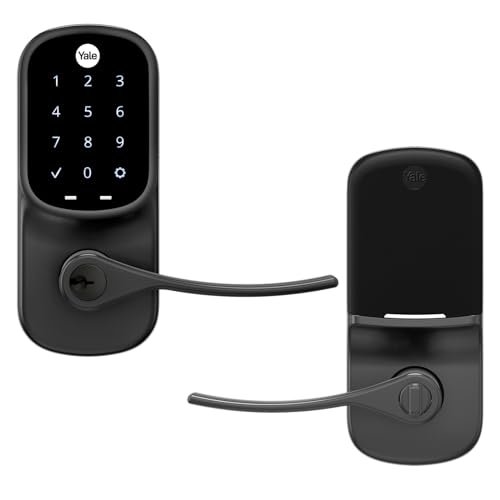
Yale Assure Touchscreen Wi-Fi Lever Lock
Best for: lever handle doors without deadbolts
- Keypad Type
- Touchscreen
- Unlock Methods
- Keypad
- Installation Type
- Lever replacement
- Wireless Connectivity
- Wi-Fi
- Color
- Black Suede
- Lock Type
- Deadbolt, Lever
This Yale lock replaces your existing lever handle on doors that do not have a deadbolt. It uses a touchscreen keypad for keyless entry and includes Wi-Fi connectivity for remote management. The black suede finish offers a distinct look compared to standard metallic options. Auto-lock ensures the door secures itself after entry. It is designed for single-hole installations, making it a practical upgrade for lever-style doors.
- Touchscreen keypad for code entry
- Wi-Fi connectivity for remote access
- Auto-lock feature for security
- Black suede finish option
- Requires a door without a deadbolt
- Limited to lever replacement installation
- Single-hole mounting constraint
- You have a lever handle door without a deadbolt
- You want Wi-Fi control for your entry point
- You prefer a touchscreen interface over physical buttons
- You need a traditional deadbolt lock
- Your door requires a double-cylinder setup
- You prefer a standard metallic finish
Verdict: Yale Assure Lever Touchscreen Black Suede is a solid choice for homeowners with lever-style doors who need Wi-Fi enabled keyless entry. It fits users who want to replace their existing hardware with a modern touchscreen solution.

Yale Assure Lock 2 Bluetooth Touchscreen Deadbolt
Best for: Apple Watch users who want auto-lock
- Keypad Type
- Touchscreen
- Unlock Methods
- Keypad, app, Apple Watch, auto-unlock
- Wireless Connectivity
- Bluetooth
- Auto-Lock Function
- Auto-Lock
- Color
- Oil Rubbed Bronze
- Dimensions
- 2.5 × 3.7 × 2.3 inches
This Yale touchscreen deadbolt offers key-free entry via keypad, app, or Apple Watch. It features Bluetooth connectivity and optional Auto-Unlock for hands-free access. The Auto-Lock function secures the door automatically. You get custom entry codes for guests and enhanced app security. This model is available in Oil Rubbed Bronze and fits standard doors.
- Supports Apple Watch unlocking
- Includes Auto-Lock function
- Allows custom entry codes
- Optional Auto-Unlock via Bluetooth
- Limited to Bluetooth connectivity
- Smaller width at 3.7 inches
- You want Auto-Lock convenience
- You use Apple Watch
- You need custom entry codes
- You require Wi-Fi connectivity
- You prefer a wider unit
- You need fingerprint recognition
Verdict: Yale Assure Lock 2 Touch Bluetooth suits users who want Apple Watch integration and automatic locking without Wi-Fi needs.

Yale Assure Lock 2 Touch Bluetooth Deadbolt
Best for: Fingerprint speed and unlimited codes
- Keypad Type
- Touchscreen
- Unlock Methods
- Fingerprint, keypad, key, app
- Wireless Connectivity
- Bluetooth
- Installation Type
- Deadbolt replacement
- User Code Capacity
- Unlimited codes
- Auto-Lock Function
- Auto-Lock
The Yale Assure Lock 2 is a deadbolt replacement with a touchscreen keypad. It supports fingerprint, keypad, key, and app unlock methods. Bluetooth connectivity enables auto-unlock as you approach. The lock offers unlimited user codes for family and service providers. Auto-lock ensures the door stays secured. This model comes in Oil Rubbed Bronze with a 2.5-inch width.
- Fingerprint recognition with 99% accuracy and under 0.5 second recognition time
- Unlimited user code capacity for family and service providers
- Auto-unlock via Bluetooth as you approach the door
- Auto-lock function prevents forgetting to secure the entry
- Bluetooth connectivity limits range compared to Wi-Fi models
- Standard 2.5-inch width may not fit all door preparations
- Requires a backup key for physical entry access
- You want fingerprint speed and unlimited codes
- You prefer Bluetooth auto-unlock convenience
- You need a standard deadbolt replacement
- You require Wi-Fi connectivity for remote access
- You want a key-free entry system only
- You need a wider lock faceplate
Verdict: Yale Assure Lock 2 Bluetooth suits users who value fingerprint speed and unlimited codes but do not need Wi-Fi remote control. It is ideal for those who want auto-unlock convenience via Bluetooth.
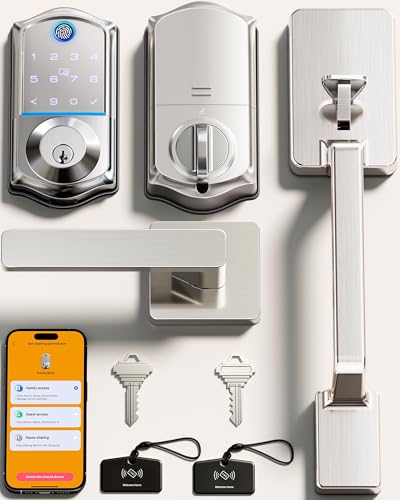
Veise VE017-D Fingerprint Lock
Best for: renters needing key fob access
- Keypad Type
- Touchscreen
- Unlock Methods
- Fingerprint, app, fob, PIN, key
- Smart Home Compatibility
- Alexa, Google Assistant (w/ gateway)
- Installation Type
- Deadbolt with lever handle
- Security Certification
- BHMA/ANSI certified
- User Code Capacity
- Over 100 passcodes
This Veise deadbolt set combines a touchscreen keypad with a lever handle and key fob support. It uses Swedish FPC fingerprint tech for under 0.2-second recognition and stores data with local AES128 encryption. You get over 100 passcodes and a 12-month battery life on four AA cells. The zinc alloy build fits front doors, offering remote app control when paired with the separate G1 gateway.
- Key fob unlock method
- Under 0.2-second fingerprint verification
- Local AES128 encrypted storage
- Over 100 passcode capacity
- Requires separate G1 gateway for remote app features
- Heavier 4.93-pound build
- Uses four AA batteries instead of rechargeable packs
- You want to use a key fob for quick entry
- You prefer local data encryption over cloud storage
- You need a deadbolt with an integrated handle
- You need native Wi-Fi without extra hardware
- You want a lighter, more compact lock
- You prefer rechargeable battery options
Verdict: Veise VE017-D Smart Lock Set is a solid choice for renters who value the convenience of a key fob and local security. It suits those who want a complete handle set without buying separate components.
Specifications side by side
| Spec | Schlage Encode Smart WiFi Deadbolt | Schlage Encode Plus Smart WiFi Deadbolt | Kwikset SmartCode 270 Satin Nickel | Kwikset Halo Touchscreen Wi-Fi Deadbolt | Tapo Smart Wi-Fi Fingerprint Deadbolt | Philips Wi-Fi Smart Deadbolt Set with Handles | Schlage Touch Keyless Deadbolt | Aqara U100 Keyed Fingerprint Deadbolt | Veise Wi-Fi Smart Deadbolt with Handle Set | Yale August Wi-Fi Smart Lock with Keypad Touch | Philips Wi-Fi Fingerprint Smart Lock Set | Yale Assure Touchscreen Wi-Fi Lever Lock | Yale Assure Lock 2 Bluetooth Touchscreen Deadbolt | Yale Assure Lock 2 Touch Bluetooth Deadbolt | Veise VE017-D Fingerprint Lock |
|---|---|---|---|---|---|---|---|---|---|---|---|---|---|---|---|
| Unlock Methods | Touchscreen keypad, app, physical key | Touchscreen, app, Apple home keys | Touchpad, physical key | Touchscreen, app, geofencing | Fingerprint, keypad, app, key | App, fingerprint, PIN, key, voice | Touchscreen keypad | Apple Home Key, fingerprint, keypad, key | Voice, fingerprint, app, code, card, key | Fingerprint, keypad, app, physical key | Fingerprint, PIN, key, app, voice | Keypad | Keypad, app, Apple Watch, auto-unlock | Fingerprint, keypad, key, app | Fingerprint, app, fob, PIN, key |
| Wireless Connectivity | – | – | – | – | Wi-Fi, Bluetooth | – | – | Matter over Thread | – | Wi-Fi, Bluetooth | 2.4 GHz Wi-Fi | – | Bluetooth | Bluetooth | – |
| Smart Home Compatibility | Alexa, Google Home, Ring, Airbnb | Apple HomeKit, Alexa, Google Assistant | – | Amazon Alexa, Google Home | – | Amazon Alexa, Google Assistant | – | Apple Home, Alexa, Google, IFTTT | Amazon Alexa, Google | – | Amazon Alexa, Google Assistant | – | – | – | Alexa, Google Assistant (w/ gateway) |
| Installation Type | – | Deadbolt replacement | Deadbolt | – | Deadbolt | Handle set | Deadbolt replacement | Deadbolt | Deadbolt with handle set | – | Handle set | Lever replacement | – | Deadbolt replacement | Deadbolt with lever handle |
| Security Certification | BHMA highest residential rating | BHMA certified | BHMA Grade 2 | Grade AAA, UL Listed | BHMA Grade 2 | – | Grade 2/AAA | BHMA Level 3 | ANSI Grade 3, BHMA | – | – | – | – | – | BHMA/ANSI certified |
| User Code Capacity | Up to 100 codes | Up to 100 | 50 user codes | Up to 250 codes | – | Up to 100 user codes | Up to 19 codes | – | 100+ codes | – | 100 user PINs, unlimited one-time PINs | – | – | Unlimited codes | Over 100 passcodes |
| Auto-Lock Function | Adjustable time delay | – | Timer delay (30s to 10 min) | Duration timer | – | 30 to 180 seconds | – | Built-in gyroscope | Timer delay (0-180s) | Auto-Lock | Auto-Lock (no sensor) | – | Auto-Lock | Auto-Lock | Timer delay (0-180 seconds) |
| Application | Airbnb | Airbnb | – | Front Door | – | – | – | – | Front Door | – | Front Door | – | – | – | Front Door |
| Entry Method | Keypad | – | – | – | Keypad, Fingerprint | Keypad, Fingerprint | Keypad | Keypad, Fingerprint, Apple Home Key | Keypad, Fingerprint | Keypad, Fingerprint | Keypad, Fingerprint | Keypad | – | Keypad, Fingerprint, Backup Key | Keypad, Fingerprint, Key Fob |
| Color | Satin Nickel | Satin Nickel | Satin Nickel | Matte Black | Black | Jet black | Matte Black | Gray | Matte Black | Silver | Matte Black | Black Suede | Oil Rubbed Bronze | Oil Rubbed Bronze | Satin Nickel |
| Connectivity | – | – | – | – | – | – | – | Thread | – | – | – | – | Bluetooth | Bluetooth | – |
| Lock Type | Deadbolt | Deadbolt | Deadbolt | Deadbolt | Deadbolt | Deadbolt, Handle Set | Deadbolt | Deadbolt | Deadbolt, Handle Set | – | Handle Set | Deadbolt, Lever | – | Deadbolt | Deadbolt, Handle Set, Lever |
| Keypad Type | Touchscreen | Touchscreen | Touchscreen | Touchscreen | Touchscreen | Touchscreen | Touchscreen | Touchscreen | Touchscreen | Touchscreen | Touchscreen | Touchscreen | Touchscreen | Touchscreen | Touchscreen |
| Special Features | – | – | Auto-Lock | – | – | Auto-Lock | – | – | Auto-Lock | – | Auto-Lock | Auto-Lock | – | – | Auto-Lock |
| Control Method | App Control, Alexa | Alexa | – | App Control | App Control | App Control, Remote Control, Voice Control, Alexa | – | Alexa | App Control, Remote Control, Voice Control | – | App Control, Voice Control, Alexa | – | – | – | App Control |
| Compatibility | Google Home | Apple Home | – | – | – | Google Home | – | Google Home, Apple Home | – | – | Google Home | – | – | – | – |
| Dimensions | 0.9 × 3 × 5 inches | 0.9 × 3 × 5 inches | 1 × 2.75 × 5.02 inches | 3.99 × 4.24 × 9.74 inches | 5.91 × 2.69 × 1.29 inches | 11 × 9 × 4 inches | 5.2 × 3 × 5.4 inches | 5.27 × 3.46 × 2.91 inches | 12.8 × 9.29 × 3.74 inches | 0.8 × 2.72 × 4.84 inches | 6 × 2 × 1.5 inches | 1.38 × 2.75 × 6.06 inches | 2.5 × 3.7 × 2.3 inches | 0.9 × 2.5 × 4.9 inches | 12 × 9 × 3 inches |
| Weight | 3.31 pounds | – | 1 pounds | 3.6 pounds | 4.61 pounds | – | 3.4 pounds | 2.59 pounds | 5.29 pounds | 2.18 pounds | 5 pounds | – | – | – | 4.93 pounds |
| Size | Encode | Encode Plus | – | – | 2.91 x 7.83 x 1.83 inches | – | (Pack of 1) | – | – | – | – | Touchscreen | Bluetooth | Bluetooth | – |
| Model | BE489WBCAM619 | BE499WBCAM619 | 992700-010 | 99390-004 | Tapo DL110 | DDL240X-1HW-H2 | BE375CEN622 | SDL-D01 | VE017G-H | AUG-SL05 | DDL240X-1HW-L | YRL226-NR-BSP | YRD450-BLE-0BP | YRD410-F-BLE-0BP | VE017-D |
If you want to review this manufacturer's lineup, compare keypad specifications across the best DESLOC smart locks.
How to choose the right one
Check wireless connectivity
Decide if you need remote access from anywhere. Built-in Wi-Fi allows control without a separate hub or bridge. The Schlage Encode Smart WiFi Deadbolt includes this feature for direct app management. If you prefer local control or have a specific network setup, Bluetooth-only models like the Yale Assure Lock 2 offer simpler installation. Choose Wi-Fi if you want to lock the door while away. Select Bluetooth if you only need control from inside your home range.
Verify smart home compatibility
Match the lock to your existing voice assistant or platform. The Schlage Encode works with Amazon Alexa and Google Assistant. The Encode Plus adds Apple HomeKit support for users in that ecosystem. Some locks, like the Aqara U100, support Matter over Thread for broader interoperability. Check the product attributes to ensure your preferred app can communicate with the device. This prevents compatibility issues and ensures seamless voice commands or automation routines.
Review entry methods
Select the access type that fits your household habits. Most listed locks use a touchscreen keypad for code entry. Several models, such as the Tapo Smart Wi-Fi Fingerprint Deadbolt, add fingerprint scanning for faster access. The Yale August Wi-Fi Smart Lock combines a keypad with a fingerprint scanner. If you prefer physical backups, the Yale Assure Lock 2 Touch Bluetooth Deadbolt includes a backup key option. Choose based on whether you value speed, convenience, or traditional key redundancy.
Consider lock type and set
Determine if you need just a deadbolt or a complete handle set. The Philips Wi-Fi Smart Deadbolt Set with Handles provides a full entry solution with integrated handles. This is ideal for replacing old hardware entirely. Other options, like the Schlage Encode, are standalone deadbolts that fit existing door preparations. The Yale Assure Touchscreen Wi-Fi Lever Lock replaces lever handles directly. Measure your door thickness and backset to ensure the chosen type fits your current door frame.
Check security certifications
Look for independent security ratings to gauge durability. The top pick, Schlage Encode, holds BHMA certification, indicating high durability and security standards. The Kwikset SmartCode 270 offers Grade 2 security for reliable performance. These ratings reflect resistance to forced entry and mechanical wear. If maximum security is your priority, prioritize locks with these certifications. They provide a verified baseline for strength, whereas non-certified models may vary in build quality and long-term reliability.
Frequently asked questions
Which touchscreen smart lock works with Apple Home Key?
The Aqara U100 Keyed Fingerprint Deadbolt supports Apple Home Key. It also uses Matter over Thread for reliable connectivity. You can pair it with Amazon Alexa and Apple HomeKit. This option suits users who want tap-to-unlock convenience and hub-based automation.
What is the fastest touchscreen smart lock?
The Tapo Smart Wi-Fi Fingerprint Deadbolt offers rapid access. It unlocks in 0.42 seconds using its fingerprint scanner. This speed benefits users who prioritize quick entry over maximum security grades. It also provides a full year of battery life for low maintenance.
Which touchscreen lock supports unlimited guest codes?
The Yale Assure Lock 2 Touch Bluetooth Deadbolt supports unlimited codes. It allows you to manage access for many guests without limit. The lock also features fingerprint speed and backup key entry. This model suits users who do not need Wi-Fi remote control.
Do any touchscreen locks include a key fob?
The Veise VE017-D Fingerprint Lock includes key fob access. You can unlock the door using the fob in addition to the keypad and fingerprint. This set includes a deadbolt and handle lever. It suits renters who value convenience and local security management.
Which touchscreen lock has the highest security grade?
The Schlage Encode Plus Smart WiFi Deadbolt offers BHMA certified durability. It is ideal for users seeking high security with Apple HomeKit support. The lock provides tap-to-unlock convenience. This option fits those who prioritize certified security ratings and ecosystem integration.
Can I use a touchscreen lock without a hub?
Yes, several models connect directly via Wi-Fi. The Schlage Encode Smart WiFi Deadbolt includes built-in Wi-Fi. It supports Amazon Alexa and Google Assistant for direct app control. This feature allows remote management without a separate hub or bridge for your smart home setup.
Which touchscreen lock is best for lever doors?
The Yale Assure Touchscreen Wi-Fi Lever Lock is designed for lever-style doors. It replaces existing hardware with a modern touchscreen solution. The lock features Wi-Fi connectivity and auto-lock. This option suits homeowners who need keyless entry for non-deadbolt door configurations.


