Best TP-Link Mesh Wifi Systems Under $200: 7 Spec-Based Picks
We analyzed 7 TP-Link mesh systems under $200. Compare specs like Wi-Fi standards and port speeds to find the right system for your home needs.

As Amazon Associates, we earn from qualifying purchases. This means we may receive a small commission at no extra cost to you if you click through and make a purchase.
As an Amazon Associate we earn from qualifying purchases. Links on this page are affiliate links.
Finding the best TP-Link mesh wifi systems under $200 requires looking at raw specs rather than marketing claims. We compared 7 models to help you choose based on published data. The TP-Link Deco X55 3-Pack Wi-Fi 6 leads because it supports up to 6,500 square feet of coverage with Gigabit Ethernet ports. This makes it ideal for medium to large homes needing stable connectivity. Each pick focuses on specific hardware capabilities like Wi-Fi standards and port speeds. This guide helps you decide which system fits your home’s size and device count.
Match ports to your internet speed
Check the Ethernet port speed before buying. The Deco BE23 offers 2.5 Gbps ports for fast wired connections, while the Deco X55 uses standard Gigabit ports. If your internet plan exceeds 1 Gbps, choose a model with higher port speeds to avoid bottlenecks. Otherwise, standard Gigabit ports handle typical home speeds effectively.
| # | Product | Best for | Price |
|---|---|---|---|
| 1 | TP-Link Deco X55 3-Pack Wi-Fi 6 Best overall | medium to large homes needing stable Wi-Fi 6 coverage | |
| 2 | TP-Link Deco Tri-Band WiFi 6E 2-Pack Best premium | Large homes needing 6 GHz stability and high device capacity | |
| 3 | TP-Link Deco Dual-Band WiFi 7 2-Pack Also great | homes under 4,500 sq ft needing 2.5 Gbps ports | |
| 4 | TP-Link Deco Dual-Band Wi-Fi 6 3-Pack Best budget | homes needing wide coverage under 1 Gbps | |
| 5 | TP-Link Archer Tri-Band WiFi 7 Router Best usb | Users needing 10G ports and USB storage | |
| 6 | TP-Link Deco Tri-Band WiFi 6E 2-Pack Also great | homes needing 2.5 Gbps wired backhaul | |
| 7 | TP-Link Dual-Band Wi-Fi 7 Gaming Router Best rgb light | single-room gaming with multi-gigabit speeds |
The best fit for you
- You need stable Wi-Fi 6 for large homes – TP-Link Deco X55 3-Pack Wi-Fi 6 – It covers up to 6500 square feet with Wi-Fi 6 and gigabit Ethernet ports.
- You want 6 GHz stability for high device capacity – TP-Link Deco Tri-Band WiFi 6E 2-Pack – This tri-band Wi-Fi 6E system provides dedicated 6 GHz bands for reduced congestion.
- You require 2.5 Gbps ports for wired speed – TP-Link Deco Dual-Band WiFi 7 2-Pack – It features 2.5 Gbps Ethernet ports and Wi-Fi 7 for homes under 4500 sq ft.
- You want wide coverage under 1 Gbps internet – TP-Link Deco Dual-Band Wi-Fi 6 3-Pack – The three-pack Wi-Fi 6 mesh system supports up to 150 devices for reliable coverage.
- You need 10G ports and USB storage – TP-Link Archer Tri-Band WiFi 7 Router – This router includes 10G ports and USB connectivity for local storage and fast LAN access.

TP-Link Deco X55 3-Pack Wi-Fi 6
Best for: medium to large homes needing stable Wi-Fi 6 coverage
- Wireless Standard
- Wi-Fi 6
- Coverage Area
- up to 6500 Sq.Ft.
- Ethernet Port Speed
- Gigabit
- Device Capacity
- up to 150 devices
- Pack Size
- 3-Pack
- Connectivity
- Wireless
The TP-Link Deco X55 3-Pack covers up to 6500 square feet using Wi-Fi 6 technology. It supports up to 150 connected devices and includes three Gigabit Ethernet ports per unit for wired backhaul. This system replaces extenders and uses AI-driven mesh to optimize your home network. It is a practical choice for medium to large homes needing reliable whole-home coverage.
- Covers up to 6500 square feet
- Supports up to 150 devices
- Includes Gigabit Ethernet ports
- Uses Wi-Fi 6 standard
- Limited to Wi-Fi 6 speeds
- Lower total throughput than Wi-Fi 6E or 7 models
- You need coverage for up to 6500 square feet
- You want to connect around 150 devices
- You prefer wired Ethernet backhaul
- You require Wi-Fi 6E or Wi-Fi 7 speeds
- You need more than 6500 square feet of coverage
- You want to connect more than 150 devices
Verdict: TP-Link Deco X55 3-Pack Mesh is a solid option for homes up to 6500 square feet that prioritize device capacity and wired connectivity over the latest wireless standards.
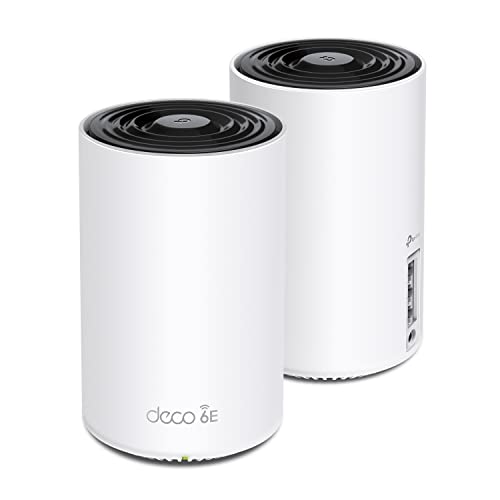
TP-Link Deco Tri-Band WiFi 6E 2-Pack
Best for: Large homes needing 6 GHz stability and high device capacity
- Wireless Standard
- WiFi 6E
- Coverage Area
- up to 5500 Sq.Ft
- Frequency Bands
- Tri-Band
- Maximum Speed
- up to 5,400 Mbps
- Device Capacity
- 200 devices
- Pack Size
- 2-Pack
The Deco XE75 is a WiFi 6E tri-band mesh system designed for homes up to 5,500 square feet. It delivers combined speeds of 5,400 Mbps across three bands, supporting up to 200 connected devices. The 6 GHz band reduces interference and serves as a dedicated backhaul by default. This system suits users seeking high capacity and next-generation frequency stability for gaming and streaming.
- Tri-band WiFi 6E standard with dedicated 6 GHz band
- Total speed up to 5,400 Mbps across all bands
- Covers up to 5,500 square feet of space
- Supports up to 200 connected devices simultaneously
- AI-driven mesh technology for automatic network optimization
- Only 2-Pack included, limiting coverage compared to 3-Pack options
- Gigabit Ethernet ports only, lacking 2.5G or 10G uplink speeds
- Higher weight at 2.69 pounds per node
- You need WiFi 6E performance for future-proofing
- You have a large home requiring 5,500 square feet of coverage
- You connect many devices, up to 200, on your network
- You require 2.5G or 10G Ethernet ports for high-speed wired connections
- You need more than two nodes for adequate coverage
- You are on a tight budget and need lower-cost WiFi 6 options
Verdict: The TP-Link Deco XE75 AXE5400 Tri-Band Mesh is a robust choice for large homes needing high device capacity and 6 GHz stability, provided you do not require multi-gigabit Ethernet ports.

TP-Link Deco Dual-Band WiFi 7 2-Pack
Best for: homes under 4,500 sq ft needing 2.5 Gbps ports
- Wireless Standard
- Wi-Fi 7
- Coverage Area
- Up to 4,500 sq ft
- Frequency Bands
- Dual-Band
- Maximum Speed
- 3.6 Gbps
- Ethernet Port Speed
- 2.5 Gbps
- Device Capacity
- 150 devices
The TP-Link Deco 7 BE23 is a dual-band Wi-Fi 7 mesh system designed for homes up to 4,500 square feet. It supports 150 devices and delivers up to 3.6 Gbps of total throughput. Each node features two 2.5 Gbps ports for high-speed wired connections. This setup uses simultaneous wireless and wired backhaul for stability. It suits users who want modern Wi-Fi 7 features in a standard dual-band package.
- Wi-Fi 7 standard with Multi-Link Operation
- Two 2.5 Gbps WAN/LAN ports per node
- Covers up to 4,500 sq ft with 2-pack
- Supports simultaneous wireless and wired backhaul
- Dual-band configuration limits total speed to 3.6 Gbps
- 2-pack covers less area than 3-pack options
- Single 160 MHz channel width on 5 GHz band
- You need 2.5 Gbps wired ports for high-speed internet
- You want Wi-Fi 7 features on a budget
- You have a home up to 4,500 sq ft
- You require tri-band speeds for heavy congestion
- You need coverage for large homes over 4,500 sq ft
- You want the highest possible theoretical throughput
Verdict: TP-Link Deco 7 BE23 Dual-Band Mesh offers solid Wi-Fi 7 performance with 2.5 Gbps ports for homes under 4,500 sq ft. It fits users prioritizing wired speed and modern standards over raw tri-band capacity.
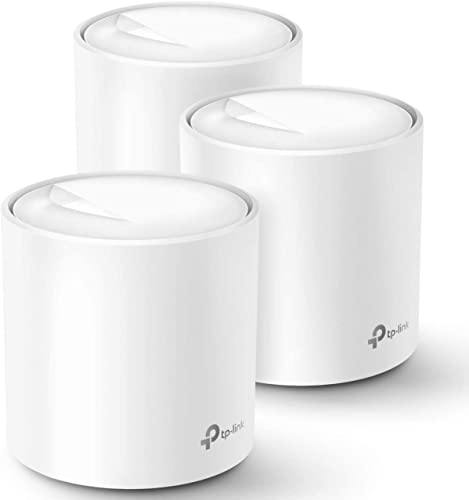
TP-Link Deco Dual-Band Wi-Fi 6 3-Pack
Best for: homes needing wide coverage under 1 Gbps
- Wireless Standard
- Wi-Fi 6
- Coverage Area
- Up to 5,800 sq ft
- Frequency Bands
- Dual-Band
- Device Capacity
- Up to 150 devices
- Pack Size
- 3-pack
- Color
- White
The TP-Link Deco X20 is a dual-band Wi-Fi 6 mesh system designed for whole-home coverage. This 3-pack setup covers up to 5,800 square feet and supports up to 150 connected devices. It uses Ethernet backhaul for stable connections between nodes. The system includes basic network security and parental controls via the Deco app. It is a practical option for homes needing reliable Wi-Fi 6 performance without tri-band speeds.
- Covers up to 5,800 square feet
- Supports up to 150 devices
- Uses Ethernet backhaul for stability
- Includes basic network security features
- Dual-band speeds are lower than the AXE5400 and BE9700 options on this list
- Single-gigabit ports limit speeds for plans over 1 Gbps
- No 10G or 2.5G WAN/LAN ports found in the data
- You need coverage for a home under 5,800 square feet
- You have an internet plan up to 1 Gbps
- You want a simple mesh setup with parental controls
- You require Wi-Fi 6E or Wi-Fi 7 speeds
- You have an internet plan faster than 1 Gbps
- You need dedicated tri-band wireless backhaul
Verdict: TP-Link Deco X20 3-Pack Mesh is a solid choice for households with standard gigabit internet plans who prioritize wide coverage over raw speed. It fits users who want reliable Wi-Fi 6 performance for up to 150 devices without needing the premium features of higher-end models.

TP-Link Archer Tri-Band WiFi 7 Router
Best for: Users needing 10G ports and USB storage
- Wireless Standard
- Wi-Fi 7
- Coverage Area
- 2,000 sq ft
- Frequency Bands
- Tri-Band
- Ethernet Port Speed
- 10 Gbps, 2.5 Gbps
- Color
- Black
- Wired Connectivity
- USB
The TP-Link Archer BE550 Pro is a Wi-Fi 7 router with tri-band speeds up to BE9700. It covers 2,000 square feet and includes one 10 Gbps WAN port and four 2.5 Gbps LAN ports. A USB 3.0 port allows for local storage sharing. This model suits users who need high-speed wired connections and a dedicated 6 GHz band for modern devices.
- Wi-Fi 7 standard with 320 MHz channels on the 6 GHz band
- One 10 Gbps WAN port and four 2.5 Gbps LAN ports
- USB 3.0 port for data transfers and storage sharing
- Covers up to 2,000 square feet with six internal antennas
- 2,000 square feet coverage is smaller than mesh systems in this guide
- Single router unit with no included satellite nodes for whole-home mesh
- 2.6 pound weight and larger footprint compared to compact mesh nodes
- You need a 10 Gbps port for a multi-gig modem
- You want to connect wired devices via multiple 2.5 Gbps ports
- You prefer a standalone router over a multi-pack mesh system
- You require seamless whole-home coverage without dead zones
- You need more than one 10 Gbps port for multiple devices
- You are looking for a compact, low-profile router design
Verdict: The TP-Link Archer BE550 Pro Tri-Band delivers high-speed tri-band performance and extensive wired connectivity. It fits users who prioritize fast LAN ports and local storage over automatic whole-home mesh coverage.

TP-Link Deco Tri-Band WiFi 6E 2-Pack
Best for: homes needing 2.5 Gbps wired backhaul
- Wireless Standard
- WiFi 6E
- Coverage Area
- up to 5,500 Sq. Ft.
- Frequency Bands
- Tri-Band
- Maximum Speed
- 5,400 Mbps
- Ethernet Port Speed
- 2.5 Gbps, 1 Gbps
- Device Capacity
- 200 devices
This TP-Link Deco XE75 Pro is a WiFi 6E tri-band mesh system sold in a 2-pack. It covers up to 5,500 square feet with a total bandwidth of 5,400 Mbps. The setup includes one 2.5 Gbps WAN/LAN port and two 1 Gbps LAN ports. It supports up to 200 devices. This system suits you if you need multi-gigabit wired connections and a dedicated 6 GHz backhaul for stable performance.
- Tri-band WiFi 6E with 5,400 Mbps total speed
- One 2.5 Gbps WAN/LAN port for multi-gig internet
- Dedicated 6 GHz band for stable node backhaul
- Covers up to 5,500 square feet
- Two-pack size covers less area than three-pack competitors
- 200-device capacity is lower than some other mesh systems
- 2.76-pound weight per unit is bulkier than standard routers
- You need a 2.5 Gbps port for fast wired connections
- You want a dedicated 6 GHz band for backhaul
- You have a home under 5,500 square feet
- You need coverage for more than 5,500 square feet
- You want to connect more than 200 devices
- You prefer a three-pack for larger homes
Verdict: TP-Link Deco XE75 Pro 2-Pack is a solid choice for users who prioritize wired speed and a dedicated 6 GHz backhaul. It fits homes up to 5,500 square feet that need multi-gigabit support.
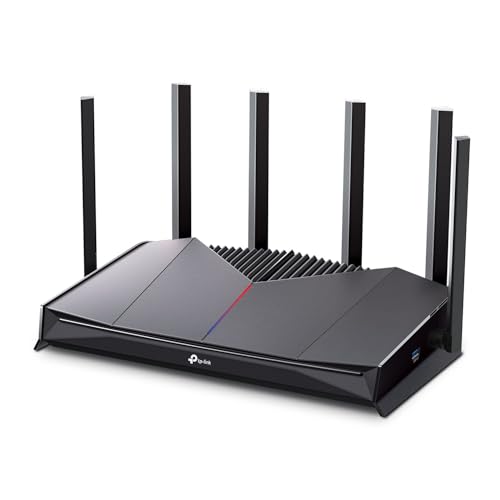
TP-Link Dual-Band Wi-Fi 7 Gaming Router
Best for: single-room gaming with multi-gigabit speeds
- Wireless Standard
- WiFi 7
- Coverage Area
- Up to 2,600 sq. ft.
- Frequency Bands
- Dual-Band
- Maximum Speed
- 6.5 Gbps
- Ethernet Port Speed
- 2.5 Gbps, 1 Gbps
- Device Capacity
- Up to 90 devices
The TP-Link Archer GE400 is a single-unit WiFi 7 router designed for gaming. It offers dual-band speeds up to 6.5 Gbps and covers up to 2,600 square feet. The device supports 90 connected devices and includes two 2.5 Gbps ports for high-speed wired connections. It features an RGB light and a dedicated game panel for traffic prioritization. This router suits gamers who need multi-gigabit throughput in a single-room setup.
- WiFi 7 standard with dual-band BE6500 speeds up to 6.5 Gbps
- Two 2.5 Gbps Ethernet ports for high-speed wired connections
- Covers up to 2,600 square feet with 90 device capacity
- Dedicated game panel for traffic prioritization and RGB light control
- Single-unit design covers only 2,600 square feet compared to mesh systems
- Dual-band configuration lacks the third band found in tri-band competitors
- 2.5 Gbps port count is lower than the 10 Gbps options on other picks
- You need multi-gigabit speeds for gaming in a single room
- You want WiFi 7 performance with dedicated game traffic prioritization
- You prefer a single router over a mesh system for small spaces
- You require whole-home coverage for large areas over 2,600 square feet
- You need tri-band performance to reduce congestion on multiple devices
- You want a mesh system for seamless roaming across multiple floors
Verdict: The TP-Link Archer GE400 Dual-Band BE6500 Gaming Router fits gamers who need high-speed wired connections and WiFi 7 performance in a single room. It is not suitable for large homes requiring whole-home mesh coverage.
Specifications side by side
| Spec | TP-Link Deco X55 3-Pack Wi-Fi 6 | TP-Link Deco Tri-Band WiFi 6E 2-Pack | TP-Link Deco Dual-Band WiFi 7 2-Pack | TP-Link Deco Dual-Band Wi-Fi 6 3-Pack | TP-Link Archer Tri-Band WiFi 7 Router | TP-Link Deco Tri-Band WiFi 6E 2-Pack | TP-Link Dual-Band Wi-Fi 7 Gaming Router |
|---|---|---|---|---|---|---|---|
| Wireless Standard | Wi-Fi 6 | WiFi 6E | Wi-Fi 7 | Wi-Fi 6 | Wi-Fi 7 | WiFi 6E | WiFi 7 |
| Coverage Area | up to 6500 Sq.Ft. | up to 5500 Sq.Ft | Up to 4,500 sq ft | Up to 5,800 sq ft | 2,000 sq ft | up to 5,500 Sq. Ft. | Up to 2,600 sq. ft. |
| Frequency Bands | – | Tri-Band | Dual-Band | Dual-Band | Tri-Band | Tri-Band | Dual-Band |
| Maximum Speed | – | up to 5,400 Mbps | 3.6 Gbps | – | – | 5,400 Mbps | 6.5 Gbps |
| Ethernet Port Speed | Gigabit | – | 2.5 Gbps | – | 10 Gbps, 2.5 Gbps | 2.5 Gbps, 1 Gbps | 2.5 Gbps, 1 Gbps |
| Device Capacity | up to 150 devices | 200 devices | 150 devices | Up to 150 devices | – | 200 devices | Up to 90 devices |
| Pack Size | 3-Pack | 2-Pack | 2-pack | 3-pack | – | 2-Pack | 1-pack |
| Wireless Connectivity | Wi-Fi | Wi-Fi | Wi-Fi | Wi-Fi | Wi-Fi | Wi-Fi | Wi-Fi |
| Color | Black, White | Black and White | White | White | Black | Black and White | Black |
| Connectivity | Wireless | – | Wired | Wireless, Wired | – | – | – |
| Wired Connectivity | Ethernet | – | – | Ethernet | USB | – | – |
| Band | – | Tri-Band | Dual-Band | Dual-Band | Tri-Band | Tri-Band | Dual-Band |
| Recommended Use | – | Gaming, Streaming | – | – | – | – | Gaming |
| Network Features | Ethernet Backhaul | – | Ethernet Backhaul | Ethernet Backhaul | – | – | – |
| Light Features | – | – | – | – | – | – | RGB Light |
| Placement | Indoor | – | – | – | – | – | – |
| Dimensions | 4.33 × 4.33 × 4.49 inches | 4.13 × 4.13 × 6.67 inches | 7.99 × 7.13 × 6.26 inches | 4.33 × 4.33 × 4.49 inches | 11.2 × 9.76 × 5.67 inches | 4.13 × 4.13 × 6.65 inches | 10.6 × 6.02 × 2.31 inches |
| Weight | 5.07 pounds | 2.69 pounds | – | – | 2.6 pounds | 2.76 pounds | 1.43 pounds |
| Size | 3 Pack | 2 Pack | 2 – Pack | 3 Pack | 2000 square_feet | 2 Pack | 1 Count (Pack of 1) |
| Model | Deco X55 | Deco XE75(2-pack) | Deco BE23(2-Pack) | Deco X20(3-pack) | Archer BE550 Pro | Deco XE75 Pro(2-pack) | Archer GE400 |
How to choose the right one
Check wireless standards
Match the Wi-Fi standard to your device needs. Wi-Fi 6, found in the Deco X55 and X20, handles many devices well. Wi-Fi 6E adds a 6 GHz band for less congestion, seen in the XE75 and XE75 Pro. Wi-Fi 7, like in the BE23 and BE550 Pro, offers the latest efficiency. Choose older standards if you want lower cost. Pick newer ones for future-proofing and handling dense networks in larger homes.
Evaluate port speeds
Look at Ethernet port speeds for wired connections. Gigabit ports, like those on the X55 and X20, support up to 1 Gbps. This suits most standard internet plans. Higher speeds matter if you have faster plans. The BE23 and XE75 Pro feature 2.5 Gbps ports. These handle multi-gigabit speeds better. The BE550 Pro adds 10 G ports. Check your internet plan speed before buying to ensure your ports can handle the load.
Determine band types
Decide between dual-band and tri-band systems. Dual-band models, such as the BE23 and X20, use two frequency ranges. They are cost-effective for smaller spaces. Tri-band systems, like the XE75 and BE550 Pro, add a third band. This extra band often serves as a dedicated backhaul. It improves stability for mesh networks. Choose tri-band for larger homes or if you have many connected devices that need consistent performance.
Assess coverage area
Match the system size to your home square footage. The X55 3-Pack covers up to 6,500 square feet. This fits medium to large homes. The XE75 Pro supports up to 5,500 square feet. Smaller homes may only need the BE23 2-Pack, which suits under 4,500 square feet. Single routers like the BE550 Pro cover about 2,000 square feet. Ensure the pack size matches your space to avoid weak spots in your network.
Consider physical size
Check dimensions for placement in your home. The X55 units measure 4.33 by 4.49 inches. They are compact and easy to hide. The XE75 models are taller at 6.67 inches. The BE23 units are wider, measuring 7.99 inches long. The BE550 Pro router is larger, at 11.2 inches long. Consider where you will place each unit. Smaller units fit better in tight spaces. Larger units may offer better heat dissipation but take up more room.
Frequently asked questions
Which TP-Link mesh system supports the latest Wi-Fi 7 standard?
The TP-Link Deco BE23 2-Pack and the Archer BE550 Pro both feature Wi-Fi 7. The Deco BE23 is a dual-band mesh system with 2.5 Gbps ports, ideal for homes under 4,500 square feet. The Archer BE550 Pro is a tri-band router with 10G and 2.5G ports, suited for users needing local storage and high-speed LAN connections rather than whole-home mesh coverage.
Do any of these models include 2.5 Gigabit Ethernet ports?
Yes, several models offer faster than standard gigabit ports. The Deco BE23 includes 2.5 Gbps ports for high-speed wired connections. The Deco XE75 Pro also features 2.5 Gbps ports, providing multi-gigabit support for homes up to 5,500 square feet. The Archer BE550 Pro goes further with both 2.5G and 10G ports for maximum wired throughput.
Which TP-Link system is best for large homes needing wide coverage?
The Deco X55 3-Pack is designed for medium to large homes, covering up to 6,500 square feet. It uses Wi-Fi 6 and gigabit Ethernet ports to maintain stability across that area. The Deco XE75 Pro 2-Pack is another option for large spaces, supporting up to 5,500 square feet with tri-band Wi-Fi 6E and dedicated 6 GHz backhaul.
Can I use these systems for gaming?
The Deco XE75 2-Pack is recommended for gaming and streaming due to its tri-band Wi-Fi 6E architecture. It provides the 6 GHz band for reduced congestion and high device capacity. The Archer GE400 is also built for gaming, offering Wi-Fi 7 performance and 2.5G ports, though it is a single router best for single-room setups rather than whole-home mesh.
What is the difference between Wi-Fi 6 and Wi-Fi 6E?
Wi-Fi 6, found in the Deco X55 and X20, handles many devices well on existing bands. Wi-Fi 6E adds a 6 GHz band, seen in the XE75 and XE75 Pro models. This extra band reduces congestion and provides more stability for high-bandwidth activities. The newer Wi-Fi 7 standard in the BE23 and Archer BE550 Pro offers even greater efficiency and speed.
Do these mesh systems support wired backhaul?
Yes, several Deco models support Ethernet backhaul for stable connections between units. The Deco X55 and Deco X20 both feature this capability, ensuring strong signal strength throughout the home. The Deco BE23 also includes Ethernet backhaul. This wired connection between nodes is more reliable than wireless-only backhaul for maintaining speed across large areas.
Which model includes USB connectivity for storage?
The Archer BE550 Pro is the only listed model that includes USB connectivity. It is a tri-band Wi-Fi 7 router with 2.5G and 10G Ethernet ports. This model is designed for users who prioritize fast LAN ports and local storage over automatic whole-home mesh coverage, making it suitable for specific single-location setups rather than multi-unit mesh networks.
How many devices can these systems support?
The Deco X20 is noted for supporting up to 150 devices, making it a solid choice for households with many connected gadgets. The Deco XE75 models also offer high device capacity, leveraging their tri-band Wi-Fi 6E architecture to manage congestion. The Deco X55 prioritizes device capacity alongside wired connectivity, making it suitable for homes with numerous active connections.


