Best ULTRALOQ Smart Locks for Front Door in 2026: 2 Picks
We compare 2 ULTRALOQ smart locks for your front door. Our analysis focuses on published specs like connectivity and entry methods to find the right fit.
As Amazon Associates, we earn from qualifying purchases. This means we may receive a small commission at no extra cost to you if you click through and make a purchase.
As an Amazon Associate we earn from qualifying purchases. Links on this page are affiliate links.
Finding the best ULTRALOQ smart locks for front door requires comparing key technical details. We analyzed 2 models based strictly on their published specifications. The top pick is the ULTRALOQ U-Bolt Pro WiFi Deadbolt. It leads because it combines built-in Wi-Fi with a fingerprint sensor for direct remote access and high security. This guide helps you decide which lock fits your entryway by focusing on connectivity, entry methods, and physical dimensions.
Check wireless connectivity and entry method
Your front door needs specific connectivity and access methods. The top pick, the ULTRALOQ U-Bolt Pro, includes built-in Wi-Fi and fingerprint entry. It controls via app or remote. The second option, the ULTRALOQ Latch 5, also has built-in Wi-Fi but adds a touchscreen keypad. Choose based on whether you prefer fingerprint scanning or keypad codes for your specific door type.
| # | Product | Best for | Price |
|---|---|---|---|
| 1 | ULTRALOQ U-Bolt Pro WiFi Deadbolt Best overall | front doors needing remote access and high security | |
| 2 | ULTRALOQ Latch 5 Touchscreen Smart Lever Lock Best keypad | lever door owners needing built-in Wi-Fi |
The best fit for you
- You need remote access and high security for your front door – ULTRALOQ U-Bolt Pro WiFi Deadbolt – Built-in Wi-Fi and fingerprint entry provide direct connectivity and strong security.
- You have a lever door and want built-in Wi-Fi – ULTRALOQ Latch 5 Touchscreen Smart Lever Lock – This lever lock includes a touchscreen keypad and native Wi-Fi for remote control.
- You want a compact deadbolt with auto-lock features – ULTRALOQ U-Bolt Pro WiFi Deadbolt – It measures 2.95 inches wide and includes auto-lock for convenience.
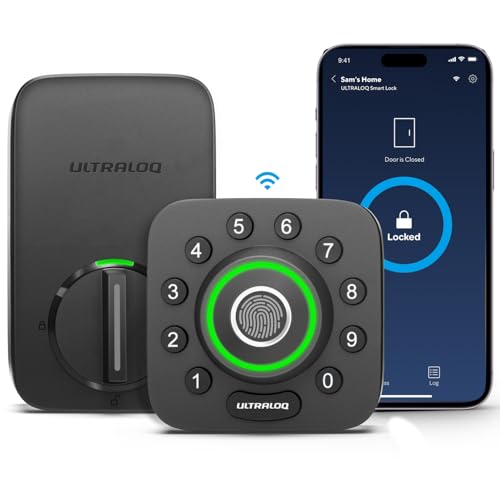
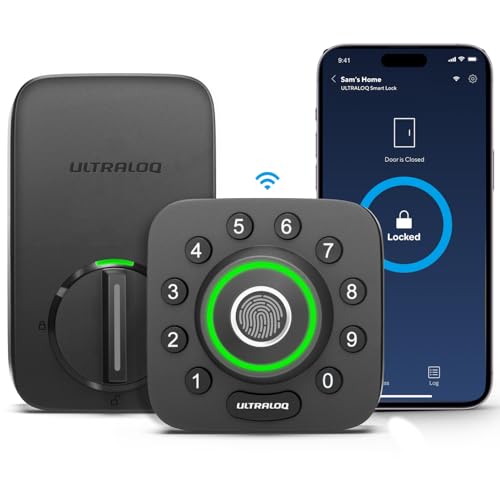
ULTRALOQ U-Bolt Pro WiFi Deadbolt
Best for: front doors needing remote access and high security
- Application
- Front Door
- Unlock Methods
- Fingerprint, passcode, app, key, voice
- Wireless Connectivity
- 2.4GHz Wi-Fi, Bluetooth
- Smart Home Compatibility
- Alexa, Google Home, SmartThings, IFTTT
- Installation Type
- Deadbolt replacement
- Security Certification
- ANSI Grade 1
The ULTRALOQ U-Bolt Pro is a deadbolt with built-in Wi-Fi and a door sensor. It supports eight entry methods, including fingerprints and passcodes. It meets ANSI Grade 1 standards for durability. The lock auto-locks when the door closes. You can control it remotely via the app. It works with Alexa and Google Home. This lock suits front doors needing robust security and remote access.
- Meets ANSI Grade 1 security standards
- Built-in Wi-Fi requires no hub
- Stores up to 100 fingerprints
- Auto-locks via door sensor detection
- IP65 weatherproof rating for exterior use
- Wi-Fi connectivity limited to 2.4GHz bands
- Supports only 50 passcodes
- Includes only an 18-month electronic guarantee
- You want direct Wi-Fi control without extra hardware
- You need high security for a front door
- You want to share access remotely via app
- You require 5GHz Wi-Fi support
- You need more than 50 unique passcodes
- You want a longer than 18-month warranty
Verdict: The ULTRALOQ U-Bolt Pro WiFi Deadbolt offers strong security and convenient remote management for homeowners who value durability and direct connectivity.
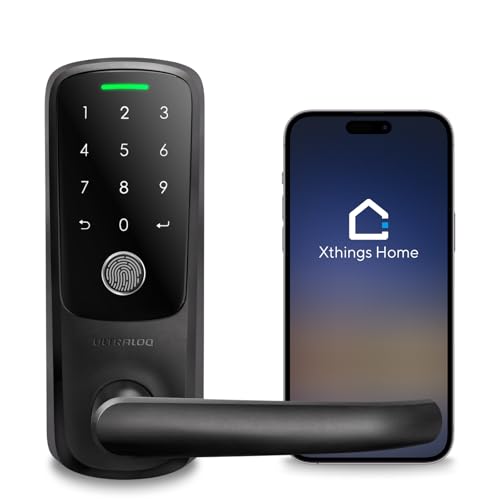
ULTRALOQ Latch 5 Touchscreen Smart Lever Lock
Best for: lever door owners needing built-in Wi-Fi
- Application
- Front Door
- Unlock Methods
- App, Fingerprint, Code, Mechanical Key
- Wireless Connectivity
- 2.4GHz Wi-Fi
- Installation Type
- Smart lever lock
- Auto-Lock Function
- Auto lock
- Entry Method
- Keypad, Fingerprint
The ULTRALOQ Latch 5 is a WiFi-enabled lever lock designed for front doors. It features a touchscreen keypad, fingerprint scanner, app control, and mechanical key. The built-in 2.4GHz Wi-Fi allows remote access management without a gateway. Its zinc alloy body offers weatherproof durability. This lock suits homeowners and rental hosts who need secure, keyless entry with remote sharing capabilities.
- Built-in 2.4GHz Wi-Fi for remote app control
- Touchscreen digital keypad for code entry
- Fingerprint recognition for quick access
- Zinc alloy construction for weatherproof durability
- Auto-lock function for added security
- Limited to 2.4GHz Wi-Fi only
- Requires lever-style door hardware
- Black finish option only in primary data
- You need a lever-style smart lock
- You want remote access via built-in Wi-Fi
- You prefer fingerprint and code entry methods
- You have a knob-style door
- You require 5GHz Wi-Fi support
- You need a deadbolt mechanism
Verdict: ULTRALOQ Latch 5 Smart Lever Lock fits users with lever doors who need remote access without extra hardware. It offers reliable keyless entry for homes and rentals.
Specifications side by side
| Spec | ULTRALOQ U-Bolt Pro WiFi Deadbolt | ULTRALOQ Latch 5 Touchscreen Smart Lever Lock |
|---|---|---|
| Unlock Methods | Fingerprint, passcode, app, key, voice | App, Fingerprint, Code, Mechanical Key |
| Wireless Connectivity | 2.4GHz Wi-Fi, Bluetooth | 2.4GHz Wi-Fi |
| Smart Home Compatibility | Alexa, Google Home, SmartThings, IFTTT | – |
| Installation Type | Deadbolt replacement | Smart lever lock |
| Security Certification | ANSI Grade 1 | – |
| User Code Capacity | Up to 50 codes | – |
| Auto-Lock Function | Door sensor detection | Auto lock |
| Application | Front Door | Front Door |
| Entry Method | Fingerprint | Keypad, Fingerprint |
| Color | Black | Black |
| Lock Type | Deadbolt | – |
| Keypad Type | – | Touchscreen |
| Special Features | Auto-Lock | Auto-Lock |
| Control Method | App Control, Remote Control | App Control, Remote Control |
| Room | – | Home Office |
| Dimensions | 2.95 × 2.95 × 1.19 inches | 3.5 × 6.5 × 7 inches |
| Weight | 2.8 pounds | – |
| Size | Bluetooth + Built-in WiFi + Door Sensor | Fingerprint |
| Model | U-BOLT-PRO-WiFi | Latch 5 |
How to choose the right ULTRALOQ lock
Check wireless connectivity type
You need to verify how the lock connects to your network. Built-in Wi-Fi allows direct remote access without a separate hub. The ULTRALOQ U-Bolt Pro WiFi Deadbolt includes this feature for immediate app control. Some models rely on Bluetooth, which requires proximity. If you want to lock or unlock your door from anywhere, look for the Wi-Fi specification. This ensures you have full remote management capabilities for your front door without extra hardware.
Select the correct lock type
Match the lock mechanism to your door hardware. Deadbolts fit standard rectangular door preparations. Lever locks are designed for doors with lever handles. The ULTRALOQ Latch 5 Touchscreen Smart Lever Lock is built specifically for lever doors. Using the wrong type can compromise security or prevent installation. Check your door handle style before buying. A deadbolt works for most front doors, while lever locks are essential for specific handle designs. Ensure the physical form factor matches your existing door setup.
Choose your entry method
Decide how you want to unlock the door daily. Fingerprint sensors offer quick, keyless entry. Keypads allow code-based access for guests or family members. The ULTRALOQ U-Bolt Pro uses a fingerprint sensor for fast entry. The Latch 5 combines both keypad and fingerprint options. Consider who needs access and how often. Fingerprint readers are convenient for residents. Keypads are useful for temporary codes. Select the method that best fits your household routine and security preferences for the front door.
Verify auto-lock feature
Auto-lock ensures your door secures itself after entry. This feature prevents accidental leaving of the door unlocked. Both listed ULTRALOQ models include this specification. It adds a layer of security without requiring manual action. You do not need to remember to turn the lock. This is particularly useful for busy households. Check the special features list for this capability. It provides peace of mind by automatically engaging the deadbolt or lever mechanism after you pass through.
Consider control methods
Look at how you manage the lock remotely. App control allows you to monitor status from your phone. Remote control capability means you can operate it from outside the local network. Both top picks support app and remote control via Wi-Fi. This lets you grant access to visitors while you are away. Verify that the control method matches your smartphone ecosystem. Direct Wi-Fi connectivity simplifies this process. Ensure you can view lock status and change settings easily through your preferred device.
Frequently asked questions
Does the ULTRALOQ U-Bolt Pro require a hub for Wi-Fi?
No, it does not require a separate hub. The lock features built-in Wi-Fi connectivity. This allows direct remote access and app control. You can manage the deadbolt from anywhere. The design includes a door sensor for added status tracking. This setup simplifies installation for front doors.
What entry methods does the ULTRALOQ Latch 5 support?
The ULTRALOQ Latch 5 supports keypad and fingerprint entry. It uses a touchscreen keypad for code access. You can also unlock it using your fingerprint. This lever lock is designed for homes and rentals. The dual entry methods provide flexible access options for daily use.
Can I control these locks remotely without being home?
Yes, you can control them remotely. Both models include built-in Wi-Fi for direct connection. You can use the app or remote control features. This allows you to lock or unlock the door from a distance. The connectivity ensures you stay connected to your front door security.
Is the ULTRALOQ U-Bolt Pro suitable for heavy front doors?
It is designed for durability and security. The deadbolt type offers strong protection for entryways. It weighs 2.8 pounds for sturdy mounting. The black finish suits many exterior styles. You get auto-lock features for added convenience. This makes it a reliable choice for primary entrances.
Does the Latch 5 work with standard lever doors?
Yes, it is specifically designed for lever doors. The ULTRALOQ Latch 5 replaces existing lever hardware. It fits well in homes and office spaces. The touchscreen keypad is integrated into the design. You get keyless entry without needing extra adapters. This simplifies the upgrade for lever-style entrances.
What is the difference between the U-Bolt Pro and Latch 5?
The U-Bolt Pro is a deadbolt with built-in Wi-Fi. The Latch 5 is a lever lock with a touchscreen. Both offer app and remote control via Wi-Fi. The U-Bolt Pro includes a door sensor. The Latch 5 focuses on lever door compatibility. Choose based on your door hardware type.
Do these smart locks include auto-lock features?
Yes, both models include auto-lock capabilities. The U-Bolt Pro deadbolt locks automatically. The Latch 5 lever lock also auto-locks. This feature enhances security by ensuring the door is secured. You do not need to remember to lock it manually. It provides consistent protection for your front door.


