Dell Monitors & Displays
Dell 34-Inch Curved Ultrawide Monitors: Creator and Workflow Guide
A dell 34 curved monitor provides digital creators, vloggers, and office multitaskers with an uninterrupted 21:9 panoramic workspace that replaces clumsy multi-screen setups. By eliminating center bezels, an expansive dell curved ultrawide monitor keeps video editing timelines, audio mixers, color scopes, and productivity suites open side by side without constant tab switching. The natural curve…

As Amazon Associates, we earn from qualifying purchases. This means we may receive a small commission at no extra cost to you if you click through and make a purchase.
A dell 34 curved monitor provides digital creators, vloggers, and office multitaskers with an uninterrupted 21:9 panoramic workspace that replaces clumsy multi-screen setups. By eliminating center bezels, an expansive dell curved ultrawide monitor keeps video editing timelines, audio mixers, color scopes, and productivity suites open side by side without constant tab switching. The natural curve keeps visual elements at an ergonomic viewing distance, making long post-production sessions and complex desktop workflows far more comfortable.
This article covers exactly five 34-inch curved monitors manufactured by Dell, each tailored for different desk priorities. Across these displays, you will find variations in panel technology, refresh rate, integrated audio, docking hub wattage, and video conferencing hardware. Whether you need an accurate color-calibrated display for video production, a high-refresh panel for fluid playback, or a streamlined dell ultrawide usb c hub monitor, understanding how these models differ will help you decide which dell 34 curved monitor to buy for your creative studio.
Which Dell Curved Monitors Should You Buy
All 5 models on this page, side by side


Prices are read from the Amazon product listing and change there, not here. Scores are out of 10, based on listed specifications and buyer feedback.
Why each one is on the list
- Dell UltraSharp 34 Curved Thunderbolt Hub: Best for color-critical video editors, Mac users, and dual-system workstations requiring IPS Black contrast and built-in KVM switching.
- Dell 34 Monitor S3425DW: Best for creators seeking deep 3000:1 contrast, smooth 120Hz visuals, and integrated 65W USB-C laptop charging for everyday media work.
- Dell UltraSharp 34 Monitor: Best for productivity specialists who need Picture by Picture multitasking, multi-screen digital daisy chaining, and IPS color stability.
- Dell S3425DW 34″ Plus Curved Monitor: Best for desk setups built from scratch that benefit from an included HDMI cable, cable ties, and an LCD care kit.
- Dell P3424WEB 34 Curved Video Conferencing: Best for remote professionals, streamers, and managers needing a certified pop-up 2K QHD webcam, echo-canceling mics, and 90W USB-C power delivery.
01 Dell UltraSharp 34 Curved Thunderbolt Hub

Best for Multitasking editors needing daisy chaining and PBP
Pros
- IPS panel with 120Hz refresh
- Digital daisy chain support
- Picture by Picture capability
Cons
- Listing notes glossy screen finish
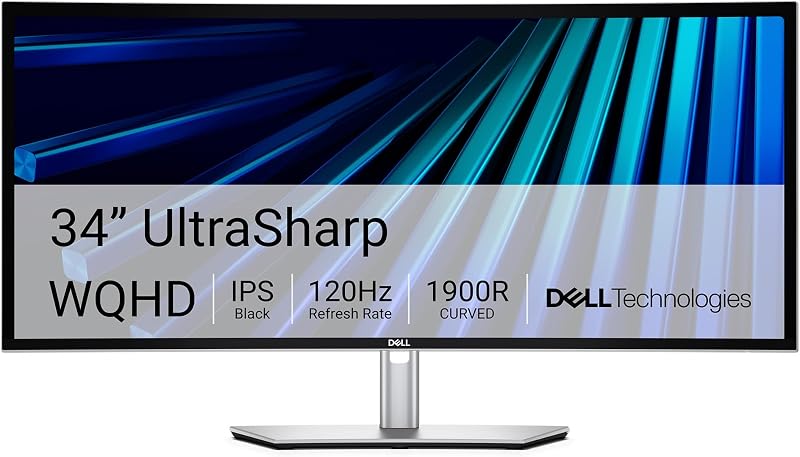
Best for Color-critical video editors and Mac workstation users
Pros
- 98% Display P3 coverage
- IPS Black 2000:1 contrast
- Integrated KVM switch
Cons
- Refresh rate not specified in listing
The Dell UltraSharp 34 Curved Thunderbolt Hub serves as a flagship workstation display engineered specifically for creative professionals, developers, and executives. Built around a 34.1-inch IPS Black panel, it delivers an impressive 2000:1 contrast ratio that produces noticeably deeper shadow detail and richer dark tones than standard IPS technology while retaining wide viewing angles. Creators benefit from 98% Display P3 color space coverage alongside factory-calibrated Delta E color accuracy of less than 2, guaranteeing dependable color fidelity for grading video footage and refining digital imagery right out of the box.
Connectivity is a standout feature for complex studio environments. The display includes Thunderbolt integration alongside fast Ethernet connectivity to provide stable network drops for large asset rendering. Dual-system users can spread their applications across the 21:9 canvas and operate two machines, such as a desktop editing rig and a mobile laptop, using a single mouse and keyboard via the integrated KVM switch. For creative teams comparing desk footprints against a larger dell ultrawide monitor, this unit offers an exceptional balance of desk real estate and hub convenience. It also serves as an ideal dell 34 inch curved monitor for mac, having been tested with macOS hardware and supporting system adjustments via the Dell Display and Peripheral Manager utility.
Visually, the monitor features a light ash exterior and a near-borderless curved profile that complements modern editing suites. The listing does not specify the refresh rate or exact USB-C charging wattage figures. This model gives way to the Dell P3424WEB when dedicated onboard teleconferencing hardware is mandatory, or to the S3425DW when high-refresh gaming performance takes priority over certified color accuracy.
- Factory-calibrated Delta E under 2 with 98% Display P3 coverage
- IPS Black panel technology providing a 2000:1 contrast ratio
- Integrated KVM switch for controlling two computers simultaneously
- Thunderbolt connectivity with fast Ethernet and macOS compatibility
02 Dell 34 Monitor S3425DW

Best for Everyday creators seeking smooth 120Hz contrast performance
Pros
- High 3000:1 VA contrast
- Fluid 120Hz refresh rate
- 65W USB-C power delivery
Cons
- 65W power limit for high-draw laptops
The Dell 34 Monitor S3425DW combines fluid multimedia performance with dependable daily productivity. Constructed with a 34-inch VA panel, it achieves a high 3000:1 contrast ratio that ensures deep black levels and sharp contrast during dark-scene video editing and entertainment viewing. Visual performance is bolstered by a smooth 120Hz refresh rate, AMD FreeSync Premium support, and an ultra-low 0.03ms response time that eliminates screen tearing and motion stutter during high-frame-rate timeline playback.
Color performance covers 99% sRGB and 95% DCI-P3, accompanied by HDR readiness for vivid detail. Desktop cable management is streamlined through a single USB-C connection that handles video, data, and up to 65W of power delivery to connected laptops. Dell has also re-engineered the integrated audio system to deliver greater output power, wider decibel dynamics, and deeper low-frequency response compared to earlier iterations, eliminating the need for dedicated desktop speakers in tight editing spaces.
The screen utilizes a glare-reducing matte finish, 300 nits of brightness, and a 109 pixel pitch. While the 65W power limit may not fully charge power-hungry mobile workstations under continuous heavy rendering, it offers outstanding capability for general creative workflows before stepping aside for the higher color precision of the UltraSharp tier.
- VA panel delivering a 3000:1 contrast ratio with HDR readiness
- 120Hz refresh rate paired with AMD FreeSync Premium and 0.03ms response
- Single USB-C connection supplying video, data, and 65W power delivery
- Improved ComfortView Plus hardware blue light reduction certified for eye comfort
03 Dell UltraSharp 34 Monitor
The Dell UltraSharp 34 Monitor, identified in its listing details as the Dell UltraSharp 34 Monitor U3425WE, brings high-level multitasking and fluid display technology to professional creators. Spanning 34.1 inches with an IPS panel and a 2000:1 contrast ratio, it ensures vibrant color consistency across wide 178-degree viewing angles. A smooth 120Hz refresh rate, flicker-free panel, and G-SYNC compatibility ensure responsive cursor movement, fluid timeline scrubbing, and reduced visual fatigue during long editing marathons.
Multi-source productivity is central to this monitor’s feature set. With Picture by Picture functionality, editors can display inputs from two separate computers simultaneously on the 21:9 ultrawide panel. When managing expansive multi-screen setups, the integrated digital daisy chain capability lets you link secondary displays directly without running multiple long cables to your primary host system. An ambient light sensor actively measures studio illumination to adjust brightness automatically, complementing Improved ComfortView Plus for all-day eye protection.
The display is supported by a secure locking stand and features a black and silver finish. Although the listing notes an anti-glare design, its specification field also lists a glossy screen finish. Creators deciding whether this screen size suits their workspace can weigh it against a larger dell 38 inch curved monitor to balance desk depth with vertical timeline space. This UltraSharp monitor stands out for multi-source workstation setups, yielding to the P3424WEB when unified video conferencing hardware is preferred.
- IPS display technology featuring a 2000:1 contrast ratio and 120Hz refresh
- Picture by Picture support for simultaneous multi-source viewing
- Digital daisy chaining for clean multi-monitor configurations
- Integrated ambient light sensor and ergonomic locking stand
04 Dell S3425DW 34″ Plus Curved Monitor

Best for Users building a complete desk from scratch
Pros
- Includes HDMI cable and care kit
- Smooth 120Hz WQHD curved panel
- Single-cable USB-C connectivity
Cons
- Specification sheet lists 4:3 aspect ratio
The Dell S3425DW 34″ Plus Curved Monitor bundle provides creators with an out-of-the-box workstation upgrade that includes essential setup accessories. Alongside the 34-inch curved display, this package includes a 6.6-foot HDMI cable, a 10-piece cable tie pack for tidy wire routing, and an LCD care kit to maintain a clean display surface. This package simplifies desk outfitting by providing installation and maintenance tools directly in the box.
The display itself delivers a crisp 3440 x 1440 WQHD resolution across an expansive curved canvas, providing 33 percent more horizontal screen space than standard widescreen panels. Its curved geometry wraps naturally around your field of vision, maintaining a uniform viewing distance from center to edge to alleviate eye strain during long production sessions. With a responsive 120Hz refresh rate and a 4ms response time, panning across timelines and navigating complex applications remains smooth and fluid.
USB-C connectivity combines display signal, high-speed data transfer, and laptop charging into a single cable, keeping your workspace clutter-free. The monitor is finished in an Ash White chassis and weighs 21.8 pounds. Note that while its specification table lists a 4:3 aspect ratio, the product description and 3440 x 1440 WQHD resolution confirm an ultrawide workspace. This bundled option is tailored for creators setting up an entire workspace from scratch, though users who already own cables and maintenance supplies may prefer the standalone S3425DW listing.
- Complete accessory bundle with HDMI cable, cable ties, and LCD care kit
- 3440 x 1440 WQHD resolution delivering 33% more horizontal workspace
- 120Hz refresh rate paired with a 4ms response time for fluid visuals
- Single-cable USB-C connectivity for video, data, and laptop charging
05 Dell P3424WEB 34 Curved Video Conferencing
Best for Remote professionals prioritizing integrated video meeting hardware
Pros
- Pop-up 2K STARVIS webcam
- 90W Always On USB-C charging
- Certified for Teams and Zoom
Cons
- Standard 60Hz refresh rate
The Dell P3424WEB 34 Curved Video Conferencing monitor is specifically engineered to streamline remote communication for editors, team leads, and live broadcasters. Often designated as the Dell P3424WEB video conferencing monitor, it integrates communication hardware directly into the display bezel. Its central highlight is a 2K QHD pop-up webcam powered by a Sony STARVIS sensor that is 29.5 percent larger than prior generations. This sensor utilizes temporal 3D and spatial 2D noise reduction to preserve crisp image quality in challenging lighting, while AI auto framing keeps you centered during video calls.
Audio and operational integration are equally advanced. Built directly into the top of the monitor are dual 5W speakers alongside dual echo-canceling microphones for natural voice transmission. The monitor holds official Zoom certification and includes dedicated touch controls certified for Microsoft Teams, allowing you to join meetings instantly. Hardware privacy is protected by a physical webcam shutter and a dedicated microphone mute button. To anchor your workstation, the monitor provides RJ45 Ethernet, two quick-access 5Gbps USB ports, and USB-C delivering up to 90W of Always On Power Delivery that charges laptops even when the display is switched off.
Operating across a 34-inch canvas with a 21:9 aspect ratio, 300 cd/m² brightness, and a 1000:1 contrast ratio, this monitor features a 60Hz refresh rate. While animators and gamers may prefer the 120Hz refresh rates of the UltraSharp or S-series models, this display is unmatched for remote meetings and collaborative production. Creators who need significantly more physical display width for massive timeline arrangements might also consider the scale of a dell 40 inch curved monitor, but the P3424WEB remains the definitive all-in-one conferencing solution.
- Built-in 2K QHD webcam with large Sony STARVIS sensor and AI auto framing
- Dual 5W integrated top speakers with dual echo-canceling microphones
- USB-C docking hub with up to 90W Always On Power Delivery and RJ45 Ethernet
- Hardware mute button, manual webcam privacy shutter, and Teams touch controls
What Sets These Models Apart
| Model | Panel & Contrast | Refresh Rate | Key Workflow Capability |
|---|---|---|---|
| Dell UltraSharp 34 Curved Thunderbolt Hub | IPS Black (2000:1) | Not Specified | 98% Display P3, KVM switch, Thunderbolt hub |
| Dell 34 Monitor S3425DW | VA (3000:1) | 120Hz | 65W USB-C, 0.03ms response, re-engineered audio |
| Dell UltraSharp 34 Monitor | IPS (2000:1) | 120Hz | Picture by Picture, daisy chaining, ambient sensor |
| Dell S3425DW 34″ Plus Curved Monitor | VA (Listing spec 4:3) | 120Hz | Bundled HDMI cable, cable ties, and LCD care kit |
| Dell P3424WEB 34 Curved Video Conferencing | VA / LED / IPS (1000:1) | 60Hz | 2K STARVIS webcam, 90W USB-C, Teams and Zoom certified |
Buying Tips for Dell Curved Monitors
When conducting a dell 34 curved monitor comparison, panel technology should be your primary consideration. If your workflow involves color grading, digital design, or working in well-lit studios, models equipped with IPS or IPS Black panels provide superior color consistency and wider viewing angles, maintaining accurate color rendering across the entire curve. Conversely, if you frequently edit video in dim environments or value deep shadow detail for casual entertainment, VA panels with 3000:1 contrast ratios deliver richer blacks and punchier contrast.
Docking hub functionality is another critical factor in determining the best dell 34 curved monitor for your workflow. Choosing a display with robust USB-C power delivery allows you to power your laptop, output video, and access external peripherals through a single cable. If you use a high-draw workstation laptop, models with 90W power delivery like the P3424WEB ensure consistent charging under heavy export loads, while models with Thunderbolt and KVM switches make it effortless to jump between personal and professional computers without re-plugging cables.
Finally, evaluate refresh rates alongside your specific production tasks. A 120Hz refresh rate makes timeline scrubbing, cursor tracking, and application navigation significantly smoother, reducing eye strain during long editing hours. However, if your daily schedule centers around client meetings, remote instruction, or team collaboration, an integrated 60Hz solution like the P3424WEB saves desktop space by packaging an auto-framing webcam, echo-canceling microphones, and physical privacy controls directly into the display housing.
FAQ
Which Dell 34 curved monitor is best for Mac users?
The Dell UltraSharp 34 Curved Thunderbolt Hub is specifically tailored for Mac environments. It has been tested with macOS devices, covers 98% of the Display P3 color space, and works with the Dell Display and Peripheral Manager utility for fine-tuning display settings directly from macOS.
How does Dell IPS Black technology compare to VA panels on curved displays?
IPS Black technology achieves a 2000:1 contrast ratio, doubling the depth of traditional IPS blacks while preserving broad viewing angles and precise color accuracy. VA panels provide even deeper native contrast ratios of 3000:1, making them exceptional for dark-room viewing, though IPS Black maintains superior color uniformity across the ultrawide curve.
Can a Dell curved ultrawide monitor replace a dual-monitor setup?
Yes, a 34-inch ultrawide display with a 21:9 aspect ratio provides approximately 33 percent more horizontal workspace than a standard widescreen display. This allows you to position timelines, browser windows, and reference monitors side by side without a distracting center bezel.
What is the benefit of a built-in KVM switch on a Dell ultrawide monitor?
A built-in KVM switch lets you connect two separate computers to the same monitor and switch control between them using a single keyboard and mouse. This is ideal for professionals who juggle a personal laptop and an employer-issued workstation at the same desk.
Does the Dell video conferencing monitor require external software for auto framing?
The Dell P3424WEB 34 Curved Video Conferencing monitor features hardware-driven AI auto framing combined with 2D and 3D noise reduction directly through its integrated 2K QHD Sony STARVIS camera system, keeping you centered in frame during calls across supported platforms.


