LG UltraFine 32 Monitor Lineup: Which Display Fits Your Workflow?
Choosing the right 32-inch monitor for a creative or productivity desk setup requires balancing screen real estate, panel architecture, resolution scaling, and port connectivity. LG’s dedicated 32-inch lineup bridges everyday office computing, color-critical media production, and high-bandwidth workstation docks. When investing in an lg ultrafine 32 display, you gain an expansive 31.5-inch to 32-inch visual…

As Amazon Associates, we earn from qualifying purchases. This means we may receive a small commission at no extra cost to you if you click through and make a purchase.
Choosing the right 32-inch monitor for a creative or productivity desk setup requires balancing screen real estate, panel architecture, resolution scaling, and port connectivity. LG’s dedicated 32-inch lineup bridges everyday office computing, color-critical media production, and high-bandwidth workstation docks. When investing in an lg ultrafine 32 display, you gain an expansive 31.5-inch to 32-inch visual canvas that accommodates dense editing timelines, complex audio tracks, dual document views, and code editors without the visual clutter of dual-bezel seams. Understanding how panel technology impacts your specific tasks ensures that you select a screen that enhances your daily creative flow.
This comprehensive guide examines six distinct models in the LG 32-inch family. While each display shares a standard 16:9 aspect ratio and 60Hz refresh rate, their internal engineering differs significantly across panel types, color spaces, and data throughput. In this lg ultrafine 32 comparison, we evaluate options ranging from high-contrast VA panels tailored for document management and media viewing, to color-accurate IPS panels calibrated for graphic design, up to flagship Nano IPS Black hardware boasting 6K pixel density and next-generation Thunderbolt 5 connectivity.
Which LG Monitors Should You Buy
All 6 models on this page, side by side


Prices are read from the Amazon product listing and change there, not here. Scores are out of 10, based on listed specifications and buyer feedback.
Why each one is on the list
- For general productivity and media entertainment with integrated audio: choose the LG 32UR500K-B Ultrafine 32-inch 4K UHD.
- For MacBook and USB-C laptop workflows requiring single-cable power and data: choose the LG 32UP83AK-W 32-inch Ultrafine 4K UHD.
- For print design and color-conscious photo editing requiring out-of-the-box accuracy: choose the LG 32″ Class Ultrafine 4K UHD.
- For studio professionals, high-end video editors, and visual artists demanding maximum pixel density: choose the LG 32U990A-S 32-Inch Ultrafine 6K.
- For spreadsheet multitasking and vertical coding with deep contrast and flexible positioning: choose the LG 32UR550K-B 32-inch Ultrafine 4K UHD.
- For borderless multi-monitor desks and window-snapping productivity: choose the LG 32U700B-B 32-inch Ultrafine 4K UHD.
01 LG 32UR500K-B Ultrafine 32-inch 4K UHD

Best for Budget home office users needing built-in audio
Pros
- Crisp 4K UHD resolution
- Waves MaxxAudio stereo sound
- OnScreen Control software support
Cons
- Tilt-only stand adjustment
- Modest 250 cd brightness
The LG 32UR500K-B Ultrafine 32-inch 4K UHD serves as a versatile desktop solution for creators and remote professionals who require crisp UHD clarity without an overly complex hardware footprint. Delivering a native resolution of 3840 x 2160 across a 31.5-inch active display area, this monitor presents four times the pixel detail of traditional 1080p screens. Its VA panel architecture yields a 1000:1 contrast ratio and reaches a brightness rating of 250 cd/m², supporting up to 90% coverage of the DCI-P3 color gamut alongside HDR10 decoding. The anti-glare matte finish maintains comfortable legibility in shared rooms or offices with mixed overhead lighting.
Integrated audio is a notable strength of this model, featuring built-in stereo speakers enhanced by Waves MaxxAudio processing. This makes the display well-suited for video conference calls, audio monitoring during rough video edits, and evening media consumption without requiring external desktop speakers. Ergonomically, the included stand provides smooth forward and backward tilt adjustments, while LG’s OnScreen Control software allows users to split the desktop canvas into customized zones using quick mouse clicks instead of navigating physical monitor buttons.
Creative hobbyists who also enjoy casual gaming will appreciate the inclusion of Dynamic Action Sync and Black Stabilizer technologies. Dynamic Action Sync reduces input processing lag so on-screen actions respond swiftly, while Black Stabilizer brightens deeply shadowed game scenes to reveal hidden details. With two HDMI inputs and a dedicated DisplayPort, the lg 32ur500k-b effortlessly connects to both a primary workstation and a secondary streaming box or console.
- 31.5-inch 4K UHD display delivering 3840 x 2160 resolution with 90% DCI-P3 color expression
- Built-in stereo speakers powered by Waves MaxxAudio for rich desktop sound
- OnScreen Control software support for instant desktop partitioning and monitor setting adjustments
- Dual HDMI ports and one DisplayPort connection for flexible multi-device management
02 LG 32UP83AK-W 32-inch Ultrafine 4K UHD
Best for Laptop creators needing single-cable USB-C docking
Pros
- 60W USB-C power delivery
- Wide-angle IPS color consistency
- Full tilt, height, and pivot stand
Cons
- Standard 60Hz refresh rate
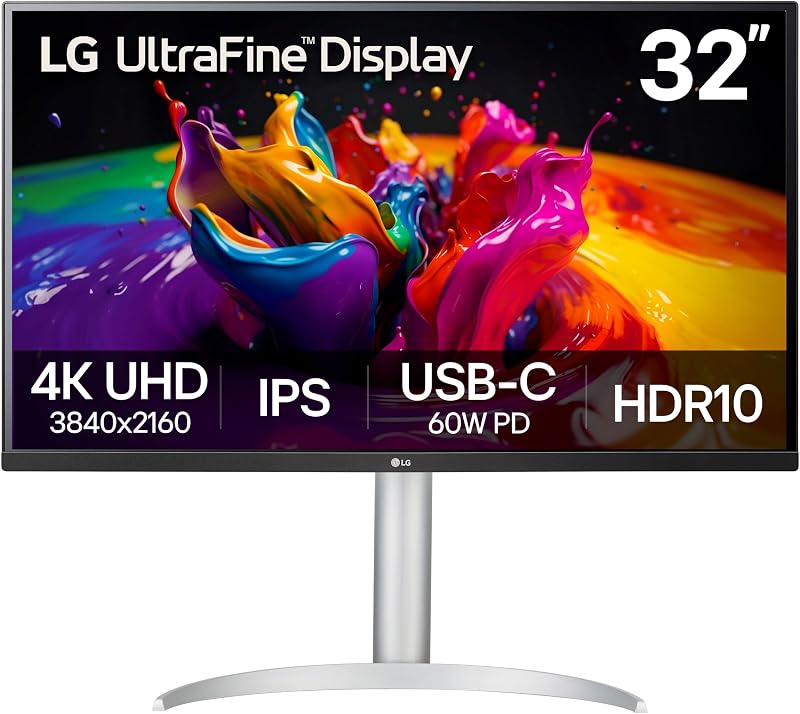
Designed specifically to streamline modern laptop setups, the LG 32UP83AK-W 32-inch Ultrafine 4K UHD integrates single-cable convenience directly into a premium visual workspace. Built around an expansive 31.5-inch IPS display panel, this lg ultrafine 32 4k monitor ensures exceptional color consistency and wide 178-degree viewing angles, preventing color shifting when viewing expansive layouts from off-axis angles. The screen achieves a bright 350 cd/m² output with 95% DCI-P3 color gamut expression, offering the vibrant saturation and tonal accuracy essential for photo retouching, video grading, and web design.
The centerpiece of this model is its integrated USB Type-C connectivity. Through a single reversible cable, the monitor receives high-resolution 4K video signals, transfers high-speed data, and delivers up to 60W of Power Delivery to charge compatible laptops. This single-cable docking capability eliminates clutter on creative desks, making it effortless to unplug a portable machine for travel and reconnect instantly upon returning. Integrated stereo speakers and dedicated headphone outputs further simplify desktop cable management.
Ergonomics on the lg 32up83ak-w are fully realized through a multi-directional stand that supports height, tilt, and 90-degree pivot adjustment into vertical portrait mode. Creative professionals working with long code repositories, vertical web mockups, or social media video timelines can rotate the display effortlessly. Integrated eye-care features, including Reader Mode and Flicker Safe backlighting, minimize visual fatigue during marathon editing sessions.
- 31.5-inch 4K UHD IPS panel delivering 3840 x 2160 clarity and 350 cd/m² brightness
- USB Type-C port offering 4K video display, data transfer, and 60W device charging over one cable
- Fully adjustable ergonomic stand supporting height, tilt, and portrait pivot adjustments
- Rich color performance covering up to 95% of the DCI-P3 color spectrum with HDR10 support
03 LG 32″ Class Ultrafine 4K UHD

Best for Color-conscious photo editors seeking factory calibration
Pros
- Factory color calibrated IPS panel
- Dual Controller multitasking support
- Height and tilt adjustable stand
Cons
- No USB-C power delivery
The LG 32″ Class Ultrafine 4K UHD focuses on color accuracy and balanced performance for creative workstations. Featuring a 31.5-inch IPS panel with 3840 x 2160 native resolution, this model distinguishes itself through rigorous factory color calibration. This baseline tuning ensures that colors, highlights, and shadow gradients correspond accurately to standard color spaces right out of the box, reducing the calibration overhead typically required for graphic design, print layout preparation, and photo editing.
The physical design combines an understated aesthetic with practical adjustability. The included stand supports smooth height adjustments along with tilt angles ranging from -5 to 15 degrees, allowing users to align the screen precisely with their eye level to alleviate neck strain. For specialized articulating arm setups, standard 100 x 100mm VESA mounting holes are integrated into the rear chassis. Video creators who archive footage across high-capacity local storage arrays, such as a synology with disk configuration, will appreciate the crisp text rendering and expansive timeline view when scrubbing through multi-camera edits.
Multitasking capabilities are expanded through LG’s Dual Controller software, which enables users to control two separate computing devices using a single keyboard and mouse connected across the same network. Super Resolution+ technology enhances lower-resolution video assets, while Black Stabilizer, Reader Mode, and Flicker-Safe operation provide visual comfort and versatility. Dual HDMI ports, a DisplayPort connection, an audio out jack, and integrated stereo speakers round out this comprehensive production monitor.
- 31.5-inch 4K UHD IPS screen with dedicated factory color calibration for reliable visual fidelity
- Ergonomic stand supporting precision height and -5 to 15-degree tilt adjustments alongside 100x100mm VESA compatibility
- Dual Controller software enabling seamless control of two networked computers with one keyboard and mouse
- Connectivity suite featuring two HDMI ports, one DisplayPort, audio output, and built-in speakers
04 LG 32U990A-S 32-Inch Ultrafine 6K

Best for Demanding creative pros requiring 6K precision
Pros
- Ultra-sharp 6K 224 PPI density
- Thunderbolt 5 with 96W charging
- 5% Adobe RGB and DisplayHDR 600
Cons
- Requires powerful workstation hardware
For high-end digital artists, commercial colorists, and post-production studios, the LG 32U990A-S 32-Inch Ultrafine 6K represents the pinnacle of desktop visual engineering. Boasting a breathtaking 6144 x 3456 native resolution across a 32-inch screen, this lg ultrafine 32 6k monitor delivers an ultra-high pixel density of 224 pixels per inch (PPI). Packing over 21 million pixels—156% more working pixels than standard 4K displays—it allows creative pros to preview full 4K and 6K video footage at 100% native scale while leaving ample room for editing toolbars, scopes, and timeline tracks.
Color reproduction and dynamic range are uncompromising on the lg 32u990a-s. Utilizing an advanced Nano IPS Black panel, the display achieves an exceptional 2000:1 contrast ratio, delivering deeper black levels and richer shadow depth than conventional IPS monitors. It meets rigorous VESA DisplayHDR 600 standards with a peak brightness rating of 450 cd/m². The panel provides true 10-bit color depth and covers 99.5% of the Adobe RGB color space alongside 98% of the DCI-P3 spectrum, ensuring precise tonal gradations and flawless consistency between on-screen imagery and high-end physical print runs.
Connectivity is headlined by cutting-edge Thunderbolt 5 integration, offering ultra-fast data transfer speeds twice as fast as Thunderbolt 4, along with 96W of laptop power delivery and seamless 6K daisy-chaining over a single cable. Workstation connectivity is further expanded with DisplayPort 2.1 (UHBR 13.5 DSC), HDMI 2.1, and auxiliary USB Type-C ports, making it effortless to interface with cutting-edge GPUs and high-speed external drive arrays. The silver ergonomic stand provides full tilt, height, and pivot adjustability to complete a true flagship production station.
- 32-inch 6K resolution (6144 x 3456) with 224 PPI ultra-high pixel density for native-scale asset editing
- Nano IPS Black panel with 2000:1 contrast ratio, 450 cd/m² brightness, and DisplayHDR 600 certification
- Exceptional color mastery featuring 99.5% Adobe RGB, 98% DCI-P3, and Real 10-bit color depth
- Next-generation Thunderbolt 5 interface delivering 96W charging, 6K daisy chaining, and DisplayPort 2.1 support
05 LG 32UR550K-B 32-inch Ultrafine 4K UHD
Best for Multi-window productivity users wanting high contrast
Pros
- Deep 3000:1 VA static contrast
- Full tilt, height, and pivot stand
- LG Switch 6-section screen partitioning
Cons
- Modest 250 cd brightness
The LG 32UR550K-B 32-inch Ultrafine 4K UHD combines high-contrast visual performance with robust physical adjustability. Operating on a 31.5-inch VA display panel with a 3840 x 2160 UHD resolution, this monitor excels in dark-room environments thanks to its deep 3000:1 static contrast ratio. Black levels appear significantly inkier than standard displays, giving text documents, code lines, and dark video scenes enhanced depth and punch. The display outputs 250 cd/m² of brightness and supports up to 90% of the DCI-P3 color gamut with HDR10 processing.
Where this model stands apart from basic home-office monitors is its ergonomic mechanical assembly. Unlike fixed-tilt entry displays or smaller desktop solutions like an lg smart monitor 27 inch, the lg 32ur550k-b features a versatile stand supporting smooth height adjustment, tilt, and full 90-degree pivot orientation. This enables productivity users and developers to effortlessly orient the expansive 31.5-inch screen vertically, providing an enormous vertical canvas that dramatically reduces page scrolling when reviewing dense spreadsheets or programming syntax.
Desktop workflow efficiency is enhanced by LG’s Switch app, which allows users to partition the active display area into up to six customized sections or trigger video conferencing tools with a hotkey. Audio needs are handled by built-in stereo speakers powered by Waves MaxxAudio, providing solid clarity for meetings and streaming media without adding speaker boxes to your desk. For gaming and interactive media, integrated Dynamic Action Sync and Black Stabilizer features keep input response snappy and low-light environments clear.
- 31.5-inch 4K UHD VA panel boasting a deep 3000:1 static contrast ratio for enhanced dark-scene detail
- Full ergonomic versatility with height, tilt, and vertical 90-degree portrait pivot adjustments
- LG Switch application integration supporting up to six customized screen partitions and hotkey commands
- Waves MaxxAudio stereo speakers and 90% DCI-P3 color coverage with HDR10 decoding
06 LG 32U700B-B 32-inch Ultrafine 4K UHD
Best for Sleek dual-screen desks prioritizing clean borders
Pros
- 3-side virtually borderless design
- Deep 3000:1 static contrast ratio
- LG Switch 11-layout screen management
Cons
- No pivot rotation on stand
The LG 32U700B-B 32-inch Ultrafine 4K UHD emphasizes clean aesthetics and expansive screen organization for modern workstations. Sporting a sleek 3-side virtually borderless bezel design, this 32-inch monitor minimizes physical frame distractions, making it an outstanding candidate for multi-display arrays where two screens sit side-by-side. Unlike massive command-center options like an lg 52 inch monitor, a dual 32-inch configuration delivers incredible total pixel workspace while maintaining manageable desk depth and ergonomic viewing distances.
Internally, the lg 32u700b-b utilizes a VA panel delivering 3840 x 2160 4K UHD resolution, 250 cd/m² brightness, and an impressive 3000:1 contrast ratio. It provides up to 99% coverage of the standard sRGB color spectrum alongside HDR10 compatibility. This color tuning makes it ideal for web developers, digital content publishers, and office multitasking where standard color spaces are prioritized. The matte display surface effectively suppresses reflections from background windows or ambient office lamps.
Multitasking control reaches peak efficiency through the LG Switch desktop software, which empowers users to split the screen into up to 11 distinct window layouts or adjust display parameters on the fly using customizable hotkeys. The included stand offers smooth height and tilt adjustments, allowing you to align the top edge of the panel with your natural line of sight. Connectivity is straightforward and versatile, offering HDMI, DisplayPort 1.4, and a dedicated headphone jack for desktop audio routing.
- 32-inch 4K UHD display with 3-side virtually borderless design for clean multi-monitor arrangements
- High 3000:1 contrast ratio delivering crisp text separation and punchy dark tones
- 99% sRGB color gamut coverage optimized for web publishing, general content creation, and office tasks
- Advanced LG Switch software support featuring up to 11 customizable screen partitioning layouts
What Sets These Models Apart
| Model | Panel Technology & Resolution | Color Gamut & Contrast | Connectivity | Stand Adjustability |
|---|---|---|---|---|
| LG 32UR500K-B | VA (3840 x 2160) 4K UHD | 90% DCI-P3, 1000:1 Contrast | 2x HDMI, 1x DisplayPort | Tilt Only |
| LG 32UP83AK-W | IPS (3840 x 2160) 4K UHD | 95% DCI-P3, 1000:1 Contrast | USB-C (60W PD), HDMI, DisplayPort | Height, Tilt, Pivot |
| LG 32″ Class | IPS (3840 x 2160) 4K UHD | Factory Calibrated, HDR10 | 2x HDMI, 1x DisplayPort, Audio Out | Height, Tilt |
| LG 32U990A-S | Nano IPS Black (6144 x 3456) 6K | 99.5% Adobe RGB, 98% DCI-P3, 2000:1 Contrast | Thunderbolt 5 (96W PD), DP 2.1, HDMI 2.1, USB-C | Height, Tilt, Pivot |
| LG 32UR550K-B | VA (3840 x 2160) 4K UHD | 90% DCI-P3, 3000:1 Contrast | HDMI, DisplayPort | Height, Tilt, Pivot |
| LG 32U700B-B | VA (3840 x 2160) 4K UHD | 99% sRGB, 3000:1 Contrast | HDMI, DisplayPort 1.4, Headphone Out | Height, Tilt |
Buying Tips for LG Monitors
When deciding which lg ultrafine 32 to buy, your primary consideration should be aligning the underlying panel technology with your workflow requirements. IPS and Nano IPS Black panels offer wide viewing angles and exceptional color consistency across the entire 32-inch expanse, making them the preferred choice for commercial photographers, graphic artists, and video colorists. Conversely, VA panels deliver superior static contrast ratios—often reaching 3000:1—which yields noticeably deeper black levels. This high contrast makes VA displays exceptional for reading dense text, editing code in dark mode, and watching films in dimly lit environments.
Cable management and port selection represent another crucial decision point. If you use a modern laptop as your primary workstation, selecting a model with integrated USB Type-C or Thunderbolt 5 connectivity simplifies your desk setup dramatically. A single connection can route uncompressed display data, provide high-speed peripheral communication, and charge your notebook with up to 60W or 96W of Power Delivery. If you work from a dedicated desktop tower with dedicated graphics outputs, monitors equipped with standard DisplayPort and HDMI ports provide all the bandwidth needed while allowing you to allocate your budget toward other features.
Finally, evaluate the physical ergonomics and software features of each model. A 32-inch panel occupies substantial desk space, making height and tilt adjustability essential for maintaining healthy posture during long editing sessions. For programmers, writers, and social video creators, a stand that supports 90-degree pivot orientation enables full-page vertical viewing. Pairing these mechanical capabilities with desktop window-management tools, such as LG Switch or OnScreen Control, lets you organize multiple applications efficiently without manually resizing application windows.
FAQ
What is the visual difference between IPS and VA panels in the LG 32-inch lineup?
IPS panels excel in color fidelity and viewing angles. When looking at an IPS monitor from an angle, colors and brightness levels remain uniform, which is vital for color-accurate video grading and graphic design. VA panels, on the other hand, produce higher static contrast ratios—up to 3000:1 compared to 1000:1 on standard IPS. This delivers much darker blacks and greater distinction in low-light imagery, though viewing angles are slightly narrower.
Can you charge a laptop directly from an LG 32-inch UltraFine monitor?
Yes, but only on models equipped with powered USB Type-C or Thunderbolt connections. The LG 32UP83AK-W provides up to 60W of Power Delivery over USB Type-C, which is sufficient for charging thin-and-light laptops and ultrabooks. The flagship LG 32U990A-S delivers up to 96W of Power Delivery via its Thunderbolt 5 port, accommodating demanding workstation-class laptops over a single cable. Models featuring only HDMI and DisplayPort inputs do not provide laptop charging.
Why choose a 6K UltraFine monitor over a standard 4K display?
A 6K display like the LG 32U990A-S packs 6144 x 3456 pixels into a 32-inch screen, resulting in a pixel density of 224 PPI compared to approximately 140 PPI on a 4K display of the same physical size. This higher density delivers razor-sharp text and allows video editors to view native 4K and 6K video content at 100% scale while still having ample screen space around the video window for editing controls, scopes, and timelines.
Do all LG 32-inch UltraFine monitors come with adjustable stands?
No, the range of physical adjustment varies by model. Entry-level displays such as the LG 32UR500K-B offer forward and backward tilt adjustments only. Step-up models like the LG 32″ Class and LG 32U700B-B add smooth height adjustment. Full ergonomic adjustability—encompassing height, tilt, and 90-degree portrait pivot rotation—is featured on the LG 32UP83AK-W, LG 32UR550K-B, and LG 32U990A-S.
How does the LG Switch software improve daily desktop workflow?
LG Switch is desktop utility software that enhances multitasking on large screens. It allows users to divide the expansive 32-inch screen area into customized grid layouts—supporting up to six sections on the 32UR550K-B and up to 11 layouts on the 32U700B-B. Users can also configure keyboard hotkeys to instantly adjust display settings or launch video conferencing applications without fiddling with the physical monitor joystick.


