Mesh Wifi Systems Buying Guide (2026): What Matters and 8 Picks
This guide compares 8 mesh wifi systems using published specifications. You will learn how to select the right hardware based on wireless standards, band types, and port speeds for your home.

As Amazon Associates, we earn from qualifying purchases. This means we may receive a small commission at no extra cost to you if you click through and make a purchase.
As an Amazon Associate we earn from qualifying purchases. Links on this page are affiliate links.
This mesh wifi system buying guide helps you choose the right hardware for your home. You will learn how to match wireless standards like Wi-Fi 6 or Wi-Fi 7 to your specific needs. The guide walks through key decisions, including band types, port speeds, and coverage area. We selected each product strictly from its published specifications. You can compare attributes such as tri-band stability or gigabit ports to find the best fit.
You will see how different pack sizes affect your setup. Some options offer three nodes for large spaces, while single routers suit smaller areas. We explain what each spec means in practice. This approach ensures you understand the trade-offs between raw speed and device capacity. By the end, you will know which system aligns with your square footage and connected devices. The recommendations are based on technical data, not marketing claims. This clarity helps you make a confident choice for your network.
Key specs for your mesh system
Wireless standard generation
The Wi-Fi generation determines speed and efficiency. Wi-Fi 6 handles many devices well in crowded homes. Wi-Fi 6E adds a less crowded 6 GHz band for less interference. Wi-Fi 7 offers the latest speeds and efficiency but requires compatible devices to realize benefits. You should match the standard to your current and future devices. Older standards may struggle with modern bandwidth demands. Newer standards offer better performance but cost more. Choose based on your upgrade timeline and device inventory.
Look for
- Wi-Fi 6 for high capacity
- Wi-Fi 7 for future speed
- Wi-Fi 6E for less interference
Band configuration type
Bands manage data traffic flow. Dual-band systems use two frequency ranges, which is standard for most homes. Tri-band systems add a third dedicated band, often for backhaul communication between nodes. This keeps your main Wi-Fi signal clearer for devices. Tri-band is useful for large homes with many connected gadgets. Dual-band is sufficient for smaller spaces or budget setups. The extra band in tri-band systems reduces congestion. You should evaluate your home size and device count before choosing.
Look for
- Tri-band for large homes
- Dual-band for small spaces
- Dedicated backhaul for stability
Ethernet port speed
Port speed limits your wired connection maximum. Gigabit ports handle up to 1 Gbps, suitable for most fiber or cable plans. 2.5G ports support speeds above 1 Gbps, ideal for fast internet tiers. If your internet plan exceeds 1 Gbps, you need 2.5G ports. These ports also help with faster local file transfers between devices. Check your internet plan speed and connected devices. Mismatched ports create bottlenecks. Ensure the router and nodes match your needs.
Look for
- 2.5G ports for fast plans
- Gigabit ports for standard plans
- Check internet plan speed
Coverage area size
Coverage area indicates how much space the system handles. Larger homes need more nodes or higher power. The eero Pro 7 covers up to 6,000 square feet with three units. Smaller systems like the eero 6 cover less area. You must match the system size to your home's footprint. Underpowered systems leave dead zones. Overpowered systems waste money. Check the square footage rating against your home size. More nodes usually mean better coverage in complex layouts.
Look for
- Match square footage rating
- More nodes for large homes
- Check layout complexity
Smart home hub integration
Some systems include a built-in smart home hub. This allows direct connection to Zigbee or Thread devices. The eero 6 and 6+ include this feature. It reduces the need for separate hubs. You can connect lights, sensors, and locks directly. Not all mesh systems offer this. Check if your smart devices require a specific hub type. Built-in hubs simplify setup and reduce clutter. If you have many smart devices, this feature adds value. It streamlines your home automation ecosystem.
Look for
- Built-in hub for smart devices
- Check device compatibility
- Reduce separate hubs needed
Physical dimensions and weight
Size and weight affect placement options. Smaller nodes fit on shelves or in tight spaces. The eero 6 is compact and lightweight. Larger routers may require more ventilation space. Consider where you will place each unit. Aesthetics also matter for visible units. Color options like white or black help blend with decor. Weight matters if you mount units high. Check dimensions to ensure they fit your intended spots. Stability is key for larger, heavier units.
Look for
- Check shelf or floor fit
- Consider color and decor
- Ensure ventilation space
Mesh System Types Explained
Multi-Node Mesh Systems
Multi-node systems use several units to blanket large homes with consistent coverage. The TP-Link Deco X55 3-Pack provides Wi-Fi 6 performance across multiple rooms, ideal for households with many connected devices. Similarly, the eero 6+ 3-Pack offers gigabit speeds and a built-in smart hub for medium to large spaces. These setups ensure seamless roaming as you move through your house. The trade-off is higher cost and more hardware to manage, but you gain reliable connectivity in dead zones where a single router cannot reach.
Tri-Band Tri-Path Options
Tri-band systems dedicate one band specifically for communication between nodes, reducing congestion on bands used by your devices. The TP-Link Deco XE75 2-Pack uses Wi-Fi 6E to provide interference-free 6 GHz connectivity for large homes. This architecture supports high device capacity and is well-suited for gaming and streaming. The eero Pro 7 3-Pack also utilizes tri-band Wi-Fi 7 technology to cover up to 6,000 square feet. You get robust performance for demanding households, though these units are typically larger and more expensive than dual-band alternatives.
Single-Router Wi-Fi 7 Units
Single-router setups are designed for smaller homes or apartments where mesh expansion is unnecessary. The TP-Link Archer BE400 delivers Wi-Fi 7 speeds with dual 2.5 Gbps ports, fitting users who want modern standards without multiple nodes. The NETGEAR Nighthawk BE9300 also offers tri-band Wi-Fi 7 with extensive wired port options for a single-story home. These devices provide high-speed connections for fewer devices in a compact area. You save on hardware complexity, but you lack the seamless whole-home coverage that multi-node mesh systems provide.
Common Mistakes to Avoid
Ignoring wired backhaul options
Relying solely on wireless connections between nodes can reduce overall network speed and stability. If your home has Ethernet ports, use them to connect the main router to satellite nodes. This wired backhaul ensures maximum bandwidth is available for your devices and reduces latency for streaming and gaming.
Overestimating coverage needs
Buying more nodes than necessary wastes money and complicates management. Measure your home’s square footage and note obstacles like thick walls or metal appliances. One or two nodes often suffice for small spaces. Only add units where you detect dead zones after initial setup to maintain a clean network.
Neglecting port speeds
Assuming all Ethernet ports support gigabit speeds is a common error. Check the WAN and LAN port specifications on the main router. If you have a fiber or cable plan faster than 1 Gbps, slower ports will bottleneck your internet. Ensure ports match your ISP’s maximum speed tier for optimal performance.
Skipping Wi-Fi 6E or 7
Sticking with older Wi-Fi 5 standards limits your network’s capacity and speed. Newer devices benefit significantly from Wi-Fi 6E or Wi-Fi 7, which offer wider channels and less interference. These standards handle multiple high-bandwidth streams better. Upgrade to ensure your mesh system supports modern smartphones, laptops, and smart home gadgets efficiently.
| # | Product | Best for | Price |
|---|---|---|---|
| 1 | TP-Link Deco X55 3-Pack Wi-Fi 6 | large homes with many connected devices | |
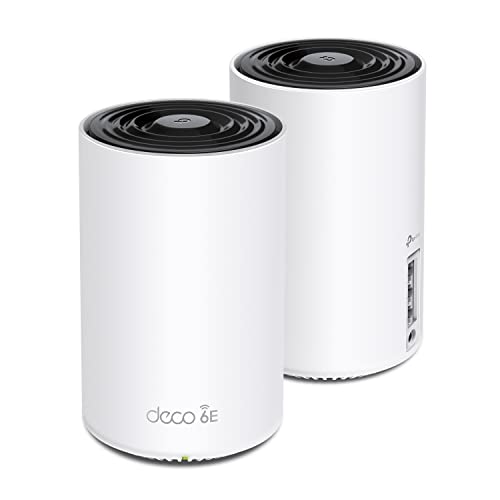
| 2 | TP-Link Deco Tri-Band WiFi 6E 2-Pack | Large homes needing tri-band stability | |
| 3 | Amazon eero 6 2-Pack Mesh System | Medium homes needing smart home hub integration | |
| 4 | TP-Link Archer Dual-Band WiFi 7 Router | Single-router Wi-Fi 7 setups with 2.5G ports | |
| 5 | eero 7 1-Pack with 2.5G Ports | Small apartments or single-room Wi-Fi 7 upgrades | |
| 6 | NETGEAR Nighthawk Tri-Band WiFi 7 Router | Single-story homes needing 2.5G wired ports | |
| 7 | Amazon eero 6+ 3-Pack Mesh System | Smart home integration and gigabit coverage | |
| 8 | Amazon eero Pro 7 Tri-Band Mesh System (3-Pack) | large homes needing high device capacity |

TP-Link Deco X55 3-Pack Wi-Fi 6
Best for: large homes with many connected devices
- Wireless Standard
- Wi-Fi 6
- Coverage Area
- up to 6500 Sq.Ft.
- Ethernet Port Speed
- Gigabit
- Device Capacity
- up to 150 devices
- Pack Size
- 3-Pack
- Connectivity
- Wireless
The TP-Link Deco X55 is a Wi-Fi 6 mesh system sold in a 3-pack. It covers up to 6500 square feet and supports up to 150 connected devices. Each unit includes three Gigabit Ethernet ports for wired backhaul. The system uses AI-driven mesh technology to optimize signal placement. It fits homes needing broad coverage for multiple users without requiring Wi-Fi 7 speeds.
- Covers up to 6500 square feet with three units
- Supports up to 150 connected devices simultaneously
- Includes three Gigabit Ethernet ports per node
- Uses Wi-Fi 6 (AX3000) standard for reliable throughput
- Features AI-driven mesh for intelligent network optimization
- Wi-Fi 6 standard offers lower maximum speeds than Wi-Fi 7 models
- Gigabit ports limit wired backhaul to 1 Gbps, unlike 2.5Gbps options
- Single wireless standard limits flexibility compared to tri-band systems
- You need whole-home coverage for a large house up to 6500 sq ft
- You want to connect up to 150 devices on a single network
- You prefer wired Ethernet backhaul for stable performance
- You require Wi-Fi 7 speeds for future-proofing
- You need 2.5Gbps wired ports for high-speed internet plans
- You want a tri-band system for dedicated backhaul channels
Verdict: TP-Link Deco X55 3-Pack covers large spaces with reliable Wi-Fi 6 performance. It suits households prioritizing device capacity and wired connectivity over next-generation speed standards.
TP-Link Deco Tri-Band WiFi 6E 2-Pack
Best for: Large homes needing tri-band stability
- Wireless Standard
- WiFi 6E
- Coverage Area
- up to 5500 Sq.Ft
- Frequency Bands
- Tri-Band
- Maximum Speed
- up to 5,400 Mbps
- Device Capacity
- 200 devices
- Pack Size
- 2-Pack
The TP-Link Deco XE75 is a tri-band WiFi 6E mesh system. This 2-pack covers up to 5,500 square feet. It supports speeds up to 5,400 Mbps for 200 devices. The dedicated 6 GHz band reduces interference. You get stable connections for gaming and streaming. This setup replaces your current router for whole-home coverage.
- Tri-band WiFi 6E standard
- Covers up to 5,500 square feet
- Supports 200 connected devices
- Dedicated 6 GHz backhaul band
- Only includes two nodes in the pack
- Gigabit Ethernet ports limit wired speeds
- Heavier build at 2.69 pounds
- You need coverage for large homes
- You want dedicated 6 GHz performance
- You connect many devices simultaneously
- You require WiFi 7 speeds
- You need 2.5Gbps wired ports
- You prefer a single router unit
Verdict: TP-Link Deco XE75 2-Pack Mesh offers robust tri-band coverage for large spaces. It suits households prioritizing high device capacity and interference-free 6 GHz connectivity.

Amazon eero 6 2-Pack Mesh System
Best for: Medium homes needing smart home hub integration
- Wireless Standard
- Wi-Fi 6
- Coverage Area
- Up to 3,000 sq ft
- Maximum Speed
- Up to 900 Mbps
- Device Capacity
- 75+ devices
- Pack Size
- 2-pack
- Color
- White
The eero 6 2-pack delivers Wi-Fi 6 coverage for spaces up to 3,000 square feet. It supports internet plans up to 900 Mbps and handles 75+ connected devices. This system includes a built-in Zigbee hub for smart home control. It is a solid choice for medium-sized homes that need reliable whole-home connectivity without complex setup.
- Covers up to 3,000 square feet with two units
- Supports 75+ devices on Wi-Fi 6
- Includes built-in Zigbee smart home hub
- White, compact design at 3.82 inches wide
- Maximum speed of 900 Mbps is lower than Wi-Fi 7 competitors
- 2-pack limits coverage compared to larger multi-unit systems
- Heavier at 1.32 pounds than some lightweight alternatives
- You need reliable coverage for up to 3,000 square feet
- You want to connect 75+ devices without congestion
- You prefer a system with a built-in smart home hub
- You require speeds exceeding 900 Mbps
- You need coverage for areas larger than 3,000 square feet
- You want Wi-Fi 7 technology for future-proofing
Verdict: eero 6 2-Pack Mesh System is a practical mesh solution for medium homes needing stable Wi-Fi 6 coverage and smart home integration. It suits users who prioritize ease of use and built-in hub features over raw speed.

TP-Link Archer Dual-Band WiFi 7 Router
Best for: Single-router Wi-Fi 7 setups with 2.5G ports
- Wireless Standard
- Wi-Fi 7
- Coverage Area
- up to 2,400 sq. ft.
- Frequency Bands
- Dual-Band
- Ethernet Port Speed
- 2.5 Gbps, 1 Gbps
- Device Capacity
- up to 90 devices
- Color
- Black
This TP-Link Archer BE400 router uses Wi-Fi 7 technology to deliver up to 6.5 Gbps of total bandwidth. It covers areas up to 2,400 square feet and supports up to 90 connected devices. The unit includes dual 2.5 Gbps ports for high-speed wired connections. You will appreciate the Multi-Link Operation for stable performance. It is a solid choice for users needing modern Wi-Fi standards in a single-unit setup.
- Wi-Fi 7 standard with Multi-Link Operation
- Dual 2.5 Gbps Ethernet ports
- Covers up to 2,400 square feet
- Supports up to 90 devices
- 6.5 Gbps total wireless bandwidth
- Dual-band design limits spectrum options compared to tri-band systems
- Maximum coverage of 2,400 sq. ft. is smaller than some competitors
- Device capacity of 90 units is lower than high-end mesh nodes
- You want Wi-Fi 7 features in a single router
- You need dual 2.5 Gbps ports for wired devices
- You have a home under 2,400 square feet
- You require a whole-home mesh system with multiple nodes
- You need tri-band connectivity for heavy interference areas
- You want to connect more than 90 devices simultaneously
Verdict: The TP-Link Archer BE400 Dual-Band Wi-Fi 7 router fits users who want modern Wi-Fi 7 speeds and dual 2.5 Gbps ports in a single device. It is ideal for smaller homes that do not require a multi-node mesh network.
eero 7 1-Pack with 2.5G Ports
Best for: Small apartments or single-room Wi-Fi 7 upgrades
- Wireless Standard
- Wi-Fi 7
- Coverage Area
- up to 2,000 sq. ft.
- Maximum Speed
- up to 1.8 Gbps
- Ethernet Port Speed
- 2.5 GbE
- Device Capacity
- 120+ devices
- Pack Size
- 1-pack
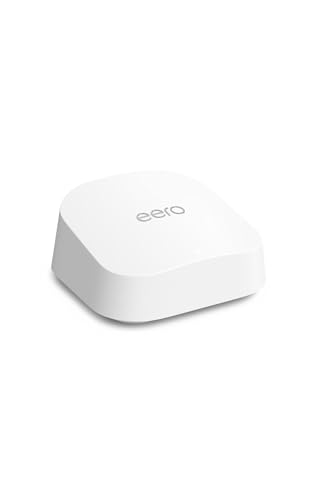
The Eero 7 is a single Wi-Fi 7 node designed for homes up to 2,000 sq. ft. It supports internet plans up to 2.5 Gbps and connects 120+ devices. Wireless speeds reach 1.8 Gbps. It includes two 2.5 GbE ports and acts as a hub for Thread, Matter, and Zigbee devices. This unit requires a subscription for parental controls and ad blocking.
- Wi-Fi 7 standard with multi-link operation
- Supports internet plans up to 2.5 Gbps
- Two auto-sensing 2.5 GbE Ethernet ports
- Handles 120+ connected devices
- Built-in Thread, Matter, and Zigbee hub
- Single-pack configuration limits whole-home coverage
- Parental controls and ad blocking require eero Plus subscription
- 2,000 sq. ft. coverage is smaller than multi-pack systems
- You need a single node for a small apartment
- You want Wi-Fi 7 performance in one room
- You already have other Eero nodes to expand coverage
- You require full whole-home coverage from one device
- You want parental controls without a monthly fee
- You need to connect more than 120 devices
Verdict: Eero 7 Single Node offers Wi-Fi 7 speeds and smart home hub features for small spaces. It suits users who need a single high-performance node or want to expand an existing mesh network.

NETGEAR Nighthawk Tri-Band WiFi 7 Router
Best for: Single-story homes needing 2.5G wired ports
- Wireless Standard
- WiFi 7
- Coverage Area
- Up to 2,500 sq ft
- Frequency Bands
- Tri-Band
- Maximum Speed
- 9.3 Gbps
- Ethernet Port Speed
- 2× 2.5G + 2× Gigabit
- Device Capacity
- 100 devices
This NETGEAR Nighthawk router delivers tri-band Wi-Fi 7 speeds up to 9.3 Gbps. It covers up to 2,500 square feet and supports 100 devices. You get two 2.5 Gbps LAN ports for wired connections. The system includes a 30-day trial for NETGEAR Armor security. It pairs with existing modems via Ethernet. This setup suits users who want high throughput for a busy home.
- Tri-band Wi-Fi 7 standard with 9.3 Gbps maximum speed
- Two 2.5 Gbps LAN ports for multi-gig wired devices
- Supports up to 100 connected devices simultaneously
- Covers up to 2,500 square feet of space
- Limited to 2,500 square feet of coverage area
- Maximum speed of 9.3 Gbps is lower than the 17.0 Gbps option available in variations
- Physical dimensions of 10.8 by 7.17 by 7.13 inches create a bulky footprint
- You need dedicated 2.5 Gbps ports for gaming or NAS drives
- You want to manage your network via the Nighthawk app
- You have a home size under 2,500 square feet
- You require whole-home mesh coverage for larger properties
- You need speeds exceeding 9.3 Gbps for future-proofing
- You prefer a compact router with minimal physical footprint
Verdict: NETGEAR Nighthawk WiFi 7 Router fits users who prioritize high-speed wired connections and app-based management for a single-story home. It is ideal for those who do not need mesh expansion.

Amazon eero 6+ 3-Pack Mesh System
Best for: Smart home integration and gigabit coverage
- Wireless Standard
- Wi-Fi 6
- Coverage Area
- Up to 4,500 sq ft
- Maximum Speed
- Up to 1 Gbps
- Device Capacity
- 75+ devices
- Pack Size
- 3-pack
- Color
- White
The eero 6+ 3-pack delivers Wi-Fi 6 speeds up to 1 Gbps across 4,500 square feet. It supports 75+ connected devices, making it suitable for busy households. The system includes a built-in smart home hub for Thread and Zigbee devices. You get reliable coverage with TrueMesh technology to reduce dead spots. This setup is ideal for those needing gigabit performance without tri-band complexity.
- Wi-Fi 6 standard with 160 MHz channel support
- Built-in Thread and Zigbee smart home hub
- Coverage up to 4,500 sq ft
- Supports 75+ connected devices
- Maximum speed is 1 Gbps, lower than the 9.3 Gbps listed for other picks
- Dual-band Wi-Fi 6, lacking the tri-band or Wi-Fi 7 specs found in higher-tier options
- You need gigabit speeds for internet plans up to 1,000 Mbps
- You want to connect Thread or Zigbee smart devices without extra hubs
- You have a home up to 4,500 square feet
- You require Wi-Fi 7 speeds for future-proofing
- You need tri-band performance to avoid congestion on the 5 GHz band
- Your internet plan exceeds 1 Gbps
Verdict: eero 6+ 3-Pack Mesh System offers solid gigabit coverage and a built-in smart hub, fitting users who prioritize value and smart home integration over maximum speed or tri-band architecture.

Amazon eero Pro 7 Tri-Band Mesh System (3-Pack)
Best for: large homes needing high device capacity
- Wireless Standard
- Wi-Fi 7
- Coverage Area
- Up to 6,000 sq ft
- Frequency Bands
- Tri-Band
- Maximum Speed
- Up to 3.9 Gbps
- Ethernet Port Speed
- 5 Gbps
- Device Capacity
- 600+ devices
The eero Pro 7 is a tri-band Wi-Fi 7 mesh system designed for large homes and high-bandwidth needs. It covers up to 6,000 square feet and supports over 600 devices. With wireless speeds reaching 3.9 Gbps, it handles internet plans up to 5 Gbps. Two auto-sensing 5 GbE ports provide robust wired connectivity. This setup suits users with demanding network requirements and extensive square footage.
- Wi-Fi 7 standard with tri-band architecture
- Covers up to 6,000 square feet
- Supports 600+ connected devices
- Wireless speeds up to 3.9 Gbps
- Two 5 GbE Ethernet ports
- Maximum wireless speed of 3.9 Gbps is lower than the 9.3 Gbps found on the NETGEAR Nighthawk
- Coverage area of 6,000 sq ft is smaller than the coverage offered by the TP-Link Deco XE75
- Device capacity of 600+ is less than some competitors supporting higher counts
- You need Wi-Fi 7 performance for future-proofing
- You have a large home over 3,000 square feet
- You require high-speed wired ports for heavy data transfer
- You only need coverage for a small apartment under 1,500 square feet
- You want the absolute highest theoretical wireless speeds available
- You prefer a dual-band system for a lower budget
Verdict: The eero Pro 7 Tri-Band Wi-Fi 7 3-Pack delivers robust coverage and high device capacity for large spaces. It fits users who need extensive square footage support and future-ready Wi-Fi 7 speeds.
Specifications side by side
| Spec | TP-Link Deco X55 3-Pack Wi-Fi 6 | TP-Link Deco Tri-Band WiFi 6E 2-Pack | Amazon eero 6 2-Pack Mesh System | TP-Link Archer Dual-Band WiFi 7 Router | eero 7 1-Pack with 2.5G Ports | NETGEAR Nighthawk Tri-Band WiFi 7 Router | Amazon eero 6+ 3-Pack Mesh System | Amazon eero Pro 7 Tri-Band Mesh System (3-Pack) |
|---|---|---|---|---|---|---|---|---|
| Wireless Standard | Wi-Fi 6 | WiFi 6E | Wi-Fi 6 | Wi-Fi 7 | Wi-Fi 7 | WiFi 7 | Wi-Fi 6 | Wi-Fi 7 |
| Coverage Area | up to 6500 Sq.Ft. | up to 5500 Sq.Ft | Up to 3,000 sq ft | up to 2,400 sq. ft. | up to 2,000 sq. ft. | Up to 2,500 sq ft | Up to 4,500 sq ft | Up to 6,000 sq ft |
| Frequency Bands | – | Tri-Band | – | Dual-Band | – | Tri-Band | – | Tri-Band |
| Maximum Speed | – | up to 5,400 Mbps | Up to 900 Mbps | – | up to 1.8 Gbps | 9.3 Gbps | Up to 1 Gbps | Up to 3.9 Gbps |
| Ethernet Port Speed | Gigabit | – | – | 2.5 Gbps, 1 Gbps | 2.5 GbE | 2× 2.5G + 2× Gigabit | – | 5 Gbps |
| Device Capacity | up to 150 devices | 200 devices | 75+ devices | up to 90 devices | 120+ devices | 100 devices | 75+ devices | 600+ devices |
| Pack Size | 3-Pack | 2-Pack | 2-pack | – | 1-pack | – | 3-pack | 3-pack |
| Wireless Connectivity | Wi-Fi | Wi-Fi | Wi-Fi | Wi-Fi | – | Wi-Fi | Wi-Fi | Wi-Fi |
| Color | Black, White | Black and White | White | Black | White | Black | White | White |
| Connectivity | Wireless | – | – | – | – | – | – | – |
| Wired Connectivity | Ethernet | – | – | USB | – | – | – | – |
| Band | – | Tri-Band | – | Dual-Band | – | Tri-Band | – | Tri-Band |
| Recommended Use | – | Gaming, Streaming | – | – | – | – | – | – |
| Network Features | Ethernet Backhaul | – | – | – | – | – | – | – |
| Placement | Indoor | – | – | – | – | – | – | – |
| Dimensions | 4.33 × 4.33 × 4.49 inches | 4.13 × 4.13 × 6.67 inches | 3.91 × 3.82 × 2.42 inches | 4.72 × 1.57 × 7.09 inches | – | 10.8 × 7.17 × 7.13 inches | 3.94 × 3.82 × 2.6 inches | 5.79 × 3.11 × 7.09 inches |
| Weight | 5.07 pounds | 2.69 pounds | 1.32 pounds | 1.37 pounds | – | 3.95 pounds | 11 ounces | 1.68 pounds |
| Size | 3 Pack | 2 Pack | 2 routers | 10.6 x 6 x 1.9 inches | – | 9.3 Gbps | 3 routers | 3-pack |
| Model | Deco X55 | Deco XE75(2-pack) | N010111 | Archer BE400 | – | BE9300-1AZPAS | R010001 | ME10001 |
If you want to compare radio bands and backhaul types, reference the mesh wifi system buying guide.
Frequently asked questions
Does a mesh system work better than a single router for large homes?
Yes, multi-node mesh systems provide consistent coverage across large spaces. Single routers often struggle to reach distant rooms without signal loss. Systems like the eero Pro 7 Tri-Band cover up to 6,000 square feet. This ensures you maintain strong connectivity throughout your entire property without dead zones.
What is the benefit of Wi-Fi 6E over standard Wi-Fi 6?
Wi-Fi 6E adds a dedicated 6 GHz band to reduce interference. This band is less crowded than the 2.4 GHz and 5 GHz bands. The TP-Link Deco Tri-Band WiFi 6E 2-Pack uses this for stable performance. It is ideal for households with many devices or high-bandwidth activities like gaming.
Should I choose a system with Ethernet ports for backhaul?
Using wired Ethernet backhaul provides the most stable and fastest connection between nodes. It prevents wireless signals from competing for bandwidth. The TP-Link Deco X55 3-Pack includes Gigabit Ethernet ports for this purpose. This setup is crucial for maintaining high speeds in larger homes with multiple units.
Can I use a single Wi-Fi 7 router for my whole house?
A single router works well for smaller homes or single-story layouts. It avoids the complexity of managing multiple nodes. The NETGEAR Nighthawk Tri-Band WiFi 7 Router covers 2,500 square feet. It is suitable if you do not need extensive coverage beyond one floor or a compact area.
Are smart home hubs included in mesh systems?
Some mesh systems include built-in smart home hubs for convenience. The eero 6 2-Pack and eero 6+ 3-Pack integrate these features. This allows you to connect compatible devices directly to the network. It simplifies setup for smart lights and sensors without needing separate hardware.
How many units do I need for a medium-sized home?
Two units are often sufficient for medium-sized homes with moderate layouts. The eero 6 2-Pack provides reliable coverage for these spaces. If you have thicker walls or multiple floors, consider adding more nodes. The goal is to ensure every room receives a strong signal from the nearest unit.
What port speed should I look for in a mesh system?
Gigabit ports are standard for most mesh systems and handle typical internet speeds. However, 2.5G ports offer higher throughput for future-proofing. The eero 7 1-Pack and TP-Link Archer BE400 include 2.5G ports. Choose these if your internet plan exceeds 1 Gbps or you need fast wired connections for devices.
Is tri-band better than dual-band for mesh networks?
Tri-band systems add a dedicated band for communication between nodes. This keeps your devices on the fastest available band without slowing down. The eero Pro 7 Tri-Band and TP-Link Deco XE75 use this architecture. It is beneficial for large homes with many connected devices competing for bandwidth.


