Teamgroup Computers & Networking
T-Create DDR5 32GB Kits Compared: Finding the Sweet Spot for Creators
Deciding on the right t create ddr5 32gb memory kit requires balancing raw transfer speed against CAS latency to keep creative applications running efficiently. Content creators working in video editing, 3D rendering, and digital composition know that system memory must deliver both raw bandwidth and swift response times. Timeline navigation, asset caching, and background rendering…

As Amazon Associates, we earn from qualifying purchases. This means we may receive a small commission at no extra cost to you if you click through and make a purchase.
Deciding on the right t create ddr5 32gb memory kit requires balancing raw transfer speed against CAS latency to keep creative applications running efficiently. Content creators working in video editing, 3D rendering, and digital composition know that system memory must deliver both raw bandwidth and swift response times. Timeline navigation, asset caching, and background rendering depend heavily on low access delay as well as high clock speeds. TEAMGROUP builds its T-Create desktop lineup specifically to handle these intensive production workloads, focusing on sustained signal integrity and platform stability during prolonged project exports.
This guide examines exactly three 32GB desktop kits from the T-Create series: the Expert DDR5-6000 CL30 kit, the Classic DDR5-5600 CL46 kit, and the Expert DDR5-6400 CL32 kit. While all three share a 32GB dual-channel footprint consisting of two 16GB modules, they target distinct workstation priorities across transfer frequencies, latency timings, operational voltages, and printed circuit board designs. One model targets the ideal low-latency sweet spot for snappy timeline response, another prioritizes baseline power efficiency and anti-interference shielding, and the third maximizes throughput for bandwidth-heavy rendering pipelines. This t-create ddr5 ram comparison breaks down how these specifications translate into real-world creative workflows.
Which T-Create DDR5 RAM Kits Should You Buy
All 3 models on this page, side by side
| Model | Our score | Listing |
|---|---|---|
01 TEAMGROUP T-Create Expert CL30 Overclocking 10L TEAMGROUP T-Create Expert CL30 Overclocking 10L |
Price | |
02 TEAMGROUP T-Create Classic 10L DDR5 32GB TEAMGROUP T-Create Classic 10L DDR5 32GB |
Price | |
03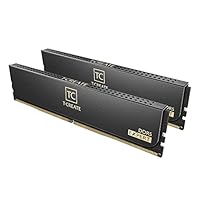 TEAMGROUP T-Create Expert CL32 Overclocking 10L TEAMGROUP T-Create Expert CL32 Overclocking 10L |
Price |
Prices are read from the Amazon product listing and change there, not here. Scores are out of 10, based on listed specifications and buyer feedback.
Why each one is on the list
- Video editors and digital artists seeking the optimal balance of snappy timeline response and low access delay should select the TEAMGROUP T-Create Expert CL30 Overclocking 10L.
- Studio engineers and continuous workstation users who prioritize baseline power efficiency, low operating temperatures, and anti-interference signal stability should purchase the TEAMGROUP T-Create Classic 10L DDR5 32GB.
- Visual effects artists and creators managing large file ingestion who require maximum transfer throughput should choose the TEAMGROUP T-Create Expert CL32 Overclocking 10L.
01 TEAMGROUP T-Create Expert CL30 Overclocking 10L

Best for High-bandwidth rendering and large file exports
Pros
- Fast 6400MHz transfer rate
- Responsive CL32 timing
- Intel XMP and AMD Expo support
Cons
- Requires 1.35V operational voltage

Best for Creators wanting optimal latency and timeline response
Pros
- Tight CL30 latency
- Dual XMP and EXPO support
- Clean white styling
Cons
- Voltage not specified in listing
The TEAMGROUP T-Create Expert CL30 Overclocking 10L is engineered for creators who demand responsive memory access alongside elevated clock speeds. Configured as a 32GB desktop kit featuring two 16GB modules, this kit operates at a rated frequency of 6000MHz (PC5-48000) paired with an aggressive CAS latency of 30. Cloaked in a clean white heat spreader, this memory module supports both Intel XMP 3.0 and AMD EXPO overclocking profiles. For PC builders upgrading from smaller baseline configurations such as a team group 16gb (2 x 8gb) 288-pin pc ram ddr5 6000 setup, moving to this 32GB dual-channel kit provides the necessary headroom for multitasking and active cache management.
This kit is ideally suited for video editors who work inside DaVinci Resolve or Adobe Premiere Pro, where timeline scrubbing, multi-track audio playback, and instant preview rendering depend on fast memory response times. The t-create ddr5 6000mhz cl30 configuration delivers a rapid access cycle that minimizes micro-stutters during multi-stream playback. Because modern desktop processors frequently run their memory controllers in a direct 1:1 ratio at 6000MHz, this model avoids unnecessary divider penalties. The listing specifies full support for both Intel and AMD overclocking standards, enabling straightforward profile activation directly within the motherboard firmware without manual timing adjustments.
While this Expert model represents the sweet spot for interactive timeline editing and general creative tasks, it gives way to the 6400MHz Expert kit when maximum raw throughput is required for uncompressed media ingestion. Furthermore, users prioritizing standard baseline electrical specifications at 1.1 volts will prefer the Classic 10L series, as the listing does not specify the operating voltage for this white CL30 model. However, for digital storytellers looking for the best t-create ram for video editing, its combination of 6000MHz frequency and CL30 timing offers an outstanding operational balance.
- Dual-channel 32GB capacity provided by two matched 16GB desktop modules
- High-speed 6000MHz frequency combined with an aggressive CL30 latency profile
- Universal profile support for both Intel XMP 3.0 and AMD EXPO architectures
- Sleek white heat spreader styling tailored for modern creator workstation builds
02 TEAMGROUP T-Create Classic 10L DDR5 32GB

Best for Studio rigs prioritizing stability and cool operation
Pros
- 10-layer anti-interference PCB
- Efficient 1.1V baseline
- Lightweight UDIMM form factor
Cons
- High CL46 latency
The TEAMGROUP T-Create Classic 10L DDR5 32GB is designed around long-term stability and rock-solid electrical consistency. This 32GB kit features two 16GB 288-pin UDIMM modules running at a 5600MHz data transfer rate (PC5-44800) with a Column Address Strobe Latency of 46. Unlike aggressive overclocked kits that push voltage boundaries, the Classic 10L operates at an efficient baseline of 1.1 volts. TEAMGROUP highlights a custom 10-layer printed circuit board built with professional anti-interference technology, making it well-suited for sustained workstation performance during continuous computation.
This model is built specifically for studio environments, audio recording workstations, and continuous rendering nodes where unexpected software crashes cannot occur. While mobile professionals working on hardware such as a dell i7 laptop 32gb ram platform must rely on pre-configured mobile memory, desktop creators installing the teamgroup t-create classic 10l ddr5 32gb can ensure their desktop rig runs with minimal heat generation. Operating at 1.1 volts keeps DIMM temperatures low, preventing thermal dissipation issues in compact desktop enclosures or quiet recording suites. The lightweight form factor and dual profile optimization for Intel XMP 3.0 and AMD EXPO guarantee effortless installation and dependable performance across desktop systems.
The primary trade-off with the Classic 10L lies in its CL46 latency rating. While the 5600MHz transfer rate provides ample bandwidth for everyday tasks, the slower latency timing means that the initial response for asset retrieval takes longer compared to Expert tier kits. For users running latency-sensitive video scrubbing or complex multi-layer compositing, this module gives way to the Expert CL30 or Expert CL32 alternatives. However, for creators who value conservative electrical draw, low operating temperatures, and anti-interference PCB design above peak benchmark speeds, the Classic 10L provides exceptional dependability.
- Professional 10-layer printed circuit board engineered for anti-interference performance
- Energy-efficient 1.1-volt baseline operation producing minimal system heat
- Standard 5600MHz transfer rate across two 16GB 288-pin desktop UDIMMs
- Full compatibility with both Intel XMP 3.0 and AMD EXPO memory profiles
03 TEAMGROUP T-Create Expert CL32 Overclocking 10L
The TEAMGROUP T-Create Expert CL32 Overclocking 10L pushes desktop bandwidth boundaries to 6400MHz (PC5-51200) across a 32GB dual-channel configuration of two 16GB modules. Styled with a minimalist black heat spreader, this lightweight desktop kit pairs its high frequency with a tight Column Address Strobe Latency of 32. Operating at a specified voltage of 1.35 volts, this memory module is built for enthusiast-grade desktop boards and includes profile support for both Intel XMP 3.0 and AMD Expo standards, enabling users to unlock high-bandwidth memory performance with a single BIOS setting.
This kit is tailored specifically for digital artists and video specialists processing massive file sizes and data-intensive assets. When editing uncompressed 6K or 8K raw video, baking complex textures in 3D modeling programs, or handling large multi-gigabyte graphic compositions, memory bandwidth dictates how fast data flows into the processing pipeline. The t-create ddr5 6400mhz cl32 specification provides substantial data throughput while keeping latency tight at CL32. This combination shortens render export queues, speeds up complex simulations, and accelerates file ingestion tasks for creators seeking peak desktop computing capability.
Because this model operates at 6400MHz and 1.35 volts, it draws more electrical power and generates more heat than the 1.1-volt Classic model. Achieving absolute stability at 6400MHz also requires a motherboard and processor with a capable integrated memory controller. On some desktop processors, pushing past 6000MHz can shift the internal memory divider, potentially introducing latency penalties that offset raw speed gains. Creators who prefer seamless plug-and-play operation without stressing the memory controller may find the 6000MHz CL30 Expert kit easier to run stably out of the box, whereas the teamgroup t-create expert cl32 overclocking 10l stands as the top choice for systems engineered to extract every bit of memory bandwidth.
- High-bandwidth 6400MHz transfer speed engineered for large asset workloads
- Low CAS latency 32 rating for responsive high-speed data handling
- 32GB dual-channel configuration split across two 16GB 288-pin UDIMMs
- Optimized profile support for both Intel XMP 3.0 and AMD Expo standards
What Sets These Models Apart
Choosing the right kit requires comparing clock speed, latency, voltage, and primary use case. The table below outlines how these three T-Create 32GB DDR5 models compare across core physical and electrical specifications from their listings.
| Model | Transfer Speed | CAS Latency | Voltage | Primary Workflow Target |
|---|---|---|---|---|
| TEAMGROUP T-Create Expert CL30 Overclocking 10L | 6000 MHz | CL30 | The listing does not specify | Interactive timeline editing and balanced low-latency production |
| TEAMGROUP T-Create Classic 10L DDR5 32GB | 5600 MHz | CL46 | 1.1 V | Low-power studio recording, audio production, and 24/7 reliability |
| TEAMGROUP T-Create Expert CL32 Overclocking 10L | 6400 MHz | CL32 | 1.35 V | High-bandwidth uncompressed file rendering and complex 3D exports |
The clear distinction across these three kits comes down to how each handles the balance of speed and power. The Classic 10L functions as a baseline, highly reliable workstation module that requires no elevated voltage, operating coolly at 1.1 volts with an anti-interference board design. Meanwhile, the two Expert models push memory performance into enthusiast territory. The 6000MHz CL30 kit focuses on lowering latency cycles for interactive timeline response, while the 6400MHz CL32 kit maximizes transfer bandwidth for intensive rendering tasks.
Buying Tips for T-Create DDR5 RAM Kits
When determining which t-create ddr5 ram to buy, your primary technical consideration should be the memory controller sweet spot of your processor platform. Modern desktop CPUs often achieve their most efficient performance when running the memory clock and memory controller clock at a 1:1 synchronized frequency, which typically tops out around 6000MHz. Operating at 6000MHz with low latency like CL30 ensures minimal system delay, which benefits interactive media editing. While desktop builders often compare these dynamics against competing memory families such as corsair ram ddr5 options, staying within the optimal frequency threshold of your specific processor is essential for preventing memory synchronization overhead.
Thermal management and operating voltage also play a major role in choosing the right kit for creative environments. Modules running at higher voltages such as 1.35 volts naturally generate more thermal load on the memory modules, necessitating clean airflow over the motherboard DIMM slots during prolonged export passes. In contrast, 1.1-volt kits like the Classic 10L operate cooler and are ideal for silent acoustic recording booths or compact small-form-factor builds where internal airflow is limited. Checking that your workstation chassis maintains steady ambient ventilation will help sustain peak memory performance under prolonged computational stress.
Finally, always confirm motherboard firmware support and memory profile compatibility. While all three T-Create models feature dual support for Intel XMP 3.0 and AMD EXPO or Expo, ensuring your motherboard BIOS is updated to the latest stable release is critical. Newer BIOS revisions frequently incorporate improved memory training algorithms and power delivery profiles, which guarantee that your 32GB dual-channel setup boots reliably at its advertised speeds and timings without requiring manual configuration.
FAQ
Does the T-Create Expert CL30 work with both Intel and AMD platforms?
Yes, the listing indicates that the TEAMGROUP T-Create Expert CL30 Overclocking 10L supports both Intel XMP 3.0 and AMD EXPO overclocking profiles, making it easy to configure across modern desktop motherboard architectures.
What makes the T-Create Classic 10L different from the Expert models?
The T-Create Classic 10L is engineered around baseline stability, utilizing a 10-layer printed circuit board with anti-interference technology and running at standard 1.1-volt power with CL46 latency. The Expert models are overclocked kits that provide higher transfer speeds of 6000MHz and 6400MHz alongside much tighter CAS latencies of CL30 and CL32 for faster creative workflows.
Is a 32GB DDR5 configuration sufficient for 4K video editing?
A 32GB dual-channel kit comprising two 16GB modules is widely considered the ideal baseline for 4K video production, providing ample capacity for background caching, multilayer timeline scrubbing, and running creative suites without bottlenecking system performance.
Why does the T-Create Expert CL32 operate at 1.35 volts?
The TEAMGROUP T-Create Expert CL32 Overclocking 10L runs at a high speed of 6400MHz while maintaining a tight CL32 timing. Driving memory at this high frequency and low latency demands additional electrical power, which is why the listing specifies an operating voltage of 1.35 volts.
Will these T-Create memory kits fit under large CPU air coolers?
Yes, the listings for both the Classic and Expert models describe them as lightweight desktop memory modules with standard 288-pin UDIMM dimensions, featuring low-profile heat spreaders without excessive height or oversized fins that could interfere with CPU cooler installations.


