Acer Monitors & Displays
Selecting the Best Acer 120Hz and High-Refresh Displays for Creator Workflows
When setting up a creative desk setup for video editing, animation, and digital content creation, choosing an acer 120hz monitor ensures fluid timeline scrubbing, reduced interface lag, and crisp visuals without demanding excessive graphics processing power. Acer balances high refresh rates with responsive panel engineering, giving hobbyists and video creators smooth motion clarity during timeline…

As Amazon Associates, we earn from qualifying purchases. This means we may receive a small commission at no extra cost to you if you click through and make a purchase.
When setting up a creative desk setup for video editing, animation, and digital content creation, choosing an acer 120hz monitor ensures fluid timeline scrubbing, reduced interface lag, and crisp visuals without demanding excessive graphics processing power. Acer balances high refresh rates with responsive panel engineering, giving hobbyists and video creators smooth motion clarity during timeline playback, canvas navigation, and asset previewing. For desk setups where motion fluidity directly impacts daily editing comfort, selecting a display with enhanced frame delivery helps prevent visual fatigue across extended working sessions.
In this acer 120hz monitor comparison, we evaluate four specific displays from Acer designed to satisfy both productivity requirements and high-motion graphics tasks. Our lineup includes standard 1080p 120Hz productivity units like the Acer KB272 G0bi and Acer KB242Y G0bi, alongside higher-velocity gaming alternatives including the Acer Nitro KG241Y Sbiip and Acer Nitro KG251Q X3biip that push refresh rates up to 180Hz and 200Hz. By comparing screen dimensions, panel technologies, color gamuts, and sync features, this guide helps you determine exactly which display aligns with your desk footprint and creative workflow.
Which Acer Monitors Should You Buy
All 4 models on this page, side by side
| Model | Buyer rating | Ratings | Listing |
|---|---|---|---|
01 Acer 27in FHD 1920×1080 IPS 120Hz Buyer pick4.6+ from 500+ ratings Acer 27in FHD 1920×1080 IPS 120Hz Buyer pick4.6+ from 500+ ratings |
2,129 | Price | |
02 Acer 23.8in FHD 1920×1080 IPS 120Hz Buyer pick4.6+ from 500+ ratings Acer 23.8in FHD 1920×1080 IPS 120Hz Buyer pick4.6+ from 500+ ratings |
2,129 | Price | |
03 Acer Nitro 23.8in FHD 1920×1080 180Hz Acer Nitro 23.8in FHD 1920×1080 180Hz |
4,142 | Price | |
04 Acer Nitro 24.5in FHD 1920×1080 200Hz Acer Nitro 24.5in FHD 1920×1080 200Hz |
Price |
Prices and ratings are read from the Amazon product listing and change there, not here. Every rating is the average left by Amazon buyers, not a score from this site.
Why each one is on the list
- For creators who need a broader visual canvas and relaxed viewing distance, the Acer 27in FHD 1920×1080 IPS 120Hz offers expansive screen space with wide viewing angles.
- For desk setups with limited space requiring sharp pixel clarity and dependable color reproduction, the Acer 23.8in FHD 1920×1080 IPS 120Hz provides an ideal compact footprint.
- For hybrid users balancing timeline scrubbing with fast-action gaming who want deep contrast and multiple digital inputs, the Acer Nitro 23.8in FHD 1920×1080 180Hz delivers rapid performance.
- For streamers and motion designers demanding maximum frame velocity, responsive pixel transitions, and HDR support, the Acer Nitro 24.5in FHD 1920×1080 200Hz provides top-tier speed and 99 percent sRGB gamut coverage.
01 Acer 27in FHD 1920×1080 IPS 120Hz

Best for Creators wanting expansive desktop workspace
Pros
- Spacious 27-inch IPS panel
- Smooth 120Hz refresh rate
- Adaptive-Sync tear prevention
- 99 color gamut rating
Cons
- Larger 0.311mm pixel pitch
- Modest 250 nits brightness
The Acer 27in FHD 1920×1080 IPS 120Hz is built around a generous 27-inch widescreen LCD panel designed to give creators ample room for expansive timelines, secondary tool windows, and multimedia playback. Carrying model designation KB272 G0bi and part number UM.HK2AA.005, this display pairs a 1920 x 1080 Full HD resolution in a 16:9 aspect ratio with an In-Plane Switching panel that preserves accurate colors and image consistency across wide viewing angles. The matte screen finish minimizes distracting reflections from overhead studio lighting or nearby windows, allowing creators to concentrate entirely on video grading, graphic layouts, or photo inspection without glare interference. It provides a brightness of 250 nits and an incredible dynamic contrast ratio of 100,000,000:1, complemented by a 99 color gamut rating.
Smooth motion is central to the display’s appeal, combining a 120Hz refresh rate with a 1ms Visual Response Boost (VRB) time to reduce smearing and trailing during rapid on-screen movement. To prevent horizontal screen tearing when scrubbing high-frame video tracks or previewing real-time renders, the display integrates Adaptive-Sync support that is FreeSync compatible, dynamically matching panel refresh to graphics card output. If you are comparing this display against other options in an acer 27 inch monitor lineup, this unit stands out by offering integrated eye protect technology and an ultra-thin enclosure featuring a frameless bezel that seamlessly integrates into contemporary creative workstations.
This monitor is best suited for visual editors and everyday content creators who sit at an ergonomic viewing distance and prefer a larger physical display area for comfortable daily multitasking. However, with its 27-inch diagonal size and Full HD resolution resulting in a 0.311mm pixel pitch, it offers a softer pixel density than smaller alternatives, meaning desktop users working on ultra-fine text rendering or tight typography might prefer moving down to a 23.8-inch display within the same product family.
- Full HD 1920 x 1080 resolution across a spacious 27-inch IPS panel with 16:9 aspect ratio
- Up to 120Hz refresh rate paired with 1ms VRB response time for smooth 2D motion rendering
- Adaptive-Sync support offering FreeSync compatibility to eliminate visual tearing
- Thin enclosure with frameless bezel, eye protect technology, and 250 nits luminance
02 Acer 23.8in FHD 1920×1080 IPS 120Hz

Best for Compact desktop creative workstations
Pros
- Crisp 0.275mm pixel pitch
- Wide 178-degree viewing angles
- Zero-frame thin bezel design
- Fluid 120Hz refresh rate
Cons
- Modest 250 nits brightness
- Limited stand ergonomics
Desk space efficiency and sharp image fidelity define the Acer 23.8in FHD 1920×1080 IPS 120Hz, designated by model number KB242Y G0bi and part number UM.QK2AA.003. By concentrating the 1920 x 1080 Full HD resolution across a compact 23.8-inch diagonal, this monitor achieves a finer 0.275mm pixel pitch (listed as 0.28mm in the specification summary), producing crisper vector graphics, sharper interface typography, and tighter image previews. The IPS panel technology delivers expansive 178-degree viewing angles and reliable color performance backed by a 99 color gamut rating, ensuring that visual assets retain their tonality when viewed from off-center angles.
For creators managing multi-application workflows, this unit provides the ideal balance of fluid motion and visual comfort. The 120Hz refresh rate doubles the frame output of traditional office screens, creating ultra-smooth cursor navigation, effortless timeline scrubbing, and responsive window resizing. Supported by Adaptive-Sync technology compatible with FreeSync graphics hardware, the monitor eliminates screen tearing and micro-stuttering across video playback applications. A non-glare matte screen finish, 250 nits brightness, and Acer eye protect technology combine to deliver comfortable viewing during detailed photo editing sessions, while the zero-frame design maximizes edge-to-edge screen real estate.
This model is an outstanding choice for vloggers, digital illustrators, and remote workers who need an acer 1080p 120hz ips display that occupies minimal desk depth while maintaining superb color consistency. It provides a sharper perceived image than its 27-inch sibling on compact desks, though users who routinely edit high-velocity gaming content or monitor high-frame capture rates will find that the specialized Nitro series monitors offer even higher refresh thresholds.
- Compact 23.8-inch IPS widescreen panel featuring 1920 x 1080 Full HD resolution
- Up to 120Hz refresh rate combined with 1ms VRB response time for smear-free transitions
- Zero-frame design delivering maximum edge-to-edge visibility for multi-monitor setups
- Color gamut rating of 99 with wide 178-degree horizontal and vertical viewing angles
03 Acer Nitro 23.8in FHD 1920×1080 180Hz

Best for Fast-motion video editors and gamers
Pros
- Rapid 165Hz to 180Hz refresh rate
- Dual HDMI and DisplayPort ports
- AMD FreeSync Premium support
- VESA 100x100mm mounting compliant
Cons
- Narrower 170-degree viewing angle
- 72 percent NTSC color gamut
The Acer Nitro 23.8in FHD 1920×1080 180Hz, cataloged under model name KG241Y Sbiip and part code UM.QX1AA.S01 (noted as UM in the manufacturer data), represents a performance-driven solution for hybrid workstations that handle gaming capture alongside video production. While the listing title highlights 180Hz capability, the core specification table notes a 165Hz native refresh rate, giving users a high-speed motion profile that renders fast pans and high-frame action sequences with striking clarity. Built upon a 23.8-inch Full HD VA panel with a 16:9 aspect ratio, the display boasts a 100,000,000:1 contrast ratio and a matte finish that keeps deep shadows legible in low-light editing suites.
Gamers and video producers benefit directly from AMD FreeSync Premium technology, which locks the monitor frame timing directly to graphics card rendering output to eradicate screen stutter and tearing during demanding render previews and gameplay reviews. With a rapid 1ms Visual Response Boost time, fast-moving subjects stay sharp without motion ghosting. Creative professionals exploring an acer nitro gaming monitor will appreciate the inclusion of HDR Ready capability, ComfyView non-glare coating, flicker-less technology, and low-dimming functionality that maintain visual comfort throughout prolonged studio sessions.
Connectivity on the KG241Y Sbiip is exceptionally practical for modern creator desks, featuring two HDMI 2.0 ports alongside a DisplayPort 1.2 connection, complete with an included HDMI cable in the box. The display includes VESA mounting compliance measuring 100 x 100mm and offers an ergonomic tilt range from -5 degrees to 15 degrees. With a 72 percent NTSC color saturation rating and 170-degree viewing angles, this display yields to IPS-equipped Acer models for critical color calibration tasks, yet remains an agile choice for creators who prioritize input versatility and extreme refresh rates.
- High-velocity 165Hz to 180Hz refresh rate powered by AMD FreeSync Premium technology
- Responsive 1ms VRB performance with Full HD 1920 x 1080 widescreen VA panel
- Extensive connectivity featuring one DisplayPort 1.2 and two HDMI 2.0 ports
- VESA 100 x 100mm mounting compliance with ergonomic tilt adjustment from -5 to 15 degrees
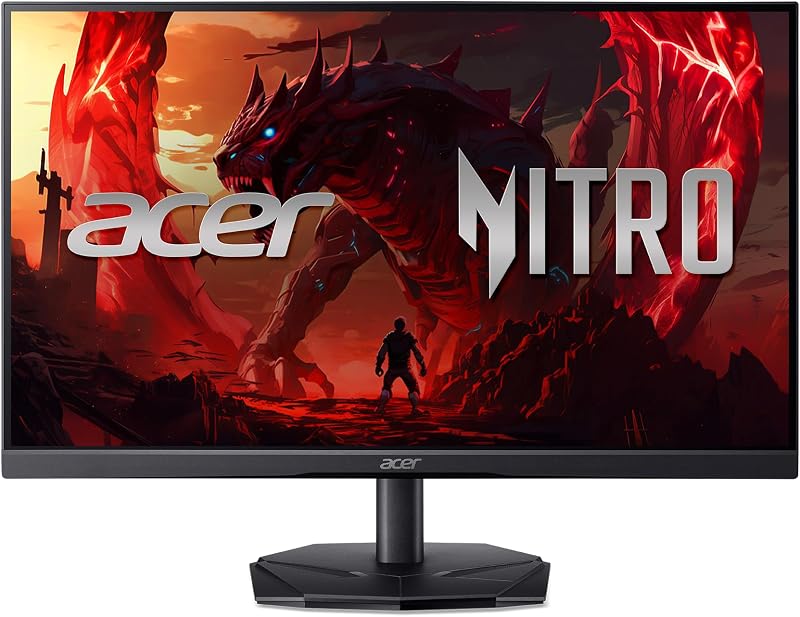
04 Acer Nitro 24.5in FHD 1920×1080 200Hz
Best for High-frame streamers and motion designers
Pros
- Blazing 200Hz refresh rate
- Ultra-fast 0.5ms GTG response time
- 99 percent sRGB color gamut
- HDR10 picture quality technology
Cons
- Compact 24.5-inch screen diagonal
- Modest 250 nits brightness
Pushing refresh velocity to its zenith, the Acer Nitro 24.5in FHD 1920×1080 200Hz, carrying model identification KG251Q X3biip, is engineered for content creators, game reviewers, and esports streamers who require instantaneous motion feedback. Featuring a 24.5-inch Full HD In-Plane Switching panel, this display achieves a blazing 200Hz refresh rate paired with an ultra-responsive 0.5ms Gray-to-Gray (GTG) response time. This combination virtually eradicates smearing, ghosting, and pixel lag, delivering exceptionally clear rendering across fast camera pans, animated titles, and high-framerate gameplay captures.
Unlike standard high-speed displays that sacrifice chromatic depth for raw velocity, the KG251Q X3biip incorporates a 99 percent sRGB color gamut and HDR10 picture enhancement technology, making it a formidable asset among acer curved monitor alternatives and flat-panel displays alike. The IPS panel delivers consistent chromatic fidelity and wide viewing angles, while the 2000:1 contrast ratio and matte display surface preserve deep blacks and clear highlights. AMD FreeSync Premium synchronization ensures tear-free visuals by synchronizing monitor frames directly with your graphics card, eliminating stuttering in timeline previews and real-time gaming sessions.
The display is wrapped in Acer’s signature ZeroFrame design, minimizing bezel borders to maximize usable visual real estate and simplify seamless multi-monitor side-by-side configurations. Integrated eye-care features include ComfyView display technology, low dimming, and flicker-less backlighting to reduce eye fatigue during intensive creative deadlines. Weighing 7.4 pounds with dimensions of 8.28 inches deep, 21.93 inches wide, and 16.28 inches high, this model is the premier choice for hybrid creators seeking maximum refresh speed without compromising standard color fidelity.
- Blazing 200Hz refresh rate with ultra-fast 0.5ms GTG response time on a 24.5-inch IPS display
- 99 percent sRGB color gamut coverage enhanced with HDR10 support for dynamic visuals
- AMD FreeSync Premium synchronization eliminating visual stutter and graphic frame tearing
- Near bezel-less ZeroFrame construction featuring flicker-less and low-dimming ComfyView display
What Sets These Models Apart
| Model Name | Screen Size & Panel | Refresh Rate | Color Gamut | Sync Technology |
|---|---|---|---|---|
| Acer 27in FHD 1920×1080 IPS 120Hz | 27-inch IPS LCD | 120Hz | 99 Color Gamut | Adaptive-Sync (FreeSync Compatible) |
| Acer 23.8in FHD 1920×1080 IPS 120Hz | 23.8-inch IPS LCD | 120Hz | 99 Color Gamut | Adaptive-Sync (FreeSync Compatible) |
| Acer Nitro 23.8in FHD 1920×1080 180Hz | 23.8-inch VA LCD | 165Hz to 180Hz | 72% NTSC | AMD FreeSync Premium |
| Acer Nitro 24.5in FHD 1920×1080 200Hz | 24.5-inch IPS LCD | 200Hz | 99% sRGB | AMD FreeSync Premium |
Buying Tips for Acer Monitors
Selecting the ideal display from the family of acer desktop monitors for creators requires balancing screen diagonal against pixel pitch and available desk depth. Full HD 1920 x 1080 resolution behaves differently depending on the physical panel size. On a 23.8-inch or 24.5-inch panel, 1080p yields a tight pixel pitch of approximately 0.275mm to 0.28mm, resulting in sharp interface typography, crisp timeline scrubbers, and clean canvas vectors. Conversely, stepping up to a 27-inch 1080p panel increases the pixel pitch to 0.311mm, which offers larger, more readable user interface elements from a comfortable viewing distance but requires slightly more desk depth to avoid noticing individual pixels.
When deciding which acer 120hz monitor to buy, evaluate the underlying panel technology and color reproduction metrics. In-Plane Switching panels, found on the KB272, KB242Y, and KG251Q, deliver broad viewing angles and reliable 99 percent color gamut support, making them the preferred choice for digital illustration, video color grading, and web design workflows. Meanwhile, Vertical Alignment panels such as the one used in the Nitro KG241Y offer high static contrast that makes shadow details pop in gaming environments, though with a 170-degree viewing angle and 72 percent NTSC color gamut. Determining whether color precision or deep black levels matters more will immediately clarify your display choice.
Motion clarity and input connectivity represent the final key criteria when shopping for an acer high refresh rate monitor. Standard 120Hz displays provide a fluid baseline that eliminates desktop stutter and eases eye fatigue compared to basic 60Hz panels. If your daily work includes live game streaming, high-speed 3D rendering, or competitive gaming capture, upgrading to the 165Hz to 200Hz capabilities of the Nitro series provides meaningful response benefits with response times reaching as fast as 0.5ms GTG. Additionally, verify input ports: models equipped with dual HDMI and DisplayPort connections, such as the KG241Y, allow effortless switching between an editing workstation and a secondary capture console without swapping cables.
FAQ
Does an acer 120hz monitor improve video editing workflows?
A 120Hz refresh rate substantially improves editing workflows by rendering interface animations, mouse tracking, and timeline scrubbing twice as smoothly as standard 60Hz displays. While edited video renders at its native project framerate, the responsive high-refresh display reduces visual stutter and eye strain during long timeline management sessions.
What is the difference between IPS and VA panels in these Acer displays?
In-Plane Switching panels, such as those featured on the KB272 G0bi, KB242Y G0bi, and KG251Q X3biip, provide wide 178-degree viewing angles and 99 percent color gamut coverage for accurate asset inspection. Vertical Alignment panels, like the one on the KG241Y Sbiip, deliver strong native contrast ratios and deep black levels, making them well-suited for high-motion simulations and low-light gaming.
Can these Acer high refresh rate monitors connect via HDMI and DisplayPort?
Connectivity varies by model according to listing specifications. The Acer Nitro KG241Y Sbiip provides one DisplayPort 1.2 connection and two HDMI 2.0 ports with an included HDMI cable, facilitating flexible multi-device routing. For other models where specific port versions are not detailed in the listing data, the listing does not specify full port arrays, though standard HDMI and PC connections are supported.
How does Adaptive-Sync and FreeSync Premium benefit creator tasks?
Adaptive-Sync and AMD FreeSync Premium dynamically synchronize the monitor’s refresh rate to the frame output of your graphics card. This synchronization prevents horizontal screen tearing and micro-stutters during high-frame video playback, motion preview rendering, and full-screen gaming previews without introducing input lag.
Which Acer monitor is best for multi-display desktop setups?
The Acer KB242Y G0bi and Acer Nitro KG251Q X3biip are exceptionally well-suited for multi-display setups due to their ZeroFrame construction and compact 23.8-inch and 24.5-inch form factors. Their ultra-thin bezels allow two or more monitors to sit flush edge-to-edge, providing an uninterrupted visual workspace across video timelines and reference monitors.