ASUS Monitors & Displays
ASUS 27-Inch 4K OLED Monitor Breakdown: ROG vs ProArt for Creative Workflows
Choosing an asus 27 4k oled display requires balancing high-density color grading with rapid refresh performance and clean workspace connectivity. Desktop creators, vloggers, and digital artists rely heavily on 27-inch monitors because they provide an ideal desktop footprint without dominating physical workspace. In this category, ASUS provides two focused approaches: the ProArt family built around…
As Amazon Associates, we earn from qualifying purchases. This means we may receive a small commission at no extra cost to you if you click through and make a purchase.
Choosing an asus 27 4k oled display requires balancing high-density color grading with rapid refresh performance and clean workspace connectivity. Desktop creators, vloggers, and digital artists rely heavily on 27-inch monitors because they provide an ideal desktop footprint without dominating physical workspace. In this category, ASUS provides two focused approaches: the ProArt family built around color verification, wide gamuts, and studio docking, alongside the Republic of Gamers (ROG) line tailored for high frame rates, low latency, and HDR rendering.
This guide breaks down exactly 6 ASUS OLED monitors in the 27-inch segment to help you determine which model fits your production pipeline. While four of these displays feature native 4K UHD resolutions for fine-detail rendering, two specialized models feature 1440p panels tuned for ultra-fast motion fluidity. They differ in panel design—including fourth-generation QD-OLED, Tandem OLED, and WOLED—as well as video interfaces like DisplayPort 2.1a and Thunderbolt 4, hardware LUT write-back capabilities, and laptop charging power.
Which ASUS 27-inch 4K OLED Should You Buy
All 6 models on this page, side by side
| Model | Buyer rating | Ratings | Listing |
|---|---|---|---|
01 ASUS ROG PG27UCDM 27 Inch 4K ASUS ROG PG27UCDM 27 Inch 4K |
Price | ||
02 ASUS ROG XG27UCDMG 27 Inch 4K ASUS ROG XG27UCDMG 27 Inch 4K |
Price | ||
03 ASUS ProArt Display 27" 4K OLED ASUS ProArt Display 27" 4K OLED |
Price | ||
04 ASUS ProArt PA27UCDMR 27 Inch 4K ASUS ProArt PA27UCDMR 27 Inch 4K |
Price | ||
05 ASUS ROG PG27AQDP 27 Inch 1440p ASUS ROG PG27AQDP 27 Inch 1440p |
Price | ||
06 ASUS ROG XG27AQWMG 27 Inch 1440p ASUS ROG XG27AQWMG 27 Inch 1440p |
186 | Price |
Prices and ratings are read from the Amazon product listing and change there, not here. Every rating is the average left by Amazon buyers, not a score from this site.
Why each one is on the list
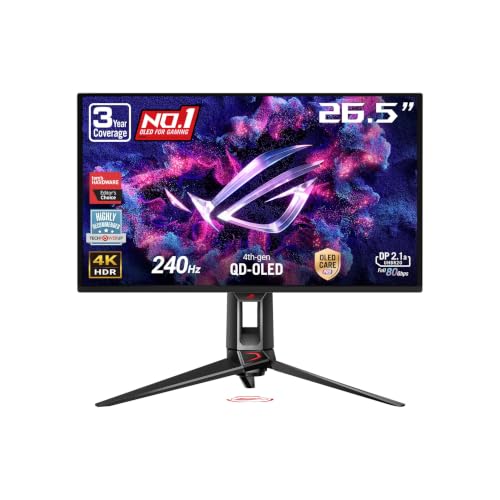
- For hybrid creative professionals requiring uncompressed DisplayPort 2.1a bandwidth, 90W USB-C charging, and 240Hz speed, choose the ASUS ROG PG27UCDM 27 Inch 4K.
- For HDR video editors needing fourth-generation QD-OLED clarity with heavy-duty heatsink thermal management, pick the ASUS ROG XG27UCDMG 27 Inch 4K.
- For dual-computer studio desks requiring integrated Auto KVM switching, DisplayPort daisy-chaining, and 96W USB-C delivery, choose the ASUS ProArt Display 27″ 4K OLED.
- For high-end colorists and Mac mastering suites demanding hardware calibration write-back and dual Thunderbolt 4 ports, choose the ASUS ProArt PA27UCDMR 27 Inch 4K.
- For esports creators and animators prioritizing a 480Hz refresh rate and 0.03ms response time over 4K resolution, choose the ASUS ROG PG27AQDP 27 Inch 1440p.
- For dark-room editors who demand a zero-haze glossy surface and the extended lifespan of Tandem OLED, choose the ASUS ROG XG27AQWMG 27 Inch 1440p.
01 ASUS ROG PG27UCDM 27 Inch 4K

Best for High-bandwidth creator and gaming hybrid setups
Pros
- Full 80Gbps DisplayPort 2.1a
- 90W USB-C power delivery
- Sharp 4th-gen QD-OLED text
- Neo Proximity Sensor burn-in protection
Cons
- Matte finish softens deep contrast
- Lacks hardware LUT write-back
The ASUS ROG PG27UCDM 27 Inch 4K is engineered as a hybrid display combining dense 3840 x 2160 visuals with a 240Hz refresh rate and a 0.03ms response time. Built around fourth-generation QD-OLED technology, this panel delivers sharp typography and clean interface lines across creative software. Color fidelity is a key focus, featuring 99% DCI-P3 coverage, a factory-calibrated Delta E under 2, and true 10-bit color depth. Content creators who divide their desktop time between 4K video timelines and fluid motion testing will appreciate its rendering precision.
Desktop connectivity is another strong suit. ASUS equips the display with DisplayPort 2.1a UHBR20 offering 80Gbps bandwidth, supporting uncompressed 4K visuals at high refresh rates. It also includes USB-C with 90W Power Delivery, HDMI 2.1, and a dedicated tripod socket on the stand. The ASUS OLED Care Pro suite uses a Neo Proximity Sensor to transition the screen to black when you step away, reducing burn-in risks. While this 240hz asus rog monitor excels in dynamic performance, editors requiring hardware LUT write-back may prefer the ProArt PA27UCDMR.
- Fourth-generation 26.5-inch 4K QD-OLED panel with 240Hz refresh rate
- DisplayPort 2.1a UHBR20 with 80Gbps bandwidth and 90W USB-C delivery
- ASUS OLED Care Pro suite with Neo Proximity Sensor burn-in protection
- Factory calibration achieving Delta E under 2 across 99% DCI-P3
02 ASUS ROG XG27UCDMG 27 Inch 4K

Best for HDR video editors prioritizing thermal management
Pros
- Custom heatsink cooling system
- VESA DisplayHDR 400 True Black
- 240Hz refresh with 0.03ms response
- Luminance compensation anti-flicker
Cons
- Omits DisplayPort 2.1 bandwidth
- No USB-C laptop power delivery
The ASUS ROG XG27UCDMG 27 Inch 4K offers high-density creative performance using a 26.5-inch 4K QD-OLED panel operating at 240Hz with a 0.03ms response time. Engineered with an enhanced custom heatsink, this model emphasizes passive thermal management to maintain luminance levels and extend panel lifespan during long rendering sessions. It achieves VESA DisplayHDR 400 True Black compliance, rendering deep shadow details alongside 3426 lumens of listing-rated brightness. With 99% DCI-P3 coverage and Delta E under 2, video editors gain trustworthy color reproduction.
Comfort during extended editing shifts is improved by OLED Anti-Flicker 2.0, which uses a luminance compensation algorithm to reduce flicker by 20% compared to previous-generation panels. Static image protection is managed by ASUS OLED Care Pro with a Neo Proximity Sensor. In an asus oled monitor comparison, this model provides excellent color fidelity but foregoes the 80Gbps DisplayPort 2.1a port and 90W laptop charging found on the PG27UCDM, making it better tailored for dedicated desktop workstations.
- 26.5-inch 4K QD-OLED panel with 240Hz refresh and 0.03ms response
- Custom heatsink thermal management system for panel longevity
- OLED Anti-Flicker 2.0 reducing luminance fluctuations by 20%
- VESA DisplayHDR 400 True Black with 99% DCI-P3 color gamut
03 ASUS ProArt Display 27″ 4K OLED

Best for Studio video editors using dual computers
Pros
- Integrated Auto KVM switch
- 96W USB-C laptop charging
- Factory-calibrated Delta E under 1.5
- DisplayPort daisy-chaining support
Cons
- Refresh rate limited to 120Hz
- Lower full-screen SDR brightness
Built specifically for post-production and color-critical workflows, the ASUS ProArt Display 27″ 4K OLED (model PA279CDV) focuses on color integrity. Its 26.5-inch 4K UHD QD-OLED panel runs at a 120Hz refresh rate with a 0.1ms GTG response time. The display offers 1000 nits peak brightness, DisplayHDR True Black 400 compliance, and wide color support covering 100% sRGB, 99% DCI-P3, and BT. 2020. Calman Verified and factory calibrated to a Delta E under 1.5, it provides the accuracy required for broadcast and film editing.
Connectivity supports complex creator setups. A USB-C port provides 96W Power Delivery for single-cable laptop operation, alongside DisplayPort daisy-chaining, HDMI, a USB hub, and an Auto KVM switch to control two computers with one peripheral set. Mac users benefit from an M Model-P3 preset tuned to MacBook displays. It also features an anti-scratch surface film with 2.5 times better protection than older panels. However, users seeking 240Hz gaming speeds or hardware LUT write-back will find a better fit in the PA27UCDMR.
- Factory-calibrated 4K QD-OLED panel with Delta E under 1.5 and Calman Verification
- USB-C port with 96W Power Delivery and integrated Auto KVM switch
- DisplayPort daisy-chaining and Mac-optimized M Model-P3 color preset
- Anti-scratch protective film providing 2.5x improved surface resilience
04 ASUS ProArt PA27UCDMR 27 Inch 4K

Best for Mastering colorists and Mac production suites
Pros
- Dual Thunderbolt 4 with 96W delivery
- Hardware calibration with profile write-back
- Multi-HDR support with Dolby Vision
- Extended 5-year warranty coverage
Cons
- Dolby Vision requires future firmware update
- Specialized toolset for casual users
The ASUS ProArt PA27UCDMR 27 Inch 4K serves as a premier mastering monitor for high-end digital imaging. Featuring a 26.5-inch 4K UHD QD-OLED screen with a 240Hz refresh rate and 0.1ms response time, it combines visual fluidity with exceptional color precision. The panel achieves a Delta E under 1, 1000 nits peak brightness, and true 10-bit color covering 99% DCI-P3 and Rec. 2020. Uniquely, it incorporates ProArt Hardware Calibration Technology, allowing calibration profiles to be written directly into the display’s internal scaler memory.
Dual Thunderbolt 4 ports provide up to 96W Power Delivery, complemented by HDMI 2.1 and DisplayPort 1.4 DSC. Broad HDR workflow support includes HDR10, HLG, and Dolby Vision (scheduled for arrival in the second quarter of 2026 via firmware). Packaged with an anti-reflection coating, calibration report, and a 5-year warranty, this display represents the premier asus 27 inch oled for creators. However, casual content creators not utilizing hardware calibration may find its feature set more extensive than necessary compared to the PA279CDV.
- 4K 240Hz QD-OLED display with factory-calibrated Delta E under 1 accuracy
- ProArt Hardware Calibration with internal profile write-back support
- Dual Thunderbolt 4 ports delivering up to 96W Power Delivery
- Multi-format HDR compatibility supporting HDR10, HLG, and Dolby Vision
05 ASUS ROG PG27AQDP 27 Inch 1440p
Best for Competitive esports creators and motion analysts
Pros
- Blazing 480Hz refresh rate
- 03ms response time eliminating blur
- Custom passive heatsink cooling
- Factory-calibrated Delta E under 2
Cons
- 1440p resolution restricts timeline canvas
- Coarser 0.23mm pixel pitch
The ASUS ROG PG27AQDP 27 Inch 1440p targets editors and motion specialists who prioritize extreme frame rendering. Recognized as the first 1440p 480Hz OLED monitor, its 26.5-inch WOLED panel provides a 0.03ms response time to eliminate motion blur. While high-speed esports animators might also track developments around an asus rog 720hz monitor, this 480Hz unit delivers remarkable visual clarity right now. It covers 99% DCI-P3 with a Delta E under 2, ensuring color reliability for video tasks.
Thermal management is handled by a custom passive heatsink coupled with OLED Care+ software. DisplayHDR 400 True Black compliance, a 1,000,000:1 contrast ratio, and 1300 cd/m2 brightness ensure punchy highlights, while ROG OLED Anti-Flicker enhances viewing stability. A 3-year warranty covers burn-in and Advance Replacement. However, with its 2560 x 1440 resolution and 0.23mm pixel pitch, it gives way to 4K alternatives like the PG27UCDM for creators who require fine-grained canvas resolution and desktop timeline space.
- 26.5-inch 1440p WOLED panel operating at a record 480Hz refresh rate
- 0.03ms response time with Extreme Low Motion Blur support
- OLED Care+ software and passive custom heatsink cooling architecture
- 99% DCI-P3 coverage with Delta E under 2 color accuracy
06 ASUS ROG XG27AQWMG 27 Inch 1440p
Best for Glossy display purists in dark editing rooms
Pros
- TrueBlack Glossy zero-haze surface
- Tandem OLED boosts lifespan and brightness
- VESA DisplayHDR 500 True Black
- Wide 99.5% DCI-P3 color gamut
Cons
- Glossy finish reflects ambient studio lighting
- 1440p resolution provides less workspace
The ASUS ROG XG27AQWMG 27 Inch 1440p offers a distinct visual profile through its TrueBlack Glossy WOLED screen. Operating at 280Hz with a 0.03ms response time on a 26.5-inch 1440p panel, it incorporates Tandem OLED technology. This structure yields 15% higher peak brightness, 25% larger color volume, and a 60% longer lifespan over standard WOLED displays. The zero-haze finish provides remarkable clarity and deep contrast, complemented by VESA DisplayHDR 500 True Black and 99.5% DCI-P3 coverage with Delta E under 2.
Panel preservation is maintained through ASUS OLED Care Pro and a Neo Proximity Sensor that turns the screen black when the workspace is empty. The compact stand makes this asus 27 inch monitor 1440p unit ideal for smaller studio desks, with settings adjusted via DisplayWidget Center. However, the glossy surface can reflect bright room lights, and its 1440p resolution offers less workspace area for editing timelines than the 4K ProArt and ROG options in the lineup.
- TrueBlack Glossy Tandem OLED panel delivering zero-haze visual clarity
- 280Hz refresh rate paired with instantaneous 0.03ms response time
- VESA DisplayHDR 500 True Black compliance with 99.5% DCI-P3 gamut
- ASUS OLED Care Pro featuring an automated Neo Proximity Sensor
What Sets These Models Apart
| Model | Panel & Resolution | Refresh & Response | Color Gamut & Precision | Key Connectivity |
|---|---|---|---|---|
| ASUS ROG PG27UCDM 27 Inch 4K | 26.5″ 4K QD-OLED (Matte) | 240Hz, 0.03ms | 99% DCI-P3, Delta E < 2 | DisplayPort 2.1a UHBR20, USB-C (90W PD), HDMI 2.1 |
| ASUS ROG XG27UCDMG 27 Inch 4K | 26.5″ 4K QD-OLED (Matte) | 240Hz, 0.03ms | 99% DCI-P3, Delta E < 2 | DisplayPort 1.4, HDMI 2.1, Custom Heatsink |
| ASUS ProArt Display 27″ 4K OLED | 26.5″ 4K QD-OLED (Matte) | 120Hz, 0.1ms GTG | 99% DCI-P3, Delta E < 1.5, Calman Verified | USB-C (96W PD), DP Daisy-Chain, Auto KVM, HDMI |
| ASUS ProArt PA27UCDMR 27 Inch 4K | 26.5″ 4K QD-OLED (Anti-Reflection) | 240Hz, 0.1ms GTG | 99% DCI-P3, Rec. 2020, Delta E < 1, HW Cal | Dual Thunderbolt 4 (96W PD), HDMI 2.1, DP 1.4 DSC |
| ASUS ROG PG27AQDP 27 Inch 1440p | 26.5″ 1440p WOLED (Matte) | 480Hz, 0.03ms | 99% DCI-P3, Delta E < 2 | DisplayPort 1.4, HDMI 2.1, Custom Heatsink |
| ASUS ROG XG27AQWMG 27 Inch 1440p | 26.5″ 1440p Tandem WOLED (Glossy) | 280Hz, 0.03ms | 99.5% DCI-P3, Delta E < 2 | DisplayPort 1.4, HDMI 2.1, USB Hub |
Buying Tips for ASUS 27-inch 4K OLED Monitors
When deciding which asus oled monitor to buy, consider whether your primary objective is creative mastering or motion performance. ProArt displays provide calibrated gamuts, hardware LUT profiling, Auto KVM switching, and high-wattage power delivery tailored to multi-device studio setups. In contrast, ROG models emphasize high refresh rates from 240Hz to 480Hz, gaming firmware features, and ultra-fast pixel response times while maintaining strong factory color fidelity suitable for creative workflows.
Screen resolution and panel coatings play major roles in day-to-day usability. A native 4K resolution on a 26.5-inch panel provides a dense 0.16mm pixel pitch, eliminating text fringing issues and offering vast workspace real estate for multi-track video editing. Choosing between matte, anti-reflection, and glossy finishes depends on your room environment: matte surfaces reduce distracting reflections in bright rooms, while glossy Tandem OLED panels provide deeper perceived contrast and zero haze in controlled lighting setups.
Connectivity and power management should match your host hardware. If you edit on a high-end laptop, selecting a monitor with 90W or 96W USB-C or dual Thunderbolt 4 connectivity simplifies your desk into a single-cable docking station. If you run a high-performance desktop graphics card, features like DisplayPort 2.1a UHBR20 provide uncompressed 80Gbps signal bandwidth for full-fidelity 4K at 240Hz. Finally, confirm the presence of automated burn-in protection, such as the Neo Proximity Sensor, to protect your panel during daily productivity.
FAQ
How does QD-OLED compare to WOLED for creative editing?
QD-OLED technology uses quantum dots to convert blue OLED light into pure red and green, creating high color volume and wide coverage across DCI-P3 and Rec. 2020 without requiring a white subpixel. WOLED panels use white light passed through color filters, offering high peak brightness efficiency and extremely rapid refresh rates up to 480Hz, making them popular for fast motion work.
Can ASUS ROG gaming monitors be used for color-accurate video grading?
Yes. Models such as the ROG PG27UCDM and XG27UCDMG feature factory-calibrated Delta E values under 2, 99% DCI-P3 coverage, and true 10-bit color depth. While they lack the internal hardware LUT write-back found on ProArt displays, their color precision is thoroughly adequate for high-end video editing and content creation.
What does the Neo Proximity Sensor do on ASUS OLED monitors?
The Neo Proximity Sensor is an integrated hardware feature within the ASUS OLED Care Pro suite. It detects when you move away from your workspace and automatically turns the display black. Once you return, it wakes up instantly, safeguarding against static image retention without interrupting your creative flow.
Why choose a 4K 27-inch OLED over a 1440p model?
A 27-inch 4K OLED monitor delivers a fine 0.16mm pixel pitch that produces sharp text, crisp interface icons, and ample desktop timeline space. While 1440p displays deliver higher refresh rates such as 480Hz, their 0.23mm pixel pitch provides less screen real estate for complex non-linear video editors.
What warranty coverage does ASUS provide against OLED burn-in?
ASUS provides a 3-year warranty with Advance Replacement and burn-in coverage across its ROG OLED monitors. On professional models like the ProArt PA27UCDMR, ASUS provides a 5-year warranty consisting of 3 standard years plus a 2-year extension upon online registration.