ASUS Monitors & Displays
ASUS 27-Inch IPS Monitor Roundup: Choosing the Right Screen for Your Setup
Finding the right asus ips 27 inch monitor requires balancing panel resolution, color range, and connectivity to fit your visual workspace. ASUS builds its 27-inch In-Plane Switching lineup around wide 178-degree viewing angles and dependable chromatic consistency, making them popular for office work, gaming, and content creation. Choosing between standard 1080p and higher-density 1440p resolutions…

As Amazon Associates, we earn from qualifying purchases. This means we may receive a small commission at no extra cost to you if you click through and make a purchase.
Finding the right asus ips 27 inch monitor requires balancing panel resolution, color range, and connectivity to fit your visual workspace. ASUS builds its 27-inch In-Plane Switching lineup around wide 178-degree viewing angles and dependable chromatic consistency, making them popular for office work, gaming, and content creation. Choosing between standard 1080p and higher-density 1440p resolutions depends on how much screen space and fine detail your workflow demands.
This roundup analyzes 6 distinct ASUS 27-inch IPS monitors to help you pick the proper display for your desk. These models differ across key areas: pixel density spanning Full HD and Quad HD, refresh speeds ranging from 75Hz to 180Hz, and port options covering legacy VGA up to modern USB Type-C connections.
Which ASUS 27-inch IPS Monitors Should You Buy
All 6 models on this page, side by side


Prices are read from the Amazon product listing and change there, not here. Scores are out of 10, based on listed specifications and buyer feedback.
Why each one is on the list
Match your daily tasks and setup requirements to the appropriate display:
- For high-speed competitive gaming and extended color coverage: ASUS TUF Gaming VG27AQ3A 27 Inch delivers 180Hz speed and 130% sRGB color.
- For smooth everyday computing and casual entertainment: ASUS VA27EHF 27 Inch 1080P FHD combines a 100Hz refresh rate with a 1,300:1 contrast ratio.
- For detailed graphic design and office productivity: ASUS VA27AQ 27 Inch 1440P QHD provides 1440p sharpness and 99% sRGB color fidelity.
- For basic document work and legacy VGA computers: ASUS 27 Inch Desktop Monitor offers reliable 1080p clarity with HDMI and D-Sub inputs.
- For modern laptop setups needing single-cable docking: ASUS ROG XG27ACS 27 Inch 1440p features an integrated USB Type-C hub and 180Hz motion.
- For multi-computer desks needing built-in audio: ASUS VA27DQ 27 Inch 1080P Computer includes DisplayPort, HDMI, VGA, and stereo speakers.
01 ASUS TUF Gaming VG27AQ3A 27 Inch
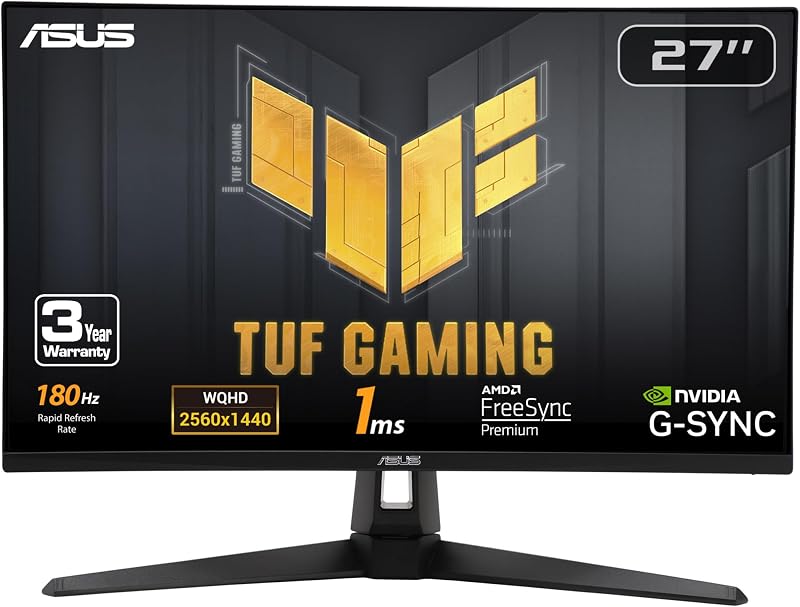
Best for High-frame-rate gamers and creative editors
Pros
- 180Hz Fast IPS panel
- 130% sRGB color gamut
- ELMB Sync with G-Sync compatibility
Cons
- External power adapter required
- Standard 1000:1 contrast ratio
The ASUS TUF Gaming VG27AQ3A 27 Inch is designed for users who want high frame rates alongside crisp visual clarity. This asus tuf gaming vg27aq3a display features a 2560 x 1440 QHD Fast IPS panel that delivers clean details for digital creative tasks. With a 180Hz refresh rate and a 1ms response time, motion remains fluid. ASUS Extreme Low Motion Blur Sync operates alongside FreeSync Premium, G-Sync compatibility, and AdaptiveSync to remove tearing and ghosting.
Visual presentation is supported by a 130% sRGB color gamut and HDR-10 capability, providing rich tones across editing software and gaming environments. The matte screen finish controls glare, while internal speakers provide audio output without needing extra desk accessories. In the box, ASUS includes a DisplayPort cable, power cord, power adapter, and an L-shaped screwdriver for setup.
This display suits hybrid users balancing competitive play with color-sensitive media editing. It gives way to the ROG XG27ACS for desks that require a USB Type-C hub, or the VA27AQ if you prefer an office-oriented frame without gaming aesthetics.
- 27-inch 2560 x 1440 QHD Fast IPS panel with 180Hz refresh rate and 1ms response time
- ELMB Sync technology paired with FreeSync Premium and G-Sync compatibility
- Wide 130% sRGB color gamut with HDR-10 support
- Integrated speakers and complimentary 3-month Adobe Creative Cloud access
02 ASUS VA27EHF 27 Inch 1080P FHD

Best for Everyday multitaskers and casual gamers
Pros
- Fluid 100Hz refresh rate
- 1,300:1 static contrast ratio
- Frameless VESA-ready design
Cons
- Standard 1080p resolution
- Basic 72% color gamut
The ASUS VA27EHF 27 Inch 1080P FHD targets general home office tasks and everyday computing where fluid movement is essential. Operating at 1920 x 1080 Full HD, the asus va27ehf 27 inch panel utilizes IPS technology to ensure wide 178-degree viewing angles. ASUS equips this model with a 100Hz refresh rate and 1ms MPRT, providing smoother scrolling and reduced motion stutter compared to standard 60Hz office panels.
The screen features a 1,300:1 contrast ratio that aids text separation during long reading sessions. Its frameless enclosure looks tidy in multi-screen setups and supports VESA wall mounting. Certified by TÜV Rheinland for Flicker-free and Low Blue Light operation, it helps maintain eye comfort during long workdays. An HDMI cable and power cord are included in the package, supported by a 3-year warranty.
This monitor is well suited for students, remote office workers, and general multi-taskers. It gives way to an asus 27 inch monitor 1440p option like the VA27AQ when your workload requires finer pixel density for detailed photo or video work.
- Full HD 1920 x 1080 IPS display with 178-degree viewing angles
- 100Hz refresh rate with Adaptive-Sync and 1ms MPRT
- 1,300:1 contrast ratio with TÜV Rheinland eye comfort certification
- Frameless design with standard VESA mounting capability
03 ASUS VA27AQ 27 Inch 1440P QHD

Best for Graphic designers and office productivity creators
Pros
- Sharp 1440p WQHD resolution
- 99% sRGB color accuracy
- Triple HDMI, DisplayPort, VGA inputs
Cons
- Capped at 75Hz refresh rate
- Basic 2W stereo speakers
The ASUS VA27AQ 27 Inch 1440P QHD provides expanded desktop space for productivity and creative work. Its 2560 x 1440 WQHD panel provides 77 percent more working room than standard 1080p screens, making the asus va27aq 1440p a strong tool for placing side-by-side documents, editing photos, or managing complex timelines. It delivers 99% sRGB color accuracy and 350 cd/m² brightness for dependable chromatic presentation.
A 75Hz refresh rate paired with Adaptive-Sync ensures smooth visuals without tearing during casual gaming or video playback. Ergonomic comfort is supported through TÜV-certified flicker-free backlighting and low blue light settings. The monitor features built-in 2W stereo speakers and provides broad connectivity through HDMI, DisplayPort, and legacy VGA ports, all housed in an edge-to-edge frameless chassis that mounts cleanly onto VESA arms.
This screen serves graphic designers, video editors, and home office professionals needing an asus 27 inch 1440p ips monitor for daily work. It yields to the TUF VG27AQ3A or ROG XG27ACS when higher gaming refresh rates beyond 75Hz are necessary.
- 27-inch WQHD 2560 x 1440 IPS panel with 350 cd/m² brightness
- 99% sRGB color gamut suited for design and editing tasks
- HDMI, DisplayPort, and VGA input connectivity
- Integrated 2W stereo speakers and TÜV-certified eye care features
04 ASUS 27 Inch Desktop Monitor

Best for General office workers and legacy setups
Pros
- TÜV Rheinland eye care suite
- Frameless space-saving chassis
- AMD FreeSync support
Cons
- Limited to HDMI and D-Sub ports
- 75Hz standard refresh rate
The ASUS 27 Inch Desktop Monitor, also listed as the asus 27 inch desktop monitor va27ehe, offers a dependable visual display for standard home or office desks. Featuring a 1920 x 1080 Full HD IPS panel, it maintains 178-degree wide viewing angles with minimal color shift. A 75Hz refresh rate enhanced with Adaptive-Sync and AMD FreeSync helps eliminate tracing and screen tearing during video playback.
The hardware includes TÜV Rheinland-certified flicker-free backlighting and low blue light modes to protect vision during extended computing sessions. It includes tilt adjustability and VESA wall-mount compatibility, making it adaptable to desktop stands or articulated arms. Physical inputs consist of HDMI and a D-Sub port, ensuring support for modern laptops alongside older desktop towers.
This monitor fits basic business workstations, secondary display setups, and school environments. It concedes ground to the VA27DQ if you require integrated speakers and DisplayPort, or to higher-resolution QHD models when detailed editing is your priority.
- Full HD 1920 x 1080 IPS panel with a frameless bezel design
- 75Hz refresh rate with Adaptive-Sync and AMD FreeSync support
- TÜV Rheinland-certified flicker-free and low blue light engineering
- Dual connectivity featuring HDMI and legacy D-Sub ports
05 ASUS ROG XG27ACS 27 Inch 1440p
Best for Creators and gamers needing USB-C docking
Pros
- Multipurpose USB Type-C hub
- 180Hz Fast IPS panel
- Wide 133% color gamut
Cons
- Lower 400:1 contrast specification
- No built-in speakers
The ASUS ROG XG27ACS 27 Inch 1440p combines competitive gaming speed with flexible connectivity. Equipped with a 2560 x 1440 Fast IPS panel, this asus rog xg27acs 27 inch monitor delivers a 180Hz refresh rate and a 1ms gray-to-gray response time. ASUS Extreme Low Motion Blur Sync operates alongside variable refresh rates to maintain motion clarity. Shoppers comparing premium gaming options can review our guide to the asus rog 27 inch monitor lineup.
A notable feature is its USB Type-C hub, which supports DisplayPort signal transmission while acting as a USB hub for wired desk peripherals. The panel provides an extensive 133% color gamut, 400 nits brightness, and HDR support for vivid visual rendering. Users can adjust display parameters with a mouse via the DisplayWidget Center software, eliminating the need to use physical rear buttons.
This screen is ideal for enthusiast gamers and modern laptop users who want a high-performance panel with single-cable docking capability. It steps aside for the TUF VG27AQ3A if built-in stereo speakers or a standard desktop footprint are preferred.
- 27-inch 2560 x 1440 QHD Fast IPS panel with 180Hz refresh rate and 1ms GTG response
- USB Type-C hub supporting DisplayPort alt mode and peripheral connections
- Wide 133% color gamut with 400 nits brightness and HDR support
- DisplayWidget Center integration and 3-month Adobe Creative Cloud access
06 ASUS VA27DQ 27 Inch 1080P Computer
Best for Multi-device desks requiring integrated audio
Pros
- DisplayPort, HDMI, and D-Sub ports
- Integrated 2W x 2 stereo speakers
- Ergonomic tilt stand
Cons
- 1080p resolution on 27-inch panel
- 72% color gamut
The ASUS VA27DQ 27 Inch 1080P Computer provides a versatile interface for multi-device workstations. Identified in corporate environments as the asus va27dq monitor, it features a 27-inch Full HD 1920 x 1080 IPS display with 178-degree viewing angles. A 75Hz refresh rate with Adaptive-Sync and FreeSync supports both NVIDIA GeForce graphics cards (GTX 10 series and newer) and AMD Radeon GPUs to ensure smooth motion without tearing.
Connectivity is a core strength, featuring DisplayPort, HDMI, and D-Sub inputs to connect multiple computers simultaneously. The monitor includes built-in 2W x 2 stereo speakers, delivering direct audio for calls and video playback without requiring external speakers. An ergonomic stand provides tilt adjustment from -5 to +23 degrees, supported by standard VESA mounting points for monitor arms.
This display fits business desks, call centers, and multi-PC setups requiring legacy and modern ports with internal sound. It gives way to the VA27AQ for content creators who need higher 1440p resolution and 99% sRGB color coverage.
- 27-inch 1080p Full HD IPS display with a frameless chassis
- Triple video inputs: DisplayPort, HDMI, and legacy D-Sub
- Built-in 2W x 2 stereo speakers for integrated desktop audio
- Adaptive-Sync and FreeSync support with ergonomic tilt adjustment
What Sets These Models Apart
Conducting an asus ips 27 inch monitor comparison requires evaluating panel resolution, refresh rates, and video input options side by side. The table below outlines how these six displays compare across primary technical specifications.
| Model | Resolution | Refresh Rate | Primary Video Connectivity | Audio Output |
|---|---|---|---|---|
| ASUS TUF Gaming VG27AQ3A 27 Inch | 2560 x 1440 (QHD) | 180Hz | DisplayPort, HDMI | Integrated Speakers |
| ASUS VA27EHF 27 Inch 1080P FHD | 1920 x 1080 (FHD) | 100Hz | HDMI | None |
| ASUS VA27AQ 27 Inch 1440P QHD | 2560 x 1440 (WQHD) | 75Hz | HDMI, DisplayPort, VGA | Built-in 2W Stereo Speakers |
| ASUS 27 Inch Desktop Monitor | 1920 x 1080 (FHD) | 75Hz | HDMI, D-Sub | None |
| ASUS ROG XG27ACS 27 Inch 1440p | 2560 x 1440 (QHD) | 180Hz | USB Type-C, DisplayPort, HDMI | None |
| ASUS VA27DQ 27 Inch 1080P Computer | 1920 x 1080 (FHD) | 75Hz | DisplayPort, HDMI, D-Sub | Built-in 2W x 2 Stereo Speakers |
Buying Tips for ASUS 27-inch IPS Monitors
When determining which asus ips 27 inch monitor to buy, resolution is your primary choice. On a 27-inch screen, 1080p yields a pixel pitch of approximately 0.31mm, which works well for standard document editing, web browsing, and general office tasks. However, opting for a 1440p display narrows the pixel pitch to 0.23mm, delivering 77 percent more screen canvas. This added space lets you view detailed timelines, large spreadsheets, and multi-window workflows with significantly sharper text rendering.
Color performance and refresh rates also dictate suitability for specific workflows. An effective asus 27 inch ips monitor for creators should offer 99% sRGB coverage or higher, as found on the VA27AQ, TUF VG27AQ3A, and ROG XG27ACS. High refresh rates like 100Hz or 180Hz improve motion tracking and cursor responsiveness in creative software while reducing visual strain. Gamers benefit directly from technologies like ELMB Sync, which eliminates motion blur while keeping adaptive frame rates active.
Port connectivity should match your computer hardware. If you work from a modern laptop, selecting a monitor with a USB Type-C hub simplifies your setup by carrying video signals and peripheral data over a single cable. Desktops and older office systems benefit from models featuring DisplayPort, HDMI, and D-Sub inputs. For users interested in premium display panels with deep contrast, our review of asus 27 4k oled models covers ultra-high-end options.
FAQ
Is 1440p or 1080p better on a 27-inch ASUS IPS monitor?
A 1440p resolution is generally better on a 27-inch screen because its tighter 0.23mm pixel pitch creates sharper text and finer image detail than a 1080p panel. It also provides 77 percent more usable desktop space for running multiple application windows simultaneously. However, 1080p remains a practical, cost-effective choice for general administrative work, data entry, and basic streaming.
What is the advantage of ASUS Fast IPS technology?
ASUS Fast IPS technology utilizes liquid crystal elements that switch up to four times faster than those in standard IPS panels. This enables response times down to 1ms gray-to-gray, reducing ghosting and smearing during fast motion while maintaining wide 178-degree viewing angles and broad color gamuts.
Can I mount these ASUS 27-inch monitors on a desk arm?
Yes, all six ASUS 27-inch monitors reviewed here support standard VESA mounting. Removing the included desktop stand reveals mounting screw holes on the back of the chassis, allowing you to attach the monitor to standard VESA wall brackets or articulated desk arms.
Do these ASUS monitors include eye care features?
Yes, these models feature TÜV Rheinland-certified eye care technologies. This includes Flicker-free backlighting to eliminate screen flicker and Low Blue Light filters to decrease blue light emissions, helping to minimize eye strain during long working or gaming sessions.
What does ASUS ELMB Sync do?
ASUS Extreme Low Motion Blur Sync (ELMB Sync) is a proprietary technology that allows motion blur reduction backlight strobing to operate simultaneously with variable refresh rate technologies like FreeSync or G-Sync. This eliminates motion blur without causing screen tearing or stuttering.


