ASUS Monitors & Displays
ASUS ROG Portable Monitor Guide: Gaming Speed vs. Field Utility
Mobile creators and competitive gamers often hit a strict hardware limit when relying entirely on a single laptop screen or handheld console. Investing in an asus rog portable monitor or a dedicated ZenScreen display solves this limitation by delivering high-refresh rates, responsive panel timings, and flexible power options in a travel-friendly footprint. Whether cutting b-roll…

As Amazon Associates, we earn from qualifying purchases. This means we may receive a small commission at no extra cost to you if you click through and make a purchase.
Mobile creators and competitive gamers often hit a strict hardware limit when relying entirely on a single laptop screen or handheld console. Investing in an asus rog portable monitor or a dedicated ZenScreen display solves this limitation by delivering high-refresh rates, responsive panel timings, and flexible power options in a travel-friendly footprint. Whether cutting b-roll on location or monitoring stream chats, an auxiliary display provides essential visual flexibility on the road.
This guide analyzes exactly 6 portable screens engineered by ASUS, highlighting how their technical architectures diverge across gaming speed, color reproduction, and workstation expansion. High-speed ROG panels prioritize 240Hz refresh rates and internal batteries, while ZenScreen alternatives emphasize OLED color accuracy, lightweight kickstands, and dual-screen productivity. Understanding these specifications will ensure you select the ideal display for your creative and gaming packout.
Which ASUS Portable Monitors Should You Buy
All 6 models on this page, side by side


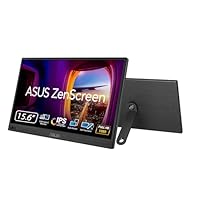


Prices are read from the Amazon product listing and change there, not here. Scores are out of 10, based on listed specifications and buyer feedback.
Why each one is on the list
- Esports competitors needing an eye-level display should pick the ASUS ROG Strix 17.3″ 1080P Portable (model XG17AHP) with its bundled tripod.
- Mobile gamers wanting 240Hz speed and battery power without tripod bulk should choose the ASUS ROG Strix 17.3″ 1080P Portable (model XG17AHPE).
- Business travelers seeking simple single-cable laptop expansion should select the ASUS ZenScreen 15.6 Inch Portable Monitor.
- Digital nomads requiring 360-degree kickstand flexibility and a 0.78kg frame should opt for the ASUS ZenScreen MB169CK 15.6 Inch 1080p.
- Visual creators demanding true blacks and cinema-grade color accuracy should invest in the ASUS ZenScreen MQ16FC 15.6 Inch16:10 USB-C.
- Multitaskers requiring stacked dual-screen workspace on the go should choose the dual-panel ASUS ZenScreen Duo MB14FCD 14 Inch.
02 ASUS ROG Strix 17.3″ 1080P Portable

Best for Mobile gamers wanting high speed without tripod bulk
Pros
- 240Hz refresh rate
- Built-in 3-hour battery
- Lightweight 2.3-pound profile
Cons
- Lacks dedicated tripod stand

Best for Competitive esports players needing an eye-level tripod setup
Pros
- 240Hz refresh rate
- Included ROG tripod stand
- Built-in 3-hour battery
Cons
- Bulkier carrying footprint
For mobile gamers and video editors, the ASUS ROG Strix 17.3″ 1080P Portable (XG17AHP) sets an elite standard for high-speed portable display engineering. Built around a 17.3-inch Full HD IPS panel, it delivers a 240Hz refresh rate (with 144Hz support) and a 3ms gray-to-gray response time. Built-in Adaptive-sync prevents screen tearing during fast-paced rendering previews and gaming. What distinguishes this package is the included ROG Tripod, Smart Case, and ROG Carrying Bag, which allow you to position the screen at eye level behind a laptop. If you follow high-speed desktop equipment like 240hz asus rog monitors, this display provides that same fluid responsiveness in transit.
Field usability is powered by an internal rechargeable battery that delivers up to 3 hours of operation at the full 240Hz refresh rate. Connectivity includes hybrid-signal USB Type-C and micro-HDMI ports for compatibility with consoles, cameras, and laptops. The flat IPS panel features an 800:1 contrast ratio, 1027.8 lm brightness, and 100 percent color gamut coverage. ASUS also provides a 3-month Adobe Creative Cloud subscription valid until August 31, 2026.
- 17.3-inch Full HD IPS panel running at 240Hz with 3ms response time
- Built-in rechargeable battery delivering up to 3 hours at 240Hz
- Complete package including ROG Tripod, Smart Case, and Carrying Bag
- Hybrid-signal USB-C and micro-HDMI ports with Adaptive-sync
02 ASUS ROG Strix 17.3″ 1080P Portable
Sharing the same 240Hz panel engineering as its tripod-equipped sibling, the ASUS ROG Strix 17.3″ 1080P Portable (XG17AHPE) is designed for travelers who prefer a lighter packout. It features the identical 17.3-inch Full HD IPS panel with a 240Hz refresh rate, 3ms response time, and Adaptive-sync support. Rather than including a separate tripod stand, this version uses the folding Smart Case as its tabletop support, keeping total weight to 2.3 pounds with a 0.39-inch profile.
This asus rog strix xg17ahpe model retains the built-in battery that provides up to 3 hours of playtime at 240Hz. The glossy screen finish enhances visual depth across its 100 percent color gamut, 800:01:00 contrast ratio, and 178-degree viewing angles. Connectivity is supported via hybrid-signal USB-C and micro-HDMI ports, connecting easily to mobile workstations and consoles. A complimentary 3-month Adobe Creative Cloud subscription valid until August 31, 2026 is also included.
- 17.3-inch Full HD IPS display with 240Hz refresh and 3ms response
- Slim 0.39-inch profile weighing 2.3 pounds for easy transport
- Integrated internal battery providing up to 3 hours at 240Hz
- Protective folding Smart Case serving as an adjustable desk stand
03 ASUS ZenScreen 15.6 Inch Portable Monitor

Best for Business travelers seeking simple laptop expansion
Pros
- Integrated fold-out kickstand
- Hybrid-signal USB connectivity
- TÜV Eye Care certification
Cons
- Standard 60Hz refresh rate
When high refresh rates take a back seat to straightforward business travel and document workflows, the ASUS ZenScreen 15.6 Inch Portable Monitor (MB16ACV) delivers reliable utility. Featuring a 15.6-inch Full HD anti-glare IPS display, this unit is engineered for travel, remote meetings, and field tasks. Its integrated fold-out kickstand props the panel securely in either landscape or portrait mode on any desk.
The monitor features a hybrid-signal solution supporting power and video transmission over a single USB Type-C cable, while also maintaining compatibility with USB Type-A ports. TÜV Rheinland-certified Flicker-free and Low Blue Light technologies help prevent eye fatigue during long sessions. The panel features a contrast ratio from 1000:1 to 3000:1, FreeSync support, and a standard 60Hz refresh rate, backed by a 3-year warranty with ARR and a 3-month Adobe Creative Cloud subscription valid to August 31, 2024.
- 15.6-inch Full HD anti-glare IPS display for business productivity
- Integrated kickstand propping the display in landscape or portrait mode
- Hybrid-signal USB connection compatible with Type-C and Type-A ports
- TÜV Rheinland-certified Flicker-free and Low Blue Light filtering
04 ASUS ZenScreen MB169CK 15.6 Inch 1080p

Best for Digital nomads needing 360-degree kickstand versatility
Pros
- Ultra-slim 0.78kg profile
- 360-degree kickstand
- Tripod socket included
Cons
- Capped at 60Hz refresh rate
Engineered for ultra-light travel and flexible positioning, the ASUS ZenScreen MB169CK 15.6 Inch 1080p serves mobile professionals and digital nomads. Weighing just 0.78kg with an 11.8mm thin chassis, this 15.6-inch Full HD display packs easily into standard laptop bags. Its matte anti-glare finish prevents reflections in cafes, supported by 300 nits brightness, a 2000:1 contrast ratio, 100 color gamut coverage, and a 60Hz refresh rate.
The key advantage of this asus zenscreen mb169ck monitor is its 360-degree kickstand paired with a standard tripod socket, allowing versatile angle adjustments. Single-cable USB-C connectivity handles both power and video, alongside dual USB-C ports and a mini-HDMI port. ASUS DisplayWidget software enables auto-rotation between portrait and landscape modes for coding or writing documents. It also provides TÜV-certified Eye Care technology and a 3-month Adobe Creative Cloud subscription valid until August 31, 2028.
- Lightweight 0.78kg frame with an 11.8mm ultra-slim profile
- Versatile 360 kickstand combined with an integrated tripod socket
- Matte anti-glare panel delivering 300 nits and 2000:1 contrast
- Auto-rotate functionality via ASUS DisplayWidget software
05 ASUS ZenScreen MQ16FC 15.6 Inch16:10 USB-C
Best for Video creators prioritizing color accuracy and contrast
Pros
- Vibrant 16:10 OLED panel
- 95% DCI-P3 color gamut
- USB-C power pass-through
Cons
- 60Hz limit for gaming
For video editors and photographers who demand professional color accuracy on location, the ASUS ZenScreen MQ16FC 15.6 Inch16:10 USB-C provides unmatched OLED image quality. Featuring a 16-inch 16:10 OLED panel with 1920×1200 WUXGA resolution, it offers an 89 percent screen-to-body ratio. The OLED display yields true blacks, a 100,000,000:1 contrast ratio, 300 cd/m² brightness, and a rapid 1ms response time. With 95 percent DCI-P3 color gamut coverage, it mirrors the grading fidelity found on studio displays like rog strix oled hardware.
The asus zenscreen mq16fc oled supports USB-C power pass-through charging, allowing it to receive power from or pass power to a connected laptop. Connectivity includes two full-function USB-C ports and a mini-HDMI port. ASUS includes an extensive accessory package with the MTS02D tripod socket kit, ZenScreen sleeve, power adapter, and cables. With auto-rotation via DisplayWidget Center and TÜV-certified Eye Care, it is an elite mobile grading monitor.
- 16-inch 16:10 WUXGA OLED display with 100,000,000:1 contrast
- Cinema-grade 95% DCI-P3 color coverage with 1ms response time
- Bi-directional USB-C power pass-through charging capability
- MTS02D tripod socket kit, power adapter, and sleeve included
06 ASUS ZenScreen Duo MB14FCD 14 Inch
Best for Heavy multitaskers requiring dual-screen mobile workspaces
Pros
- Dual 14-inch stacked screens
- 360-degree folding hinge
- Power pass-through support
Cons
- Larger desktop footprint
Multitaskers needing maximum desktop real estate in transit will benefit from the ASUS ZenScreen Duo MB14FCD 14 Inch. Featuring dual 14-inch IPS panels connected by a 360-degree hinge, it opens to form a continuous 21-inch workspace. Each screen provides 1920×1200 resolution in a 16:10 aspect ratio with 350 cd/m² brightness, 100 color gamut coverage, and a matte anti-glare finish. For creators accustomed to large desktop workspaces like an asus 27 4k oled setup, this dual-panel design brings comparable productivity into a mobile pack.
The folding 360 hinge allows the asus zenscreen duo mb14fcd to operate in vertically stacked portrait, side-by-side landscape, or tent presentation mode using its fold-out kickstand and tripod mount. The display supports power pass-through via dual USB-C ports, alongside a mini-HDMI port. The bundle includes an MTS02D tripod socket kit, sleeve, power adapter, and a 3-month Adobe Creative Cloud subscription valid to August 31, 2028.
- Dual 14-inch IPS screens opening to a 21-inch total workspace
- 1920×1200 resolution per screen in a productivity-minded 16:10 ratio
- Durable 360 hinge with fold-out kickstand and tripod socket mount
- Dual USB-C ports supporting power pass-through and auto-rotation
What Sets These Models Apart
| Model | Panel & Refresh Rate | Resolution & Aspect Ratio | Mounting & Stand | Key Workflow Advantage |
|---|---|---|---|---|
| ASUS ROG Strix XG17AHP | 17.3-inch IPS, 240Hz, 3ms | 1920×1080 (16:9) | ROG Tripod & Smart Case | Built-in 3-hour battery and eye-level tripod mount |
| ASUS ROG Strix XG17AHPE | 17.3-inch IPS, 240Hz, 3ms | 1920×1080 (16:9) | Folding Smart Case | 240Hz refresh and battery in a 2.3-pound profile |
| ASUS ZenScreen MB16ACV | 15.6-inch IPS, 60Hz | 1920×1080 (16:9) | Integrated kickstand | Hybrid-signal USB-C/Type-A simplicity for office tasks |
| ASUS ZenScreen MB169CK | 15.6-inch IPS, 60Hz | 1920×1080 (16:9) | 360 kickstand & tripod socket | Ultra-light 0.78kg frame with 360-degree positioning |
| ASUS ZenScreen MQ16FC | 16-inch OLED, 60Hz, 1ms | 1920×1200 (16:10) | MTS02D tripod socket kit | OLED contrast, 95% DCI-P3, and power pass-through |
| ASUS ZenScreen Duo MB14FCD | Dual 14-inch IPS, 60Hz | 1920×1200 (16:10) per panel | 360 hinge & kickstand | Dual stacked or side-by-side screens in one chassis |
Buying Tips for ASUS Portable Monitors
Choosing the right external display requires balancing your primary mobile workload against physical panel capabilities. If your daily routine centers on fast-paced gaming or timeline scrubbing, choosing an asus portable gaming monitor like the XG17AHP or XG17AHPE is essential. Their 240hz portable monitor asus refresh rates and built-in batteries guarantee fluid motion without exhausting your laptop battery in the field.
In any asus rog portable monitor comparison, creative professionals should weigh high refresh speeds against color fidelity and screen geometry. The ZenScreen MQ16FC OLED provides 95 percent DCI-P3 color coverage and true blacks that standard gaming panels cannot match, making it the preferred choice for video grading. Meanwhile, the ZenScreen Duo MB14FCD offers dual 16:10 panels that expand vertical space for multitrack editing and coding.
Mounting options and cabling flexibility also dictate travel usability when deciding which asus portable monitor to buy. If you work from studio tables or hotel desks, integrated tripod sockets or 360-degree kickstands provide superior viewing angles. For minimal cable clutter, an asus usb c portable monitor supporting single-cable video and power pass-through eliminates the need for separate charging cables.
FAQ
Can an ASUS ROG portable monitor run at 240Hz over a single USB-C cable?
Yes. When connected to a device with a USB Type-C port supporting DisplayPort Alternate Mode, both the XG17AHP and XG17AHPE operate at their full 240Hz refresh rate with Adaptive-sync enabled. You can also connect via micro-HDMI from supported graphics cards.
Do all of these ASUS portable monitors include internal batteries?
No. Only the ROG Strix XG17AHP and XG17AHPE feature built-in rechargeable batteries, providing up to 3 hours of operation at 240Hz. The ZenScreen MB16ACV, MB169CK, MQ16FC, and Duo MB14FCD draw power from your host laptop or an external adapter.
What is the difference between the ROG Strix XG17AHP and XG17AHPE?
Both models share identical internal hardware, 240Hz IPS panels, and 3-hour batteries. The XG17AHP includes the dedicated ROG Tripod, Smart Case, and Carrying Bag. The XG17AHPE includes only the Smart Case, providing a lighter packout for users who do not need tripod mounting.
How does auto-rotation function on ZenScreen portable displays?
On models like the MB169CK, MQ16FC, and Duo MB14FCD, internal orientation sensors communicate with ASUS DisplayWidget or DisplayWidget Center software on your PC. When you change the screen’s physical angle, the software automatically rotates the display orientation.
Why should video creators choose the ZenScreen MQ16FC over an ROG monitor?
The ZenScreen MQ16FC OLED prioritizes color accuracy and contrast over high refresh rates. With a 16:10 WUXGA resolution, 95 percent DCI-P3 coverage, a 100,000,000:1 contrast ratio, and a 1ms response time, it delivers the precision required for professional video grading.
Choosing the right portable display ultimately comes down to balancing panel refresh rates against your available travel wattage and gear loadout. While compact battery banks handle single screens on the go, larger workstation setups demand structured energy management outlined in our Power Rack Guide for high-output hardware. Evaluating these trade-offs early ensures your mobile battle station stays fully powered and responsive wherever production demands take you.


