2 Best Yale Smart Locks Under $150, Compared
We compared 2 Yale smart locks under $150 using only published specifications. See how connectivity, entry methods, and installation fit your specific home requirements.
As Amazon Associates, we earn from qualifying purchases. This means we may receive a small commission at no extra cost to you if you click through and make a purchase.
As an Amazon Associate we earn from qualifying purchases. Links on this page are affiliate links.
Finding the best yale smart locks under $150 requires checking published specs, not hype. We compared 2 models to help you choose. The Yale August Wi-Fi Smart Lock with Keypad Touch leads because its built-in Wi-Fi and fingerprint scanner offer keyless convenience without replacing hardware. This guide uses only the specifications listed on each product page. You will see how entry methods and connectivity types affect your daily use. Read on to decide which lock fits your door and security needs.
Check connectivity and entry methods
Your choice depends on wireless needs and access style. The top pick includes built-in Wi-Fi and fingerprint scanning for direct remote control. The second option offers Bluetooth and fingerprint speed but lacks Wi-Fi. Select the model that matches your home network and preferred entry method for reliable performance.
| # | Product | Best for | Price |
|---|---|---|---|
| 1 | Yale August Wi-Fi Smart Lock with Keypad Touch Best overall | existing deadbolts needing smart upgrades | |
| 2 | Yale Assure Lock 2 Touch Key-Free Deadbolt Best satin nickel | Standard doors needing fingerprint speed |
The best fit for you
- You want to upgrade an existing deadbolt – Yale August Wi-Fi Smart Lock with Keypad Touch – Built-in Wi-Fi and fingerprint scanner allow keyless entry without new hardware.
- You prioritize fingerprint speed on standard doors – Yale Assure Lock 2 Touch Key-Free Deadbolt – Bluetooth proximity and unlimited codes suit standard doors where Wi-Fi is not required.
- You prefer a silver finish for your lock – Yale August Wi-Fi Smart Lock with Keypad Touch – The silver color matches modern door hardware aesthetics.

Yale August Wi-Fi Smart Lock with Keypad Touch
Best for: existing deadbolts needing smart upgrades
- Unlock Methods
- Fingerprint, keypad, app, physical key
- Wireless Connectivity
- Wi-Fi, Bluetooth
- Auto-Lock Function
- Auto-Lock
- Color
- Silver
- Keypad Type
- Touchscreen
- Dimensions
- 0.8 × 2.72 × 4.84 inches
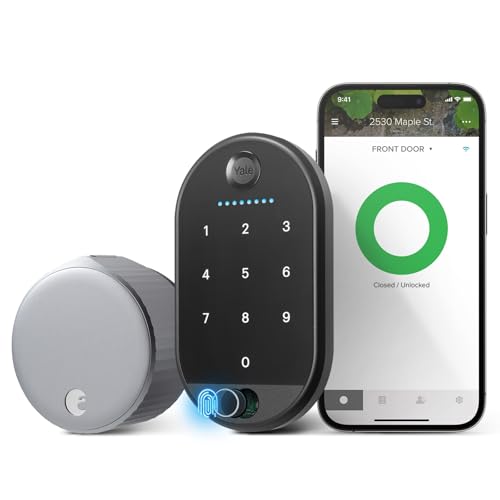
The Yale August Wi-Fi Smart Lock installs inside your door, keeping your existing deadbolt. It features built-in Wi-Fi and Bluetooth, so you do not need a separate hub. You can unlock the door using your fingerprint, a touch keypad, the app, or a physical key. The unit measures 2.72 inches wide and weighs 2.18 pounds. This setup suits homeowners who want keyless entry and remote access without replacing their current hardware.
- Built-in Wi-Fi connectivity requires no extra hub
- Fingerprint scanner offers 99% accuracy for quick entry
- Installs on the inside of the door to preserve existing keys
- Supports multiple unlock methods including keypad and app
- Weighs 2.18 pounds, which is heavier than some standard deadbolts
- Requires the Yale Access app for full remote management features
- You want to keep your current physical keys and deadbolt
- You prefer fingerprint scanning for daily entry
- You need Wi-Fi access without buying a separate bridge
- You need a full replacement deadbolt rather than an add-on
- You do not want to use a smartphone app for access
- You require a lock that weighs less than 2 pounds
Verdict: Yale August Wi-Fi Lock with Fingerprint fits users who want to add smart features to their existing door without replacing the hardware. The built-in Wi-Fi and fingerprint scanner make it a solid choice for keyless convenience.

Yale Assure Lock 2 Touch Key-Free Deadbolt
Best for: Standard doors needing fingerprint speed
- Unlock Methods
- Fingerprint, keypad, app, auto-unlock
- Wireless Connectivity
- Bluetooth
- Installation Type
- Deadbolt replacement
- User Code Capacity
- Unlimited codes
- Auto-Lock Function
- Auto-Lock
- Color
- Satin Nickel
This Yale deadbolt replaces your existing hardware using only a screwdriver. It supports Bluetooth connectivity for app-based access and auto-unlock when you approach. The keypad accepts a fingerprint with under 0.5-second recognition time. You can generate unlimited user codes for family or service providers. The satin nickel finish matches standard hardware. It suits those who want key-free entry without Wi-Fi hardware.
- Fingerprint recognition in under 0.5 seconds
- Auto-unlock via Bluetooth proximity
- Unlimited user code capacity
- Standard deadbolt replacement installation
- Bluetooth connectivity only, no built-in Wi-Fi
- Requires a separate bridge for remote access
- You want fingerprint speed without Wi-Fi hardware
- You need unlimited codes for guests
- You prefer standard deadbolt installation
- You need built-in Wi-Fi for remote control
- You require a different finish like black
- You want a model with extended battery life
Verdict: Yale Assure Lock 2 Touch Satin Nickel fits users who prioritize fingerprint speed and unlimited codes over built-in Wi-Fi. It is ideal for standard doors where Bluetooth proximity is sufficient.
Specifications side by side
| Spec | Yale August Wi-Fi Smart Lock with Keypad Touch | Yale Assure Lock 2 Touch Key-Free Deadbolt |
|---|---|---|
| Unlock Methods | Fingerprint, keypad, app, physical key | Fingerprint, keypad, app, auto-unlock |
| Wireless Connectivity | Wi-Fi, Bluetooth | Bluetooth |
| Installation Type | – | Deadbolt replacement |
| User Code Capacity | – | Unlimited codes |
| Auto-Lock Function | Auto-Lock | Auto-Lock |
| Entry Method | Keypad, Fingerprint | Keypad, Fingerprint |
| Color | Silver | Satin Nickel |
| Connectivity | – | Bluetooth |
| Lock Type | – | Deadbolt |
| Keypad Type | Touchscreen | – |
| Dimensions | 0.8 × 2.72 × 4.84 inches | 0.9 × 2.5 × 3.75 inches |
| Weight | 2.18 pounds | – |
| Model | AUG-SL05 | YRD430-F-BLE-619 |
| Size | – | Bluetooth |
Key specs to check before buying
Check wireless connectivity type
You need to verify how the lock connects to your home network. Built-in Wi-Fi allows direct remote access without extra hubs. The Yale August model features this for immediate control. Other options may rely on Bluetooth. Bluetooth requires a nearby phone or a separate hub for remote features. Choose Wi-Fi if you want consistent remote status checks. Select Bluetooth if you only need local access or already have a compatible hub. This spec determines your convenience level for checking door status from anywhere.
Compare entry methods available
Look at how you can unlock the door. Most smart locks offer keypad and fingerprint options. The Yale August includes both a touchscreen keypad and a fingerprint scanner. This gives you flexibility for family members who prefer codes or biometrics. Some models focus heavily on one method. Ensure the entry method matches your household habits. Fingerprint scanners offer speed. Keypads provide a backup if your fingers are wet or dirty. Verify both are present for maximum utility.
Review physical dimensions carefully
Measure your existing door hardware before purchasing. The Yale August measures 2.72 inches in width and 4.84 inches in height. It weighs 2.18 pounds. These dimensions must fit your current deadbolt cutout. If the new lock is too wide or tall, it will not install properly. Check the length and thickness as well. The Yale Assure Lock 2 is slightly narrower at 2.5 inches wide. Compare these numbers against your door’s backset and borehole size to ensure a proper fit without drilling new holes.
Select your preferred finish
Choose a color that matches your door hardware. The Yale August comes in a silver finish. The Yale Assure Lock 2 is available in satin nickel. These finishes affect the visual appeal of your entryway. Silver often pairs well with modern or industrial styles. Satin nickel offers a warmer, traditional look. Check the product data for the exact color name. Do not assume finishes are identical across different models. Matching your existing hinges and handles creates a cohesive appearance for your home entrance.
Verify compatibility with existing locks
Determine if the lock upgrades your current hardware. The Yale August is designed for existing deadbolts needing smart upgrades. It replaces the interior portion while keeping your existing exterior strike. This saves money on new door hardware. Other models might require full replacement. Check the product description for installation requirements. If you want to keep your current aesthetic, choose an upgrade model. If you are replacing old hardware entirely, any model works. This decision impacts installation time and overall project cost.
Frequently asked questions
Which Yale smart lock works best with existing deadbolts?
The Yale August Wi-Fi Smart Lock with Keypad Touch is designed for this purpose. It fits over your current hardware, allowing you to add smart features without replacing the entire deadbolt. This model includes a built-in fingerprint scanner and touchscreen keypad for easy access.
Does the Yale Assure Lock 2 have built-in Wi-Fi?
No, the Yale Assure Lock 2 Touch relies on Bluetooth connectivity. It does not connect directly to your home network without an external hub. This makes it ideal for standard doors where proximity-based unlocking is sufficient and you do not need remote Wi-Fi control.
What entry methods do these Yale locks support?
Both models support fingerprint scanning and keypad entry. The top pick features a touchscreen keypad, while the second option uses a standard keypad interface. Both allow you to unlock the door using your biometric data or a custom code, eliminating the need for physical keys.
What finishes are available for these Yale smart locks?
You can choose between a silver finish or satin nickel. The Yale August model comes in silver, while the Assure Lock 2 Touch is available in satin nickel. These finishes allow you to match the lock to your existing door hardware and interior design preferences.
How large are these Yale smart locks?
The Yale August Wi-Fi lock measures 2.72 inches in width and 4.84 inches in height. The Assure Lock 2 is slightly smaller at 2.5 inches wide and 3.75 inches high. Both are compact enough to fit standard door preparations without obstructing the door frame or surrounding trim.
Can I control these locks remotely without a hub?
Only the Yale August Wi-Fi Smart Lock allows direct remote control. Its built-in Wi-Fi connects straight to your network. The Assure Lock 2 requires Bluetooth proximity for operation, meaning you must be near the door to unlock it unless you add a separate Wi-Fi bridge.
Are these Yale locks suitable for standard doors?
Yes, both models are designed for standard residential doors. The Assure Lock 2 is explicitly noted as fitting standard doors where Bluetooth is sufficient. The August model also installs on existing deadbolts, making it compatible with most standard door setups found in homes and apartments.