MSI Thin Core i5 vs Higher-Tier Gaming Laptops: Creator Workflow Guide
Evaluating whether an msi thin ci5 laptop delivers the processing headroom and thermal stability needed for mobile creative work requires examining how entry-level hardware handles modern production suites. The baseline configuration pairing an Intel Core i5 processor with dedicated GeForce graphics provides a compact platform for mobile video editors, vloggers, and hobbyist streamers who work…
As Amazon Associates, we earn from qualifying purchases. This means we may receive a small commission at no extra cost to you if you click through and make a purchase.
Evaluating whether an msi thin ci5 laptop delivers the processing headroom and thermal stability needed for mobile creative work requires examining how entry-level hardware handles modern production suites. The baseline configuration pairing an Intel Core i5 processor with dedicated GeForce graphics provides a compact platform for mobile video editors, vloggers, and hobbyist streamers who work primarily in 1080p timelines. When cutting daily vlogs, managing social media reels, or encoding lightweight gaming streams, this lightweight machine provides the necessary hardware acceleration while remaining exceptionally portable. However, heavy timeline scrubbing with multi-layered effects, color grading nodes, or complex 4K compositions reveals the boundaries of a slim thermal enclosure and modest core counts, making stepped-up hardware desirable for intensive production pipelines.
In this comprehensive msi gaming laptop comparison, we examine six distinct machines from the MSI catalog to help creators decide which msi gaming laptop to buy. These models span from the portable 4.1-pound thin form factors equipped with 10th, 11th, and 12th Generation Intel processors up to powerhouse desktop replacements featuring cutting-edge Intel Core Ultra architecture and high-tier RTX graphics. While the portable thin models prioritize mobility and foundational content creation on the road, higher-tier machines introduce superior thermal solutions, advanced panel technology like OLED and QHD resolutions, expanded VRAM buffers, and high-bandwidth connectivity to support advanced video editing workflows.
Which MSI Gaming Laptops Should You Buy
All 6 models on this page, side by side
| Model | Buyer rating | Listing |
|---|---|---|
01 MSI GF63 Thin 15.6" Gaming Laptop MSI GF63 Thin 15.6" Gaming Laptop |
Price | |
02 msi Thin GF63 15.6" 144Hz Gaming msi Thin GF63 15.6" 144Hz Gaming |
Price | |
03 msi GF65 Gaming Laptop msi GF65 Gaming Laptop |
Price | |
04 MSI Prestige 16 AI+ Evo 16" MSI Prestige 16 AI+ Evo 16" |
Price | |
05 msi Vector 16 HX AI Gaming msi Vector 16 HX AI Gaming |
Price | |
06 msi Katana 15 15.6” 165Hz QHD msi Katana 15 15.6” 165Hz QHD |
Price |
Prices and ratings are read from the Amazon product listing and change there, not here. Every rating is the average left by Amazon buyers, not a score from this site.
Why each one is on the list
- Students and mobile vloggers needing lightweight 1080p editing should choose the MSI GF63 Thin 15.6″ Gaming Laptop.
- Creators seeking modern encoding architecture and enhanced cooling in a slim chassis should choose the msi Thin GF63 15.6″ 144Hz Gaming.
- Video editors prioritizing higher CUDA core counts for GPU rendering should choose the msi GF65 Gaming Laptop.
- Visual artists, photographers, and mobile colorists needing pristine OLED color accuracy should choose the MSI Prestige 16 AI+ Evo 16″.
- Studio professionals demanding uncompromised 4K/8K rendering and workstation connectivity should choose the msi Vector 16 HX AI Gaming.
- Streaming hobbyists and developers wanting balanced high-resolution gaming and video rendering should choose the msi Katana 15 15.6” 165Hz QHD.
01 MSI GF63 Thin 15.6″ Gaming Laptop

Best for Entry-level mobile vloggers and student creators
Pros
- Lightweight 4.1-pound chassis
- Dedicated RTX 3050 graphics
- Fast 144Hz FHD display
Cons
- Modest 512GB SSD storage
- Older 11th Gen processor
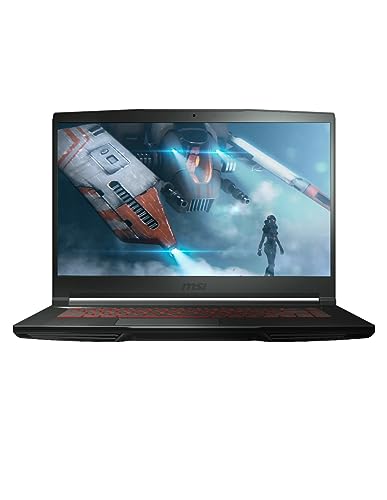
The MSI GF63 Thin 15.6″ Gaming Laptop serves as an entry point for creators wanting dedicated graphics processing in a chassis weighing only 4.1 pounds. Powered by the Intel Core i5-11400H processor and an NVIDIA GeForce RTX 3050 graphics coprocessor, this machine delivers dedicated hardware encoding for popular video editing applications. With 16GB of DDR4 memory and a 512GB NVMe solid-state drive, it provides responsive system operation for day-to-day video logging, basic timeline cuts, and standard multitasking. The 15.6-inch Full HD display features a 144Hz refresh rate that delivers smooth visual feedback when navigating interfaces and previewing high-frame-rate content.
For mobile content creators and traveling hobbyists, the physical footprint of this MSI GF63 Thin 15.6 configuration is its primary asset. At 4.1 pounds, it slips easily into standard camera bags, making it an appealing tool for capturing footage on location and performing initial rough assemblies before returning to a main workstation. The backlit keyboard facilitates editing in dim studio environments or late-night editing sessions, while the inclusion of Windows 11 ensures modern operating system integration with current creative utilities. The listing also notes Microsoft Office 365 as included automatic backup software, aiding creators in keeping production schedules and scripts synchronized.
While this configuration excels at lightweight mobile tasks, creators working with heavy multi-track 4K video or complex motion graphics will encounter the natural limits of its hardware and cooling design. When exports stretch into sustained multi-layered renders, the portable chassis must manage heat carefully, and the 512GB storage capacity can fill quickly when capturing uncompressed camera files. Creators who require expanded graphics memory and higher compute density will naturally look toward higher-tier models in the lineup that offer upgraded cooling and more robust GPU specifications.
- Intel Core i5-11400H processor with NVIDIA GeForce RTX 3050 dedicated graphics
- 15.6-inch Full HD display with 144Hz refresh rate
- 16GB DDR4 memory paired with a 512GB NVMe solid-state drive
- Lightweight 4.1-pound chassis with backlit keyboard
02 msi Thin GF63 15.6″ 144Hz Gaming

Best for Mobile video editors needing newer architecture
Pros
- 12th Gen 10-core i7 processor
- Cooler Boost 5 thermal design
- Modern RTX 4050 graphics
Cons
- Limited 512GB internal storage
- DDR4 instead of DDR5 memory
Stepping up within the portable form factor, the msi Thin GF63 15.6″ 144Hz Gaming laptop updates the core processing architecture while maintaining the travel-friendly 4.1-pound weight. Equipped with a 12th Generation Intel Core i7-12650H processor with a 6-performance and 4-efficient core layout, this model provides significantly higher multi-threaded headroom for video rendering and background encoding tasks. Graphics processing is managed by an NVIDIA GeForce RTX 4050 with 6GB of video memory, giving video editors access to updated Ada architecture features and dedicated tensor cores for artificial intelligence acceleration in modern video software.
Thermal management is reinforced by MSI’s Cooler Boost 5 system, which deploys 2 internal fans and 6 heat pipes to dissipate heat away from the central processing units. This thermal engineering is critical for mobile creators who produce multi-layered timeline projects and demand sustained clock speeds without immediate throttling. The 15.6-inch 144Hz display includes an anti-glare coating to reduce ambient reflections during location shoots, and high-speed data transfer is supported through Gen 4×4 solid-state drive speeds and DDR4-3200 memory. Creators exploring alternatives like an msi rtx 4060 laptop will find this RTX 4050 configuration strikes a compelling middle ground between thermal efficiency and real-world rendering capability.
This model is particularly suited for gaming vloggers and mobile students who need a balanced machine for classroom note-taking, streaming, and creative production. Connectivity options include Type-C USB 3.2 Gen 1 and high-resolution audio support, allowing creators to plug in external microphones, audio interfaces, and external editing drives seamlessly. However, the 512GB storage volume remains a factor that will necessitate external storage management for users holding massive 4K raw libraries, prompting power users to look toward 1TB models higher up the line.
- Intel Core i7-12650H 10-core processor with NVIDIA GeForce RTX 4050 6GB graphics
- Cooler Boost 5 thermal architecture featuring 2 fans and 6 heat pipes
- 15.6-inch 144Hz display equipped with an anti-glare coating
- High-speed Gen 4×4 SSD support and Type-C USB 3.2 Gen 1 connectivity
03 msi GF65 Gaming Laptop

Best for Budget-conscious editors needing 6GB VRAM
Pros
- RTX 3060 6GB graphics coprocessor
- Fast 3ms 144Hz display
- Cooler Boost 5 enlarged pipes
Cons
- Older 10th Gen Intel processor
- Ships with Windows 10 Home
The msi GF65 Gaming Laptop offers a specialized alternative within the 4.1-pound portable chassis, pairing a 10th Generation Intel Core i7-10750H 6-core processor with an NVIDIA GeForce RTX 3060 graphics processor carrying 6GB of VRAM. For creators who prioritize raw GPU compute over CPU core generation, the RTX 3060 provides a broader graphics pipeline that accelerates timeline scrubbing, hardware decoding, and visual effect rendering. The 15.6-inch 144Hz 1080p display features a 3ms response time and anti-glare coating, ensuring fluid motion and reduced eye strain during long timeline review sessions.
Cooling performance is addressed through an implementation of Cooler Boost 5 that incorporates enlarged internal diameter thermal pipes to facilitate heat transfer out of the compact frame. This configuration comes out of the box with Windows 10 Home, appealing to editors running legacy audio production plugins or specialized workflow utilities that favor older driver environments. Network performance is bolstered by Wi-Fi 6 technology operating on 802.11ax standards, providing rapid transfer rates when backing up video proxies or uploading finished project files to remote clients and cloud repositories.
This machine is well-suited for video editors and multimedia creators who want dedicated 6GB graphics memory without carrying a bulky workstation. It provides substantial rendering power for 1080p and light 4K projects, though its 10th Generation architecture gives way to newer 12th and 13th Generation processors when multi-threaded CPU tasks like software encoding or background file compiling take precedence. Furthermore, editors seeking the newest Windows 11 environment natively or larger internal SSD capacity will find higher-tier alternatives more aligned with their future-proofing needs.
- Intel Core i7-10750H 6-core processor paired with NVIDIA GeForce RTX 3060 6GB GPU
- Cooler Boost 5 cooling with enlarged internal diameter thermal pipes
- 15.6-inch 144Hz 1080p display with 3ms response and anti-glare coating
- Integrated Wi-Fi 6 wireless networking and distinctive red backlit keyboard
04 MSI Prestige 16 AI+ Evo 16″
Best for Color-critical photographers and travel creators
Pros
- Stunning 16-inch 4K OLED display
- Featherweight 3.3-pound chassis
- Modern Wi-Fi 7 connectivity
Cons
- Integrated Arc graphics without dedicated VRAM
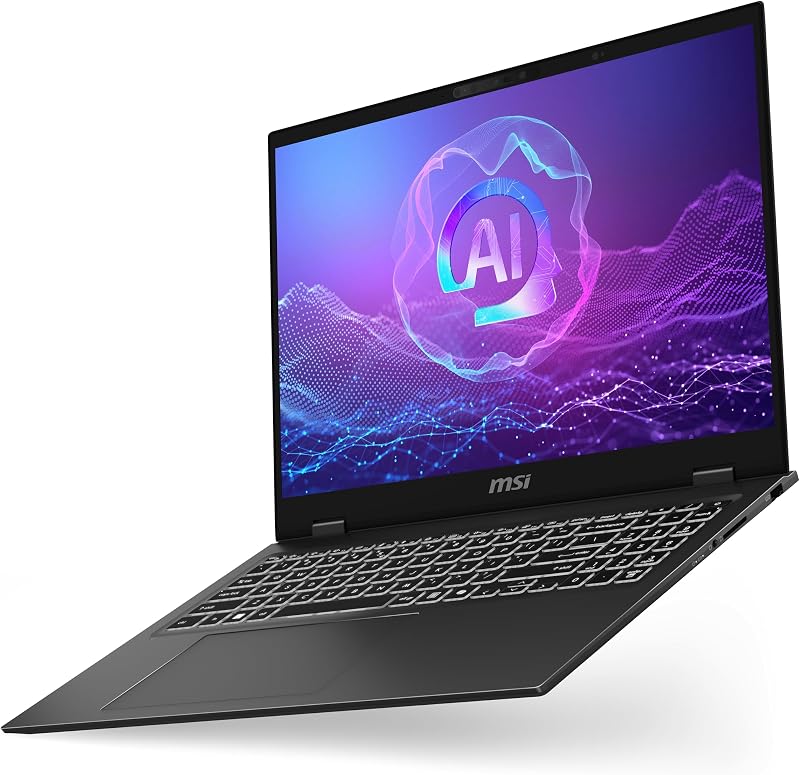
Shifting from traditional gaming aesthetics to purpose-built creative engineering, the MSI Prestige 16 AI+ Evo 16″ is designed specifically for visual artists, photographers, and professional vloggers. Built in an ultra-slim Stellar Gray clamshell chassis weighing only 3.3 pounds, it is the lightest laptop in this roundup. It introduces the advanced Intel Core Ultra 7-256V processor with integrated Intel Arc Graphics, offering exceptional power efficiency and dedicated artificial intelligence acceleration tailored for modern creative suites like Premiere Pro, Lightroom, and DaVinci Resolve.
The centerpiece of this machine is its stunning 16-inch UHD+ OLED display, which delivers deep blacks, vivid whites, and remarkable contrast that standard gaming panels cannot match. For colorists and video editors whose work demands precise color grading and dynamic range verification, this 4K OLED screen eliminates the guesswork associated with color-critical workflows. In a home studio, creators might expand this visual precision by connecting their laptop to a specialized desktop display like an msi meg x monitor for dual-screen productivity. Cutting-edge Wi-Fi 7 wireless connectivity allows lightning-fast project synchronization across cloud storage, while the spacious 1TB NVMe solid-state drive and 16GB of DDR5 memory handle large media asset libraries with ease.
Beyond display excellence and wireless performance, this laptop features comprehensive biometric security including a fingerprint reader and front infrared camera with face recognition. The backlit keyboard and full HDMI output provide immediate workflow integration in mobile environments. Because it relies on integrated Intel Arc Graphics rather than high-wattage discrete GeForce hardware, this machine gives way to dedicated gaming laptops when heavy 3D scene rendering or intense GPU rasterization is the core objective. For mobile color accuracy and light travel, however, it remains an unmatched option.
- Intel Core Ultra 7-256V processor with integrated Intel Arc Graphics
- 16-inch UHD+ 4K OLED display engineered for color-accurate visual production
- Ultra-lightweight 3.3-pound clamshell design in Stellar Gray
- 1TB NVMe solid-state drive, 16GB DDR5 memory, and Wi-Fi 7 connectivity
05 msi Vector 16 HX AI Gaming
Best for Studio professionals demanding maximum 4K rendering
Pros
- Massive 24-core Ultra 9 processor
- Powerful RTX 5080 16GB graphics
- Dual high-speed Thunderbolt 5 ports
Cons
- Heavy desktop-replacement chassis
- High power consumption
For studio production houses, professional 3D animators, and heavy timeline video editors, the msi Vector 16 HX AI Gaming laptop represents the pinnacle of computing power in MSI’s lineup. This workstation-class machine is powered by an Intel 24-core Ultra 9 275HX processor and an NVIDIA GeForce RTX 5080 graphics processor with an expansive 16GB VRAM buffer. With 32GB of high-speed DDR5 memory and a 1TB solid-state drive, this machine effortlessly scrubs through uncompressed 4K and 8K multi-camera timelines, runs complex particle simulations, and handles intensive artificial intelligence workloads delivering up to 1334 AI TOPS.
Visual output is delivered on a 16-inch QHD+ (2560 x 1600) IPS panel running at an ultra-smooth 240Hz refresh rate, combining crisp resolution with fluid motion tracking. Comprehensive external connectivity makes it the best msi laptop for video editing in fixed studio environments, featuring two high-bandwidth Thunderbolt 5 ports, two USB-A 3.2 ports, an HDMI 2.1 display output, an RJ45 Ethernet port, and a built-in SD Express Card Reader for rapid offloading of camera footage. While mobile editors might turn to desktop alternatives like an amd gaming pc for raw studio power, this portable workstation brings equivalent horsepower anywhere production demands.
The chassis incorporates a 24-zone RGB backlit keyboard, Nahimic 3 high-resolution audio, an FHD infrared camera with HDR 3D noise reduction, and a substantial 90Wh battery. The listing specifications note dimensions of 11.1 by 14.05 by 1.12 inches with a weight of 5.95 pounds in the description text, while listing an item weight of 49.8 pounds in the technical table. Given its substantial desktop-replacement class components and massive cooling hardware, this machine gives up the featherweight portability of the Thin series in exchange for uncompromising rendering speed and unmatched interface bandwidth.
- Intel 24-core Ultra 9 275HX processor and NVIDIA GeForce RTX 5080 16GB graphics
- 16-inch QHD+ (2560 x 1600) IPS display with 240Hz refresh rate
- Dual Thunderbolt 5 ports, HDMI 2.1, and an integrated SD Express Card Reader
- 32GB DDR5 RAM, 1TB SSD storage, and Windows 11 Pro operating system
06 msi Katana 15 15.6” 165Hz QHD
Best for Streamers and developers wanting balanced QHD
Pros
- Sharp 165Hz QHD display
- NVIDIA RTX 4070 8GB GPU
- 13th Gen Intel Core i7
Cons
- Heavier 5-pound frame
- Standard 16GB RAM ceiling
The msi Katana 15 15.6” 165Hz QHD bridges the divide between portable entry-level laptops and massive desktop workstations. Outfitted with a 13th Generation Intel Core i7-13620H processor and an NVIDIA GeForce RTX 4070 graphics processor with 8GB of VRAM, this clamshell laptop delivers powerful Ada architecture ray tracing and AI acceleration. The inclusion of 16GB of DDR5 memory and a 1TB NVMe solid-state drive ensures smooth multitasking, rapid asset loading, and generous local storage for video b-roll and rendering scratch disks.
Creative workflows benefit directly from the upgraded 15.6-inch QHD display, which operates at a 165Hz refresh rate to provide higher pixel density and sharper text compared to standard 1080p panels. This higher resolution allows video editors to view sharper timeline previews while maintaining sufficient desktop real estate for editing palettes and audio meters. Thermal stability during sustained rendering is maintained by Cooler Boost 5 engineering, ensuring that both the 13th Gen Core i7 CPU and RTX 4070 GPU maintain consistent operating frequencies without thermal throttling under production loads.
Weighing 5 pounds, this machine strikes a practical balance between desktop performance and mobile transportability for game developers, creative students, and streaming creators. Additional hardware features include a backlit keyboard, high-definition audio, and pre-installed Windows 11 Home. While it does not offer the ultra-lightweight 3.3-pound profile of the Prestige or the extreme 16GB VRAM ceiling of the Vector, it represents a versatile and balanced sweet spot for content creators who need robust 1440p gaming and reliable video rendering in one unified package.
- 13th Gen Intel Core i7-13620H processor paired with NVIDIA GeForce RTX 4070 8GB GPU
- 15.6-inch QHD display featuring a 165Hz refresh rate for higher pixel clarity
- Cooler Boost 5 thermal management system for sustained computing workloads
- 16GB DDR5 memory and 1TB NVMe SSD inside a 5-pound clamshell chassis
What Sets These Models Apart
Understanding the architectural differences across these six MSI laptops helps creators match specific hardware capabilities to their actual editing and rendering demands. While entry-level thin configurations emphasize travel mobility and fundamental video assembly, higher-tier units prioritize graphics memory buffers, display color accuracy, and high-throughput external ports.
| Model | Processor | Graphics Processor | Display Specifications | Chassis Weight |
|---|---|---|---|---|
| MSI GF63 Thin 15.6″ Gaming Laptop | Intel Core i5-11400H | NVIDIA GeForce RTX 3050 | 15.6-inch 144Hz FHD | 4.1 pounds |
| msi Thin GF63 15.6″ 144Hz Gaming | Intel Core i7-12650H | NVIDIA GeForce RTX 4050 6GB | 15.6-inch 144Hz FHD Anti-Glare | 4.1 pounds |
| msi GF65 Gaming Laptop | Intel Core i7-10750H | NVIDIA GeForce RTX 3060 6GB | 15.6-inch 144Hz FHD Anti-Glare | 4.1 pounds |
| MSI Prestige 16 AI+ Evo 16″ | Intel Core Ultra 7-256V | Intel Arc Graphics | 16-inch UHD+ 4K OLED | 3.3 pounds |
| msi Vector 16 HX AI Gaming | Intel Ultra 9 275HX (24 cores) | NVIDIA GeForce RTX 5080 16GB | 16-inch 240Hz QHD+ IPS | 49.8 pounds (5.95 lbs listed in text) |
| msi Katana 15 15.6” 165Hz QHD | Intel Core i7-13620H | NVIDIA GeForce RTX 4070 8GB | 15.6-inch 165Hz QHD | 5 pounds |
Buying Tips for MSI Gaming Laptops
When selecting an MSI laptop for video production, streaming, and content creation, dedicated video memory (VRAM) is often the most critical bottleneck. Entry-level models equipped with 4GB or 6GB of VRAM provide sufficient headroom for cutting 1080p footage, rendering web video, and running casual creative suites. However, if your workflow involves multiple 4K video streams, color grading with extensive lookup tables, or GPU-accelerated motion graphics plugins, opting for hardware with 8GB or 16GB of dedicated VRAM prevents application crashes and timeline playback stutter during demanding sequences.
Thermal management is another decisive factor when choosing between ultra-portable chassis and performance-oriented enclosures. Slim machines such as the MSI Thin series utilize compact heat-pipe designs like Cooler Boost 5 to keep system weight around 4.1 pounds. This lightweight engineering is ideal for carrying to location shoots and conventions, but prolonged multi-hour video exports will cause the fans to spin aggressively to prevent thermal throttling. If your workflow centers on sustained, continuous 3D rendering or prolonged batch exports, larger chassis designs with expanded thermal chambers and multiple exhaust paths offer more reliable sustained throughput.
Display selection should always reflect your primary output format rather than refresh rate alone. While high refresh rates such as 144Hz, 165Hz, or 240Hz make viewport navigation and gaming ultra-responsive, visual creators must also evaluate resolution and panel technology. For daily editing and fast-paced streaming, a standard Full HD or QHD IPS screen provides excellent responsiveness and clarity. However, if your focus is color grading, commercial photography, or HDR video mastering, investing in a high-resolution OLED panel like the 4K screen on the Prestige ensures true black levels and accurate color representation that standard gaming screens cannot replicate.
FAQ
Is an MSI Thin Core i5 laptop sufficient for 4K video editing?
An MSI Thin Core i5 laptop can edit basic 4K video files, especially when using proxy workflows and hardware-accelerated video codecs supported by the dedicated NVIDIA graphics card. However, complex multi-layer 4K timelines with uncompressed camera codecs and intensive color grading nodes will push the 6-core processor and entry-level graphics memory to their limits. For smooth real-time scrubbing without proxies, stepping up to a Core i7 or Core Ultra configuration with at least 8GB of VRAM is recommended.
What is the difference between Cooler Boost 5 and standard laptop cooling?
Cooler Boost 5 is MSI’s proprietary thermal architecture that utilizes dual dedicated cooling fans and up to six thermal heat pipes to channel heat away from both the central processor and graphics coprocessor simultaneously. In compact models like the Thin GF63 and GF65, this system maximizes airflow through specialized heat exchangers to maintain stable operating temperatures during intensive gaming sessions or sustained video rendering.
Why choose an OLED panel over a high-refresh gaming screen for content creation?
OLED displays feature self-emissive pixels that produce absolute black levels and virtually infinite contrast, making them ideal for precise color grading, HDR mastering, and photo editing. While high-refresh gaming displays prioritize motion smoothness up to 240Hz for competitive gaming, an OLED panel delivers superior color fidelity, wide dynamic range, and pixel-level luminance accuracy necessary for professional visual work.
What advantages does Thunderbolt 5 provide for mobile video editors?
Thunderbolt 5, available on high-end models like the Vector 16 HX, offers massive bidirectional bandwidth that significantly accelerates mobile creative workflows. It enables editors to connect high-speed external NVMe RAID arrays, run dual high-resolution external studio displays, and ingest large volumes of high-bitrate raw camera footage in a fraction of the time required by standard USB interfaces.
Can an MSI gaming laptop handle multi-monitor setups for live streaming?
Yes, MSI gaming laptops equipped with dedicated HDMI outputs and Type-C or Thunderbolt display connections can easily drive external monitors. This capability allows live streamers to dedicate one high-resolution display to video capture and broadcast software while running their game or preview monitor on the secondary screen without degrading hardware encoding performance.


