Razer Computers & Networking
Choosing the Right Razer Gaming Laptop for Creator Workflows
Finding the right balance between raw computing throughput and mobile ergonomics is the primary hurdle when choosing a modern razer gaming laptop. Hybrid content creators, video editors, and digital artists demand machines that can scrub multitrack high-resolution footage, execute hardware-accelerated 3D rendering, and provide studio-grade color precision without requiring a massive desk footprint. Razer answers…

As Amazon Associates, we earn from qualifying purchases. This means we may receive a small commission at no extra cost to you if you click through and make a purchase.
Finding the right balance between raw computing throughput and mobile ergonomics is the primary hurdle when choosing a modern razer gaming laptop. Hybrid content creators, video editors, and digital artists demand machines that can scrub multitrack high-resolution footage, execute hardware-accelerated 3D rendering, and provide studio-grade color precision without requiring a massive desk footprint. Razer answers this need by packing high-wattage silicon and color-calibrated panels into slim, CNC-machined aluminum enclosures that fit easily into a commuter backpack or camera bag.
This comprehensive razer gaming laptop comparison analyzes three distinct configurations from the current catalog: the high-bandwidth Intel-based Razer Blade 16, the ultra-compact AMD-driven Razer Blade 14, and the top-tier AMD flagship Razer Blade 16 equipped with maximum graphical power. While each machine shares signature unibody construction, vapor chamber cooling, and factory-calibrated OLED panels, they differ considerably across thermal ceilings, expansion capabilities, memory bus speeds, and physical footprints.
Which Razer Gaming Laptops Should You Buy
All 3 models on this page, side by side
| Model | Buyer rating | Listing |
|---|---|---|
01 Razer Blade 16 Razer Blade 16 |
Price | |
02 Razer Blade 14 Razer Blade 14 |
Price | |
03 Razer Blade 16 Razer Blade 16 |
Price |
Prices and ratings are read from the Amazon product listing and change there, not here. Every rating is the average left by Amazon buyers, not a score from this site.
Why each one is on the list
- Travel filmmakers, remote vloggers, and commuters who prioritize featherweight portability and long battery life should pick the Razer Blade 14.
- Video editors, motion designers, and developers needing dual storage drives, Thunderbolt 5 speeds, and the fastest system memory should opt for the Intel-powered Razer Blade 16 with RTX 5070 Ti.
- 3D animators, virtual production specialists, and heavy render artists who demand the highest sustained TGP and maximum graphical VRAM should invest in the Razer Blade 16 with RTX 5090.
03 Razer Blade 16


The Intel-equipped Razer Blade 16 establishes a benchmark for balanced creative production in an ultra-thin 14.9 mm CNC aluminum chassis. At its core, the Intel Core Ultra 9 386H processor delivers 16 physical cores capable of clocking up to 4.9 GHz alongside a dedicated Intel NPU pushing up to 50 TOPS for local AI processing. Backed by the NVIDIA GeForce RTX 5070 Ti laptop GPU with 12GB of cutting-edge GDDR7 video memory operating at up to a 140W total graphics power ceiling, this configuration handles intensive timeline effects, ray tracing previews, and modern game development tasks without thermal stutter.
For visual creators, the built-in 16-inch 2560×1600 OLED panel is an outstanding asset. Boasting a fluid 240Hz refresh rate, an ultra-fast 0.2 ms response time, and a productive 16:10 aspect ratio, this display carries Calman Verified certification for 100% DCI-P3 color gamut coverage. It also earns VESA DisplayHDR TrueBlack 1000 certification with peak brightness hitting up to 1100 nits, ensuring exceptional dynamic range when color-grading HDR video. Creators transitioning from older desktop-replacement hardware, such as an aging rog laptop 1070 workstation, will find the jump in visual contrast and panel responsiveness transformative for daily production.
Connectivity and local expansion make this variant especially compelling for professional media environments. Razer outfits this chassis with 32GB of high-speed LPDDR5X memory running at an impressive 9600MHz, ensuring rapid data transfers between the CPU and graphics pipeline. While this memory is soldered and non-upgradeable, internal storage flexibility is outstanding: the laptop houses a 1TB PCIe 4.0 SSD out of the box and features two full M.2 NVMe slots supporting expansion up to 8TB total capacity. Combined with Thunderbolt 5, full-size SD card support, HDMI 2.1, Wi-Fi 7, and Windows Hello facial recognition, this model provides seamless field ingest for editors who need massive internal scratch drives.
- Intel Core Ultra 9 386H processor featuring 16 cores, up to 4.9 GHz boost, and a 50 TOPS AI NPU.
- NVIDIA GeForce RTX 5070 Ti laptop GPU with 12GB GDDR7 memory and up to 140W TGP.
- 16-inch QHD+ 240Hz OLED display with 0.2 ms response, 100% DCI-P3 Calman Verified color, and 1100 nits peak HDR brightness.
- Two internal M.2 NVMe slots expandable up to 8TB alongside Thunderbolt 5 and SD card connectivity.
02 Razer Blade 14
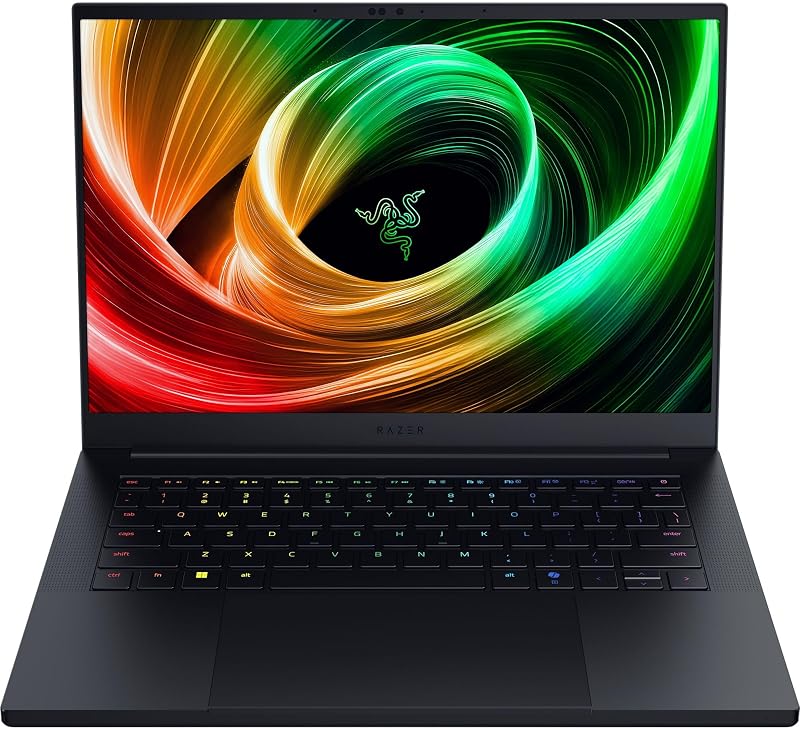
The redesigned Razer Blade 14 is engineered specifically for users who need serious graphical compute without the bulk of a standard workstation. Measuring just 0.62 inches thin and tipping the scales at a mere 3.59 lbs, this model is 11% smaller than its predecessor, making it the most portable razer laptop for editing in the lineup. Powering the system is an AMD Ryzen AI 9 365 processor featuring up to 50 TOPS of dedicated NPU compute, delivering triple the AI performance of the previous 14-inch chassis to accelerate automated tasks in modern operating systems and creative applications.
Graphics processing is handled by an NVIDIA GeForce RTX 5070 laptop GPU operating at up to 115W TGP. Paired with NVIDIA DLSS 4 technology, it produces fluid frame rates for entertainment while leveraging dedicated hardware encoders for rapid video rendering on the road. The system integrates 32GB of power-efficient LPDDR5X RAM clocked at 8000MHz, which represents a 33% frequency increase over the previous generation. A generous 72 Whr battery provides up to 11 hours of on-screen productivity, allowing field creators and mobile vloggers to log interviews, review rushes, and finalize cuts away from wall outlets.
Despite its ultra-compact form factor, the laptop makes zero compromises regarding color fidelity. It features a vibrant 14-inch 3K OLED display running at 120Hz with an ultra-responsive 0.2 ms response time and factory Calman Verification. Thermal dissipation is managed by a bespoke vapor chamber cooling mechanism engineered to draw heat away from the unibody aluminum shell during sustained exports. While this 14-inch model gives way to the larger 16-inch platforms when multi-drive expansion, higher GPU wattage, or ultra-high refresh rates are mandatory, its unmatched portability makes it a favorite among roving filmmakers.
- AMD Ryzen AI 9 365 processor with up to 50 TOPS of dedicated neural compute.
- NVIDIA GeForce RTX 5070 laptop GPU operating up to 115W TGP with DLSS 4 support.
- Factory Calman Verified 14-inch 3K 120Hz OLED screen offering instantaneous 0.2 ms response.
- Featherweight 3.59 lb aluminum chassis measuring 0.62 inches thin with up to 11 hours of battery life.
03 Razer Blade 16
For high-end simulation, real-time 3D rendering, and uncompromised multimedia production, the AMD-powered Razer Blade 16 stands at the pinnacle of mobile graphical performance. This build pairs an AMD Ryzen AI 9 HX 370 processor—armed with 12 physical cores, 24 simultaneous threads, and a 50 TOPS NPU—with a monstrous NVIDIA GeForce RTX 5090 laptop GPU. Unlike bulkier desktop-replacement alternatives such as a heavy lenovo legion rtx 5080 rig, Razer manages to house this 160W maximum TGP graphics processor inside a razor-thin 14.9 mm CNC aluminum chassis.
The razer blade rtx 5090 configuration is precision-milled from a single solid block of aluminum and anodized for enhanced structural rigidity and scratch resistance. It features an upgraded internal vapor chamber cooling system calibrated to handle sustained rendering jobs across both CPU and GPU dies. Storage is generous straight from the factory with a fast 2TB PCIe SSD, giving video editors immediate space for large media libraries. The unified memory architecture leverages 32GB of LPDDR5X RAM operating at 8000MHz, which is 42% faster than previous iterations, expediting cache playback in editing timelines.
Visual fidelity is driven by a 16-inch QHD+ 240Hz OLED display tailored for demanding visual standards. Featuring professionally tuned Calman Verified color profiles and a 2 ms response time, this razer blade oled laptop allows colorists and digital painters to make critical exposure and palette choices with complete confidence. Creators will also appreciate the redesigned tactile keyboard featuring 1.5 mm of key travel for comfortable extended writing sessions, as well as a sharp 1080p Windows Hello infrared webcam that ensures quick, biometric logins and crisp video conferencing while working remotely.
- AMD Ryzen AI 9 HX 370 processor with 12 cores, 24 threads, and Copilot+ AI acceleration.
- NVIDIA GeForce RTX 5090 laptop GPU pushing up to 160W TGP for premier rendering output.
- 16-inch QHD+ 240Hz Calman Verified OLED panel optimized for accurate color grading.
- Slim 14.9 mm unibody aluminum build housing 2TB of high-speed NVMe solid-state storage.
What Sets These Models Apart
Selecting between these three machines requires weighing processor architecture, sustained graphics wattage, physical dimensions, and onboard storage capacity. The table below outlines how these configurations differ across essential operational parameters.
| Feature | Razer Blade 16 (Intel) | Razer Blade 14 (AMD) | Razer Blade 16 (AMD) |
|---|---|---|---|
| Processor & NPU | Intel Core Ultra 9 386H (16 Cores, 50 TOPS) | AMD Ryzen AI 9 365 (50 TOPS) | AMD Ryzen AI 9 HX 370 (12 Cores / 24 Threads, 50 TOPS) |
| Graphics & TGP | RTX 5070 Ti (12GB GDDR7, up to 140W) | RTX 5070 (up to 115W) | RTX 5090 (up to 160W) |
| Display Panel | 16″ QHD+ 240Hz OLED (0.2 ms, TrueBlack 1000) | 14″ 3K 120Hz OLED (0.2 ms, Calman Verified) | 16″ QHD+ 240Hz OLED (2 ms, Calman Verified) |
| Memory & Storage | 32GB (9600MHz) / 1TB SSD (Dual M.2 up to 8TB) | 32GB (8000MHz) / 1TB SSD | 32GB (8000MHz) / 2TB SSD |
| Chassis Profile | 14.9 mm CNC Aluminum | 0.62 in (11% smaller, 3.59 lbs) | 14.9 mm CNC Aluminum |
Buying Tips for Razer Gaming Laptops
When deciding which razer gaming laptop to buy, assessing your primary workspace constraints is essential. Content creators who spend the majority of their time traveling between shooting locations will appreciate the 3.59-pound footprint and 11-hour battery life of the 14-inch model. However, working on complex visual effects or multitrack 4K video benefits heavily from the expanded 16:10 workspace and higher graphics thermal headroom found on the 16-inch chassis. If you frequently handle uncompressed footage, the Intel-powered Blade 16 is uniquely advantageous due to its dual M.2 slots, enabling up to 8TB of onboard NVMe storage without relying on external drives.
Display fidelity remains one of the strongest arguments for adopting a gaming laptop razer setup for professional production. All three of these models utilize factory Calman Verified OLED displays that eliminate guesswork when grading rec.709 or DCI-P3 color spaces. The deep black levels afforded by individual pixel illumination provide true contrast ratios that conventional IPS panels cannot match. For stationary studio environments, pairing your portable workstation with ergonomic support such as a razor gaming chair creates a comfortable editing station that lets you utilize the laptop as either a primary canvas or a calibrated secondary display.
Finally, consider thermal requirements and memory configurations before settling on a specific tier. Razer employs advanced vapor chamber cooling across all three systems to maximize surface area contact across the CPU and GPU dies, but wattage determines thermal output. The 115W TGP envelope of the 14-inch laptop runs noticeably cooler and quieter under load than the 160W ceiling of the RTX 5090 flagship. Because the fast LPDDR5X system memory is integrated directly onto the motherboard across all three platforms, evaluate your multitasking needs at the point of purchase to ensure the 32GB allotment fits your workflow for years to come.
FAQ
Which Razer gaming laptop to buy for mobile 4K video editing?
The best razer gaming laptop for creators working on the go is the Razer Blade 14 if weight and battery life are top priorities. At just 3.59 lbs with up to 11 hours of battery runtime and an RTX 5070 GPU, it allows creators to edit in transit easily. However, if your timeline involves multi-stream raw 4K media and massive file caching, the Razer Blade 16 with RTX 5070 Ti is the superior pick due to its dual M.2 slots that support up to 8TB of storage and its blazing 9600MHz memory bus.
How does the Razer Blade OLED laptop screen benefit creative work?
Every featured Razer Blade OLED laptop comes factory Calman Verified, ensuring exact color representation straight out of the box. OLED technology features self-lit pixels that achieve true absolute blacks and infinite contrast, certified under standards like VESA DisplayHDR TrueBlack 1000. This precision allows video editors, photographers, and VFX artists to grade high dynamic range footage with accurate shadow detail and highlights up to 1100 nits.
Can the memory and storage be upgraded on these Razer Blade models?
The system memory on all three laptops consists of high-speed LPDDR5X RAM that is non-upgradeable and soldered to the motherboard. In terms of storage, the Razer Blade 16 (Intel) provides dual M.2 NVMe slots capable of expanding up to 8TB total capacity. The Razer Blade 14 listing includes a 1TB SSD, and the Razer Blade 16 (AMD) includes a 2TB SSD, though additional slot expandability on those specific AMD listings is not specified.
What makes the Razer Blade 16 RTX 5070 Ti different from the RTX 5090 model?
Beyond the GPU tier, the razer blade 16 rtx 5070 ti model uses an Intel Core Ultra 9 386H processor, faster 9600MHz memory, Thunderbolt 5, and dual storage slots up to 8TB with a 140W GPU ceiling. In contrast, the RTX 5090 model features an AMD Ryzen AI 9 HX 370 processor, an upgraded 160W graphics ceiling with 32GB of 8000MHz RAM, a 2TB standard SSD, and an enhanced keyboard with 1.5 mm travel.
Is the Razer Blade 14 powerful enough for professional 3D rendering and color grading?
Yes, the Razer Blade 14 easily handles professional color grading and 3D modeling thanks to its RTX 5070 GPU pushing up to 115W TGP and its factory-calibrated 3K 120Hz OLED screen. While complex scene rendering will take slightly longer compared to the higher-wattage 160W RTX 5090 model, the Blade 14 maintains substantial processing power while remaining under 3.6 lbs.


