Satechi Computers & Networking
Best Satechi Docking Stations for Creative Workflows: Model Comparison
Finding the right Satechi docking station comes down to balancing display bandwidth, host charging wattage, and the specific port selection your daily workflow requires. Digital creators running multiple high-resolution displays need to distinguish between native Thunderbolt transmission and driver-assisted DisplayLink connections, while mobile editors often prioritize high-speed media card slots and integrated drive storage over…

As Amazon Associates, we earn from qualifying purchases. This means we may receive a small commission at no extra cost to you if you click through and make a purchase.
Finding the right Satechi docking station comes down to balancing display bandwidth, host charging wattage, and the specific port selection your daily workflow requires. Digital creators running multiple high-resolution displays need to distinguish between native Thunderbolt transmission and driver-assisted DisplayLink connections, while mobile editors often prioritize high-speed media card slots and integrated drive storage over sprawling port counts. Choosing the wrong dock can lead to throttled peripheral transfer speeds, insufficient laptop charging, or external screens limited to mirroring instead of full desktop expansion.
This comparison covers exactly five docking stations from Satechi, spanning compact travel-friendly hubs to full-scale studio desktop consoles. Across these five models, you will find distinct hardware architectures: dedicated USB-C options that leverage DisplayLink software for triple monitor support, ergonomic stand docks that house internal NVMe solid-state drives, minimalist Thunderbolt 4 splitters built for high-speed daisy-chaining, hybrid multi-display Thunderbolt docks, and massive 16-in-1 desktop command centers featuring 2.5 Gigabit networking. Reviewing their technical specifications side by side clarifies which design aligns with your desk space and hardware demands.
Which Satechi Docking Station Should You Buy
All 5 models on this page, side by side
| Model | Buyer rating | Ratings | Listing |
|---|---|---|---|
01 Satechi 13-in-1 Triple 4K USB-C Docking Satechi 13-in-1 Triple 4K USB-C Docking |
Price | ||
02 Satechi Dual Docking Station & Stand Satechi Dual Docking Station & Stand |
265 | Price | |
03 Satechi Thunderbolt 4 Slim Hub Pro Satechi Thunderbolt 4 Slim Hub Pro |
Price | ||
04 Satechi Thunderbolt 4 Docking Station Satechi Thunderbolt 4 Docking Station |
Price | ||
05 Satechi 16-in-1 Thunderbolt 4 Docking Station Satechi 16-in-1 Thunderbolt 4 Docking Station |
Price |
Prices and ratings are read from the Amazon product listing and change there, not here. Every rating is the average left by Amazon buyers, not a score from this site.
Why each one is on the list
- Triple-display office workstations: Choose the Satechi 13-in-1 Triple 4K USB-C Docking if you need to run three external 4K monitors on standard Mac or Windows systems using DisplayLink software while maintaining 100W laptop power delivery.
- Compact desk setups needing fast onboard backup: Choose the Satechi Dual Docking Station & Stand if you want dual 4K video outputs combined with an integrated M.2 NVMe and SATA enclosure underneath your laptop chassis.
- Modular Thunderbolt workflows: Choose the Satechi Thunderbolt 4 Slim Hub Pro if you require up to 40Gbps downstream bandwidth to daisy-chain high-performance external drives, external monitors, and high-speed studio gear.
- High-resolution quad-display creative suites: Choose the Satechi Thunderbolt 4 Docking Station if your editing station requires up to four 4K displays at 60Hz alongside high-speed UHS-II card dumping and 96W charging.
- Heavy peripheral studios and audio setups: Choose the Satechi 16-in-1 Thunderbolt 4 Docking Station if you demand maximum desktop connectivity, including dual DisplayPort, dual HDMI, 2.5Gbps Ethernet, and comprehensive legacy USB ports.
01 Satechi 13-in-1 Triple 4K USB-C Docking

Best for Triple-display office workstations
Pros
- Triple 4K display output
- 100W host power delivery
- 130W power brick included
- Built-in SD card reader
Cons
- Requires DisplayLink software drivers
The Satechi 13-in-1 Triple 4K USB-C Docking is designed specifically for professionals who need an expansive visual workspace without relying on native multi-stream transport limitations. Built with a durable aluminum desktop housing that aids in passive heat management during extended editing sessions, this unit acts as a central hub for power, networking, audio, and visual output. By utilizing DisplayLink technology, the dock enables machines that typically output to only a single external monitor, such as standard base-tier Apple silicon laptops, to drive three independent 4K displays simultaneously when the requisite drivers are installed.
Power management is robust, supported by an included 130W external power adapter that provides up to 100W of dedicated host charging directly to your connected notebook. This ensures your computer maintains full performance under heavy rendering workloads while the remaining wattage fuels the dock’s internal controllers and external USB peripherals. Networking reliability is anchored by a Gigabit Ethernet port, preventing Wi-Fi dropouts during file transfers or live streaming sessions. The listing notes broad hardware compatibility, catering to MacBook Air and Pro computers as well as Windows laptops with standard USB-C or Thunderbolt connections.
For creators comparing multi-display solutions against options like the lionwei 13-in-1 usb-c docking station, Satechi differentiates this unit through its rigid desktop build, included USB-C to USB-A host adapter, and full dual-year manufacturer warranty. It gives way to Satechi’s native Thunderbolt offerings when your setup demands ultra-high 40Gbps data throughput for external graphics or high-speed RAID arrays, as this dock relies on standard USB-C data protocols for its peripheral ports.
- Supports up to three external 4K displays via DisplayLink software drivers
- Provides up to 100W host charging backed by an included 130W power brick
- Solid aluminum desktop enclosure for passive thermal dissipation
- Equipped with Gigabit Ethernet, SD card access, and multiple USB peripheral ports
02 Satechi Dual Docking Station & Stand

Best for Laptops needing integrated NVMe storage
Pros
- Built-in NVMe and SATA SSD enclosure
- Ergonomic stand form factor
- Dual HDMI and DisplayPort connectivity
Cons
- Lower 75W host power delivery
- Limited to dual monitor expansion
The Satechi Dual Docking Station & Stand merges peripheral connectivity with an ergonomic physical stand, elevating your laptop slightly off your desk surface to encourage natural airflow. Measuring 12.2 inches in length and finished in Space Gray, it sits discreetly beneath the chassis of modern laptops. The defining feature of this nine-port dock is its internal solid-state drive enclosure, which accepts both NVMe SSDs running at up to 10Gbps speeds and SATA SSDs running at up to 6Gbps. This integrated compartment removes the clutter of loose external portable drives, turning your docking stand into a seamless local backup or media caching array.
For video workflows, the dock provides dual HDMI ports and a DisplayPort connection, enabling users to output to two external displays in extended desktop mode. Users can configure their visual setup using either both HDMI ports or by combining the DisplayPort with the farthest HDMI port. Host power delivery operates at up to 75W, which provides adequate charging current for ultraportable computers and mid-tier work laptops such as the Dell XPS 15, Surface laptops, and MacBook Air or Pro machines. Note that the listing specifies the MacBook Pro M3 is supported, making this a versatile hardware base for mobile editors.
While the integrated storage compartment is an exceptional space-saving feature, this dock yields to larger desktop stations when full 100W power delivery or multi-gigabit networking is mandatory. Its 75W charging ceiling may slow charging times on large workstation laptops running sustained CPU and GPU exports, but for mobile creators seeking an all-in-one stand and fast NVMe storage expansion, its footprint is exceptionally efficient.
- Internal M.2 enclosure supporting 10Gbps NVMe and 6Gbps SATA solid-state drives
- Dual monitor visual output via two HDMI ports or DisplayPort and HDMI combinations
- 75W USB-C Power Delivery port to maintain laptop battery capacity
- Includes dedicated SSD mounting screw, screwdriver, and durable aluminum casing
03 Satechi Thunderbolt 4 Slim Hub Pro
Best for Quad-monitor video editing stations
Pros
- Supports up to four 4K displays
- 32Gbps PCIe bandwidth for drives
- Includes high-output 180W power supply
- High-speed UHS-II card slot
Cons
- Requires DisplayLink for quad output

Best for Minimalist desks demanding high bandwidth
Pros
- Three downstream 40Gbps Thunderbolt 4 ports
- Efficient 150W GaN power adapter
- Fast UHS-II SD card slot
Cons
- Only one USB-A port
- Five total connection ports
The Satechi Thunderbolt 4 Slim Hub Pro is engineered for workstations that demand maximum data throughput within an ultra-compact, travel-ready footprint. Measuring just 5.31 inches long and weighing 8.75 ounces, this low-profile aluminum unit expands a single host connection into three downstream Thunderbolt 4 ports, each capable of transferring data at full 40Gbps speeds. This high-bandwidth architecture lets you daisy-chain up to six devices per port, linking high-speed NVMe storage enclosures, capture cards, and display monitors without bottlenecking bus communication.
Display support on the Slim Hub Pro is exceptionally flexible, accommodating either dual 4K monitors running at 60Hz or a single massive 8K display at 30Hz on compatible systems. Power delivery is equally capable: despite its diminutive size, the dock supplies up to 100W (with 96W listed in base hardware specs) of clean power to the host computer, supported by an included 150W GaN power adapter. This compact GaN brick provides high efficiency with low heat generation, ensuring continuous power distribution to your connected computer and all attached high-drain accessories.
Photographers and field videographers will appreciate the integrated front-facing UHS-II SD card reader, which delivers transfer speeds up to 312MB/s for rapid camera offloads. The dock also includes a Gigabit Ethernet port and a 10Gbps USB-A port. If you are comparing streamlined options to a traditional satechi thunderbolt 4 dock, this Slim Hub Pro represents the ideal minimalist choice, conceding legacy port volume in exchange for pure Thunderbolt expansion and portability.
- Three downstream Thunderbolt 4 ports offering full 40Gbps bandwidth
- Visual output supporting either dual 4K at 60Hz or a single 8K display at 30Hz
- Included 150W GaN power supply delivering up to 100W host power delivery
- High-speed UHS-II SD card reader capable of transfers up to 312MB/s
04 Satechi Thunderbolt 4 Docking Station
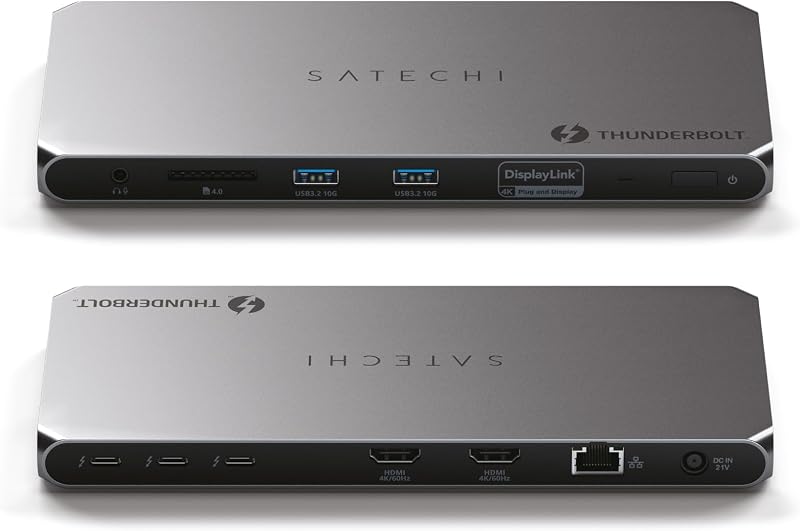
The Satechi Thunderbolt 4 Docking Station serves as a complete command bridge for complex visual creative suites, integrating high-speed Thunderbolt 4 data pipelines with DisplayLink multi-screen management. With twelve dedicated connection points, this station allows users on supported hardware to deploy up to four 4K displays operating at 60Hz simultaneously. The display array routes two screens natively through the downstream Thunderbolt 4 ports, while an additional two displays connect via the onboard HDMI outputs when the required DisplayLink drivers are active.
Under the hood, the dock houses three Thunderbolt 4 ports pushing up to 40Gbps data bandwidth, with specialized support for external graphics enclosures and Thunderbolt solid-state drives at speeds up to 32Gbps. Two USB-A ports operate at 10Gbps for high-speed legacy accessories, while a 96W USB-C Power Delivery profile keeps your host laptop fully operational under sustained processor loads. Satechi includes a generous 180W AC power adapter and a 1-meter Thunderbolt 4 cable in the package, guaranteeing that all ports receive stable voltage without siphoning power away from the host computer.
Thermal stability is a central engineering focus, with the unit operating across an official temperature range of 86 to 131 degrees Fahrenheit within its aluminum shell. The integrated UHS-II SD 4.0 card slot provides 312MB/s read speeds for rapid high-bitrate video ingest, complemented by a Gigabit Ethernet port for lag-free media streaming. This model gives way to larger studio units only if you require native legacy display connectors like full-size DisplayPort jacks or faster multi-gigabit local networking.
- Drives up to four 4K 60Hz displays via dual Thunderbolt 4 and dual HDMI ports
- Delivers up to 32Gbps PCIe data speeds for external SSDs and high-speed daisy chains
- Robust 180W AC adapter provides continuous 96W host laptop power delivery
- Integrated UHS-II SD 4.0 reader, Gigabit Ethernet, and 10Gbps USB-A ports
05 Satechi 16-in-1 Thunderbolt 4 Docking Station
Best for Demanding studios needing extensive ports
Pros
- Sixteen comprehensive connectivity ports
- Upgraded 2.5Gbps Ethernet connection
- Dual UHS-II SD and Micro SD readers
- Native quad display output on Windows
Cons
- Large desktop footprint
- Base M1 and M2 Macs limited to one display
The Satechi 16-in-1 Thunderbolt 4 Docking Station represents the pinnacle of desktop peripheral capacity in the brand’s lineup, eliminating the need for standalone splitters and dongles. Encased in a substantial aluminum housing weighing 1.51 pounds and supplied with a custom rubber stand for vertical or horizontal orientation, this powerhouse delivers sixteen total connection options. The rear panel is fitted with dual DisplayPort 1.4 jacks and dual HDMI 2.1 ports, granting users the freedom to link modern high-resolution displays using their preferred native cabling.
Display capabilities are extensive: Windows workstations can output natively to up to four 4K screens at 60Hz without software emulation. On Apple platforms, recent M5 and M4 MacBooks can power dual external displays, while base M3 models support dual screens in clamshell mode, and base M1/M2 variants support a single external monitor. Host charging is maintained at 96W via dynamic power delivery that actively regulates wattage for hardware safety and charging efficiency, backed by an included 135W desktop power supply.
Where this station outclasses standard docks and models like a traditional dell universal dock is in its network and peripheral breadth. It features a fast 2.5Gbps Ethernet connection, offering more than double the transfer ceiling of standard Gigabit ports for local NAS file management. Front-facing connectivity includes both SD and Micro SD slots supporting UHS-II speeds up to 312MB/s concurrently, alongside a dedicated 3.5mm audio jack, high-speed 10Gbps USB-C, three 10Gbps USB-A ports, two 5Gbps USB-A ports, and a legacy USB 2.0 charging port delivering 7.5W.
- Sixteen connectivity ports including dual DisplayPort 1.4 and dual HDMI 2.1 outputs
- Upgraded 2.5Gbps Ethernet port for high-speed local network and NAS workflows
- Simultaneous UHS-II SD and Micro SD card reading with transfer rates up to 312MB/s
- Dynamic 96W Power Delivery with an included 135W power adapter and rubber dock stand
What Sets These Models Apart
| Model | Primary Host Interface | Maximum Display Output | Host Power Delivery | Key Hardware Feature |
|---|---|---|---|---|
| Satechi 13-in-1 Triple 4K USB-C Docking | USB-C (DisplayLink) | Triple 4K Displays | 100W | 130W adapter with USB-A conversion adapter included |
| Satechi Dual Docking Station & Stand | USB-C | Dual 4K Displays | 75W | Built-in M.2 NVMe (10Gbps) and SATA (6Gbps) SSD bay |
| Satechi Thunderbolt 4 Slim Hub Pro | Thunderbolt 4 (40Gbps) | Dual 4K/60Hz or Single 8K/30Hz | Up to 100W | Compact GaN power supply with 3x TB4 downstream ports |
| Satechi Thunderbolt 4 Docking Station | Thunderbolt 4 (40Gbps) | Quad 4K/60Hz (DisplayLink) | 96W | 180W power supply with 32Gbps PCIe drive support |
| Satechi 16-in-1 Thunderbolt 4 Docking Station | Thunderbolt 4 (40Gbps) | Quad 4K/60Hz (Windows) / Dual 4K (Mac) | 96W | 2.5Gbps high-speed Ethernet and dual DisplayPort/HDMI |
Buying Tips for Satechi Docking Stations
When selecting a Satechi docking station, your first consideration should be the distinction between driver-based DisplayLink docks and hardware-native Thunderbolt connections. Docks that utilize DisplayLink, such as the 13-in-1 USB-C and the 12-port Thunderbolt 4 Docking Station, compress and transmit video streams via system software. This architecture is vital if you need to run three or four independent external displays on laptops with native display bus limits, such as base-tier Apple silicon processors. However, this requires installing driver software on your operating system and granting appropriate screen-recording permissions before external video displays can activate.
Power budget calculations are equally critical for sustained system stability. Satechi pairs each docking station with an external power adapter sized to handle both host laptop charging and the peak wattage requirements of connected drives, memory cards, and input peripherals. If your laptop regularly draws high wattage during 4K video rendering or 3D compilation, selecting a dock with 96W or 100W Power Delivery prevents battery depletion under load. For lighter computing environments, a 75W output will adequately sustain thin-and-light laptops while maintaining a more compact overall desk presence.
Finally, inspect the physical footprint and thermal structure relative to your studio desk arrangement. Satechi constructs these docks from rigid aluminum to aid in passive heat dissipation, which naturally causes the chassis to feel warm to the touch during heavy multi-gigabit file transfers or simultaneous multi-monitor rendering. If desk space is restricted, stand-style units elevate your computer to preserve desk area, while vertical-standing docks like the 16-in-1 unit reduce desk footprint while exposing broad surface area to circulating room air.
FAQ
Do Satechi docking stations require software drivers to run multiple monitors?
It depends on the model. Docks that utilize DisplayLink technology, such as the Satechi 13-in-1 Triple 4K USB-C Docking and the Satechi Thunderbolt 4 Docking Station, require you to download and install DisplayLink software drivers to achieve multi-monitor output. Hardware-native Thunderbolt models, such as the Thunderbolt 4 Slim Hub Pro and 16-in-1 Thunderbolt 4 Docking Station, drive displays using native operating system protocols without extra display software, though display counts on Apple computers remain subject to the host processor’s native multi-display limits.
Can the internal SSD enclosure on the Dual Docking Station boot my operating system?
The SSD enclosure inside the Satechi Dual Docking Station & Stand functions as an external high-speed USB drive running over 10Gbps NVMe or 6Gbps SATA interfaces. While you can store project files, media libraries, and system backups on the drive, booting an operating system directly from an external enclosure depends entirely on your specific laptop hardware, BIOS settings, and operating system security policies.
Why does my Satechi aluminum docking station feel warm during use?
Satechi manufactures its docking stations with solid aluminum enclosures designed to function as passive heat sinks. Because the internal controllers manage high-wattage power delivery, multi-gigabit network traffic, and high-resolution video streams simultaneously without internal fans, heat is conducted away from the internal circuit board directly to the aluminum exterior. Warmth during intensive daily use is normal and indicates the passive thermal design is actively cooling internal components.
Will a 96W or 100W Satechi dock damage a laptop that only requires 45W or 65W?
No. Satechi docking stations utilize smart USB-C Power Delivery protocols that negotiate charging rates dynamically with the connected host computer. The dock communicates with your laptop to deliver only the specific voltage and amperage your machine requests, ensuring safe and efficient charging without overloading lower-wattage devices.
Can I use my existing USB-C charging cable to connect the dock to my computer?
You should always use the cable supplied in the retail packaging with your Satechi dock. Standard USB-C charging cables bundled with smartphones or laptops often only support USB 2.0 data transfer rates and lack the high-bandwidth wiring required to carry 40Gbps Thunderbolt data, DisplayLink video streams, or high-current Power Delivery simultaneously. Using the included Thunderbolt 4 or high-spec USB-C cable ensures full functionality.


