Satechi Computers & Networking
Satechi 7-Port USB Hub Comparison: Which Adapter Fits Your Setup?
Modern laptops continue to trim built-in ports, frequently leaving creatives and hybrid professionals with only two Type-C connections for power, storage, and external displays. Choosing an expansion hub requires balancing data bandwidth, thermal dissipation, and port selection for your specific workflow. If you are comparing options for a satechi 7 port hub or a multi-port…

As Amazon Associates, we earn from qualifying purchases. This means we may receive a small commission at no extra cost to you if you click through and make a purchase.
Modern laptops continue to trim built-in ports, frequently leaving creatives and hybrid professionals with only two Type-C connections for power, storage, and external displays. Choosing an expansion hub requires balancing data bandwidth, thermal dissipation, and port selection for your specific workflow. If you are comparing options for a satechi 7 port hub or a multi-port adapter, identifying your required connection types ensures your external drives maintain full transfer speeds without display interruptions.
This guide analyzes six distinct expansion solutions from Satechi, comparing three dedicated 7-in-1 hubs alongside compact splitters and full desktop docking stations. Across the lineup, models range from 5Gbps travel adapters to 40Gbps high-bandwidth interfaces, utilizing magnetic backing plates, flush MacBook connectors, or dedicated desktop enclosures. Evaluating these models side by side reveals which hub layout matches your mobile gear bag or creative studio desk.
Which Satechi USB Hub Should You Buy
All 6 models on this page, side by side
| Model | Buyer rating | Ratings | Listing |
|---|---|---|---|
01 Satechi OntheGo 7-in-1 USB-C Hub Satechi OntheGo 7-in-1 USB-C Hub |
Price | ||
02 Satechi 7-in-1 USB-C Hub with Ethernet Satechi 7-in-1 USB-C Hub with Ethernet |
Price | ||
03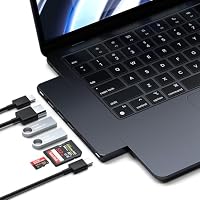 Satechi 7-in-1 USB-C Hub Pro Slim Satechi 7-in-1 USB-C Hub Pro Slim |
Price | ||
04 Satechi 11-in-1 Thunderbolt 4 Dock Satechi 11-in-1 Thunderbolt 4 Dock |
139 | Price | |
05 Satechi 4-in-1 USB-C Hub Satechi 4-in-1 USB-C Hub |
Price | ||
06 Satechi 8-in-1 USB-C Hub V2 Satechi 8-in-1 USB-C Hub V2 |
Price |
Prices and ratings are read from the Amazon product listing and change there, not here. Every rating is the average left by Amazon buyers, not a score from this site.
Why each one is on the list
- For mobile creators needing magnetic mounting on MagSafe gear: Satechi OntheGo 7-in-1 USB-C Hub.
- For editors needing wired Gigabit networking and 10Gbps USB-A ports: Satechi 7-in-1 USB-C Hub with Ethernet.
- For MacBook users wanting a flush, cable-free attachment: Satechi 7-in-1 USB-C Hub Pro Slim.
- For studio desks requiring dual displays and high host power: Satechi 11-in-1 Thunderbolt 4 Dock.
- For minimalists working strictly with modern Type-C drives: Satechi 4-in-1 USB-C Hub.
- For users seeking maximum pass-through charging wattage with legacy ports: Satechi 8-in-1 USB-C Hub V2.
01 Satechi OntheGo 7-in-1 USB-C Hub

Best for Mobile creators needing MagSafe attachment
Pros
- Magnetic mounting system
- Compact coiled travel cable
- Gigabit Ethernet and SD reader
Cons
- 5Gbps maximum data rate
- Plastic exterior housing
The Satechi OntheGo 7-in-1 USB-C Hub is built for mobile creators working from temporary setups, airport lounges, or production carts. It features a magnetic mounting system that attaches to MagSafe-compatible devices or adheres using an included 3M pad and magnetic ring. Its flexible coiled cable keeps the connection snug against your laptop, preventing loose cord clutter during travel.
In terms of connectivity, the satechi onthego 7-in-1 usb-c hub provides 4K video at 60Hz over HDMI, a Gigabit Ethernet jack, an SD card reader, USB-A ports, and USB-C pass-through charging. The hub accepts up to 100W input and delivers up to 80W to your host machine. Finished in Space Black with a lightweight 68-gram plastic shell, it supports Chrome OS, Windows, iPadOS 17, and macOS 14 Sonoma.
The primary trade-off is bus throughput, which maxes out at 5Gbps across its three USB ports. While dependable for routine file transfers and peripheral connectivity, editors moving large raw video libraries may prefer faster 10Gbps options.
- Magnetic attachment for MagSafe devices plus included 3M adhesive ring
- Coiled cable design prevents loose cord clutter in travel bags
- Smooth 4K video output at 60Hz and Gigabit Ethernet port
- Supports up to 80W charging to devices via 100W input
02 Satechi 7-in-1 USB-C Hub with Ethernet

Best for MacBook users wanting a flush profile
Pros
- Direct cable-free side connection
- 40Gbps transfer capability
- Automatic thermal shut-off protection
Cons
- Blocks adjacent laptop ports
- No built-in Ethernet port

Best for Speed-focused editors wanting Ethernet connectivity
Pros
- 10Gbps USB-A transfer speeds
- Sturdy aluminum build
- Smooth 4K 60Hz output
Cons
- Pass-through limited to 80W
- Integrated cable cannot detach
The Satechi 7-in-1 USB-C Hub with Ethernet provides higher bus bandwidth for creators moving large image batches and video footage. Equipped with two USB-A 3.2 Gen 2 ports delivering up to 10Gbps, this satechi 10gbps usb-c hub utilizes Parade Technologies chipsets for secure data transfers, moving thousands of high-resolution JPEGs in roughly one minute.
This satechi 7-in-1 usb-c hub pairs data speed with practical connectivity. It houses an HDMI port that drives 4K monitors at 60Hz when using an HDMI 2.0 or higher cable, an RJ45 Gigabit Ethernet port for stable networking, and both SD and MicroSD card slots. For power delivery, the hub accepts up to 100W input and routes up to 80W directly to your host computer.
Constructed from Space Gray aluminum and weighing 64.5 grams, the hub includes a braided cable with a reinforced neck and rounded Type-C connector. It works across Chrome OS, Linux, Windows 10, Windows 11, and Mac OS X 10.6 or newer, though host charging tops out at 80W.
- Dual USB-A 3.2 Gen 2 ports delivering fast 10Gbps transfers
- Crystal-clear 4K output at 60Hz via HDMI 2.0 connection
- Durable aluminum enclosure with reinforced braided cable
- Built-in Gigabit Ethernet and Micro/SD card reader slots
03 Satechi 7-in-1 USB-C Hub Pro Slim
The Satechi 7-in-1 USB-C Hub Pro Slim eliminates cables entirely, docking directly into the dual USB-C ports of compatible Apple laptops. Its slim aluminum profile matches the Midnight finish of modern MacBooks, establishing an integrated desk footprint. This cable-free configuration makes the satechi 7-in-1 usb-c hub pro slim an attractive choice for creatives wanting a clutter-free workspace.
Built with a 40Gbps transfer pipeline, this satechi usb hub for macbook features an HDMI port supporting 4K displays, two 10Gbps USB 3.2 Gen 2 ports, an SD card reader, a USB-C data port, and up to 100W charging pass-through. Because it allows full 100W pass-through charging, power-hungry laptops receive ample current during intensive export tasks.
To ensure safety within its compact 41-gram aluminum body, Satechi integrates an automated safety shut-off that activates if temperatures exceed 40°C (104°F) or if electrical anomalies occur. The hub requires Mac OS 13 Ventura or newer for Mac users and works on Windows and Linux, though its flush mount design leaves no room for wired Ethernet.
- Cable-free direct attachment designed flush for MacBook Pro and Air
- Fast 40Gbps transfer pipeline with two 10Gbps USB-A ports
- Up to 100W charging pass-through for power-demanding laptops
- Integrated thermal safety shut-off mechanism activating above 40°C
04 Satechi 11-in-1 Thunderbolt 4 Dock

Best for Studio desks needing multi-monitor setups
Pros
- Dedicated 135W external power
- Dual 4K 60Hz display support
- Thunderbolt 4 daisy-chaining
Cons
- Heavier non-portable desktop footprint
- Dual display limited on macOS
When production demands outgrow compact travel dongles, the Satechi 11-in-1 Thunderbolt 4 Dock transforms a single cable into an expansive desktop production station. To explore how dedicated desktop docks improve high-bandwidth studio workflows, our evaluation of the satechi thunderbolt 4 dock details workstation integration.
Constructed from Space Gray aluminum, this desktop dock features 12 ports in its hardware specification. It supports 40Gbps Thunderbolt 4 transfer rates, daisy-chaining for up to six devices, Gigabit Ethernet, an SD card reader, three USB-A 3.2 ports, and USB-C connectivity. Windows systems can output to dual 4K monitors at 60Hz. The included 135W power supply provides 96W of dedicated host charging to keep high-end laptops fully powered under heavy loads.
Weighing 14.88 ounces, this dock is designed to sit permanently on your desk rather than travel in a sleeve. It connects through an included Thunderbolt 4 cable and manages heat through its aluminum chassis. Mobile creators who only need basic travel ports will find its external power brick and desktop form factor excessive.
- Thunderbolt 4 technology supporting 40Gbps transfer speeds and daisy-chaining
- Dual 4K video output at 60Hz for compatible Windows systems
- Dedicated 135W power supply delivering 96W of host charging
- Stationary aluminum enclosure with Gigabit Ethernet and SD slot
05 Satechi 4-in-1 USB-C Hub
Best for Users transitioning entirely to Type-C peripherals
Pros
- Four 10Gbps USB-C ports
- Pocket-sized square aluminum shell
- Up to 100W power delivery
Cons
- No video or display output
- No legacy USB-A ports
Many creators have moved away from legacy cables and now operate entirely with Type-C external drives, card readers, and audio gear. The Satechi 4-in-1 USB-C Hub caters specifically to this workflow by offering four dedicated USB-C ports in a pocket-sized form factor. Measuring 2.36 by 2.36 inches and weighing 50 grams, this satechi usb-c multiport adapter provides streamlined connectivity without unnecessary bulk.
Every port on this hub supports the USB 3.2 Gen 2 protocol, delivering transfer speeds up to 10Gbps across all four Type-C connections. This allows editors to copy footage between fast external SSDs without experiencing the bandwidth limits of older hubs. The adapter also supports up to 100W Power Delivery pass-through, enabling host charging while your storage peripherals remain online.
Finished in Space Gray aluminum with chamfered edges and a braided cable, the adapter easily tucks into any camera pocket. If you are configuring a compact mobile kit, pairing this hub with gear from our anker multi charger lineup ensures dependable power on location. However, this model does not provide video outputs or legacy USB-A ports.
- Four USB-C data ports supporting 10Gbps USB 3.2 Gen 2 speeds
- Supports up to 100W Power Delivery pass-through charging
- Compact square aluminum enclosure with chamfered edges
- Reinforced braided cable designed for mobile longevity
06 Satechi 8-in-1 USB-C Hub V2
Best for Travelers needing high pass-through charging wattage
Pros
- High 115W pass-through charging
- Balanced 8-port legacy selection
- Dual SD and MicroSD slots
Cons
- Older USB-A 3.0 standard
- Slightly bulkier travel dimensions
The Satechi 8-in-1 USB-C Hub V2 offers a versatile bridge between modern USB-C laptops and essential legacy peripherals. Built from durable Space Gray aluminum, it features 4K HDMI video at 60Hz, Gigabit Ethernet up to 1000Mbps, USB-A 3.0 ports, and separate SD and MicroSD card readers. Its aluminum shell assists passive heat dissipation during sustained media transfers.
A standout specification of this hub is its charging capability, which supports up to 115W USB-C pass-through power delivery. This high threshold provides substantial charging headroom for power-hungry laptops running complex rendering applications. Creators organizing multi-device charging setups on their desks can also explore our guide to the anker multi device charging station to streamline power management.
With a rated transfer speed of 10Gbps and broad compatibility across macOS 10.15 Catalina or newer, Windows, and iPad Pro, this 78-gram adapter serves as an effective all-around workstation companion. While it is slightly heavier than the 4-in-1 splitter, its combination of high-wattage pass-through, wired networking, and dual card readers makes it well suited for creators with varied peripheral needs.
- High-capacity USB-C pass-through charging supporting up to 115W
- Smooth 4K video output at 60Hz over HDMI
- Gigabit Ethernet jack and independent SD and MicroSD slots
- Sturdy aluminum body designed for passive heat dissipation
What Sets These Models Apart
When conducting a thorough satechi usb hub comparison, understanding how port speeds, physical design, and power delivery vary across models helps identify the right fit for your workflow. Satechi offers designs tailored to specific setups, ranging from magnetic portable casings to stationary aluminum desktop docks. The table below outlines the core hardware specifications across all six evaluated models.
| Model | Data Speed | Display Support | Power Delivery | Enclosure & Weight |
|---|---|---|---|---|
| Satechi OntheGo 7-in-1 USB-C Hub | 5 Gbps | 4K @ 60Hz HDMI | 100W input / Up to 80W to device | Plastic, 68 g |
| Satechi 7-in-1 USB-C Hub with Ethernet | 10 Gbps | 4K @ 60Hz HDMI | 100W input / Up to 80W output | Aluminum, 64.5 g |
| Satechi 7-in-1 USB-C Hub Pro Slim | 40 Gbps | 4K HDMI | Up to 100W pass-through | Aluminum, 41 g |
| Satechi 11-in-1 Thunderbolt 4 Dock | 40 Gbps | Dual 4K @ 60Hz (Windows) | 96W host charging (135W supply) | Aluminum, 14.88 oz |
| Satechi 4-in-1 USB-C Hub | 10 Gbps | The listing does not specify | Up to 100W pass-through | Aluminum, 50 g |
| Satechi 8-in-1 USB-C Hub V2 | 10 Gbps | 4K @ 60Hz HDMI | Up to 115W pass-through | Aluminum, 78 g |
Buying Tips for Satechi USB Hubs
Deciding which satechi usb hub to buy starts with identifying the data transfer speeds your daily peripherals require. If you regularly offload camera cards or work directly from portable solid-state drives, choose hubs equipped with 10Gbps USB 3.2 Gen 2 ports or 40Gbps Thunderbolt connections to avoid long wait times. Basic 5Gbps connections work reliably for peripheral accessories like keyboards, mice, and standard thumb drives, but high-bitrate media files benefit significantly from higher-bandwidth buses. To see how these adapters integrate into broader workstation configurations, review our guide to choosing a satechi docking station for desktop productivity.
Power delivery overhead is another key consideration. Most pass-through hubs consume between 15W and 20W of incoming power to operate their internal controllers and connected peripherals, leaving the remaining wattage for your laptop. For instance, a hub supporting 100W input that delivers 80W output is ideal for standard ultrabooks, but power-heavy laptops under sustained export workloads may charge slower unless paired with higher-wattage pass-through hubs or dedicated external power supplies.
Finally, examine physical form factor and cable ergonomics. Tethered hubs featuring braided cords provide flexibility on cluttered surfaces and minimize strain on your computer ports. In contrast, flush-mount adapters attach directly to the side of your laptop for a clean footprint, though they may not seat properly if you use protective laptop cases. Consider your typical working environment to select the design that best matches your desk or travel routine.
FAQ
Does the Satechi 7-in-1 USB-C Hub with Ethernet support 4K 60Hz video output?
Yes, the Satechi 7-in-1 USB-C Hub with Ethernet supports 4K video output at 60Hz through its HDMI port. The listing notes that you must connect an HDMI 2.0 or higher cable to an external display that supports 4K at 60Hz to achieve this refresh rate.
Can the Satechi OntheGo 7-in-1 USB-C Hub attach to laptops without MagSafe?
Yes, the Satechi OntheGo 7-in-1 USB-C Hub includes an adhesive magnetic ring and a 3M adhesive pad in the package. This allows you to mount the magnetic hub securely to Windows laptops, Chromebooks, or older MacBooks that do not feature built-in MagSafe magnets.
What safety mechanisms protect the Satechi 7-in-1 USB-C Hub Pro Slim from overheating?
The Satechi 7-in-1 USB-C Hub Pro Slim features an aluminum enclosure for heat dissipation and an internal safety shut-off mechanism. It automatically powers down if operating temperatures exceed 40°C (104°F) or if abnormal current or voltage is detected.
Does the Satechi 4-in-1 USB-C Hub include legacy USB-A ports or video outputs?
No, the Satechi 4-in-1 USB-C Hub features four USB-C data ports supporting 10Gbps transfer speeds. The listing does not include USB-A ports, HDMI connections, or SD card slots, making it a dedicated expansion tool for Type-C storage and accessories.
Can the Satechi 11-in-1 Thunderbolt 4 Dock drive dual displays on both Windows and Mac?
The listing specifically highlights dual 4K display support at 60Hz for Windows computers. While the dock provides broad connectivity for MacBook Air and MacBook Pro systems over Thunderbolt 4, dual display support is explicitly detailed for Windows machines.


